Hi.
I'm trying to start a survival game, but it keeps crashing during the load. Works fine with creative. I tried running with -dx11, -dx12 and -windowed, did not help. Attached is my dxdiag.
I also checked the event viewer for exception details, but it doesn't show very much:
<Event >
<System>
<Provider Name="Application Hang" />
<EventID Qualifiers="">1002</EventID>
<Version>0</Version>
<Level>2</Level>
<Task>101</Task>
<Opcode>0</Opcode>
<Keywords>0x80000000000000</Keywords>
<TimeCreated SystemTime="2025-12-01T20:38:35.9974954Z" />
<EventRecordID>175894</EventRecordID>
<Correlation />
<Execution ProcessID="" ThreadID="" />
<Channel>Application</Channel>
<Computer>Rumcajs</Computer>
<Security />
</System>
<EventData>
<Data>SpaceEngineers2.exe</Data>
<Data>2.0.2.14</Data>
<Data>1d20</Data>
<Data>01dc6301a47ecdb6</Data>
<Data>2</Data>
<Data>F:\SteamLibrary\steamapps\common\SpaceEngineers2\Game2\SpaceEngineers2.exe</Data>
<Data>ce4f75b2-aef1-41d4-9988-598a2de6faa5</Data>
<Data />
<Data />
<Data>Unknown</Data>
<Binary>55006E006B006E006F0077006E0000000000</Binary>
</EventData>
</Event>
Best wishes


 I have the same bug
Reduce your graphics from settings.
Reduce your graphics from settings.
I tried everything. I put all the graphics to lowest possible settings but the game never loads into the world. I never get past the loading screen before it crashes. I have a 7900XTX, 9800X3D, and 64 gigs of RAM. Also it's installed on the OS C:/ drive which is a 2TB NVMe SSD. Not sure if any of this info helps
Edit - I was wrong about the install location. I forgot I did some cleanup recently and moved the game to a different drive. I am going to move it back to C drive and try again.
Edit 2 - Didn't fix the issue.
I tried everything. I put all the graphics to lowest possible settings but the game never loads into the world. I never get past the loading screen before it crashes. I have a 7900XTX, 9800X3D, and 64 gigs of RAM. Also it's installed on the OS C:/ drive which is a 2TB NVMe SSD. Not sure if any of this info helps
Edit - I was wrong about the install location. I forgot I did some cleanup recently and moved the game to a different drive. I am going to move it back to C drive and try again.
Edit 2 - Didn't fix the issue.
Hello Nick F,
Could you please attach you Game logs?
You can find them here:
C:\Users\(your_username)\AppData\Roaming\SpaceEngineers2\Temp\Logs
Kind Regards,
Bartosz
Keen Software House
Hello Nick F,
Could you please attach you Game logs?
You can find them here:
C:\Users\(your_username)\AppData\Roaming\SpaceEngineers2\Temp\Logs
Kind Regards,
Bartosz
Keen Software House
I do think it's something about the display adapter. I have crashed on 4 different tries and 3 of them had no error messages at all. But on the outlier, I did get a message about the display adapter timing out. I believe I have the latest drivers from AMD but will double check.
I do think it's something about the display adapter. I have crashed on 4 different tries and 3 of them had no error messages at all. But on the outlier, I did get a message about the display adapter timing out. I believe I have the latest drivers from AMD but will double check.
Here's the two files from the latest crash in the folder noted.
Here's the two files from the latest crash in the folder noted.
Hi,
Having the same problem with an AMD based build.
I've attached both logs, normal and the Render12 one.
Thanks for all your effort
Hi,
Having the same problem with an AMD based build.
I've attached both logs, normal and the Render12 one.
Thanks for all your effort
game is not responding when creating and loading in a new survival game just like for many people according to steam discussions, mostly with AMD builds it seems
game is not responding when creating and loading in a new survival game just like for many people according to steam discussions, mostly with AMD builds it seems
"New Game" > Survival or "Worlds" > "Welcome to Verdure" simply stops responding and goes to 0% cpu, even on lowest graphics settings.
I'm able to load my existing concordia research facility save.
Windows 10, amd 5 5600x, AMD rx 6600 xt 8gb, ssd 32gb ram.
"New Game" > Survival or "Worlds" > "Welcome to Verdure" simply stops responding and goes to 0% cpu, even on lowest graphics settings.
I'm able to load my existing concordia research facility save.
Windows 10, amd 5 5600x, AMD rx 6600 xt 8gb, ssd 32gb ram.
Hey, I'm joining the conversation to tell you guys I'm having the same problem. I've already put around 80 hours into the game, and this had never happened before. I've encountered 3 different errors when the game crashed, too: one very generic, one referring to an "Exception processing message 0xc0000005", and another one that told me my game files seemed to be corrupt. I checked the integrity just to be sure, but still nothing.
[EDIT] I know this info is collected in the logs, and it seems the game already sent a report, but just to provide a little context: Windows 10 Pro 22H2 / Ryzen 5900X / 32GB RAM / RTX 3080Ti FE. The game is installed in a 2TB Crucial P5 plus NVMe SSD.
Hey, I'm joining the conversation to tell you guys I'm having the same problem. I've already put around 80 hours into the game, and this had never happened before. I've encountered 3 different errors when the game crashed, too: one very generic, one referring to an "Exception processing message 0xc0000005", and another one that told me my game files seemed to be corrupt. I checked the integrity just to be sure, but still nothing.
[EDIT] I know this info is collected in the logs, and it seems the game already sent a report, but just to provide a little context: Windows 10 Pro 22H2 / Ryzen 5900X / 32GB RAM / RTX 3080Ti FE. The game is installed in a 2TB Crucial P5 plus NVMe SSD.
Getting CTD on save loading
Getting CTD on save loading
same here just keeps crashing :(
i am running AMD as well RX 7900 XTX.
i have done a system reboot & Verifying game files on steam. no luck
doing a reinstall of the game . no luck
checking drivers .no luck
dropped graphics to low.no luck
Edit: Windows 10, Ryzen 9 3950x, Radeon RX 7900 XTX, 64GB Ram . 1TB M.2 Sabrent
same here just keeps crashing :(
i am running AMD as well RX 7900 XTX.
i have done a system reboot & Verifying game files on steam. no luck
doing a reinstall of the game . no luck
checking drivers .no luck
dropped graphics to low.no luck
Edit: Windows 10, Ryzen 9 3950x, Radeon RX 7900 XTX, 64GB Ram . 1TB M.2 Sabrent
Same here, more log files to help the cause
Win10,
CPU: AMD 5700x3d
GPU: RX 9070XT - drivers up to date
Tried changing compatibility mode, run as admin, verified game files, and of course multiple restarts.
Creative works just fine
Same here, more log files to help the cause
Win10,
CPU: AMD 5700x3d
GPU: RX 9070XT - drivers up to date
Tried changing compatibility mode, run as admin, verified game files, and of course multiple restarts.
Creative works just fine
I have the same thing. The game crash at objective.
I changed the language to French. I reversed to English. And that work for now.
I have the same thing. The game crash at objective.
I changed the language to French. I reversed to English. And that work for now.
Changing my graphics settings to Medium seems to have fixed this
Changing my graphics settings to Medium seems to have fixed this
Same here
Same here
me 3
me 3
Hello Engineers,
Thank you all for the Game logs.
Unfortunately, there is no exception in all of them. As such, I would like to ask you all to check your Event Viewer (On Windows OS) and look for Space Engineers 2 in Error and Critical Categories and attach a screenshot of them.
You can access Event Viewer from Control Panel:
Kind Regards,
Bartosz
Keen Software House
Hello Engineers,
Thank you all for the Game logs.
Unfortunately, there is no exception in all of them. As such, I would like to ask you all to check your Event Viewer (On Windows OS) and look for Space Engineers 2 in Error and Critical Categories and attach a screenshot of them.
You can access Event Viewer from Control Panel:
Kind Regards,
Bartosz
Keen Software House
Unfortunately nothing in my logs on the crashes. However, I have found some new information. Loading the planet survival scenario itself crashes the game on loading. Creative in the concordia research station works just fine.
However, using the "creative with verdure and kemik" mod in the steam workshop, I can load the scenario and land on the planet just fine on high settings with solid 60FPS.
I'm unsure if this is new information but I hope to share it so people know that the issue is not the GPU trying to load the planets, but it seems the survival scenario itself is causing issues. I may be wrong.
Unfortunately nothing in my logs on the crashes. However, I have found some new information. Loading the planet survival scenario itself crashes the game on loading. Creative in the concordia research station works just fine.
However, using the "creative with verdure and kemik" mod in the steam workshop, I can load the scenario and land on the planet just fine on high settings with solid 60FPS.
I'm unsure if this is new information but I hope to share it so people know that the issue is not the GPU trying to load the planets, but it seems the survival scenario itself is causing issues. I may be wrong.
I also tried to play on the planets, but it didn't work out.. I log in to the creative without any problems, nothing slows down or glitches. when trying to create a new world, it just freezes on loading and you have to close the unresponsive application. I am attaching the logs.
Thank you for your work and I'm waiting for localization!
I also tried to play on the planets, but it didn't work out.. I log in to the creative without any problems, nothing slows down or glitches. when trying to create a new world, it just freezes on loading and you have to close the unresponsive application. I am attaching the logs.
Thank you for your work and I'm waiting for localization!
seams it has somthing todo with the video player at the start this world should load people fine for now https://steamcommunity.com/sharedfiles/filedetails/?id=3616222162
seams it has somthing todo with the video player at the start this world should load people fine for now https://steamcommunity.com/sharedfiles/filedetails/?id=3616222162
Hopefully this helps, keep up the good work! We appreciate your dedication!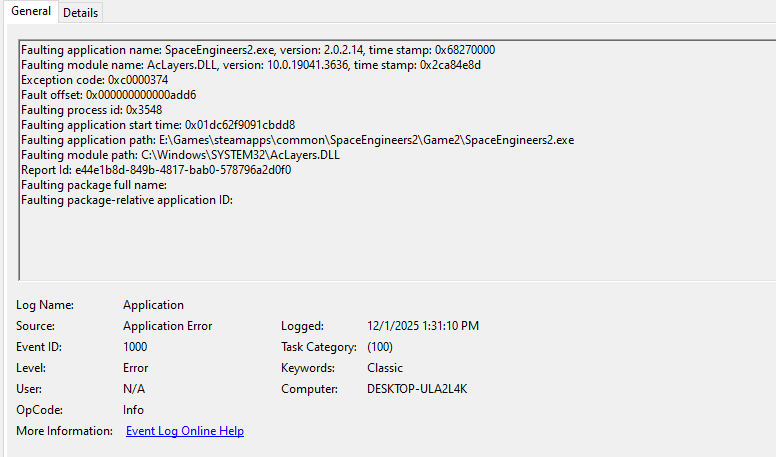
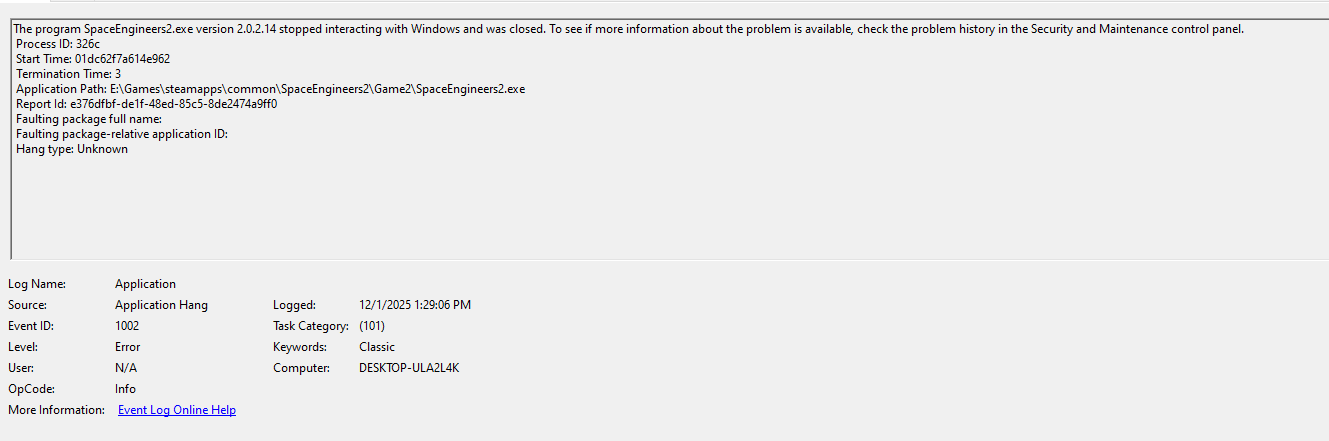
Hopefully this helps, keep up the good work! We appreciate your dedication!

I have a crash on survival world loading with
Same file for multiple workers at same time
etc etc etcAnd finally
I have a crash on survival world loading with
Same file for multiple workers at same time
etc etc etcAnd finally
Only found this in the event log:
Only found this in the event log:
I created a new crash and checked my events viewer. I don't have much to provide, but there is an error at least. It points to the Security and Maintenance control panel for any additional info, but there is none to be found there. Here is a screenshot showing basically everything I can see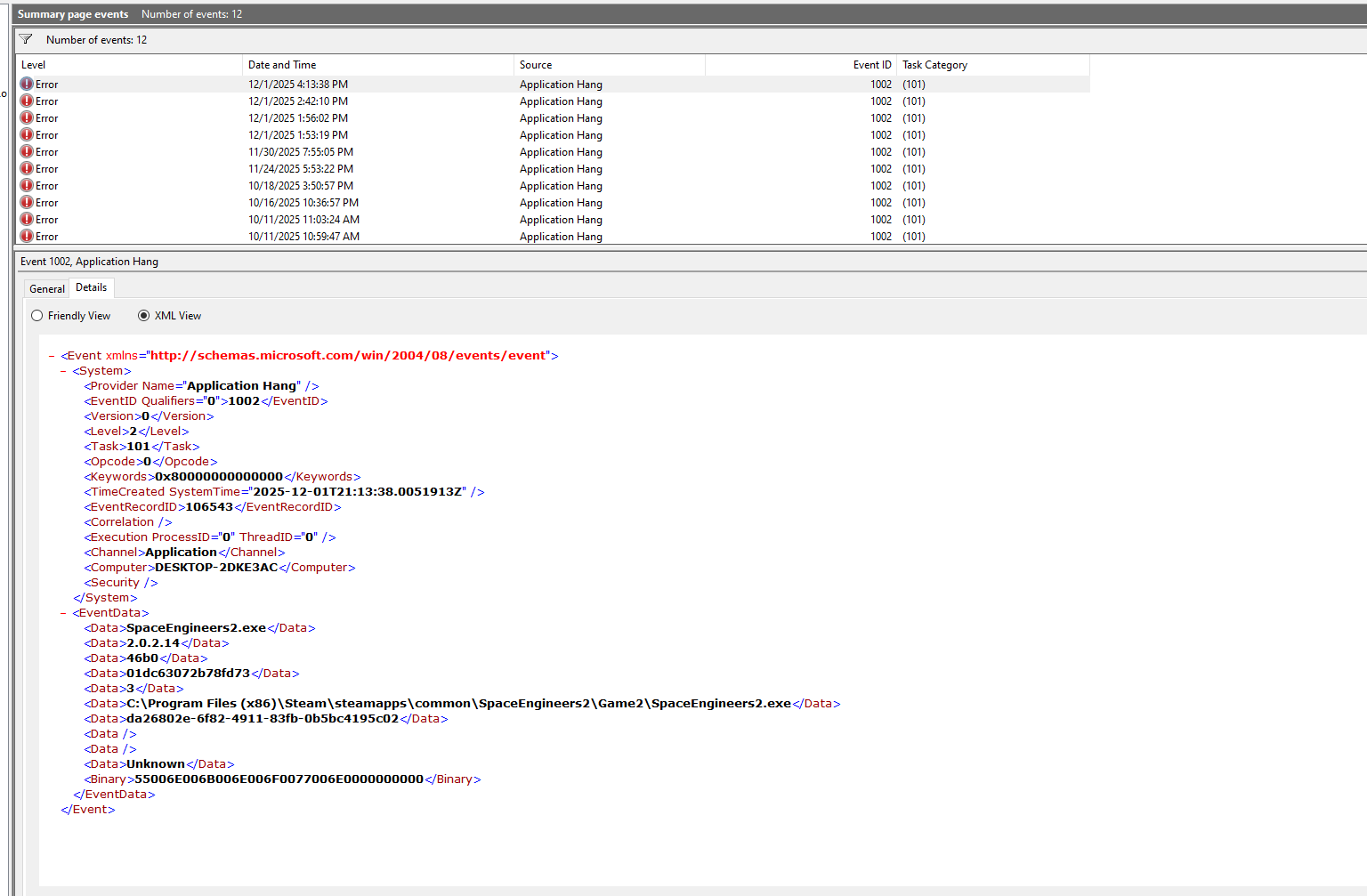
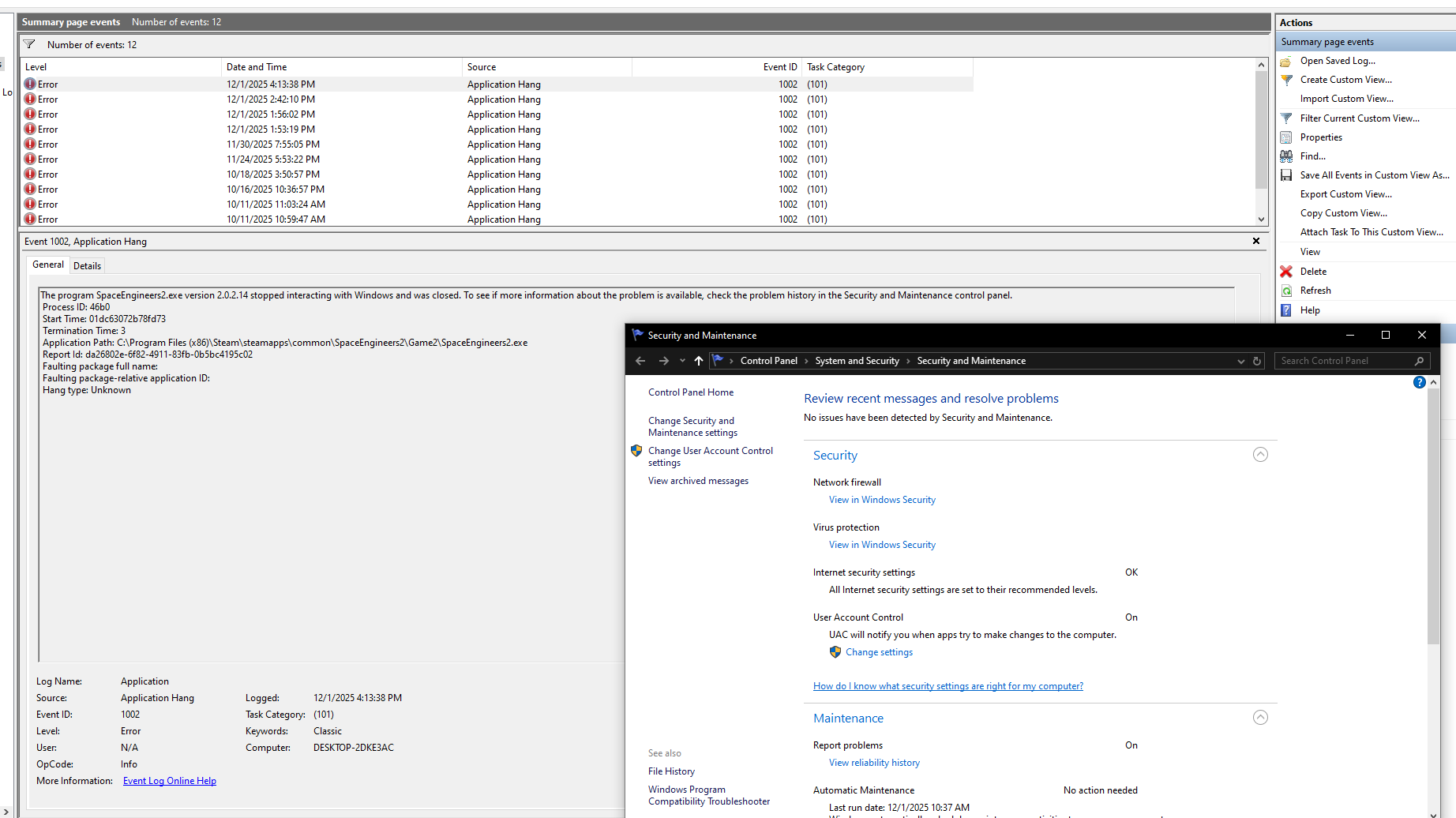
I created a new crash and checked my events viewer. I don't have much to provide, but there is an error at least. It points to the Security and Maintenance control panel for any additional info, but there is none to be found there. Here is a screenshot showing basically everything I can see

Game appears to be crashing/application not responding on RX series AMD GPUs (crashing on my AMD Radeon RX 6650 XT as well as other Discord users RX 7700 XT, RX 6800, 7600xt, 900 RX, 6900xt, 5900x) when loading the survival scenario
Launching with -noVideoPlayer as Inflex suggested does not fix it, loading it in the uploaded workshop item https://steamcommunity.com/sharedfiles/filedetails/?id=3616222162 which is just the survival world but past the cinematic works and the game runs fine!
I am running the latest version of Windows 10, AMD Radeon RX 6650 XT with an AMD Ryzen 5600X 6-core CPU
Game appears to be crashing/application not responding on RX series AMD GPUs (crashing on my AMD Radeon RX 6650 XT as well as other Discord users RX 7700 XT, RX 6800, 7600xt, 900 RX, 6900xt, 5900x) when loading the survival scenario
Launching with -noVideoPlayer as Inflex suggested does not fix it, loading it in the uploaded workshop item https://steamcommunity.com/sharedfiles/filedetails/?id=3616222162 which is just the survival world but past the cinematic works and the game runs fine!
I am running the latest version of Windows 10, AMD Radeon RX 6650 XT with an AMD Ryzen 5600X 6-core CPU
I can confirm the mod called "If your game has issues loading the survival world try this" does get things working. Note that you must access the mod via the appropriate menu and start the game from there in order for it to take effect.
I can confirm the mod called "If your game has issues loading the survival world try this" does get things working. Note that you must access the mod via the appropriate menu and start the game from there in order for it to take effect.
Hello Engineers,
It seems that the Intro Cutscene at the beginning of the Survival scenario causes the crashes with AMD GPUs. Issue is reported internally and should be fixed ASAP. I have added this thread to our internal ticket (SE2-29059).
For now, please use the world uploaded by stonelords (It is a Survival scenario with the cutscene skipped):
Steam Workshop::If your game has issues loading the suvvial world try this
Kind Regards,
Bartosz
Keen Software House
Hello Engineers,
It seems that the Intro Cutscene at the beginning of the Survival scenario causes the crashes with AMD GPUs. Issue is reported internally and should be fixed ASAP. I have added this thread to our internal ticket (SE2-29059).
For now, please use the world uploaded by stonelords (It is a Survival scenario with the cutscene skipped):
Steam Workshop::If your game has issues loading the suvvial world try this
Kind Regards,
Bartosz
Keen Software House
Hey Team. i'm having the same issue. I do have a dump file though from my crash and watchdog error that the application froze with the freeze type RnderThreadFreeze. capturing dump.
Hey Team. i'm having the same issue. I do have a dump file though from my crash and watchdog error that the application froze with the freeze type RnderThreadFreeze. capturing dump.
My game just hangs when trying to load into the survival world after a few seconds of loading. AMD system. I also note some weird slight changing of colour/flickering in the loading menu before it hangs.
Fresh install of the game.
Windows 10 Pro (Up to date)
AMD Ryzen 7 5700X (Up to date drivers)
SSD for storage
AMD Radeon RX 7900 XT (Up to date drivers)
Creating a creative world -> works just fine
Creating a survival world -> hangs on loading screen and eventually unresponsive.
Creating a worlds (empty world) -> works just fine
Creating a worlds (Concordia Research Facility) -> this one straight up crashed and displayed a cmd window with "writing a minidump" which i assume created a dump/log files
Creating a worlds (Welcome to Vendure) -> hangs on loading screen and eventually unresponsive.
Attached is a screen shot of event viewer and all the logs after testing type of world create.
Hopefully you can fix it soon, i was looking forward to playing on the planets!
My game just hangs when trying to load into the survival world after a few seconds of loading. AMD system. I also note some weird slight changing of colour/flickering in the loading menu before it hangs.
Fresh install of the game.
Windows 10 Pro (Up to date)
AMD Ryzen 7 5700X (Up to date drivers)
SSD for storage
AMD Radeon RX 7900 XT (Up to date drivers)
Creating a creative world -> works just fine
Creating a survival world -> hangs on loading screen and eventually unresponsive.
Creating a worlds (empty world) -> works just fine
Creating a worlds (Concordia Research Facility) -> this one straight up crashed and displayed a cmd window with "writing a minidump" which i assume created a dump/log files
Creating a worlds (Welcome to Vendure) -> hangs on loading screen and eventually unresponsive.
Attached is a screen shot of event viewer and all the logs after testing type of world create.
Hopefully you can fix it soon, i was looking forward to playing on the planets!
Hello John Relins,
Do you use AMD Graphics card? We are currently working on fix for AMD GPUs that cannot load into Survival due to an issue with Intro Cutscene.
For a workaround, please try loading this Workshop World, it is a Survival scenario with the cutscene skipped:
Steam Workshop::If your game has issues loading the suvvial world try this
Kind Regards,
Bartosz
Keen Software House
Hello John Relins,
Do you use AMD Graphics card? We are currently working on fix for AMD GPUs that cannot load into Survival due to an issue with Intro Cutscene.
For a workaround, please try loading this Workshop World, it is a Survival scenario with the cutscene skipped:
Steam Workshop::If your game has issues loading the suvvial world try this
Kind Regards,
Bartosz
Keen Software House
Hi Team,
I’m experiencing the same issue, but in my case I’m using an Intel i7-14700K and an Nvidia RTX 2080 Ti (so not AMD). One thing I haven’t seen mentioned above is that when the game gets stuck on the loading screen, Task Manager shows memory usage continuously increasing until I run out of RAM at around 26 GB (32 GB system).
Using the -NoVideo launch parameters mentioned above did allow me to load into the game (and with RAM usage around 7 GB), but it didn’t actually remove the cutscene. Instead, it played extremely fast, and the audio was sped up to the point of being completely unintelligible but the game still loaded
Hi Team,
I’m experiencing the same issue, but in my case I’m using an Intel i7-14700K and an Nvidia RTX 2080 Ti (so not AMD). One thing I haven’t seen mentioned above is that when the game gets stuck on the loading screen, Task Manager shows memory usage continuously increasing until I run out of RAM at around 26 GB (32 GB system).
Using the -NoVideo launch parameters mentioned above did allow me to load into the game (and with RAM usage around 7 GB), but it didn’t actually remove the cutscene. Instead, it played extremely fast, and the audio was sped up to the point of being completely unintelligible but the game still loaded
Hello Engineers,
The issue is fixed on next Hotfix. Using AMD GPUs should no longer cause a crash when starting a new Survival scenario.
As such, I will close this thread. For any new crashes encountered after the Hotfix, please create a new thread.
Happy Engineering!
Kind Regards,
Bartosz
Keen Software House
Hello Engineers,
The issue is fixed on next Hotfix. Using AMD GPUs should no longer cause a crash when starting a new Survival scenario.
As such, I will close this thread. For any new crashes encountered after the Hotfix, please create a new thread.
Happy Engineering!
Kind Regards,
Bartosz
Keen Software House
I also encountered the same error, but after I restarted my computer, the error disappeared. I was very happy about that.
I also encountered the same error, but after I restarted my computer, the error disappeared. I was very happy about that.
I've had a great experience with FF Beta Terbaru because it offers an exciting preview of upcoming game improvements. The new features are creative, the gameplay feels smoother, and the graphics continue to get better with each update. It's clear that the developers are working hard to improve the overall player experience. I enjoy testing the latest content before the official release, and every update makes me even more excited for what's coming next. FF Beta has a very promising future.
I've had a great experience with FF Beta Terbaru because it offers an exciting preview of upcoming game improvements. The new features are creative, the gameplay feels smoother, and the graphics continue to get better with each update. It's clear that the developers are working hard to improve the overall player experience. I enjoy testing the latest content before the official release, and every update makes me even more excited for what's coming next. FF Beta has a very promising future.
Good to know this was fixed in the hotfix. I was wondering if the AMD GPU issue was causing the crashes. Thanks for the update!
Good to know this was fixed in the hotfix. I was wondering if the AMD GPU issue was causing the crashes. Thanks for the update!
BitLife – Life Simulator
A text-based life simulation game where you guide a character from birth to death. Every choice matters: you can study hard, pursue a career, marry, and raise a family, or choose a rebellious path filled with crime and wild adventures. Its endless possibilities and unpredictable outcomes make it one of the most replayable simulation games available.
A rogue-lite action platformer with smooth controls and challenging combat. You explore a constantly changing castle, unlock new weapons, and fight your way through tough enemies where death simply resets your run with new upgrades.
A relaxing open-ended farming RPG. You inherit your grandfather’s old farm plot, grow crops, raise animals, mine for resources, and build relationships with the local townspeople at your own pace.
A massive, visually stunning open-world action RPG featuring real-time element-based combat, detailed story quests, and continuous content updates.
BitLife – Life Simulator
A text-based life simulation game where you guide a character from birth to death. Every choice matters: you can study hard, pursue a career, marry, and raise a family, or choose a rebellious path filled with crime and wild adventures. Its endless possibilities and unpredictable outcomes make it one of the most replayable simulation games available.
A rogue-lite action platformer with smooth controls and challenging combat. You explore a constantly changing castle, unlock new weapons, and fight your way through tough enemies where death simply resets your run with new upgrades.
A relaxing open-ended farming RPG. You inherit your grandfather’s old farm plot, grow crops, raise animals, mine for resources, and build relationships with the local townspeople at your own pace.
A massive, visually stunning open-world action RPG featuring real-time element-based combat, detailed story quests, and continuous content updates.
საახალწლო საჩუქრები, რომლებიც ნამდვილად გამოგადგებათ
ჩვენ გთავაზობთ არა მხოლოდ ლამაზ, არამედ პრაქტიკულ კორპორატიულ საჩუქრებს. ისეთებს, რომლებსაც ხალხი ნამდვილად გამოიყენებს და დააფასებს მთელი წლის განმავლობაში.
საახალწლო კორპორატიული შეკვეთები
საახალწლო საჩუქრები, რომლებიც ნამდვილად გამოგადგებათ
ჩვენ გთავაზობთ არა მხოლოდ ლამაზ, არამედ პრაქტიკულ კორპორატიულ საჩუქრებს. ისეთებს, რომლებსაც ხალხი ნამდვილად გამოიყენებს და დააფასებს მთელი წლის განმავლობაში.
საახალწლო კორპორატიული შეკვეთები
same problem with RTX 4090 intel i9 13900k 64gb ram
same problem with RTX 4090 intel i9 13900k 64gb ram
Replies have been locked on this page!