


Can't launch any type of world since maj VS2
Solved
Hello Devs, First thanks for your great job, i've been a massive SE1 player with at least 2000hrs.
Now here my report, since VS2 maj my game crash on loading sceen of anykind of world i'll try to start (Creative, New Survival, Empty...) cannot start a previous save either.
My specs are:
i5-10600KF CPU 4.10GHz
NVIDIA GeForce RTX 3060
16 Go Ram 2133 MHz
Windows 10
2 SSD 1To with 200Go freespace On C:
SE2 instaled on C:
I send also all the logs i can get since VS2 maj
Hope you can Fix this.
 I have the same bug
Forgot to say i tryed the world save on steam with no cinematic on Survival, verify my games files, reinstal the game and none of it worked.
Forgot to say i tryed the world save on steam with no cinematic on Survival, verify my games files, reinstal the game and none of it worked.
Hello Cobkillaz,
Sometimes after update, old setting files cause issues with the launching Game and scenarios. The usual solution for this is to delete the contents of this folder (Please note that this will delete all of your saves and blueprints, as such I recommend making a backup of Blueprints and SaveGames folders):
C:\Users\(your_username)\AppData\Roaming\SpaceEngineers2\AppData
After the AppData folder is empty, try to launch the Game again.
Let me know if this helps.
Kind Regards,
Bartosz
Keen Software House
Hello Cobkillaz,
Sometimes after update, old setting files cause issues with the launching Game and scenarios. The usual solution for this is to delete the contents of this folder (Please note that this will delete all of your saves and blueprints, as such I recommend making a backup of Blueprints and SaveGames folders):
C:\Users\(your_username)\AppData\Roaming\SpaceEngineers2\AppData
After the AppData folder is empty, try to launch the Game again.
Let me know if this helps.
Kind Regards,
Bartosz
Keen Software House
Hello Bartosz and thank you for your reply.
Sadly i tryed your solution and nothing changed, i can launch the game but it still crash when trying to start anykind of world.
Here are the new logs of crash after clearing the appData files.
Keep up the good work, there's no rush for me to enjoy what will most certainly be a new wonderfull engineering experience ;)
Hello Bartosz and thank you for your reply.
Sadly i tryed your solution and nothing changed, i can launch the game but it still crash when trying to start anykind of world.
Here are the new logs of crash after clearing the appData files.
Keep up the good work, there's no rush for me to enjoy what will most certainly be a new wonderfull engineering experience ;)
Update: after the new Hotfix release today, No change at all, even with the appdata clearing and my setings downed to low with performance preferance, and the display resolution.
New logs incoming, hoping it's helping you.
Update: after the new Hotfix release today, No change at all, even with the appdata clearing and my setings downed to low with performance preferance, and the display resolution.
New logs incoming, hoping it's helping you.
Hello Cobkillaz,
Thank you for the fresh logs. It seems that some files may be missing from your SE2 folder.
What we can try is:
1. Go to your Space Engineers 2 folder - Steam\steamapps\common\SpaceEngineers2\GameData\Vanilla\ and delete the Content folder.
2. Then, run verification of Game files integrity on Steam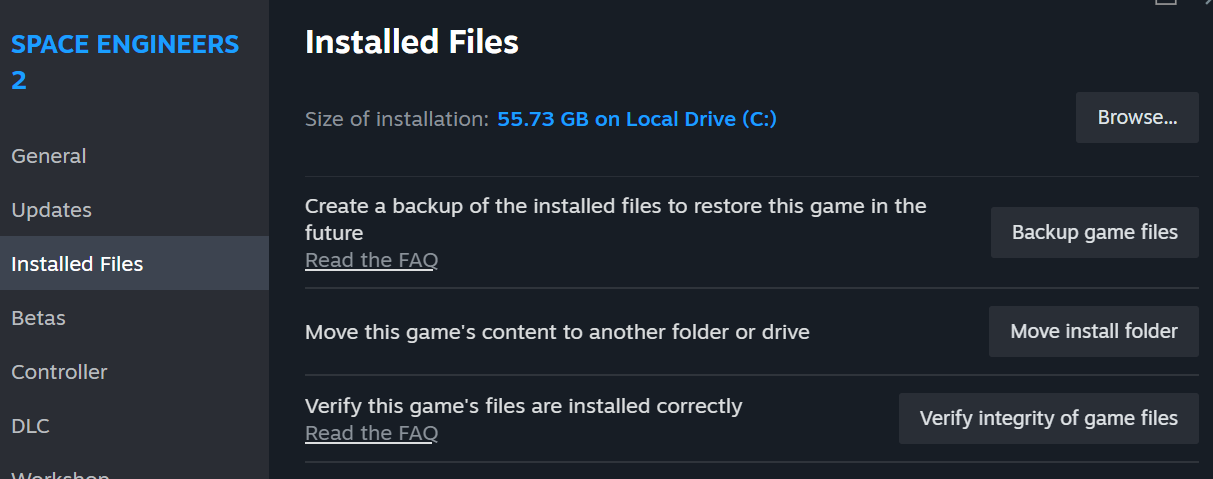
3. After the verification is complete, launch the Game and try to load any world
Let me know if this helps.
Kind Regards,
Bartosz
Keen Software House
Hello Cobkillaz,
Thank you for the fresh logs. It seems that some files may be missing from your SE2 folder.
What we can try is:
1. Go to your Space Engineers 2 folder - Steam\steamapps\common\SpaceEngineers2\GameData\Vanilla\ and delete the Content folder.
2. Then, run verification of Game files integrity on Steam
3. After the verification is complete, launch the Game and try to load any world
Let me know if this helps.
Kind Regards,
Bartosz
Keen Software House
Hello Bartosz,
i deleted the files and try to reinstal them (my internet connection is not realy good with 1.5Mo/s max) so i will keep you updated when it's donne.
Thanks again and kind regards too.
Hello Bartosz,
i deleted the files and try to reinstal them (my internet connection is not realy good with 1.5Mo/s max) so i will keep you updated when it's donne.
Thanks again and kind regards too.
Nothing changed. Same crash when trying to start anykind of world, grafics still on low. Steam says the game files size is 39.78Go like before the Content files wipe.
I'm done, 24h for almost reinstaling the game with my ***** internet connection. i'll be waiting for an actual update...
Nothing changed. Same crash when trying to start anykind of world, grafics still on low. Steam says the game files size is 39.78Go like before the Content files wipe.
I'm done, 24h for almost reinstaling the game with my ***** internet connection. i'll be waiting for an actual update...
Hello Bartosz
Great news, the new hotfix 2.0.2.33 solved my issue, i can start a new game now!
tryed on Survival and creative, everything works fine, i will now test graphic settings and keep you informed.
Thank you and the team for your great job.
Kind regards.
Cabkillaz
Hello Bartosz
Great news, the new hotfix 2.0.2.33 solved my issue, i can start a new game now!
tryed on Survival and creative, everything works fine, i will now test graphic settings and keep you informed.
Thank you and the team for your great job.
Kind regards.
Cabkillaz
Hello Cobkillaz,
As this issue was solved some time ago, I will close this thread.
Kind Regards,
Bartosz
Keen Software House
Hello Cobkillaz,
As this issue was solved some time ago, I will close this thread.
Kind Regards,
Bartosz
Keen Software House
Replies have been locked on this page!