


after the update the game doesn't start
I stopped playing for a while and 3 new updates came in but I can't play anymore. things I've tried:
- Unistall and reinstall the game;
- Update/install directX and .NET Framework 4;
- Delete my "...appdata/spaceengineers" Folder;
Problem signature:
Problem Event Name:APPCRASH
Application Name:SpaceEngineers.exe
Application Version:1.0.0.0
Application Timestamp:989557b6
Fault Module Name:KERNELBASE.dll
Fault Module Version:6.3.9600.19671
Fault Module Timestamp:5e673d0b
Exception Code:e0434352
Exception Offset:00000000000088dc
OS Version:6.3.9600.2.0.0.256.48
Locale ID:1033
Additional Information 1:b5e5
Additional Information 2:b5e58feac10880bebf86014696514bed
Additional Information 3:a963
Additional Information 4:a963aa0432f89ab9ee2df0111991fe18
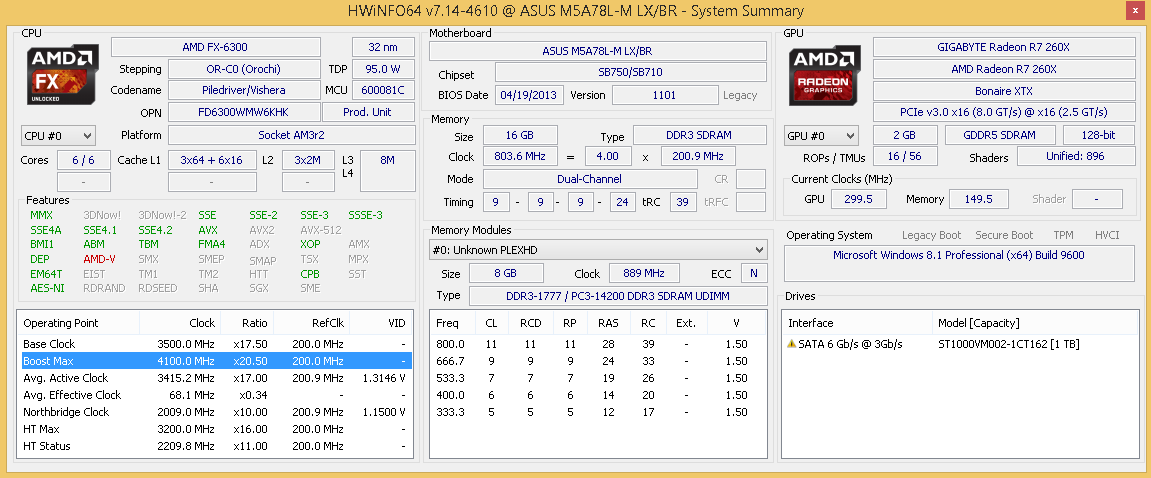
my pc information in the attachment.
 I have the same bug
Hello, Leon!
Sorry to hear you're having this issue. There have been a couple of reports of this and I would suggest looking at this thread here
Some players have fixed this issue by doing the following:
Please let me know how you get on with this :)
Kind Regards
Laura, QA Department
Hello, Leon!
Sorry to hear you're having this issue. There have been a couple of reports of this and I would suggest looking at this thread here
Some players have fixed this issue by doing the following:
Please let me know how you get on with this :)
Kind Regards
Laura, QA Department
Hello, Engineer!
Because there is no new comment from you, and we are unable to reproduce the issue on our own, I will close this thread now as outdated.
If you or any other player will experience this issue again, please make a new thread and provide all needed info there.
Thank you for understanding.
Kind Regards
Keen Software House: QA Department
Hello, Engineer!
Because there is no new comment from you, and we are unable to reproduce the issue on our own, I will close this thread now as outdated.
If you or any other player will experience this issue again, please make a new thread and provide all needed info there.
Thank you for understanding.
Kind Regards
Keen Software House: QA Department
Replies have been locked on this page!