


INSTALLATION ISSUES
Won't Fix
My game won’t launch. I’ve reinstalled it several times and also verified the integrity of the files, but none of that makes the game open.
So I decided to check the installation folder and… a lot of files are missing. There are only a handful of folders, and even the spaceengineers.exe isn’t there.
WHAT COULD THIS BE?
(I don’t have any kind of antivirus installed.)
Files:
ErroSpace.png
 I have the same bug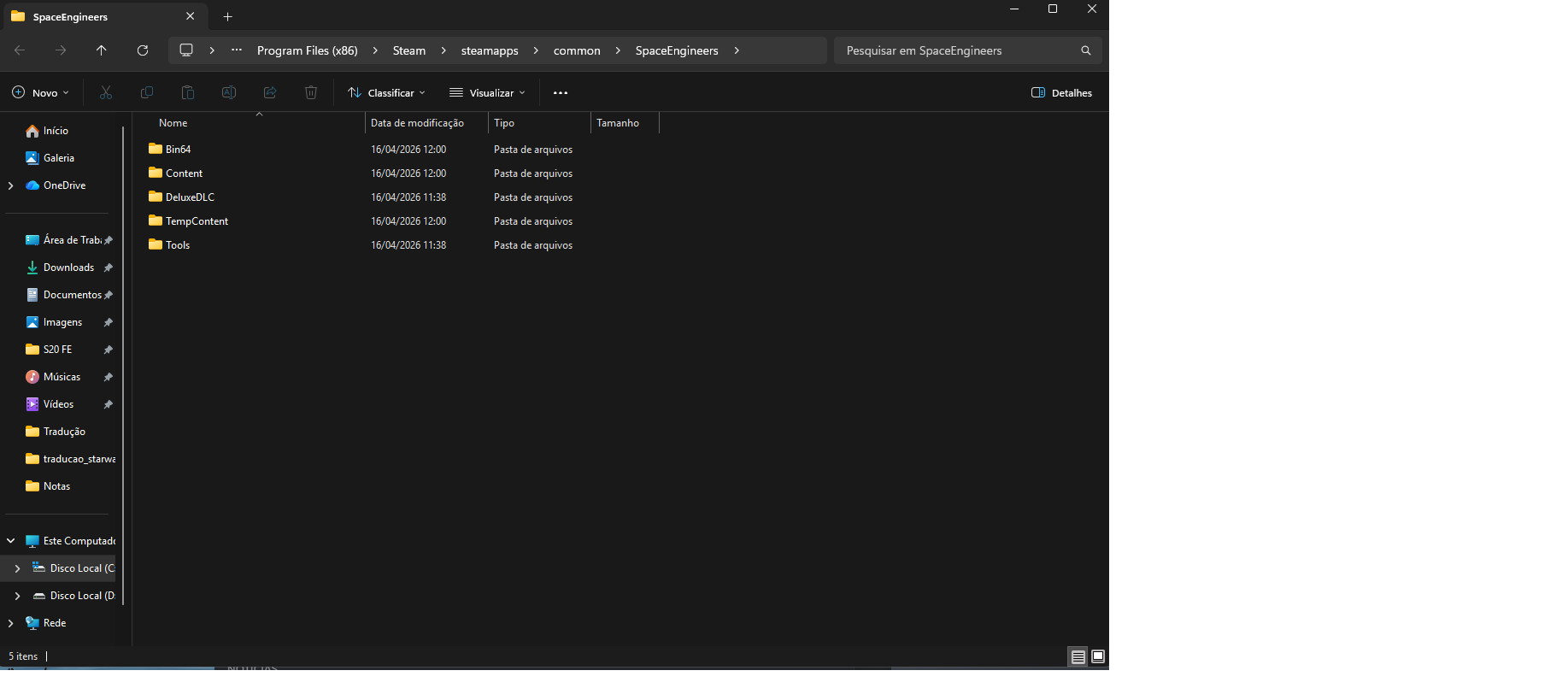
You can't vote. Please authorize!
You can't vote. Please authorize!
You can't vote. Please authorize!
Hello!
Thank you for contacting us. Since this is a bug report, I'm moving your ticket to our support page, where our QA team will take care of you.
Kind Regards,
Keen Software House
Hello!
Thank you for contacting us. Since this is a bug report, I'm moving your ticket to our support page, where our QA team will take care of you.
Kind Regards,
Keen Software House
Hello Engineer,
Thank you for reaching our forum with this problem.
Can you please confirm that you did all the general troubleshooting steps?
These are:
Please let us know if any of the steps helped you or the situation is still the same.
Can you also please share a log file from the game?
You can access your log files by typing %appdata% into your Windows search bar and you will be redirected to the hidden Roaming folder. After that just follow: \Roaming\SpaceEngineers.
Thank you in advance.
Kind Regards,
Keen Software House: QA Department
Hello Engineer,
Thank you for reaching our forum with this problem.
Can you please confirm that you did all the general troubleshooting steps?
These are:
Please let us know if any of the steps helped you or the situation is still the same.
Can you also please share a log file from the game?
You can access your log files by typing %appdata% into your Windows search bar and you will be redirected to the hidden Roaming folder. After that just follow: \Roaming\SpaceEngineers.
Thank you in advance.
Kind Regards,
Keen Software House: QA Department
I’ve already done all of that and nothing worked. My game still won’t open. Steam shows that the game is running, and when I open Task Manager, the Space Engineers icon is there. But the game never actually opens...
I’ve already done all of that and nothing worked. My game still won’t open. Steam shows that the game is running, and when I open Task Manager, the Space Engineers icon is there. But the game never actually opens...
Let’s go, where are you guys? I really want to get back to playing Space Engineers, but I’m having this problem and I’ve already tried everything that was described. What should I do—format my PC? '-'
I even tried a disk repair, and I also uninstalled Space Engineers from one drive and installed it on a completely new one, and still nothing works…
Let’s go, where are you guys? I really want to get back to playing Space Engineers, but I’m having this problem and I’ve already tried everything that was described. What should I do—format my PC? '-'
I even tried a disk repair, and I also uninstalled Space Engineers from one drive and installed it on a completely new one, and still nothing works…
Ok guys, I get it now — there’s some kind of PERSONAL issue with me… you’re not replying to me here or even on the Steam discussion.
Ok guys, I get it now — there’s some kind of PERSONAL issue with me… you’re not replying to me here or even on the Steam discussion.
Hiya, HS_DRAGON! I'm Navy-kun, an average non-developer player. I, as well as numerous other players, have been having a carbon-copy of this same problem for days. Let me guess: This started on 4/14 right after the April Windows Update Package was released? The one with the now infamous KB5082417 Security Update? I've reported this same problem myself here, on Steam, and to Microsoft. They could at least send us some kind of progress report on their investigations into the matter... *hint, hint. wink, wink. nudge, nudge.* All we can really do now is stand by and hope that they're even listening to us and correct this minor issue--which has now become a major problem. Surely, they must realize they have customers out here who are growing more dissatisfied by the minute.
Hiya, HS_DRAGON! I'm Navy-kun, an average non-developer player. I, as well as numerous other players, have been having a carbon-copy of this same problem for days. Let me guess: This started on 4/14 right after the April Windows Update Package was released? The one with the now infamous KB5082417 Security Update? I've reported this same problem myself here, on Steam, and to Microsoft. They could at least send us some kind of progress report on their investigations into the matter... *hint, hint. wink, wink. nudge, nudge.* All we can really do now is stand by and hope that they're even listening to us and correct this minor issue--which has now become a major problem. Surely, they must realize they have customers out here who are growing more dissatisfied by the minute.
I am having the same issue as HS_dragon. I have tried all suggestions and its not helping.
I am having the same issue as HS_dragon. I have tried all suggestions and its not helping.
Hello Engineer,
Thank you for your replies.
Please note that as Keith is mentioning, we have already reported issues that sounds very similar to yours. Can you please take a look here to this thread and try the workaround mentioned in the "Best Answer" given there?
https://support.keenswh.com/spaceengineers/pc/topic/53728
Please let us know if this workaround solves your problem - then it would be the same - or whether you are still experiencing any kind of problem after this.
Thank you in advance.
Kind Regards,
Keen Software House: QA Department
Hello Engineer,
Thank you for your replies.
Please note that as Keith is mentioning, we have already reported issues that sounds very similar to yours. Can you please take a look here to this thread and try the workaround mentioned in the "Best Answer" given there?
https://support.keenswh.com/spaceengineers/pc/topic/53728
Please let us know if this workaround solves your problem - then it would be the same - or whether you are still experiencing any kind of problem after this.
Thank you in advance.
Kind Regards,
Keen Software House: QA Department
Hello Engineer,
As there has been no reply to this thread in some time, we will close it. If you're experiencing this issue, please create a new thread.
Kind regards,
Keen Software House: QA Department
Hello Engineer,
As there has been no reply to this thread in some time, we will close it. If you're experiencing this issue, please create a new thread.
Kind regards,
Keen Software House: QA Department
Replies have been locked on this page!