


File errors
Went play last night on my pc my modded world would not load made a new world with all the same mods got file errors made a new world no mods got errors what should I do? the attachment was from the modded one the errors listed below are from the new game with no mods
MOD_ERROR: Unknown, in file: D:\SteamLibrary\steamapps\common\SpaceEngineers\Content\Data\Audio_music.sbc
Unable to find audio file: 'MusConcert_2', 'MUS\MusConcert\10YA_Track2_mix2.wav'
MOD_ERROR: Unknown, in file: D:\SteamLibrary\steamapps\common\SpaceEngineers\Content\Data\Audio_music.sbc
Unable to find audio file: 'MusConcert_3', 'MUS\MusConcert\10YA_Track3_mix1.wav'
MOD_ERROR: Unknown, in file: D:\SteamLibrary\steamapps\common\SpaceEngineers\Content\Data\Audio_music.sbc
Unable to find audio file: 'MusConcert_4', 'MUS\MusConcert\10YA_Track4_mix1.wav'
MOD_ERROR: Unknown, in file: D:\SteamLibrary\steamapps\common\SpaceEngineers\Content\Data\Audio_music.sbc
Unable to find audio file: 'MusConcert_5', 'MUS\MusConcert\10YA_Track5_mix1.wav'
MOD_ERROR: Unknown, in file: D:\SteamLibrary\steamapps\common\SpaceEngineers\Content\Data\Audio_music.sbc
Unable to find audio file: 'MusConcert_6', 'MUS\MusConcert\10YA_Track6_mix1.wav'
MOD_ERROR: Unknown, in file: D:\SteamLibrary\steamapps\common\SpaceEngineers\Content\Data\Audio_music.sbc
Unable to find audio file: 'MusConcert_7', 'MUS\MusConcert\10YA_Track7_mix1.wav'
MOD_ERROR: Unknown, in file: D:\SteamLibrary\steamapps\common\SpaceEngineers\Content\Data\Audio_music.sbc
Unable to find audio file: 'MusConcert_8', 'MUS\MusConcert\10YA_Track8_mix1.wav'
MOD_ERROR: Unknown, in file: D:\SteamLibrary\steamapps\common\SpaceEngineers\Content\Data\Audio_music.sbc
Unable to find audio file: 'MusConcert_9', 'MUS\MusConcert\10YA_Track9_mix1.wav'
MOD_ERROR: Unknown, in file: D:\SteamLibrary\steamapps\common\SpaceEngineers\Content\Data\Audio_music.sbc
Unable to find audio file: 'MusConcert_10', 'MUS\MusConcert\10YA_Track10_mix1.wav'
 I have the same bug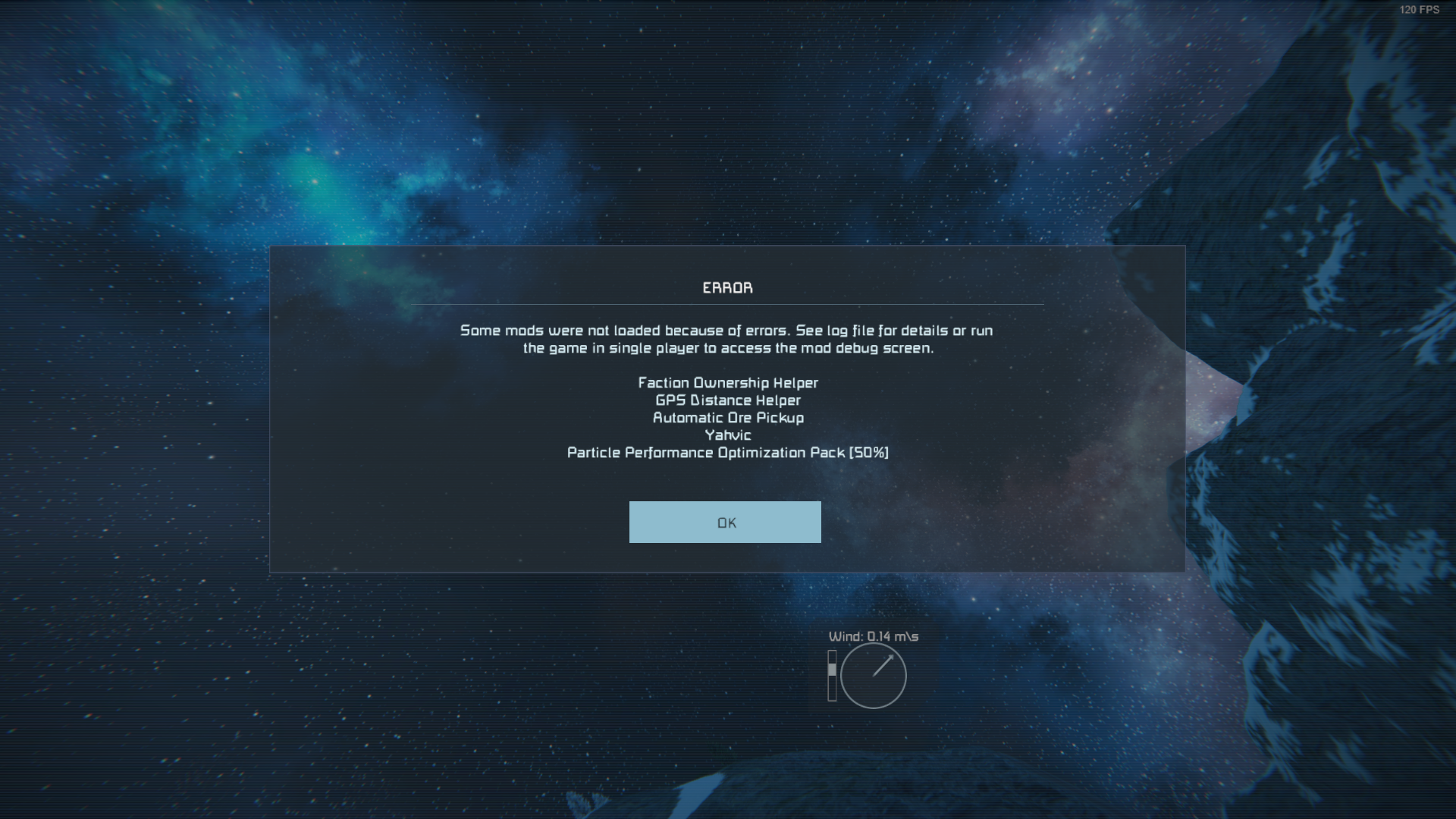
Hello!
Thank you for contacting us. Since this is a bug report, I'm moving your ticket to our support page, where our QA team will take care of you.
Kind Regards
Keen Software House
Hello!
Thank you for contacting us. Since this is a bug report, I'm moving your ticket to our support page, where our QA team will take care of you.
Kind Regards
Keen Software House
Hello, harlin,
thank you for reaching our forum with the problem that you are experiencing. We are sorry that it is happening to you in a first place.
Can you please provide me more information?
First of all – we do not support mods and other 3rd party SW, only the base vanilla game without any mods. It is the mod (script, plug-in...) creator/owner responsibility to make sure it is working as expected on the current game version.
However, since you are observing this problem also in the game without any mod loaded in, can you provide more information on this case?
Is the world in single player mod or multiplayer?
This is now happening to all (vanilla) worlds that you try and load/start?
Can you please our general workarounds that helps to most of the players to solve most of the problems that they are experiencing. These are:
Please let me know if after performing these steps you are still experiencing the same problem.
If yes, please share me full log from the affected vanilla game, so I can investigate it further.
Thank you in advance.
Kind Regards
Keen Software House: QA Department
Hello, harlin,
thank you for reaching our forum with the problem that you are experiencing. We are sorry that it is happening to you in a first place.
Can you please provide me more information?
First of all – we do not support mods and other 3rd party SW, only the base vanilla game without any mods. It is the mod (script, plug-in...) creator/owner responsibility to make sure it is working as expected on the current game version.
However, since you are observing this problem also in the game without any mod loaded in, can you provide more information on this case?
Is the world in single player mod or multiplayer?
This is now happening to all (vanilla) worlds that you try and load/start?
Can you please our general workarounds that helps to most of the players to solve most of the problems that they are experiencing. These are:
Please let me know if after performing these steps you are still experiencing the same problem.
If yes, please share me full log from the affected vanilla game, so I can investigate it further.
Thank you in advance.
Kind Regards
Keen Software House: QA Department
Hello Engineer,
We wanted to let you know that a new update for Space Engineers has been released recently.
When you have the chance, please update your game to version 208 and check if the issue you reported is still present.
Your confirmation will help us make sure everything is working as intended.
Kind regards,
Keen Software House
Hello Engineer,
We wanted to let you know that a new update for Space Engineers has been released recently.
When you have the chance, please update your game to version 208 and check if the issue you reported is still present.
Your confirmation will help us make sure everything is working as intended.
Kind regards,
Keen Software House
Hello Engineer,
As there has been no reply to this thread in some time, we will close it. If you're experiencing this issue, please create a new thread.
Kind regards,
Keen Software House: QA Department
Hello Engineer,
As there has been no reply to this thread in some time, we will close it. If you're experiencing this issue, please create a new thread.
Kind regards,
Keen Software House: QA Department
Hi! This problem is still persists me and and buddy was playing together he put like 40+ hours into our save file and used 2 mods the Hydrogen Plus v3 w/Mod Support and the Build Vision 3.0 and while building a ship he got dissconnected the game said unloading world for him and a few second later it said the same thing for me and unloaded the world ever since that if i try to load in as soon the load finished it says unloading the world again so I checked world setting it changed the online mode to offline i fixed that then succesfully loaded in then he joined and for like 3 minutes it worked then same error happened exact same way he got disconnected then it unloaded me as well so i tried to load back up it loaded but it was like if i had 1000+ brightness could barley see anything so im not sure if my safe file is bricked or what
Hi! This problem is still persists me and and buddy was playing together he put like 40+ hours into our save file and used 2 mods the Hydrogen Plus v3 w/Mod Support and the Build Vision 3.0 and while building a ship he got dissconnected the game said unloading world for him and a few second later it said the same thing for me and unloaded the world ever since that if i try to load in as soon the load finished it says unloading the world again so I checked world setting it changed the online mode to offline i fixed that then succesfully loaded in then he joined and for like 3 minutes it worked then same error happened exact same way he got disconnected then it unloaded me as well so i tried to load back up it loaded but it was like if i had 1000+ brightness could barley see anything so im not sure if my safe file is bricked or what
I successfully fixed it by deleting all the audio .scb files then doing a verify install also I had forgot that I changed the max speed of the aircrafts to 1000m/s from 100 and the verify set that back although i don't think that was the cause since I always set it up when I re install the game and put over 500 hours into the game since i bought it and a few hundred more when I was little and did not had the money to buy the game leggit and increasing the speed never caused a problem
I successfully fixed it by deleting all the audio .scb files then doing a verify install also I had forgot that I changed the max speed of the aircrafts to 1000m/s from 100 and the verify set that back although i don't think that was the cause since I always set it up when I re install the game and put over 500 hours into the game since i bought it and a few hundred more when I was little and did not had the money to buy the game leggit and increasing the speed never caused a problem
Replies have been locked on this page!