


Group Block
There is no way to put a block into multiple groups. Nesting is also pretty limited.
I propose adding a new block, calling it "group controller" or just "group block."
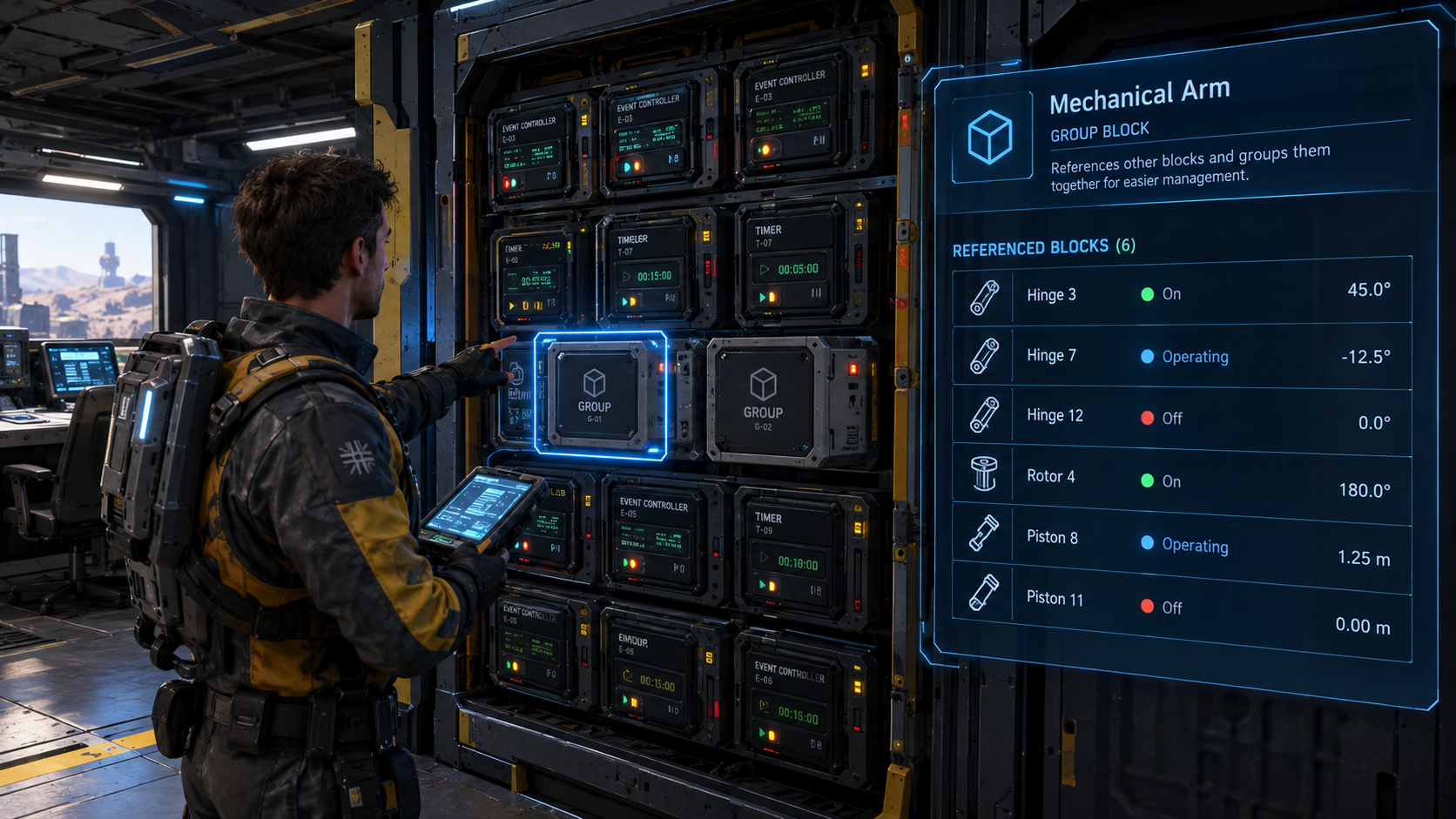
Inside this block you can reference other functional blocks, effectively creating a group. Then, instead of targeting individual blocks, you will be able to target the group block and set an action on it in any hotbar.
A list of available actions will depend on what blocks are in the group. For example, you could have a group with 2 pistons and a rotor, so the list of the available action will be a combination of all possible actions from these blocks. You will see "extend"/"retract" and "set angle limits", although, when you activate the "extend" action only the pistons will react, while the rotor will ignore an unknown command. Basically the same behavior as we had in SE1 with groups created in terminal.
You can also reference other group blocks inside a group block. This way you can organise blocks however you want for all kinds of purposes, independently of the hierarchy you have in the terminal, which can now be used just for nice viewing organisation.
The group block has to be quite small. Max 50cm^3 or even half of that. So it can be feasible on small grids too. I must say that I like having control rooms filled with all sorts of automation blocks, so this will very much add to it :)
 I like this feedback
Related to this topic: Blocks in a grid should be able to belong to more than one group
Related to this topic: Blocks in a grid should be able to belong to more than one group
Looking at the picture, a couple of ideas have crossed my mind.
First, I'd like every automation block to show simplified UI about current automation rule. The EC can display the type of trigger, and its state, while the timer can show the countdown. A list of referenced blocks with some operational data like it is shown for the group block in the picture. The name of the automation rule (if given). This can be separate from the block name (so you can copy a rule from one block to another without bothering to rename them).
The second idea is to have physical buttons on blocks like EC and Timers. On the timer it should trigger the actions. On EC there can be 2 buttons, one for "true" state and one for "false". This way, you can easily test your automation rulesI.
Third. What if each of those automation blocks had a slot for a data pad? You can easily swap automation rules between blocks by moving data pads similarly as we do for battery cells. The block will still "remember" the last automation rule you loaded in with a data pad, so even if you take it out, it will still work (or when you print the new ship from a blueprint). But if you insert a data pad with a new rule inside, you overwrite the rule with a new one. Insert an empty data pad to save the rule from the block. This enables several gameplay features. First, it allows you to "populate" automation blocks with data pads and then easily swap the "programs" between them, rearranging them and grouping visually for better organisation. We can't easily detach and attach blocks in this game. In the terminal, it is often not as easy to find the blocks and copy/paste settings. With data pads it would be much easier and immersive. It is like inserting a disk with software into a computer. Second, cool usage would be during missions. Imagine a mission where you need to find a program and insert it into a timer, then press that physical button to make something happen, for example, to close a bridge, or to turn on blocks like a reactor or battery you don't have direct access to, cycle an airlock, open complex hangar doors and so on.
Looking at the picture, a couple of ideas have crossed my mind.
First, I'd like every automation block to show simplified UI about current automation rule. The EC can display the type of trigger, and its state, while the timer can show the countdown. A list of referenced blocks with some operational data like it is shown for the group block in the picture. The name of the automation rule (if given). This can be separate from the block name (so you can copy a rule from one block to another without bothering to rename them).
The second idea is to have physical buttons on blocks like EC and Timers. On the timer it should trigger the actions. On EC there can be 2 buttons, one for "true" state and one for "false". This way, you can easily test your automation rulesI.
Third. What if each of those automation blocks had a slot for a data pad? You can easily swap automation rules between blocks by moving data pads similarly as we do for battery cells. The block will still "remember" the last automation rule you loaded in with a data pad, so even if you take it out, it will still work (or when you print the new ship from a blueprint). But if you insert a data pad with a new rule inside, you overwrite the rule with a new one. Insert an empty data pad to save the rule from the block. This enables several gameplay features. First, it allows you to "populate" automation blocks with data pads and then easily swap the "programs" between them, rearranging them and grouping visually for better organisation. We can't easily detach and attach blocks in this game. In the terminal, it is often not as easy to find the blocks and copy/paste settings. With data pads it would be much easier and immersive. It is like inserting a disk with software into a computer. Second, cool usage would be during missions. Imagine a mission where you need to find a program and insert it into a timer, then press that physical button to make something happen, for example, to close a bridge, or to turn on blocks like a reactor or battery you don't have direct access to, cycle an airlock, open complex hangar doors and so on.
Replies have been locked on this page!