


User Input Controller & Automation Mapping Block
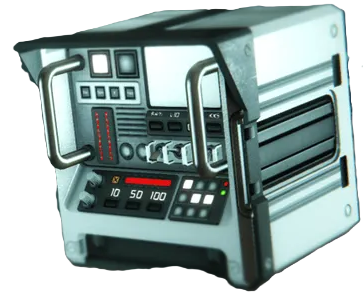
I want to make a suggestion about a new way of automation and user input key/axis binding for SE2.
In SE1, we have Event Controllers and Timer Blocks for automation. Timer Blocks are also used to group multiple actions together and trigger them in one go. All of this is useful—but I think we can do better.
The main thing we’ve always been missing is continuous inputs/outputs and proper user input mapping.
So there are two main topics I want to discuss, as they are closely related:
- User Input Mappings
- Automation Mappings
1. User Input Mappings
Introduce a special block, for example called User Input Controller (UIC), where players can map user inputs to desired actions.
Input types
- Discrete Inputs. Each input has two action slots: when input is present and when it is not. The name of inputs are defined in game settings, for example "forward": is usually mapped to "W" key on a keyboard and you should be able to remap it there.
- Continuous inputs: Holding a key, moving mouse or controller axes
For continuous inputs, the action should apply a change to a continuous value on a target block.
Example
- Moving the mouse along one axis rotates a rotor, extend a piston, increase override or speed on a block and so on.
- A multiplier can be set to scale the input
- A negative multiplier would invert the input direction
Using UICs in cockpits
- When you enter a cockpit or seat, you can activate a specific UIC
- You can have multiple UICs, each with its own mappings, for example: one UIC controls a crane arm, another controls the claw or "wrist" on the crane.
- The player can control only one UIC at a time
- Switching between UICs should be quick and seamless, without “exiting” or camera shifting (unlike the Custom Turret Controller in SE1)
Potential use cases
This system would enable a huge range of gameplay features, such as:
- Controlling wheels (or anything) on sub-grids
- Controlling turrets
- Mechanical arms
- All sorts of cranes
- Mechs and walking machines
- Landing and docking mechanisms
- Remote-controlled equipment and drones
- Thrusters/gyro overrides
The possibilities here are essentially endless.
2. Automation Mappings
Introduce another block, for example called Automation Mapping Block (AMB) .
- Each AMB has: one input and one output
- To create more mappings, you build more AMBs (using more PCU accordingly)
- AMB should be quite small, so you can easily fit many of them in a small space.
Input sources
- Any functional block can be an input source
- Inputs can be: Discrete values or Continuous values
Discrete input mappings
For discrete inputs, the number of action slots depends on the input type, for example:
- Block On / Off → 2 action slots
- Battery state → 3 action slots: charging/auto/discharging
- Chosen targeting system → many slots: weapons, power, propulsion, default...
Continuous input mappings
This is where automation becomes much more powerful.
You have two main options:
Option 1: Continuous value → continuous value
- Map one continuous value directly to another
- Example: Rotor angle → rotor angle
- You can set a multiplier using positive and negative values (inverting input)
- Mapping should ensure a precise match. For example, if the input hinge is 10°, and you set a multiplier of -2, then the target hinge should go to -20°.
- You can, of course, map values between different types of blocks. For example, a thruster override of 50% can be mapped to 50% of piston extension or a 180° rotation of a rotor (half a full rotation) or 45° of hinge rotations (half of 90° max rotation) or half of the light intensity and so on.
- Therefore, every continuous value is normalized between 0 and 1 (or 0 and -1) to be used for mapping between different types of blocks.
Any continuous value from a source block can be mapped to any continuous value on a target block:
- Rotor/hinge angle
- Piston extension
- Thruster or gyro override
- Speed of mechanical blocks or wheels
- Cargo/tanks fill level
- Battery charge
- Light intensity
Basically, anything with a non-discrete range can be used as both an input and an output.
Option 2: Continuous value → breakpoints
Instead of mapping to another continuous value, you can define breakpoints along the input range.
Example:
- Input: Cargo fill level
- Breakpoints at: 20%, 40%, 60%, 80%, 100%
For each breakpoint:
- Two action slots: One for less than or equal, One for greater than
Example use case:
- Turn on or off five separate lights as cargo fill increases
This system would greatly expand automation, make mechanical builds far more intuitive, and finally give players proper axis-based control and logic without relying on workarounds.
Thx for reading.
Referenced or similar topics:
Advanced Multi-Channel Cockpit Controls
Unable to change keyboard mappings in Space engineers 2
key bindings are not customizable
 I like this feedback
On/Off input can still be mapped to a continuous value. Off is the min value, On is the max value.
For example:
The only thing you need to do after setting this up is to turn the turret on and off, and it will pop up and go down automatically.
Another QoL addition would be having "ease" functions besides multiplier coefficients. By default, the ease function will be a linear slope, but you could select different functions, like "ease in", "ease out", "ease in out", or adjust the curve as you like to make a custom easing function.
On/Off input can still be mapped to a continuous value. Off is the min value, On is the max value.
For example:
The only thing you need to do after setting this up is to turn the turret on and off, and it will pop up and go down automatically.
Another QoL addition would be having "ease" functions besides multiplier coefficients. By default, the ease function will be a linear slope, but you could select different functions, like "ease in", "ease out", "ease in out", or adjust the curve as you like to make a custom easing function.
Question : how do wheels on a sub-grid know which way is forward.
Question : how do wheels on a sub-grid know which way is forward.
Replies have been locked on this page!