


Built a ship with 9 drills, began mining with it but when the drills get ore, they just spam the ore between the other drills instead of moving it into cargo, the drills have 3 different conveyer access points to cargo, I can move ores into the cargo manually but the drills just decide not to which also causes the game to get like 2 FPS with the inventory screen open

Ores in the drill getting stuck and or moving between cargo and drill
Solved
I build a ship with 4 drills, in between mining the drills deside to not give the ores in the cargo. Instead they get full and when i try to move the ore they quickly move between cargo and the drills around until my game crashes. Now my drills are locked up with ore and i cant move them.
Files:
Drill ore spam.zip
SpaceEngineers2...
SpaceEngineers2...
SpaceEngineers2...
SpaceEngineers2...
New Bitmap imag...
New Bitmap imag...
clip_1,764,972,...
SpaceEngineers2...
SpaceEngineers2...
SpaceEngineers2...
SpaceEngineers2...
Screenshot 2025...
Screenshot 2025...
Recording 2025-...
Recording 2025-...
Запись экрана_2...
clip_1 765...
SpaceEngineers2...
2025-12-24 12-4...
a little buggy...
Grid.zip
2026-01-30 17-0...
2026-01-30 17-2...
Video Project (...
Space Engineers...
MedalTVSpaceEng...
Merged Objects
Inventory push bug with drills
When using the pre-built "Bullfrog" miner from a quest, the ship reports "inventory full" prematurely, and judging by the way the inventory screen is having a seizure, I think the two drills are pushing into each other's inventory as fast as they can. The result is that one drill is completely full, while the other is empty, but it moves so quickly that neither can collect new ore.
For extra fun, both drills are ignoring other blocks with empty inventories - one of the cargo containers and the connector. Only one container and the cockpit gets filled by the drills. Materials can be moved between them all, so it's not a conveyor problem.
Finally when all this inventory pushing is happening, the list in the menu moves around too quickly to be able to drag the ore out of whichever drill has it this game tick. This can only be worked around by turning off the drills so they stop pushing to each other. Please also stop this dynamic inventory list sorting. It's very distracting even in normal use to have the container you were trying to fill jump away after you place the first item in it.
Drill inventories not working properly
Title is semi self explanatory, but I'll go more in depth here
Put 4x drills onto the hydrogen ship in space engineers 2 'survival' mode
The drills work as intended, but their inventories do not, i have 1 that's full, and i can't move the iron ore from it to another inventory, it acts like it exists, then doesn't rapidly swapping between the two
Drill to cargo container
The inventory its keep glitching harder when i mine with a drill ship . It keep flickering out and in of drill block and refusing to gather more ore into the cargo container since it display full . And other thing i forgot to mention , if theres an ore inside of the drill block it wont allow me to move it from it. And 30 minutes later when i connected the conveyor line to connector it un-glitched.
Multiple Drills
Having multiple drills on a grid seems to bug out in a few ways.
- Drills dont push ore out through conveyors into cargo.
- Only one drill is actually collecting ore.
- If you name them separately you can see that in the Inventory menu they are trying to merge/share the same inventory. Or one is trying to overwrite the other. As this is happening the UI begins to lag a bit.
- When this happens you cannot grab the ore out of the drill without turning off the ship
I've uploaded a video to Youtube as it was too big to attach here.
Inventory not filling properly on mining ship at Kemik
Mining Fe near Kemik and got inventory full message around 40% full. Drills and one cargo container was empty. Trying to manually move Fe from full to empy seemed to result in losing that Fe. Inventory screens showed flickering full/empty (see video). Clicking 'save as to try to save the world resulted in a crash.
Ship Drill inventory glitching
I have 2 ships and occasionally the inventory does not leave one or more drills, even though the drills may be connected together or if I add a 2nd conveyor path. When viewing the inventory in the drill it appears to be moving in and out of the drill rapidly. I can move ores into the drill and see them swapping spaces inside the drill rapidly. If I get lucky, I can select the ore, but it flickers so rapidly that I cannot drag it out. I've found I can right click to remove the ore out of the drill.
[Not Game breaking] Drills push each other their items if containers are full
1. A drill (2xdrills) Ship with a container
2. container needs to be full
3. drills will push their items to each other, which results in flickering items/ores
Drill inventory flickering when near/at capacity
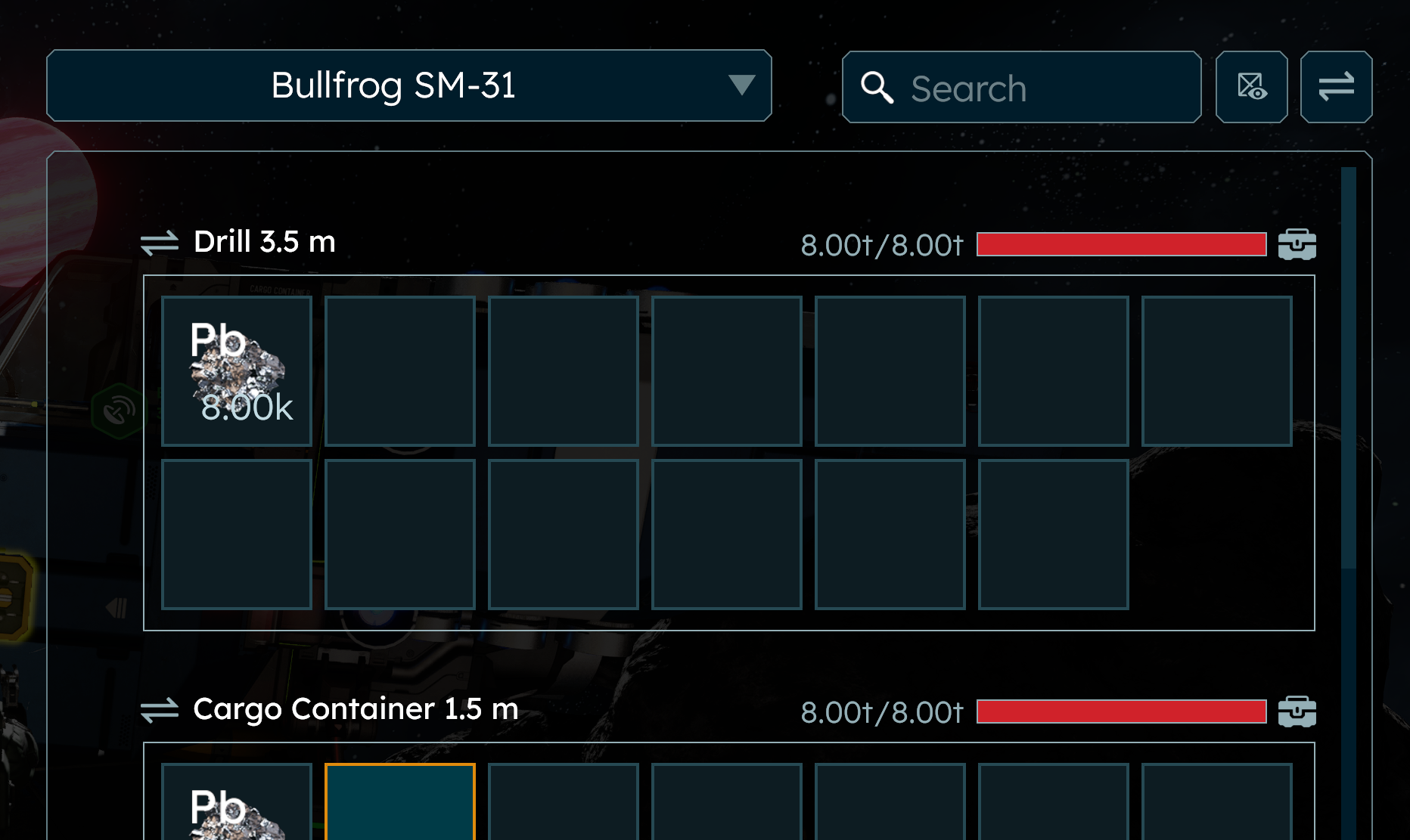
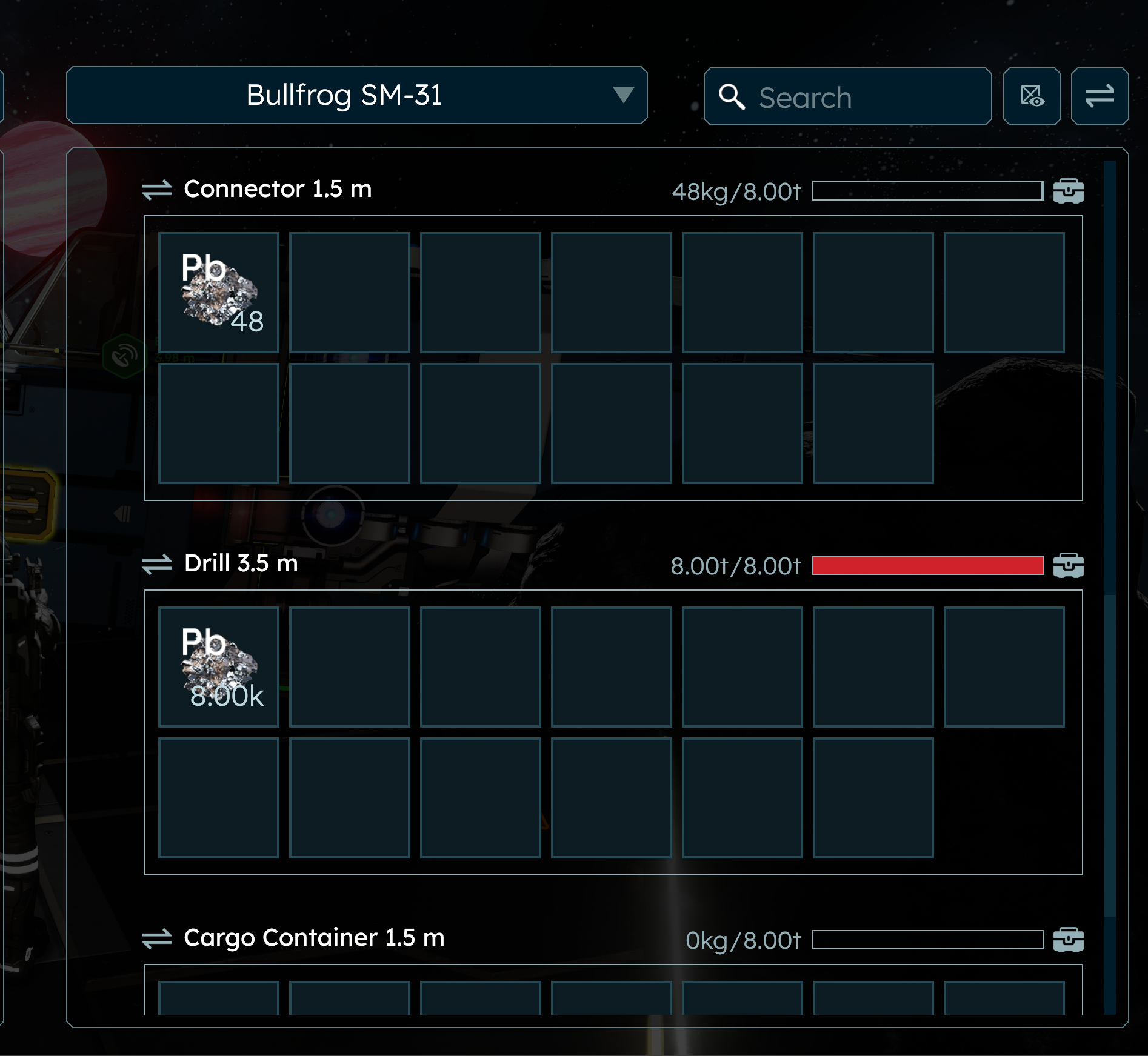
This screenshot shows the Bullfrog drill with the issue, but not the actual issue. I found and mined lead, since this is the first time that I have seen it. I mined until the ship said the inventory was full then docked the ship.
When I open the inventory, the drill's lead contents and red bar are flickering (existing then not existing). The ore text that should show 8.00t/8.00t is flickering between 8.00t/8.00t and 0kg/8.00t as well.
There was also an issue when I scrolled down in the inventory to view the second drill. The scrollbar won't scroll down anymore, and the cargo container and drill appear to be shown empty below the connector, but flicker back and forth with a full drill and something else.
I have recorded movies without audio on Windows to show the issue. They are also attached here.
When I unloaded the ore and emptied out the drill, the flickering stopped. There appears to be a second cargo container on the ship, but I don't know if it actually contained any items.
Items travel between multiply of drills infinitely
Hello, I've encountered a bug where Iron travels between couple of drills and doesn't get into any of the cargo storages. I've recorded it on the video.
PC Specs:
- Ryzen 5 7535 U
- Nvidia RTX 4050
- 16 GB RAM (DDR5)
- Mangaro Linux (game launches on GE-Proton10-17
Steps to reproduce bug:
- Build a spacecraft with 2 or more drills connected to shared conveyor system.
- Mine some ore.
- Check the conveyor inventory of the spacecraft
- Encounter an endless cycle of drills sharing items with each other.
I can attach a world file if needed.
Inventory Won't Scroll
Trying to swap inventory from my character to the ship is not working because I cannot scroll to the other containers. I can see there is more to the list with the scroll bar, but it won't let me click the scroll bar and won't let me grab and drag the scroll bar in order to get to the containers I need to put things in. I have one large container and 4 smaller ones with 2 drills and 2 O2/H2 generators. I have Show All Inventories turned on. I have Show Empty Inventories turned on. The scroll bar only goes half way down and will not let me scroll any further. Even using the mouse wheel stops at half way, not letting me scroll it any further to see my other inventory containers. The order in the lsit is as follows...
Large Cargo Container
Cockpit
Connector
Drill
Drill
O2/H2 Generator
O2/H2 Generator
Small Cargo Container (stops half way through seeing this container)
3 more containers should be show, and the scroll bar indicates there are more in the list, but will not scroll. I've tried restarting the game.
SE2 - Bullfrog miner 2. Cargo not working
The Bullfrog miner in mission in Kemic has 2 cargos. The back cargo is not reachable unless you grind it down below functional and back up.
Drills freaking out when having material inside (Bullfrog drill ship)
Mined a lot in the 2nd sector for the Uranium mine mission. Couldn't retrieve the items due to them teleporting between drills. Can only retrieve after turning off both drills.
Miner Tool Inventory toggle loop crashes game
built a miner with multiple mining tools. They are connected with a conveyer junction. Ore constantly toggles between 2 drill inventory slots and container inventory as fast as the game can do it. Which is burning compute which crashes the game. While the inventory is self toggling back and forth I can't select it to move it elsewhere because the state changes so fast and resets the selector. Shutting the ship down stops the madness.
I notice when opening inventory on the platform takes a long long time and feel its related. Something is a bit wrong with the inventory system and I feel its sucking cpu cycles in the game.
Might be related.
Multiple drills causing item shuffling
Video shows what I mean - when running multiple drills, at least with ice, it seems they will shuffle the ice/ore back and forth, instead of into an available cargo container. This also results in extreme latency within the inventory menu.
Overflowing Ore Gets Stuck in Drills and Causes Camera to Shake Vigorously.
When mining in a ship, and the ore you are mining is overflowing, the overflowing ore gets stuck in the spinning part of the drill where it is not visible and causes the camera to vigorously shake.
Reversing and attempting to loosen the stuck ore may help but most of the time the ore will have to eject itself on it's own with time and only then will the camera stop shaking.
Attached is a video showing the issue, and it's repeatable.
Drill/Welding
Hello Support Team,
-The drills do not transport the raw materials further into the containers. Once you have attached 3 or 4 drills to a ship, you will encounter problems.
-The welding points and cutting points are not possible from every side of the Block, which makes it difficult to remove blocks that have been set.
I played SE 1 for many years and am very excited to play SE2. I am really looking forward to the game and hope that the basic functions will be up and running soon :-)
Best regards,
Daniel
3.5m drill conveyor block multi connection inventory loop
unable to unload inventory if more than one conveyor is connected. Drill does not transfer inventory to attached cargo container if also a conveyor is attached.
https://steamcommunity.com/sharedfiles/filedetails/?id=3631963618
Small drills, cargo containers and mining..
I build my first bigger miner, still with small blocks but plenty of cargo to move bigger loads of ore in one run. But somehow the game has problems to guide ore through the drills fast enough into the cargo containers behind them and so they are ejected back to space and fly around me in little ore balls like they do when mining with the handdrill. I added both my savegame file and the miners blueprint, just in case i messed up something myself.. but i am pretty sure the conveyor systen works and the cargo containers.
Inventory inability to transfer materials
There is a bug that will not always allow materials to be transferred between grids or between containers on the same grid.
Drills will not allow manual transfer at all.
The inventory system is BROKEN
Ore in drills which are connected floating wildly from one to another
When combining drills in a grid ship for drilling the ore floates wildly from one drill to another and back showing INVENTORY FULL for the ship while there is plenty of space in the drills left.
Ore bouncing between drills
Reproduction steps:
- Build 2 x Drill and 1 x Cargo Container in T-shape that drills are connected directly with each other (see video).
- Mine some ore or just put it into one of drills.
Actual result:
Ore is endlessly pushed from one drill to another and as the result it bounces between drills.
It is no longer possible to interact with ore in inventory window.
The only way to stop it is to grind a conveyor connection between drills.
Expected result:
Ore should be pushed to cargo container.
Partial Workaround:
Change layout of conveyors to U-shape that there is no direct connection between drills so ore is pushed from drill to cargo container. It works while cargo container has room to accept ore, as soon it is full, the ore starts bouncing between drills (see second video).
Rapid transfer of drill inventory
A ship equipped with two or more drills and used to mine recourses will become unstable and vibrating after a while. Reason is that there is a constant and rapid transfer of items between the inventories (and therefore movement of masses). When deactivating the drills the movement stops, (because no masses are shifted around anymore)
Mining ship not filling all cargo.
Mining Ships doesn't fill all the cargo containers in the ship.
It fills the 1st container in the convayor line and then gives a "Inventory Full" at 40% Cargo.
But when you're trying to manually move the cargo you can't scroll down to the empty Cargo Containers. Also the Drills are going nut if you succeed in fill every inventory incl. the drills, they try to move the cargo around to empty and it makes the whole ship vobble and "clank out" a bit.
I was using the blueprint of Keens "Bullfrog Miner" when I got this bug.
bug with inventory systems and drills and performance issues
so basically, when 2 drills are connected to each other via conveyors, the ore will be constantly moved between the 2 drills inventories, like really quickly, so quickly it's impossible to interact with it without turning the drill off entirely so as to stop it's conveyors.
and while yes for this next issue i need to upgrade my cpu, the inventory system is really performance intensive, and especially with the drills going crazy with their inventories it stutters so bad it reaches around 50%ish stutter micro (in amd adrenaline overlay)
conveyor - drill circle of death
I've been slowly modifying the original ship. The first, lower, row of drills was fine. I just added the upper row, and now when trying to harvest ice, the ice is just circling really fast between the drills and not going to the cargo. It's so fast that you can't grab it and manually move it. I also tried adding a sorter, but there doesn't seem to be any way to configure the small one, like a drain all switch, so it didn't help. I'm not sure how to post a video of it here? it won't let me upload it with Attach File.
https://steamcommunity.com/sharedfiles/filedetails/?id=366559927311
Drills have phantom iron ore
Hi
Had a strange problem where while mining some iron with a small mining ship (this was my third time mining with it) I had received an inventory full message despite one of my three cargo containers, both my connectors, and cockpit being completely empty (My ship is fully connected I can move items to any storage space in my miner). after this I mined a bit more and got another inventory full message but when I opened my inventory all the containers that where empty where still empty but my drills now had 8k worth of iron ore inside of them with their icons flashing and I was not able to move or interact with this ore.
After seeing this I ground down the drills and rebuilt them which got ride of the 8k iron ore that was in them but after words I moved some iron into the drills from my containers and was not able to interact with this iron ore in the drill but after moving some other ore around from container to other container that iron I had moved into the drills disappeared.
I do have a video I recorded of the initial 8k iron ore flashing in and out of existence which i attached (after shortening it to make it short enough to attach)
Cargo Autosort breaking functionality
Hi. You seems to have the cargo containers, as well as drills etc, autosorting both on whether they contain anything, but also on how MUCH they contain. This is causing a huge issue where I can't actually move anything from one container to another. it also seems related maybe to auto push pull. When on my mine ship, the main containers get full, the ore starts cycling through the drills etc, and it gives me "cargo full" messages. This despite the fact that the drills themselves have space left. The drills stop accepting more material, so balls of ore get left floating in space. There is no way to stabilize it, because I can't grab the ore and move it because the container list is autosorting so fast.
Block Drills rapidly pass ore back and forth
When using ship drills, ore is rapidly passed between each other, causing frame drops. Bug is likely caused when a drill passes ore to another drill, which then passes it back to the original drill. Bug stopped happening when a container was placed directly onto the drill.
Drill's hot potating with items with each other.
In additon to the included video, when the ship is conntected to a station connector (starting platform), the station will pull the materials if needed. But if the ship is not connected it ore's inside the drills will just swap between each other not being able to get grab and/or moved to another storage location on the ship.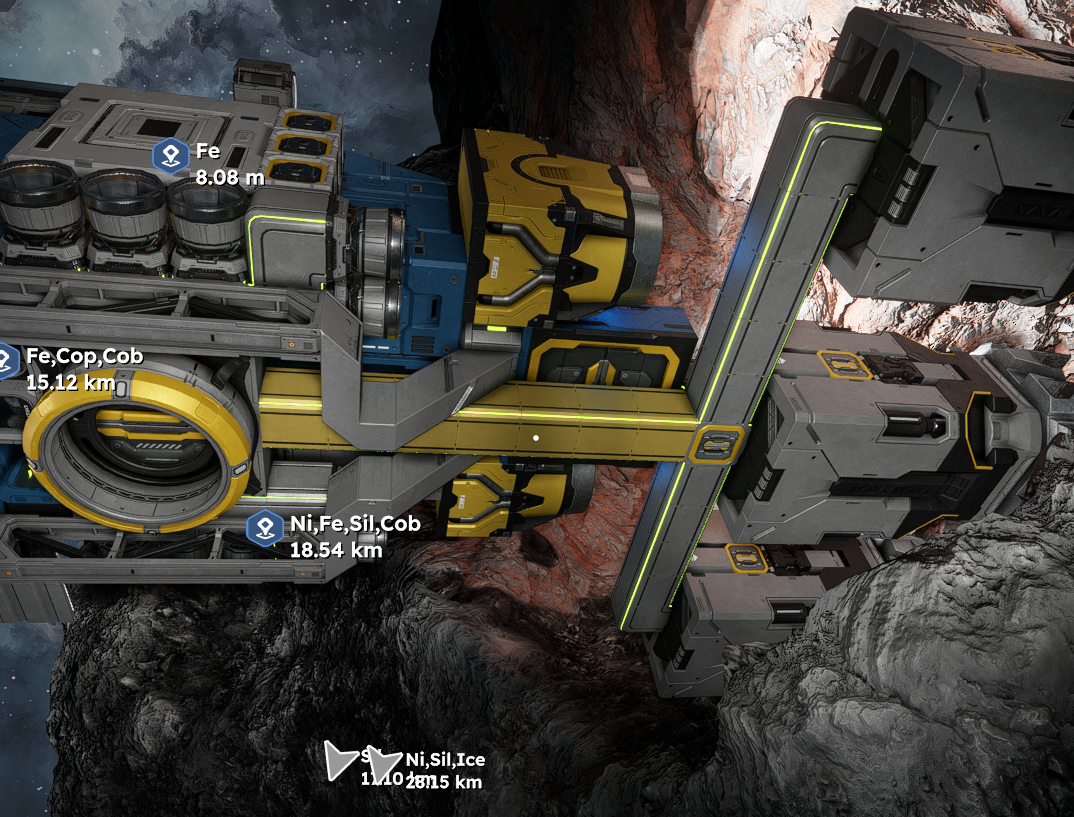
VRAGE3 v2.0.2.57 Alpha
drills and storage issue
when you have two drills that hook up to the same conveyor line instead of the ores going to the storage the ores get moved to the drills back and forth and there is also another thing if you have a cockpit hooked up to some storage and then two drills connected to the cockpit once the cockpit gets full it doesn't try to push ores into the storage they just get stuck in the drills then dropped out of them.
p.s. if you read all of that thank you for taking your time to do so
 I have the same bug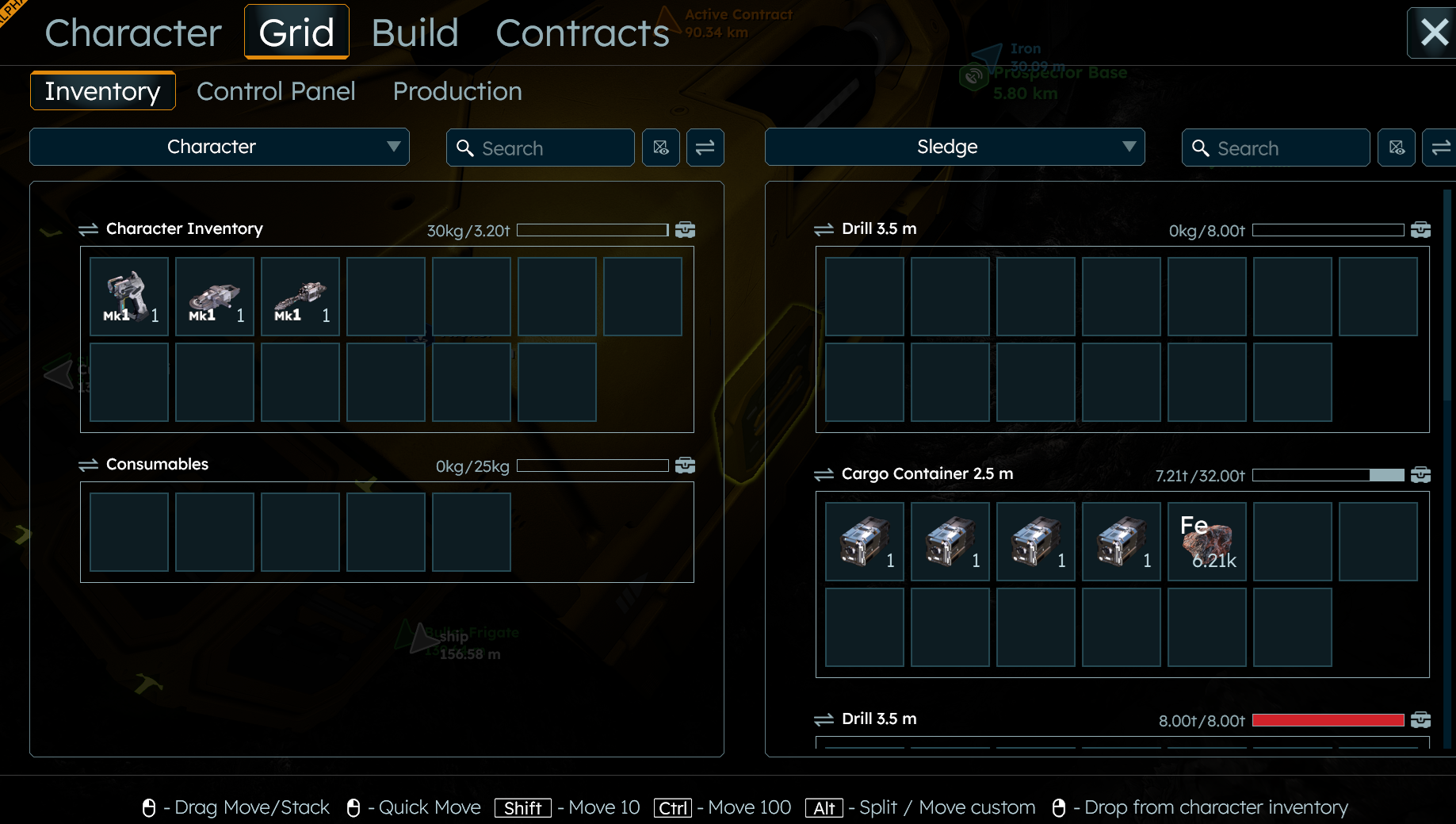
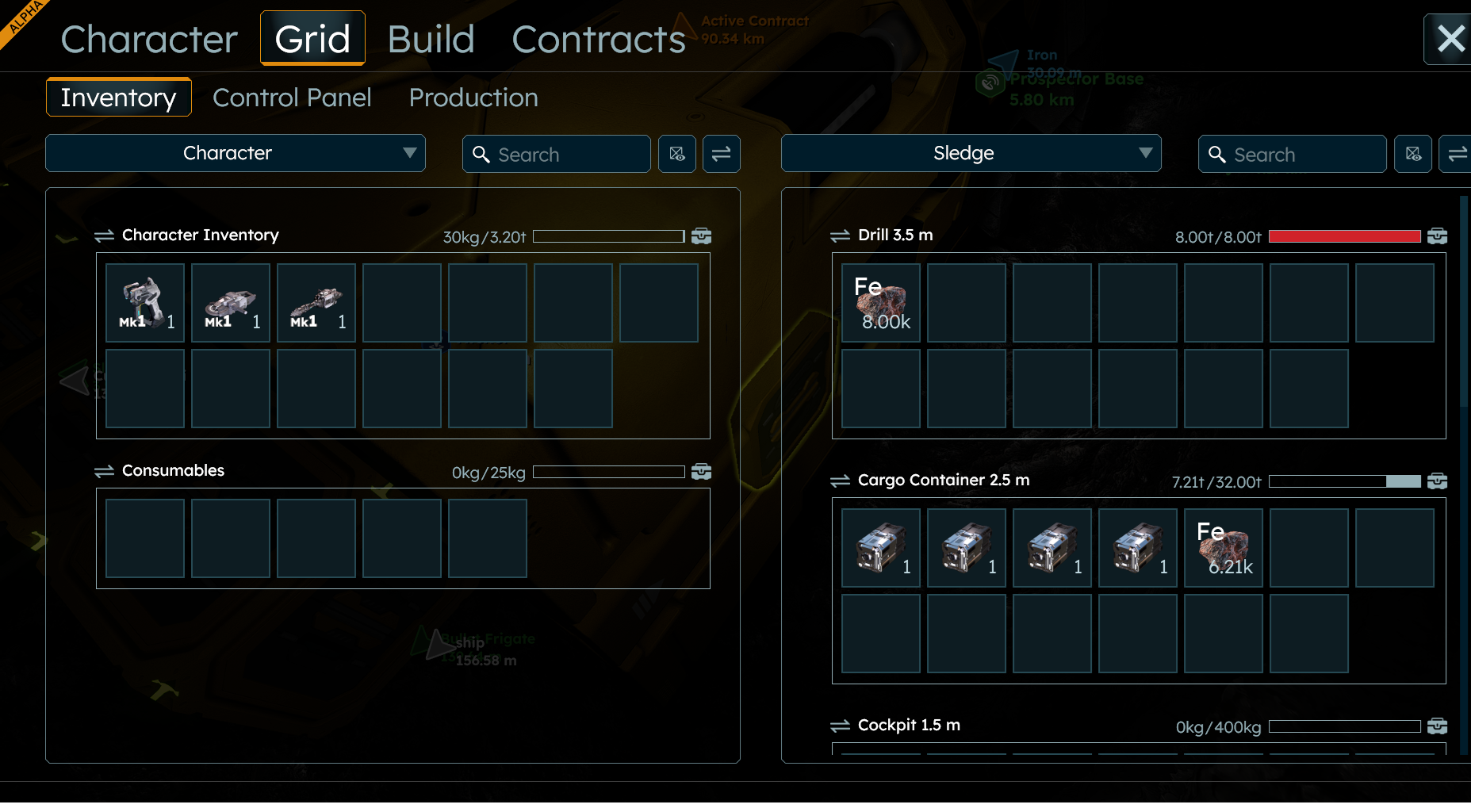
Yea I experienced the same thing in my playthrough, with 2 drills on the Sledge. You can see it the issue in my stream: https://www.youtube.com/live/sHHms4rhxE0?si=kYEJOVUzWNt-Ti-V&t=12096
Yea I experienced the same thing in my playthrough, with 2 drills on the Sledge. You can see it the issue in my stream: https://www.youtube.com/live/sHHms4rhxE0?si=kYEJOVUzWNt-Ti-V&t=12096
Yea I experienced the same thing in my playthrough, with 2 drills on the Sledge. You can see it the issue in my stream: https://www.youtube.com/live/sHHms4rhxE0?si=kYEJOVUzWNt-Ti-V&t=12096
Yea I experienced the same thing in my playthrough, with 2 drills on the Sledge. You can see it the issue in my stream: https://www.youtube.com/live/sHHms4rhxE0?si=kYEJOVUzWNt-Ti-V&t=12096
Fix i found was to grind down the drill. I ended up getting the full amount plus some extra. Almost like the drill tried to take in some extra ore that it cannot take due to inventory space in the drill.
Fix i found was to grind down the drill. I ended up getting the full amount plus some extra. Almost like the drill tried to take in some extra ore that it cannot take due to inventory space in the drill.
After mining the only 1 of the drills has ore but then ore switches rapidly between the two. you can see the drill names switching in the inventory screen (Drill Right <--> Drill Left) the only fix is to turn off the ship and move the ore to the cargo yourself! Please fix it as I spent way too long on the ship. Thanks
After mining the only 1 of the drills has ore but then ore switches rapidly between the two. you can see the drill names switching in the inventory screen (Drill Right <--> Drill Left) the only fix is to turn off the ship and move the ore to the cargo yourself! Please fix it as I spent way too long on the ship. Thanks
I've noticed the same issue with only 2 Drills. What is odd is that I can only see one Drill through the control panel/inventory screen. But I can see both are connected to conveyors correctly. I mined Ice and I can see the weight looping between 0t and 3t. It's happening so quickly that I can't select the Ice to move it to a Cargo container.
I've noticed the same issue with only 2 Drills. What is odd is that I can only see one Drill through the control panel/inventory screen. But I can see both are connected to conveyors correctly. I mined Ice and I can see the weight looping between 0t and 3t. It's happening so quickly that I can't select the Ice to move it to a Cargo container.
here is the currently leading topic for this bug.
https://support.keenswh.com/spaceengineers2/pc/topic/50467-drills-moving-ore-between-eachother-instead-of-cargo
here is the currently leading topic for this bug.
https://support.keenswh.com/spaceengineers2/pc/topic/50467-drills-moving-ore-between-eachother-instead-of-cargo
Same issue. It also means that when you drill, the drills flicker "full" on and off so it rejects a ton of ore making it take forever to mine.
Same issue. It also means that when you drill, the drills flicker "full" on and off so it rejects a ton of ore making it take forever to mine.
Also same issue, glad someone found a temp fix though!! didn't think to turn ship off and do it that way, would be better if it was fixed in game by keen, but i'm happy to be patient :)
Also same issue, glad someone found a temp fix though!! didn't think to turn ship off and do it that way, would be better if it was fixed in game by keen, but i'm happy to be patient :)
Also a quick fix sometimes making the connection shorter to connector somehow fixes , if theres a hydrogen thruster on the line it breaks and glitches....
Also a quick fix sometimes making the connection shorter to connector somehow fixes , if theres a hydrogen thruster on the line it breaks and glitches....
I have similar problem whenever i have more than 1 drill on a ship every item that get there gets glitched. It seems like multiple drills try to steal item from container for themselves and after they do it they send item back to a container then cycle repeats for every drill so item is blinking between all available storages. When ship has only 1 drill they act as they should, just send item to a container.
I have similar problem whenever i have more than 1 drill on a ship every item that get there gets glitched. It seems like multiple drills try to steal item from container for themselves and after they do it they send item back to a container then cycle repeats for every drill so item is blinking between all available storages. When ship has only 1 drill they act as they should, just send item to a container.
My workaround is to disable power to the ship with 'Y' and then manually move the ore from the drill to a container.
Pretty clearly the multiple drills are fighting over taking or ejecting the ore to the nearest storage.
My workaround is to disable power to the ship with 'Y' and then manually move the ore from the drill to a container.
Pretty clearly the multiple drills are fighting over taking or ejecting the ore to the nearest storage.
on my ship i have two drills and keeps sending and pulling from one another, so i disconnect one from logistic and than it fixes, but i have to do it all times i drill...
on my ship i have two drills and keeps sending and pulling from one another, so i disconnect one from logistic and than it fixes, but i have to do it all times i drill...
Behold my setup that it works !
Behold my setup that it works !
I noticed this as well, one of the drills & cargo containers keep swapping their inventories between each other like 10-20 times per second.
I noticed this as well, one of the drills & cargo containers keep swapping their inventories between each other like 10-20 times per second.
If I Y turn off the ship, it stops. If I only load into non-drill components it stops.
If I Y turn off the ship, it stops. If I only load into non-drill components it stops.
Same. Here is my POV:
https://youtu.be/9FHsg1ZLhcg?si=YLqRySL_JbHCCe0O
Same. Here is my POV:
https://youtu.be/9FHsg1ZLhcg?si=YLqRySL_JbHCCe0O
just place a Cargo for the Drills to be Routed to instead of other Drills like placing a small cargo on the back of them
just place a Cargo for the Drills to be Routed to instead of other Drills like placing a small cargo on the back of them
Powering off the ship stops the ores from moving around, making it possible to manually clear the drills.
Powering off the ship stops the ores from moving around, making it possible to manually clear the drills.
I believe this may be related to the battery bug, batteries on CHARGE allow most of the ship to operate. I've been drilling and flying for an hour but then noticed my O2H2 generators were not working because they had no power. I never put them on charge, so that is odd.
I believe this may be related to the battery bug, batteries on CHARGE allow most of the ship to operate. I've been drilling and flying for an hour but then noticed my O2H2 generators were not working because they had no power. I never put them on charge, so that is odd.
Same issue here. Here's a video showing it in action.
Same issue here. Here's a video showing it in action.
here is the main thread for this issue.
https://support.keenswh.com/spaceengineers2/pc/topic/50467-drills-moving-ore-between-eachother-instead-of-cargo
here is the main thread for this issue.
https://support.keenswh.com/spaceengineers2/pc/topic/50467-drills-moving-ore-between-eachother-instead-of-cargo
I too found that if I hook the drill up to a converter connected to a cargo container, or to a small conveyor solves the problem. The problem seems to only happen when the drill is connected to a converted that is then connected to a large conveyor.
I too found that if I hook the drill up to a converter connected to a cargo container, or to a small conveyor solves the problem. The problem seems to only happen when the drill is connected to a converted that is then connected to a large conveyor.
I'm having the same problem with a 4 drill ship I built from scratch. All four drills are feeding into the same medium cargo container (2 on each side connected to the 2 small conveyor ports). The drills completely fill up and don't want to deposit ore into the cargo container, and then the game crashes after about 10 seconds.
I'm having the same problem with a 4 drill ship I built from scratch. All four drills are feeding into the same medium cargo container (2 on each side connected to the 2 small conveyor ports). The drills completely fill up and don't want to deposit ore into the cargo container, and then the game crashes after about 10 seconds.
I've been playing around with it.
1) Large conveyor, converter, drill - This will fail every time.
2) Small conveyor with drill - This will fail sometimes.
3) Powering ship off and then transferring ores manually works 100% of the time.
4) This bug appears to happen when more than one drill shares a conveyor. It also effects the thruster sound which goes on an off rapidly at the same pace (sometimes). It's a hydrogen ship.
5) The same issue effects the mining ship the game gives us at the anomaly contract.
I have a drill ship with 10 drills:
The middle drill will fail between two other drills when it shares one or both of the other drill conveyors. The two outer drills began with their own small conveyors going to their own cargo. The center drill shares their conveyor. I tried all sorts of configurations; the center drill will need a private conveyor and cargo container to work.
The ship has7 other drills. Each of these 7 drills are setup with a medium cargo container, converter, and then drill. One of these drills fails every time. I've tripled checked that all of the welding was completed.
The issue with using Y is that there's another bug, harmless but a pain.
I've been playing around with it.
1) Large conveyor, converter, drill - This will fail every time.
2) Small conveyor with drill - This will fail sometimes.
3) Powering ship off and then transferring ores manually works 100% of the time.
4) This bug appears to happen when more than one drill shares a conveyor. It also effects the thruster sound which goes on an off rapidly at the same pace (sometimes). It's a hydrogen ship.
5) The same issue effects the mining ship the game gives us at the anomaly contract.
I have a drill ship with 10 drills:
The middle drill will fail between two other drills when it shares one or both of the other drill conveyors. The two outer drills began with their own small conveyors going to their own cargo. The center drill shares their conveyor. I tried all sorts of configurations; the center drill will need a private conveyor and cargo container to work.
The ship has7 other drills. Each of these 7 drills are setup with a medium cargo container, converter, and then drill. One of these drills fails every time. I've tripled checked that all of the welding was completed.
The issue with using Y is that there's another bug, harmless but a pain.
I also ran into this problem. Sometimes it also happens that I can't get the ore out of the drill because of this bug, it helps to re-enter the world.
Oh, and by the way, it's not just lead that does this. With iron too. I think this happens with all ores.
I also ran into this problem. Sometimes it also happens that I can't get the ore out of the drill because of this bug, it helps to re-enter the world.
Oh, and by the way, it's not just lead that does this. With iron too. I think this happens with all ores.
Something related is my drills bounce between each other when the cargo is full!
Something related is my drills bounce between each other when the cargo is full!
The conveyor code considers drills a destination when it should be considered a source only. A workaround WOULD HAVE BEEN to use sorters, I think, but we don't have functional sorters yet. Until this code is updated we will forever have shrodingers drills. Especially if you have multiple drills in the same conveyor network.
The conveyor code considers drills a destination when it should be considered a source only. A workaround WOULD HAVE BEEN to use sorters, I think, but we don't have functional sorters yet. Until this code is updated we will forever have shrodingers drills. Especially if you have multiple drills in the same conveyor network.
Details and work around mentioned here:
https://support.keenswh.com/spaceengineers2/pc/topic/50577-ores-in-the-drill-getting-stuck-and-or-moving-between-cargo-and-drill
Details and work around mentioned here:
https://support.keenswh.com/spaceengineers2/pc/topic/50577-ores-in-the-drill-getting-stuck-and-or-moving-between-cargo-and-drill
I had the same issue but I don't think it's solely based on the cargo capacity. I added some drills to the Sledge ship and had both the drills connected to each other and then to the cargo hold of the ship like this: [Drill>Conveyor>Drill>Conveyor>Cargo] Even when the cargo holds and drills are completely empty the drills would rapidly swap the contents of their inventories when they collected any ores. Suspecting a bug with the drills connected directly to one another I reconfigured the connections to this: [Drill>Conveyor>Cargo; Drill>Conveyor>Cargo] and the issue has since resolved itself. I don't know if the issue will return when the cargo starts to reach it max capacity but I think it's important to note this behavior as well.
I had the same issue but I don't think it's solely based on the cargo capacity. I added some drills to the Sledge ship and had both the drills connected to each other and then to the cargo hold of the ship like this: [Drill>Conveyor>Drill>Conveyor>Cargo] Even when the cargo holds and drills are completely empty the drills would rapidly swap the contents of their inventories when they collected any ores. Suspecting a bug with the drills connected directly to one another I reconfigured the connections to this: [Drill>Conveyor>Cargo; Drill>Conveyor>Cargo] and the issue has since resolved itself. I don't know if the issue will return when the cargo starts to reach it max capacity but I think it's important to note this behavior as well.
place cargo right after the drills
place cargo right after the drills
temporary workaround: power down drill, move cargo
temporary workaround: power down drill, move cargo
Update on this. So most of my inventories has a lot of items in them, some of them full. Now that I've used up a vast amount of inventory items and ore, the scrolling option has started to work now. So this is related to full inventories when the bug occurs.
Update on this. So most of my inventories has a lot of items in them, some of them full. Now that I've used up a vast amount of inventory items and ore, the scrolling option has started to work now. So this is related to full inventories when the bug occurs.
Currently how I deal with the problem - when one or more of the drills are filled, I power them off to stop the flickering of inventory, transfer the ores to cargo and power them back on.
Currently how I deal with the problem - when one or more of the drills are filled, I power them off to stop the flickering of inventory, transfer the ores to cargo and power them back on.
Hello Vrayl,
Thank you for reaching our forum with this.
Based on the description alone, it’s difficult for us to follow the exact steps or reproduce the issue on a similar grid.
Could you please provide a bit more information? It would be extremely helpful if you could share a video showing the issue occurring on your side, along with the affected save file that includes the grid in question. This would allow us to test the problem directly in the same environment and investigate it more accurately.
You can access your save files by typing %appdata% into your Windows search bar and you will be redirected to the hidden Roaming folder. After that just follow: \Roaming\SpaceEngineers\Saves. There should be a folder with your SteamID and your saves.
Please zip the file and attach it here. If you are having difficulty attaching files you can optionally use Google Drive. When sharing a google drive link please make sure it is set to be downloadable by anyone with the link.
Thank you in advance.
Kind regards,
Keen Software House: QA Department
Hello Vrayl,
Thank you for reaching our forum with this.
Based on the description alone, it’s difficult for us to follow the exact steps or reproduce the issue on a similar grid.
Could you please provide a bit more information? It would be extremely helpful if you could share a video showing the issue occurring on your side, along with the affected save file that includes the grid in question. This would allow us to test the problem directly in the same environment and investigate it more accurately.
You can access your save files by typing %appdata% into your Windows search bar and you will be redirected to the hidden Roaming folder. After that just follow: \Roaming\SpaceEngineers\Saves. There should be a folder with your SteamID and your saves.
Please zip the file and attach it here. If you are having difficulty attaching files you can optionally use Google Drive. When sharing a google drive link please make sure it is set to be downloadable by anyone with the link.
Thank you in advance.
Kind regards,
Keen Software House: QA Department
Okay, so it seems I've posted this in the wrong location. This is SE2, not SE1. I'm not sure how to move it.
In any case, files are attached.
To reproduce, simply fill up the containers by mining with the 2 drills. The second I get the "Inventory Full" red bar message, I stop. Then go directly to the inventory. A video is also attached along wiht the save-game.
Okay, so it seems I've posted this in the wrong location. This is SE2, not SE1. I'm not sure how to move it.
In any case, files are attached.
To reproduce, simply fill up the containers by mining with the 2 drills. The second I get the "Inventory Full" red bar message, I stop. Then go directly to the inventory. A video is also attached along wiht the save-game.
It doesn't look like the video will upload. I'll try to shrink it up.
It doesn't look like the video will upload. I'll try to shrink it up.
Trying to upload a smaller video of the issue in SE2.
Trying to upload a smaller video of the issue in SE2.
I had the same thing happen.
It looks like after the container directly connected to the drills is full, one drill will transfer its items to the other Drill until it is 100% full, and will then both drills will rapidly shift the items back and forth so rapidly that entering the drill to remove the items doesnt work because you cannot click on the items (ores in this case) before the item is shifted to the other container again.
I was able to fix this was to remove the conveyors connecting the drills, so that the items can be selected and manually transferred.
You can also add more storage for now or only have 1 drill. Since the sorters are not functional yet they were not able to prevent this either.
You can see in the attached video that despite being at 27% storage, because I directly connected the drills to the connector which is connected to the storage, it fills up the connector and then produces this bug with still empty storage present on the ship
I had the same thing happen.
It looks like after the container directly connected to the drills is full, one drill will transfer its items to the other Drill until it is 100% full, and will then both drills will rapidly shift the items back and forth so rapidly that entering the drill to remove the items doesnt work because you cannot click on the items (ores in this case) before the item is shifted to the other container again.
I was able to fix this was to remove the conveyors connecting the drills, so that the items can be selected and manually transferred.
You can also add more storage for now or only have 1 drill. Since the sorters are not functional yet they were not able to prevent this either.
You can see in the attached video that despite being at 27% storage, because I directly connected the drills to the connector which is connected to the storage, it fills up the connector and then produces this bug with still empty storage present on the ship
like 50 different posts for this already my guy, use the search feature and upvote the existing ones
like 50 different posts for this already my guy, use the search feature and upvote the existing ones
Hello Vrayl,
Thank you for your reply and for clarifying the situation.
I will move this thread to the SE2 part of the forum for you.
Kind regards,
Keen Software House: QA Department
Hello Vrayl,
Thank you for your reply and for clarifying the situation.
I will move this thread to the SE2 part of the forum for you.
Kind regards,
Keen Software House: QA Department
i have this too. its the drills being bugged. when the drills are full it causes the problem.
workaround:
when drills are full turn them off
you can now scroll inventory
manually move ore from drill to cargo.
turn drills back on to continue mining
repeat process until cargo is full
i have this too. its the drills being bugged. when the drills are full it causes the problem.
workaround:
when drills are full turn them off
you can now scroll inventory
manually move ore from drill to cargo.
turn drills back on to continue mining
repeat process until cargo is full
i have this too. its the drills being bugged. when the drills are full it causes the problem.
workaround:
when drills are full turn them off
you can now scroll inventory
manually move ore from drill to cargo.
turn drills back on to continue mining
repeat process until cargo is full
i have this too. its the drills being bugged. when the drills are full it causes the problem.
workaround:
when drills are full turn them off
you can now scroll inventory
manually move ore from drill to cargo.
turn drills back on to continue mining
repeat process until cargo is full
I built my own miner in Survival and encountered a very similar issue. One drill is showing 5.82k/8.00k and one cargo container is full at 8.00k/8.00k. The screen is not stuttering like in the miner mission, but the scrollbar of inventories is also stuck just under halfway down. I have two cargo containers on the ship, and only one is showing full. (See screenshot). The other is empty.
The cockpit inventory is also empty, but it is appearing at the top of the list as if it were full.
Because of the stuck scrollbar, I cannot see the other inventories such as the connector.
I built my own miner in Survival and encountered a very similar issue. One drill is showing 5.82k/8.00k and one cargo container is full at 8.00k/8.00k. The screen is not stuttering like in the miner mission, but the scrollbar of inventories is also stuck just under halfway down. I have two cargo containers on the ship, and only one is showing full. (See screenshot). The other is empty.
The cockpit inventory is also empty, but it is appearing at the top of the list as if it were full.
Because of the stuck scrollbar, I cannot see the other inventories such as the connector.
I've been having the same issue with both the Bullfrog and a custom miner. Tried grinding down the drills but that ate the ore that was inside.
I've been having the same issue with both the Bullfrog and a custom miner. Tried grinding down the drills but that ate the ore that was inside.
Also just experienced it again with a custom miner, this time receiving the inventory full message when the ship was only 46% full. I have 2 miners and 2 cargo pods plus the cockpit inventory and connector that aren't full yet.
Also the glitched scrollbar occurs on both sides of the Inventory window if I set them both to show the ship's grid.
Also just experienced it again with a custom miner, this time receiving the inventory full message when the ship was only 46% full. I have 2 miners and 2 cargo pods plus the cockpit inventory and connector that aren't full yet.
Also the glitched scrollbar occurs on both sides of the Inventory window if I set them both to show the ship's grid.
I have the same problem with my custom built mining ship. it has 3 drills all 3 with small ( 0.5m) conveyor tubes going to a 2.5m conveyor and then to a 2.5m cargo box.
when I drill into an asteroid, everything is fine until one of the drills fills up - then the ship starts shaking uncontrollably. When I go into the control panel, I see the ore I was mining rapidly bouncing around between the EMPTY cargo container and the full drill. if I try to manually move it, it does not work as everything is shifting around too fast.
I found i can power off the ship ( Press Y ), and then I can manually move the ore out of all 3 drills and into the cargo container. then I can resume mining.
The process is 100% repeatable every time I go mining.
Drill -> ship shakes -> power off -> manually move ore -> power on -> Drill
I have the same problem with my custom built mining ship. it has 3 drills all 3 with small ( 0.5m) conveyor tubes going to a 2.5m conveyor and then to a 2.5m cargo box.
when I drill into an asteroid, everything is fine until one of the drills fills up - then the ship starts shaking uncontrollably. When I go into the control panel, I see the ore I was mining rapidly bouncing around between the EMPTY cargo container and the full drill. if I try to manually move it, it does not work as everything is shifting around too fast.
I found i can power off the ship ( Press Y ), and then I can manually move the ore out of all 3 drills and into the cargo container. then I can resume mining.
The process is 100% repeatable every time I go mining.
Drill -> ship shakes -> power off -> manually move ore -> power on -> Drill
Had the same problem when I built my first miner. Two drills, went back to base and docked. Upon inspection saw the Iron ore teleporting back and forth between drills. When I deconstruct both drills the ore dissappeared completely.
Had the same problem when I built my first miner. Two drills, went back to base and docked. Upon inspection saw the Iron ore teleporting back and forth between drills. When I deconstruct both drills the ore dissappeared completely.
The auto-unload function of the drill pushes the ore into the other drill if the first container is full, and vice-versa with the other drill when it receives the unloaded ore. Think the devs need to add a flag to drills, and probably scrapping tools when they are working, as not a valid auto-unload target.
The auto-unload function of the drill pushes the ore into the other drill if the first container is full, and vice-versa with the other drill when it receives the unloaded ore. Think the devs need to add a flag to drills, and probably scrapping tools when they are working, as not a valid auto-unload target.
I had the problem with 5 drills and 3 empty containers
I had the problem with 5 drills and 3 empty containers
Yes you can use a work around but its not optimal if you use the bullfrog and if you get the first message inventory full then turn one of the drills off, and digg until its full.
The problem persists even with 3, 4, or 5 drills. Switch all off and let one drill on then the remaining will fill up one by one.
The drills always want to empty themselves. They see an empty inventory, then they push the item into it. but is the empty inventory a drill then the drill will empty selves to, and so they move it back and forth. may be you can made a cargo direct behind the drills not sure.
Yes you can use a work around but its not optimal if you use the bullfrog and if you get the first message inventory full then turn one of the drills off, and digg until its full.
The problem persists even with 3, 4, or 5 drills. Switch all off and let one drill on then the remaining will fill up one by one.
The drills always want to empty themselves. They see an empty inventory, then they push the item into it. but is the empty inventory a drill then the drill will empty selves to, and so they move it back and forth. may be you can made a cargo direct behind the drills not sure.
Haven't finished my mining ship yet, but I would call drills shifting to other drills on full cargo a good thing. The PAM mining script for SE1 does this. It's call balancing so you can keep drilling until the drills are also full
Haven't finished my mining ship yet, but I would call drills shifting to other drills on full cargo a good thing. The PAM mining script for SE1 does this. It's call balancing so you can keep drilling until the drills are also full
The conveyors don't empty the drills; the drills return the ore to each other.
With only 2 kg of ore and a container at 3%
The conveyors don't empty the drills; the drills return the ore to each other.
With only 2 kg of ore and a container at 3%
I can confirm this as well using the larger drills available after the missions are completed. I created a new miner with 12 large drills and 2 of the 7.5m cargo containers. The ore is rapidly cycling between the drills and none of it is going to the containers. I have conveyors between the drills like ships from SE 1, but none of the ore has transferred to the cargo containers at all. You can see the flickering in the attached video.
Also I can confirm that turning off the drills from the control panel does also stop the ore moving between drills.
I am also hitting the inventory full message way earlier than expected because the 5.25m drills are hitting the full capacity mark. None of the ore has transferred to the cargo containers as expected. They're all stuck in the drills flickering back and forth.
I can also confirm that turning off the drills and manually transferring the ore to one of the cargo containers does fix the issue temporarily so I can resume mining. The transfer to the cargo container appears to be a one-way move.
On a related note, turning off the drills also seems to fix the inventory scroll issue that I encountered where I was not able to see all the inventories. (Fixing the drill transfer might also fix the scroll issue.)
I can confirm this as well using the larger drills available after the missions are completed. I created a new miner with 12 large drills and 2 of the 7.5m cargo containers. The ore is rapidly cycling between the drills and none of it is going to the containers. I have conveyors between the drills like ships from SE 1, but none of the ore has transferred to the cargo containers at all. You can see the flickering in the attached video.
Also I can confirm that turning off the drills from the control panel does also stop the ore moving between drills.
I am also hitting the inventory full message way earlier than expected because the 5.25m drills are hitting the full capacity mark. None of the ore has transferred to the cargo containers as expected. They're all stuck in the drills flickering back and forth.
I can also confirm that turning off the drills and manually transferring the ore to one of the cargo containers does fix the issue temporarily so I can resume mining. The transfer to the cargo container appears to be a one-way move.
On a related note, turning off the drills also seems to fix the inventory scroll issue that I encountered where I was not able to see all the inventories. (Fixing the drill transfer might also fix the scroll issue.)
Thre is a kind of Jitter balancing ores between multiple drills when cargo space is full. As mentioned above, power down the vessel and manually unclog the drils before powering back on to continue.
Thre is a kind of Jitter balancing ores between multiple drills when cargo space is full. As mentioned above, power down the vessel and manually unclog the drils before powering back on to continue.
the same truble exist with smelter if two smelters are connected, they block each other, like the drills.
the same truble exist with smelter if two smelters are connected, they block each other, like the drills.
Yeah, and if i access the cargo if the drills are turned on, the game is a slideshow until i get out, or turn off the drills.
Yeah, and if i access the cargo if the drills are turned on, the game is a slideshow until i get out, or turn off the drills.
Similar problem experienced on small miner with two drills. It has two 2.5 cargo containers in line. The ore fills the first and then reports 'inventory full'. If I manually move the ore then it will use the cleared space. Both drills unload into the first container
Similar problem experienced on small miner with two drills. It has two 2.5 cargo containers in line. The ore fills the first and then reports 'inventory full'. If I manually move the ore then it will use the cleared space. Both drills unload into the first container
Same with Smelter
Same with Smelter
Correction to my message above: it's not the drills that are the problem, but the conveyor pipes. See my picture in the attachment.
Correction to my message above: it's not the drills that are the problem, but the conveyor pipes. See my picture in the attachment.
Oh and i renamed Grid to medium miner in the game, but somehow the game keept the blueprints original name in the game folder.
Oh and i renamed Grid to medium miner in the game, but somehow the game keept the blueprints original name in the game folder.
Hello Engineers,
This issue is known and already reported internally. I have added this thread to our internal ticket (SE2-29792).
Kind Regards,
Bartosz
Keen Software House
Hello Engineers,
This issue is known and already reported internally. I have added this thread to our internal ticket (SE2-29792).
Kind Regards,
Bartosz
Keen Software House
I have the same bug. But then I grinded it fully by accident, i can't build it back - it's restricted.
I have the same bug. But then I grinded it fully by accident, i can't build it back - it's restricted.
have the same, you can make some free space in cargo containers, and ore will drop there from drills
have the same, you can make some free space in cargo containers, and ore will drop there from drills
In my case, the bug occurs when two or more drills are directly connected by a conveyor (there are no inventory blocks between them). Items also only move between drills. Disabling power to all drills (one can be left active) allows you to collect the ore, but prevents all drills from being used simultaneously.
In my case, the bug occurs when two or more drills are directly connected by a conveyor (there are no inventory blocks between them). Items also only move between drills. Disabling power to all drills (one can be left active) allows you to collect the ore, but prevents all drills from being used simultaneously.
Hello Engineers,
This issue has been fixed on our internal environment and the fix should be shipped as a part of VS2.2 release.
As such, I will close this thread.
Happy Engineering!
Kind Regards,
Bartosz
Keen Software House
Hello Engineers,
This issue has been fixed on our internal environment and the fix should be shipped as a part of VS2.2 release.
As such, I will close this thread.
Happy Engineering!
Kind Regards,
Bartosz
Keen Software House
I think this can be related: https://support.keenswh.com/spaceengineers2/pc/topic/52433-ore-bouncing-between-drills
I think this can be related: https://support.keenswh.com/spaceengineers2/pc/topic/52433-ore-bouncing-between-drills
Having the same identical issue. Material jumping around between drills / containers randomly preventing to sort it and, mostly, not filling up the empty containers. Tried all possible turnaround, including having a miner with 1 only container,.but this don't help as it randomly jumps between the drill and the container or the connector. Very annoying and not possible to use the miners
Having the same identical issue. Material jumping around between drills / containers randomly preventing to sort it and, mostly, not filling up the empty containers. Tried all possible turnaround, including having a miner with 1 only container,.but this don't help as it randomly jumps between the drill and the container or the connector. Very annoying and not possible to use the miners
Replies have been locked on this page!