


There was an error while saving snapshot.
From about month or a bit longer on most of saves i experience issue with saving game progress that end up in game error popup Like in screenshot se-save-error.png
Also when I'm in load game window, and wnat to delete on of the backup save of given game i got op-up error "Session delete failed"
How to reproduce:
- start new custom game or custom scenario (with at least one mod it's way easier to reproduce) - easiest way is to spawn custom solar system, or one with custom planet
- set backup save to at lease 1
- start game
- type /save twice in chat
- after 2nd save command error in game pop-up will appear
What I already tried:
- full game reinstall
- graphic driver update
- directx update
- remove all mods from affected saves (with all mods files in given savegame)
First occurrence of this bug i saw when starting to play `(Workshop) AndrewmanGaming Survival 2025`. After striping it down from all mods error is still persisting. I then started new game in random start system (no mods default settings) - error was appearing but not always.
I'm also attaching latest custom save game.
Below is whole log entry for such situation (does not matter if game is modded or not) - full log in attachment:
2025-03-25 18:44:31.286 - Thread: 11 -> Session snapshot save - START
2025-03-25 18:44:31.286 - Thread: 11 -> Checking file access for files in target dir.
2025-03-25 18:44:31.433 - Thread: 11 -> Saving Sandbox world configuration file C:\Users\adamm\AppData\Roaming\SpaceEngineers\Saves\76561197973903214\Empty World 2025-03-15 21-25\.new\Sandbox_config.sbc
2025-03-25 18:44:31.454 - Thread: 11 -> There was an error while saving snapshot.
2025-03-25 18:44:31.467 - Thread: 11 -> Exception occurred: System.IO.IOException: Access to the path 'C:\Users\adamm\AppData\Roaming\SpaceEngineers\Saves\76561197973903214\Empty World 2025-03-15 21-25\Backup\2025-03-15 213203' is denied.
 at System.IO.Directory.DeleteHelper(String fullPath, String userPath, Boolean recursive, Boolean throwOnTopLevelDirectoryNotFound, WIN32_FIND_DATA& data)
 at System.IO.Directory.Delete(String fullPath, String userPath, Boolean recursive, Boolean checkHost)
 at Sandbox.Game.World.MySessionSnapshot.Backup(String targetDir, String backupDir)
 at Sandbox.Game.World.MySessionSnapshot.Save(Func`1 screenshotTaken, String thumbName, Action`1 progress)
2025-03-25 18:44:31.467 - Thread: 11 -> Session snapshot save - END
2025-03-25 18:44:31.485 - Thread: 1 -> SaveFinished: failed to save the world at System.Environment.GetStackTrace(Exception e, Boolean needFileInfo)
 at System.Environment.get_StackTrace()
 at Sandbox.Game.Screens.Helpers.MyAsyncSaving.SaveFinished(MySessionSnapshot snapshot)
 at ParallelTasks.Parallel.RunCallbacks()
 at Sandbox.Game.World.MySession.Update(MyTimeSpan updateTime)
 at Sandbox.MySandboxGame.Update()
 at Sandbox.Engine.Platform.Game.UpdateInternal()
 at Sandbox.Engine.Platform.Game.RunSingleFrame()
 at Sandbox.Engine.Platform.FixedLoop.<>c__DisplayClass11_0.b__0()
 at Sandbox.Engine.Platform.GenericLoop.Run(VoidAction tickCallback)
 at Sandbox.Engine.Platform.Game.RunLoop()
 at Sandbox.MySandboxGame.Run(Boolean customRenderLoop, Action disposeSplashScreen)
 at SpaceEngineers.MyProgram.Main(String[] args)
 I have the same bug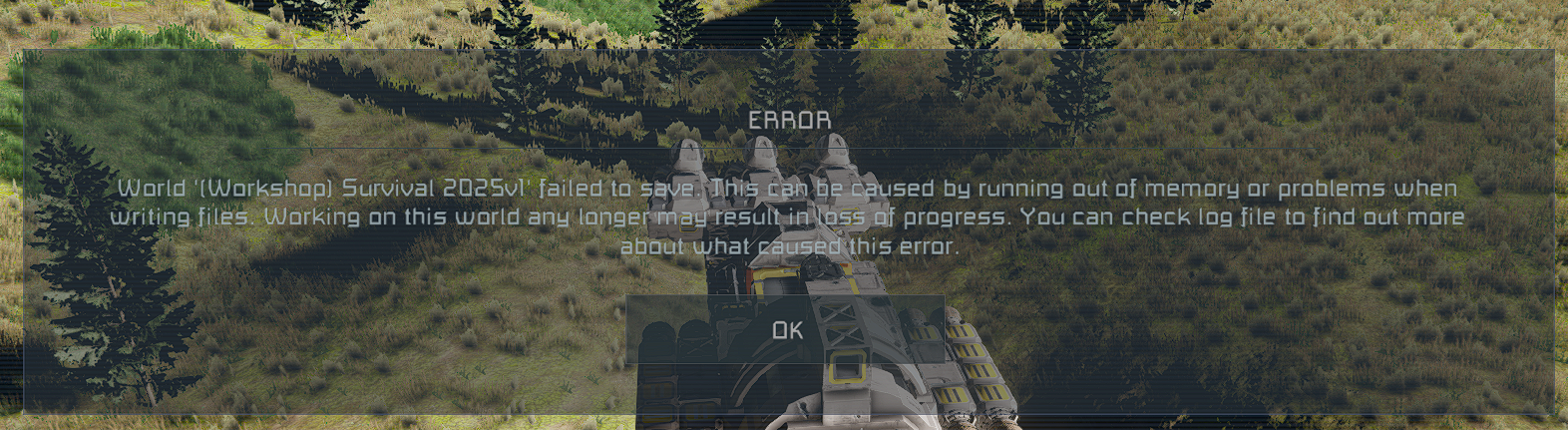
1.206 updated fixed this for me
1.206 updated fixed this for me
Hello, Engineer!
We're happy to hear that the issue's been resolved for you! We will close this ticket. If you experience this issue again, please feel free to open a new ticket.
Kind Regards
Keen Software House
QA Department
Hello, Engineer!
We're happy to hear that the issue's been resolved for you! We will close this ticket. If you experience this issue again, please feel free to open a new ticket.
Kind Regards
Keen Software House
QA Department
Replies have been locked on this page!