


This object is in archive!

Blueprint/Building Bug
Won't Fix
I began to build a large rover with 8 wheels in creative. The rover only worked for about a minute. Then I copied and pasted it or used a blueprint to place it somewhere else to make sure still works. This was built on "Mars". The blueprint would crash into the planet and stick out in a diagonal direction. Wheels would not move as well. You can hear the turning of the wheels though nothing is moving in-game and will not fall flat. Just sticks up.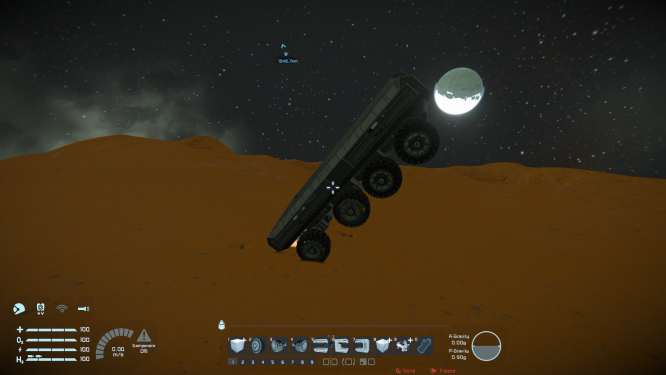
 I have the same bug
 You can't vote. Please authorize!
Hello Daniel!
Sorry that you're experiencing this issue. Could you please supply a copy of your blueprint? That was we can have a look at what the issue is with it.
Kind Regards
Laura, QA Department
Hello Daniel!
Sorry that you're experiencing this issue. Could you please supply a copy of your blueprint? That was we can have a look at what the issue is with it.
Kind Regards
Laura, QA Department
Hello, Engineer!
Because there is no new comment from you, and we are unable to reproduce the issue on our own, I will close this thread now as outdated.
If you or any other player will experience this issue again, please make a new thread and provide all needed info there.
Thank you for understanding.
Kind Regards
Keen Software House: QA Department
Hello, Engineer!
Because there is no new comment from you, and we are unable to reproduce the issue on our own, I will close this thread now as outdated.
If you or any other player will experience this issue again, please make a new thread and provide all needed info there.
Thank you for understanding.
Kind Regards
Keen Software House: QA Department
Replies have been locked on this page!