


Subject: [BUG] MOD Localization Files Loaded but Translations Not Displayed In-Game - Veteran Modder
Subject: [BUG] MOD Localization Files Loaded but Translations Not Displayed In-Game - Veteran Modder's Case
Game: Space Engineers
Version: [请填写您当前的游戏版本号]
Platform: PC (Steam)
Modding Experience: Over 10 years
1. Problem Description
As a veteran modder and the author of the official Chinese localization patch, I am encountering a persistent and severe issue: The Chinese localization files for my MOD are correctly placed and formatted, but their translations are completely ineffective in-game. All displayed text remains as the default English or the localization keys.
The critical clue is: Even when I directly copy the proven, working .resxand .sblfiles from another 100% functional localization MOD, and only replace the text content with my own, the translation still fails. This proves the issue is not with the content of my translation entries, but with some underlying loading, conflict, or game engine bug specific to my MOD's configuration or the game's handling of it.
2. Steps to Reproduce
- Subscribe to and enable my MOD "Super Mod PACK" in a brand new, clean world (no other MODs).
- Observe that the blocks/items from my MOD appear in the G-menu, but their DisplayNameand Descriptionshow either the English default text or the raw string keys (e.g., DisplayName_Category_Add_Super_Mod_Block).
- The game's debug log (Alt+F11) shows no critical errors preventing MOD load, and the localization files are listed as loaded.
3. Expected vs. Actual Result
- Expected: The game should display the Chinese text defined in MyTexts.zh-CN.resx(e.g., "-超级-MOD-方块-") for the corresponding blocks.
- Actual: The game displays either the English fallback text from MyTexts.resxor the raw localization key itself. The Chinese translation is completely ignored, despite the files being present and correctly indexed by MyTexts.zh-CN.sbl.
4. What I Have Already Tried & Verified (All Passed)
- File Encoding: Ensured all .resxand .sblfiles are saved as UTF-8 without BOM (using Notepad++).
- File Structure & Path: The localization files are placed in the standard and correct path: `...Mods\Super Mod PACK\Data\Localization`. (See attached screenshot 1).
- .sbcCall Syntax: Verified that in all my MOD's .sbcdefinition files, the text fields use the correct {LOC:KeyName}wrapper (e.g., <DisplayName>{LOC:DisplayName_Category_Add_Super_Mod_Block}</DisplayName>).
- Clean Test: Repeatedly tested in a new world with only this MOD active, ruling out conflicts with other MODs or global localization patches.
- "Reverse Test" (Most Conclusive): Copied the .resx/.sblfiles from a known-working, simple localization MOD, pasted them into my MOD's directory, and modified a single line. The translation still did not work. This indicates the problem lies with my MOD's identity or meta configuration, not the translation file content.
5. Environment & Files
- MOD Localization Files: MyTexts.zh-CN.resx, MyTexts.zh-CN.sbl, MyTexts.resx, MyTexts.sbl, Localization.zip.
- Screenshot 1: File explorer showing the correct localization file structure and paths. [您可以直接附上之前的截图]
6. Related Known Issue (From Official Wiki)
The official Modding Wiki (Modding/Tutorials/Localization) mentions a known bug: "If you place blocks from a MOD that uses {LOC:...}in your toolbar, save and reload the world, the toolbar shows the localization key instead of the translated name. Keen is aware but hasn't fixed it."
My issue is more fundamental: The translation does not show anywhere at all (not just the toolbar), suggesting a deeper loading failure or a different manifestation of a related core bug.
7. Request
Please investigate why a MOD's properly formatted localization files might be loaded by the game but their content entirely disregarded. This is a critical blocker for non-English modders. Diagnostic tools or more detailed logging for localization loading would be immensely helpful.
Thank you for your time and support.
 I have the same bug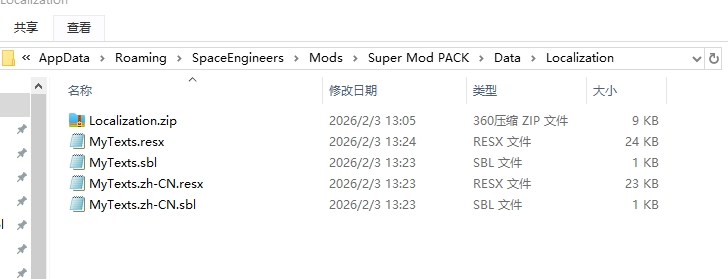
Hello Engineer,
Thank you for reaching out to us on the forum.
To help us investigate this issue further and to ensure we are reviewing the correct MOD, could you please share the MOD link or the MOD’s folder with us?
As you mentioned that the MOD is already published on the Workshop, please provide the Steam Workshop or mod.io link.
Alternatively, if you have the MOD files available locally, you can share those as well. The MOD folder can be found at, AppData\Roaming\SpaceEngineers\Mods
Please zip the MOD folder and attach it here.
Kind regards,
Keen Software House: QA Department
Hello Engineer,
Thank you for reaching out to us on the forum.
To help us investigate this issue further and to ensure we are reviewing the correct MOD, could you please share the MOD link or the MOD’s folder with us?
As you mentioned that the MOD is already published on the Workshop, please provide the Steam Workshop or mod.io link.
Alternatively, if you have the MOD files available locally, you can share those as well. The MOD folder can be found at, AppData\Roaming\SpaceEngineers\Mods
Please zip the MOD folder and attach it here.
Kind regards,
Keen Software House: QA Department
Replies have been locked on this page!