


no inicia el juego
buenas, saludos, el juego el dia de ayer abrio sin problemas ahora me sale este error:
please apply windows updates and update to latest graphics drivers.
ya tengo los controladores de la tarjeta grafica actualizados, y tambien probe borrando la carpeta ShaderCache2, pero aun no se ejecuta, ya reinicie la PC luego de actualizar drivers.
Agradezco de su ayuda, muchas gracias.
Hello, greetings. The game opened without problems yesterday, but now I'm getting this error: "Please apply Windows updates and update to the latest graphics drivers."
I already have the latest graphics card drivers, and I also tried deleting the ShaderCache2 folder, but it still won't run. I restarted my PC after updating the drivers.
I would appreciate your help. Thank you very much.
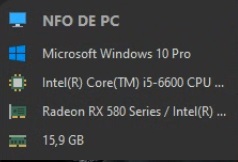
 I have the same bug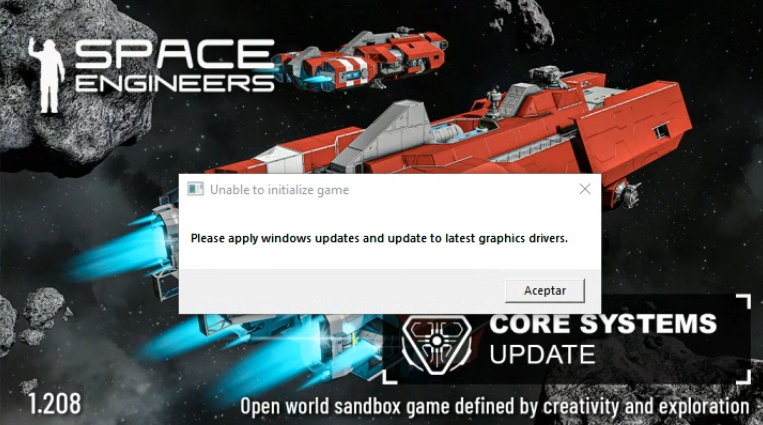
Hello!
Thank you for contacting us. Since this is a bug report, I'm moving your ticket to our support page, where our QA team will take care of you.
Kind Regards
Keen Software House
Hello!
Thank you for contacting us. Since this is a bug report, I'm moving your ticket to our support page, where our QA team will take care of you.
Kind Regards
Keen Software House
Muchas gracias, quedare atento.
Thank you very much, I will be waiting.
Muchas gracias, quedare atento.
Thank you very much, I will be waiting.
Hello Alfredo,
Thank you for writing to us on the forum regarding this issue.
This error usually appears when the game detects an issue with Windows updates, graphics drivers, or the graphics device being used. To resolve this, try the following steps:
If the issue persists after trying the above, please send us the log file (named as SpaceEngineers_) from the time this issue occurred.
Kind Regards,
Keen Software House: QA Department
Hello Alfredo,
Thank you for writing to us on the forum regarding this issue.
This error usually appears when the game detects an issue with Windows updates, graphics drivers, or the graphics device being used. To resolve this, try the following steps:
If the issue persists after trying the above, please send us the log file (named as SpaceEngineers_) from the time this issue occurred.
Kind Regards,
Keen Software House: QA Department
Hello Engineer,
As there has been no reply to this thread in some time, we will close it. If you're experiencing this issue, please create a new thread.
Kind regards,
Keen Software House: QA Department
Hello Engineer,
As there has been no reply to this thread in some time, we will close it. If you're experiencing this issue, please create a new thread.
Kind regards,
Keen Software House: QA Department
Replies have been locked on this page!