


Airlock Depressurisation Bug (Cause found in code!)
Hi there,
There has been a long standing Depressurization bug in Space Engineers that seemingly causes air vents to be impossible to depressurize.
After quite a bit of work, the cause has been found (both in game and in code) by myself.
As seen in the attached image, the room with room id 91 is in the right most room... the flood of room ids seen in the lower middle of the screen are also room 91...
The bug is caused by the blocks that count as part of a room id being spread outside the room. This also explains why other rooms can have the depressurization bug behavior "spread", as when you open doors, the bugged room essentially takes over the space (For example, if I opened rooms in the image shown, they too became room 91 if part of the same grid).
The cause for this, I believe, is a race condition / issue with the asynchronous programming in `MyGridGasSystem`.
Specifically, within the `Update` method, a call to `this.StartGenerateAirtightData()` is called, and within it is a parallel task :
this.m_backgroundTask = Parallel.Start(new Action(this.GenerateAirtightData), new Action(this.OnBackgroundTaskFinished));
The issue is this parallel task is called with no checks to see if any other parallel tasks are running. I.e. the parallel task within `this.StartGenerateAirtightData()` will always run.
The issue is that `this.StartGenerateAirtightData()` is relatively quick, so its `BackgroundTaskFinished` method call will happen quite quickly also. Within that `BackgroundTaskFinished` task is a call to do the following:
this.m_isProcessingData = false;
So, if the previous tick / update's other parallel tasks such as:
this.StartShrinkData();
or
this.StartRefreshRoomData();
Are still running (due to being parallel tasks, they can carry through to the next call of `Update()` then, as `this.StartGenerateAirtightData()` will always run, there is a chance that:
this.m_isProcessingData = false;is called before the other parallel tasks are completed.
This can then lead to 2 threads executing either of the parallel tasks in
this.StartShrinkData();
or
this.StartRefreshRoomData();
Methods, as the check that should prevent this will pass due to the previously mentioned:
this.m_isProcessingData = false;caused by `this.StartGenerateAirtightData()` .
Whilst I cannot tell you exactly why the behavior seen in the attached image is caused by this concurrency / race condition, hopefully it is enough context for you wonderful folks at Keen to finally nip this age old issue in the bud.
Kind Regards,
Jordan Senft (An Aerospace Engineering Programme Lead who loves this Aerospace Engineering game so much he spent his Friday de-compiling code to bug hunt, and his Saturday morning writing up a bug report for one of his favorite game studios!
 I have the same bug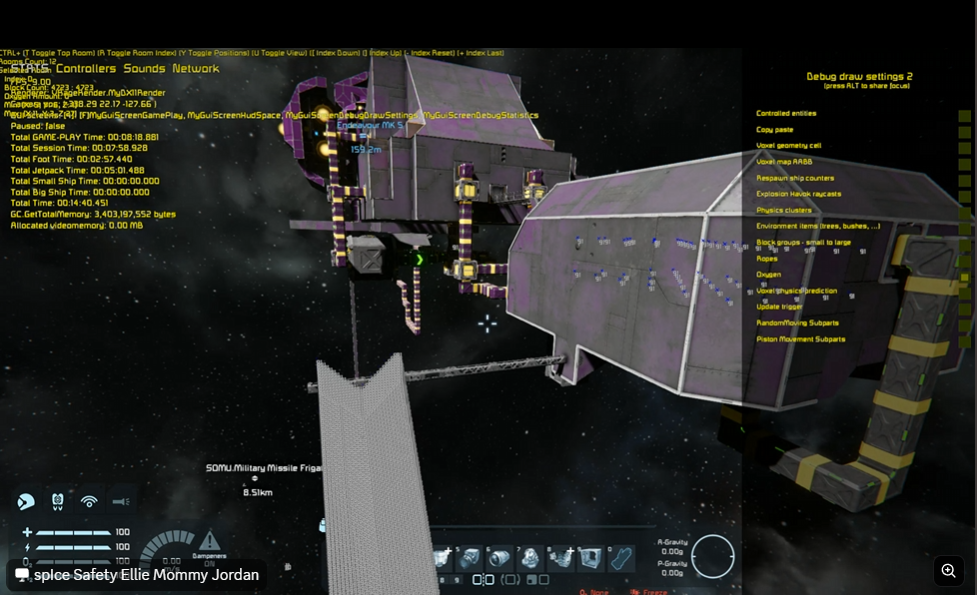
Hello Jordan,
Thank you for the detailed report and for taking the time to share your findings and analysis. We really appreciate the effort you’ve put into investigating this behavior.
To help us investigate this further on our side, could you please provide the following information:
If your original world is modded, it would be helpful if you could try to reproduce and show the behavior in a new unmodded/vanilla world.
We are currently investigating similar behavior internally, and having a reproducible example along with the information above would be extremely helpful in assessing the current state of the issue and continuing the investigation alongside the details you’ve already shared.
Thank you again for your time and for helping us improve Space Engineers.
Kind Regards,
Keen Software House: QA Department
Hello Jordan,
Thank you for the detailed report and for taking the time to share your findings and analysis. We really appreciate the effort you’ve put into investigating this behavior.
To help us investigate this further on our side, could you please provide the following information:
If your original world is modded, it would be helpful if you could try to reproduce and show the behavior in a new unmodded/vanilla world.
We are currently investigating similar behavior internally, and having a reproducible example along with the information above would be extremely helpful in assessing the current state of the issue and continuing the investigation alongside the details you’ve already shared.
Thank you again for your time and for helping us improve Space Engineers.
Kind Regards,
Keen Software House: QA Department
Apologies for the delay in response, the update email went into my junk mail.
I can provide you the BP that you have requested, however I would like to add some context as to the replication of the behavior in files that users send you. I say this as I have a suspicion the reason this bug is so hard to track is, no matter how many files you get sent by users making claims of this bug, there are no signs within the BPs / save files... and I believe there is a core reason for this.
The bottom line is, the moment you reload the save, the induced behavior ceases. This implies the bug that causes the behavior is related to these parallel processes, as it is a behavior that is reset on restart (i.e. the issue persists as the damage is done, but a hard reset starts the room logic from scratch) .
As for the behavior itself, it took a solid 30 minutes of running backwards and forwards between 4 sets of doors to induce this behavior (which does also imply its a race condition, as I had to perform the action in just the right order cadence to get it to work, with 0 indication of what the trigger condition actually was)
I imagine quite a few of your QA team would have given up long before myself, and the only reason I managed to replicate it in such a controlled environment was a mixture of frustration and pure spite haha
As another note, even if I did go out my way to reproduce the bug again, the framerate of my PC (5080 + 9950x3D) tanks to below 5FPS, so a video would be all but worthless.
I could attempt to replicate the bug again, but this moves me onto another issue the playerbase has had, and I might aswell use this ticket to soap box it.
The Debug Tools we utilise is a "Bodge Job" of using the Mod SDK files to allow better debugging tools in normal play. The most common place this bug occurs is within Servers (and it would be a lot easier for us to debug this issue if we could get said debug tools to work on servers) but there is currently no way to allow profiling enabled users to log into servers.
Below file is the blueprint (the creative world was literally just a standard sandbox with experimental and scripting active).
However, I want to stress that the easiest way for you to get a plethora of new data to help you guys solve this problem is adding some sort of bool to your server configs that would allow users whom have profiling enabled the ability to log into them.
This would allow server admins who are dedicated to helping the Keen Software House QA Department get as much info on this sucker as possible actually inspect the bug in detail whenever it occurs on a server (which, as of the moment, is quite literally impossible).
You have a community of incredibly passionate nerds who just wanna do their part to help you lick this long-standing problem, we just need the tools to be able to do it.
Kind regards,
Jordan Senft
Apologies for the delay in response, the update email went into my junk mail.
I can provide you the BP that you have requested, however I would like to add some context as to the replication of the behavior in files that users send you. I say this as I have a suspicion the reason this bug is so hard to track is, no matter how many files you get sent by users making claims of this bug, there are no signs within the BPs / save files... and I believe there is a core reason for this.
The bottom line is, the moment you reload the save, the induced behavior ceases. This implies the bug that causes the behavior is related to these parallel processes, as it is a behavior that is reset on restart (i.e. the issue persists as the damage is done, but a hard reset starts the room logic from scratch) .
As for the behavior itself, it took a solid 30 minutes of running backwards and forwards between 4 sets of doors to induce this behavior (which does also imply its a race condition, as I had to perform the action in just the right order cadence to get it to work, with 0 indication of what the trigger condition actually was)
I imagine quite a few of your QA team would have given up long before myself, and the only reason I managed to replicate it in such a controlled environment was a mixture of frustration and pure spite haha
As another note, even if I did go out my way to reproduce the bug again, the framerate of my PC (5080 + 9950x3D) tanks to below 5FPS, so a video would be all but worthless.
I could attempt to replicate the bug again, but this moves me onto another issue the playerbase has had, and I might aswell use this ticket to soap box it.
The Debug Tools we utilise is a "Bodge Job" of using the Mod SDK files to allow better debugging tools in normal play. The most common place this bug occurs is within Servers (and it would be a lot easier for us to debug this issue if we could get said debug tools to work on servers) but there is currently no way to allow profiling enabled users to log into servers.
Below file is the blueprint (the creative world was literally just a standard sandbox with experimental and scripting active).
However, I want to stress that the easiest way for you to get a plethora of new data to help you guys solve this problem is adding some sort of bool to your server configs that would allow users whom have profiling enabled the ability to log into them.
This would allow server admins who are dedicated to helping the Keen Software House QA Department get as much info on this sucker as possible actually inspect the bug in detail whenever it occurs on a server (which, as of the moment, is quite literally impossible).
You have a community of incredibly passionate nerds who just wanna do their part to help you lick this long-standing problem, we just need the tools to be able to do it.
Kind regards,
Jordan Senft
For context, the way I induced this behavior was as follows:
- Run between the doors of the farm area and the central area of the Mars Outpost Grid (opening / shutting them as I go as quickly as I can, or using a automated door closing script, though when I induced the behavior the script was not active, though the script does tend to increase the chance of the bug occurring, further implying race conditions)
- Repeat until depressurization occurs "illogically" (I.e. a room is not pressurised when it should be).
- Do NOT have room debug visuals enabled pre-bug replication as the bug itself will likely freeze up any PC, no matter how powerful, due to the sheer amount of room ids that will be rendering via the debug view. The best way to mitigate frame drops is to turn off string info (room id, coords etc) until you are ready to take screenshots of the info (i.e. move to the position you will take screenshots, then briefly turn those specific labels on, and then off again, but even then the UI freezes up quite badly so may take some time / patience to turn them off again)
- This replication is very much not deterministic, and very much by pure chance. This could take 10 minutes, it could take 40 minutes to an hour. This is a bug that, by my analysis above, is caused by race conditions... hence it is not a bug that will be easy to "reliably replicate" as it will just be pure fluke on the speed of certain functions that run asynchronously...
For context, the way I induced this behavior was as follows:
- Run between the doors of the farm area and the central area of the Mars Outpost Grid (opening / shutting them as I go as quickly as I can, or using a automated door closing script, though when I induced the behavior the script was not active, though the script does tend to increase the chance of the bug occurring, further implying race conditions)
- Repeat until depressurization occurs "illogically" (I.e. a room is not pressurised when it should be).
- Do NOT have room debug visuals enabled pre-bug replication as the bug itself will likely freeze up any PC, no matter how powerful, due to the sheer amount of room ids that will be rendering via the debug view. The best way to mitigate frame drops is to turn off string info (room id, coords etc) until you are ready to take screenshots of the info (i.e. move to the position you will take screenshots, then briefly turn those specific labels on, and then off again, but even then the UI freezes up quite badly so may take some time / patience to turn them off again)
- This replication is very much not deterministic, and very much by pure chance. This could take 10 minutes, it could take 40 minutes to an hour. This is a bug that, by my analysis above, is caused by race conditions... hence it is not a bug that will be easy to "reliably replicate" as it will just be pure fluke on the speed of certain functions that run asynchronously...
What is the current status of this?
What is the current status of this?
Replies have been locked on this page!