


Renegade mission GPS Marker cover almost entire enemy ship
Not Enough Votes
Renegade mission GPS Marker cover almost entire ship, from a small distance of 300m when he already shooting me, I almost don't see the entire Big ship, I don't see where to shoot:
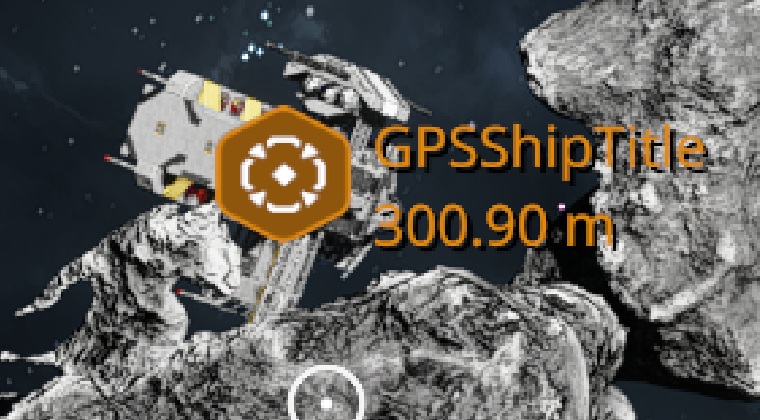
Meybe it's better to put marker 50m near the ship in empty space or any other solution ?
 I like this feedback
Access denied
The GPS markers are a bit large and cover targets completely. Is there a way to change them or make them brackets like "[ ]" or targeting reticles around targets; especially when they are hostile/unknown ships or stations.
Also the GPS markers stacking on top of each other so you can't read any info is a problem.
The GPS markers are a bit large and cover targets completely. Is there a way to change them or make them brackets like "[ ]" or targeting reticles around targets; especially when they are hostile/unknown ships or stations.
Also the GPS markers stacking on top of each other so you can't read any info is a problem.
This is a issue a lot of missions and all the markers in general. I think they should be bracket or cross hair or just hex outline if they want to keep the hexagon style.
Also show closer things above far away things. I found sometimes digging around Vallis Reach ores right under me would be obscured by other indicators projecting through the planet from around The Barn / Vallation station.
The key that tweaks indictors display could probably have filters for things under x distance or type of thing.
This is a issue a lot of missions and all the markers in general. I think they should be bracket or cross hair or just hex outline if they want to keep the hexagon style.
Also show closer things above far away things. I found sometimes digging around Vallis Reach ores right under me would be obscured by other indicators projecting through the planet from around The Barn / Vallation station.
The key that tweaks indictors display could probably have filters for things under x distance or type of thing.
Replies have been locked on this page!