


Wireless Terminal
This is basically the Build Vision mod, but built properly into the game.
We have been using mods for this kind of thing for years, because the usual terminal is pretty limited and inconvenient when it comes to find exact block we need, especially when a grid is quite large and complex, or when you have many connected grids/subgrids.
The basic idea is simple. Hold a button and look around (or maybe use a special hand tool). Nearby blocks that can be accessed wirelessly get a small marker when you point at them. Press another button and you open a Wireless Terminal (WT) for that block.
The WT would be a small window on the side of your screen, so you can still move, fly or operate your character while using it. It would show the important operational data for that block.
For example, a piston WT could show:
PISTON 01
Current extension: 3 m
Max extension: 20 m
Min extension: 0 m
Speed: 0.5 m/s
A production block could show its current queue, production rate and power consumption. A cargo container could give you a quick look at its inventory. Basically the useful information you normally get from the regular terminal, but right at the block instated of searching inside normal terminal.
You should also be able to open the full terminal from the WT if you need to change more detailed settings (with a hotkey)
The range would depend on antenna coverage. If you leave antenna range, the WT closes, and when you come back into range it can open again automatically.
If you have several terminals opened recently, you could quickly cycle between them, similar to switching hotbar pages. For example, open rotor WT, then a piston WT, then you can switch back to rotor and again to piston with a simple hotkeys.
And the really interesting part is that every block would have its own toolbar, just like when you are sitting in a cockpit or control seat.
For example, you could look at a piston, open its WT and put Extend and Retract on the block's hotbar. Then you can fly around and operate the piston without having to constantly go back to a control panel.
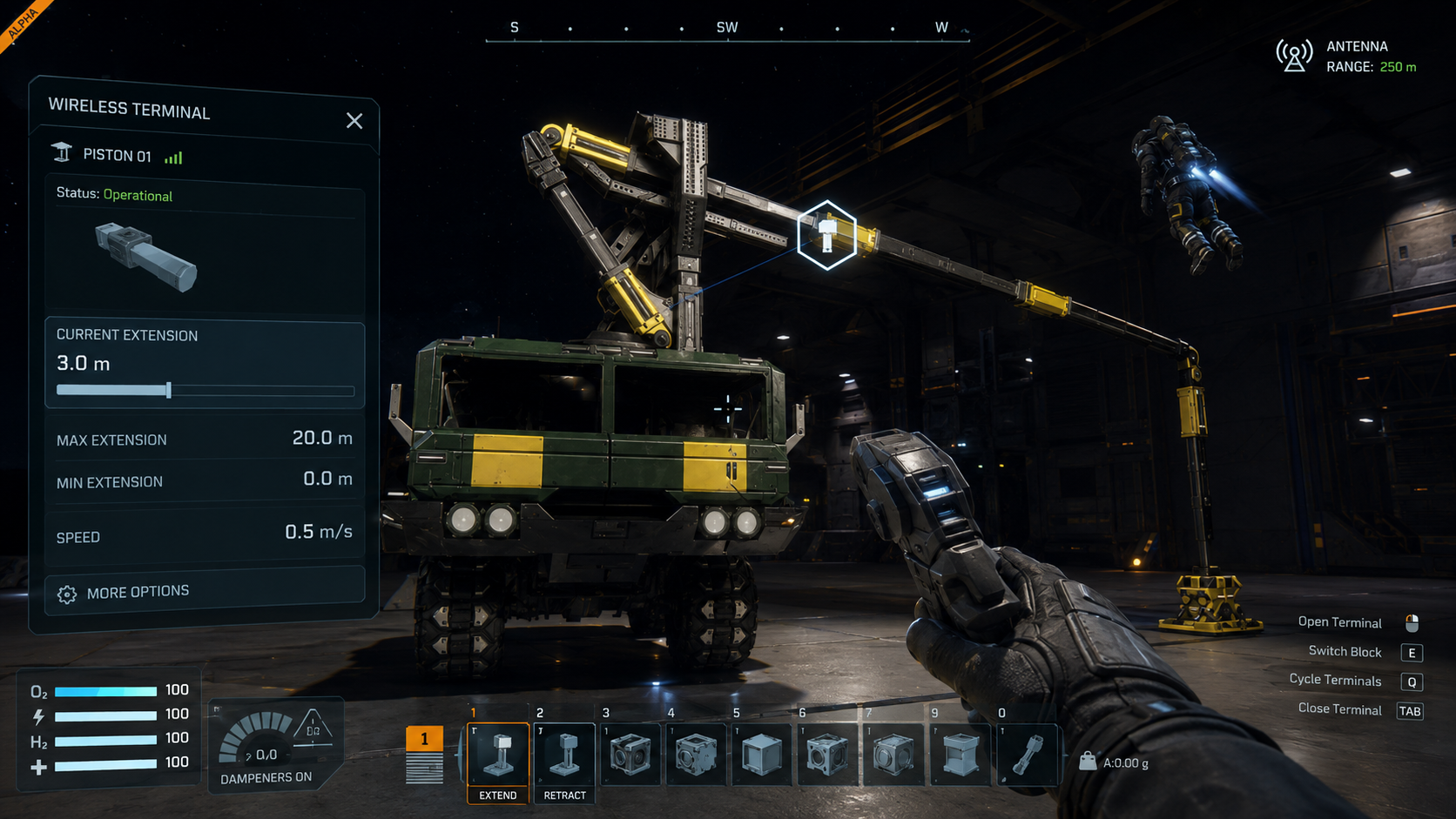
This would be especially useful for setting up mechanical systems, like a crane on the image (credit to Ender, workshop link to the crane). You could fly around your construction, look at each mechanical block, quickly adjust its limits or other settings (with a hotbar actions or by opening full terminal), switch between blocks and operate them from any viewing point.
The marker on the selected block is also important. You always know exactly which block you are controlling, even if it is generic Rotor 1, Rotor 2, Piston 1, Piston 2 and so on.
Honestly, this feels like one of those things we have always wanted from Space Engineers. We have had different mods trying to solve parts of this problem, but a proper built-in system could take the best parts of them and make it a core building and engineering tool.
It would make working with complex grids much less tedious.
Initially, I was thinking about using a player's cable to connect to each block. But wireless terminals feel even more convenient. And it seems like the player's cable is being considered and not planned :(
Thx for reading.
 I like this feedback
Wireless access to blocks, their icons on the HUD and UI systems that allow you to control your character while interacting with the blocks is very much a foundation needed for this feature and many other features of the game. Combat awareness is impossible without better UI systems that do not cover your entire screen yet provide sufficient information about the surrounding world. Hacking mechanics are very much tied to having block icons on your HUD, as described here. As well as block highlighting in area that we already have with area welding already in the game. More and more of those kinds of UIs are needed for a comfortable gameplay. Traditional all-screen terminal UI has its advantages, but it is mostly to supervise and access information far away on the grid, or as a secondary way, not the primary UI, to interact with the game world.
Our helmet is basically a very advanced augmented reality device able to display all sorts of overlays and contextual menus. Ideally, the helmet can become a suit module you can craft, and more advanced models provide more and more features, so it is not all free from the beginning of the game and also overwhelming the players, but is part of the progressio and deliberate choise. For hacking in particular, there can be a special helmet you can use in combination with other hacking tools. For building, there can be different kinds of helmets, allowing you to have more info about blocks and projection options. For controlling mechanical blocks and other functional blocks and previewing of cargo containers, there can be yet another helmet. For warfare, of course, a helmet with additional combat awareness that can work together with the scanner block scan on your ship feeding it with detailed information about enemy grids, their weapons, hostile engineers and so on.
Wireless access to blocks, their icons on the HUD and UI systems that allow you to control your character while interacting with the blocks is very much a foundation needed for this feature and many other features of the game. Combat awareness is impossible without better UI systems that do not cover your entire screen yet provide sufficient information about the surrounding world. Hacking mechanics are very much tied to having block icons on your HUD, as described here. As well as block highlighting in area that we already have with area welding already in the game. More and more of those kinds of UIs are needed for a comfortable gameplay. Traditional all-screen terminal UI has its advantages, but it is mostly to supervise and access information far away on the grid, or as a secondary way, not the primary UI, to interact with the game world.
Our helmet is basically a very advanced augmented reality device able to display all sorts of overlays and contextual menus. Ideally, the helmet can become a suit module you can craft, and more advanced models provide more and more features, so it is not all free from the beginning of the game and also overwhelming the players, but is part of the progressio and deliberate choise. For hacking in particular, there can be a special helmet you can use in combination with other hacking tools. For building, there can be different kinds of helmets, allowing you to have more info about blocks and projection options. For controlling mechanical blocks and other functional blocks and previewing of cargo containers, there can be yet another helmet. For warfare, of course, a helmet with additional combat awareness that can work together with the scanner block scan on your ship feeding it with detailed information about enemy grids, their weapons, hostile engineers and so on.
Replies have been locked on this page!