


[Suggestion] Improving control panel by adding tree style representation of blocks
I have an idea from browser addon inspiration, that I used for years, for a Chrome it's Tabs Outliner and for Firefox it's Tree Style Tabs, you could look at screenshots of those addons to have a context. Another such example could be in VS Code in Git tab where you selecting which file to commit.
So, when I looked at control panel block list I thought that the same principle could be applied here too.
First of all, current list style could still be left as it is, but on the top of it near search bar you could add an icon to switch between list and tree view (like in VS Code).
When you in tree view, first of all any subgrid blocks will be grouped under "Subgrid" category and they should be collapsed by default to remove any visual clutter. For example if you have only cockpit, 4 rotors and some blocks in subgrid, e.g. wheels, then you will see tree like that (subgrids are collapsed, but I expand them to show full tree):
- Cockpit 1
- Rotors
- Rotor 1
- Rotor 2
- Rotor 3
- Rotor 4
- Subgrid 1
- Wheel 1
- Subgrid 2
- Wheel 1
- Subgrid 3
- Wheel 1
- Subgrid 4
- Wheel 1
As for the block on the current grid they will all group under their type, in the example above it's "Rotors", however different variation will group under same name, for example "Thrusters" would group any type of thruster, "Lights" will group any type of lights, "Turrets" as well. I think groups of this grid by default should be expanded to reduce any clicking required to access the block. However if group have only 1 block, e.g. one Cockpit, we do not create a group for that, otherwise there would be group "Cockpits" with "Cockpit 1" and "Cockpit 2" blocks in it. This reduce unnesessary nesting.
Some QoL features that would be useful: navigating with arrow keys up/down to previous/next block and left/right on the category will collapse/expand it and pressing left on the block jump straight to it's category allowing for quick navigation.
Additionally current category could always be visible at the top (sticky to the top, you also could take inspiration from VS Code if you search for "sticky" settings).
Also clicking on any category, e.g. "Thrusters", "Gyro", "Lights", etc. will select all blocks under this category allowing for quick actions for all of them which will reduce requirements to create a groups.
Now, for any custom groups that player create, it will just create a new category, it may be colored differently to add significance for it, for example if we take same tree above and create cutom group called "Wheels" we will see:
- Wheels (group)
- Wheel 1
- Wheel 1
- Wheel 1
- Wheel 1
- Cockpit
- Rotors
- Rotor 1
- Rotor 2
- Rotor 3
- Rotor 4
- Subgrid 1
- Wheel 1
- Subgrid 2
- Wheel 1
- Subgrid 3
- Wheel 1
- Subgrid 4
- Wheel 1
And last case that need to be covered is nested subgrids and to give an example, let's assume that we add control panel to "Subgrid 4" and then access tree not from cockpit, but from that control panel, this mean that main grid will only have that wheel and everything else in subgrid and 3 other wheels are nested, the tree will look like that:
- Control panel 1
- Wheel 1
- Subgrid
- Cockpit
- Rotors
- Rotor 1
- Rotor 2
- Rotor 3
- Rotor 4
- Subgrid 1
- Wheel 1
- Subgrid 2
- Wheel 1
- Subgrid 3
- Wheel 1
 I like this feedback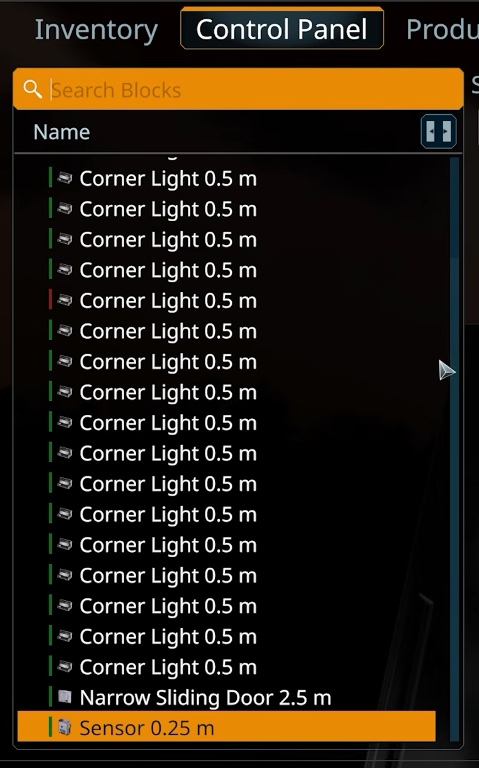
I just find out that in Vertical Slice 2.3 Keen added groups which partially implement my suggestion, which is a good sign already and this also mean that auto-grouping by block type should be easier to implement.
I just find out that in Vertical Slice 2.3 Keen added groups which partially implement my suggestion, which is a good sign already and this also mean that auto-grouping by block type should be easier to implement.
Replies have been locked on this page!