


This object is in archive!

Remove rectangular bounding box of angled blocks
Not Enough Votes
My understanding was that one of the huge advantages of the new block system would be that the bounding boxes of blocks would actually match their geometry. But I'm trying to fill a triangular gap with 0.5m armour blocks that clearly fit and finding that I'm not allowed to place them. The UI makes it look like the problem is a rectangular bounding box around the blocks, even though they aren't remotely rectangular in shape.
Files:
20260523161108_...
 I like this feedback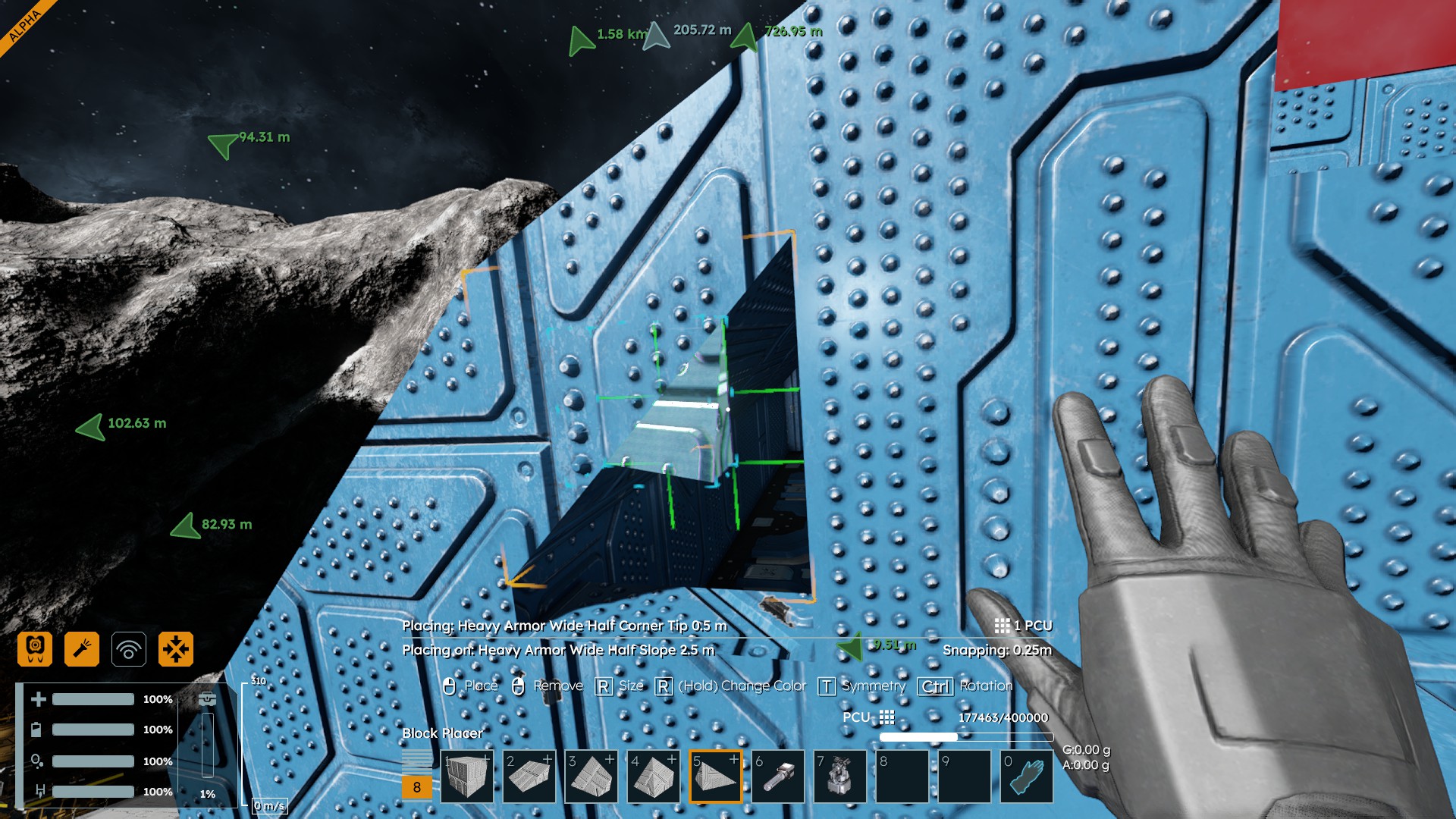
This is a better screen shot.
This is a better screen shot.
Yeah, I've noticed that corners of the sloped windows have keepouts outside their box also.
Yeah, I've noticed that corners of the sloped windows have keepouts outside their box also.
That's done correctly. It works exactly the same way in SE1.
You can place only a single object, a single building element, in a single "box" of the 3D grid.
So if there is a “diagonally cut half-cube” in the grid and you want to replace it with a “whole cube,” you cannot insert a second “diagonally cut half-cube” there. You must remove the original “diagonally cut half-cube” and insert a new “whole cube” in its place.
This rule also applies to small flat objects, such as certain "control panels" and buttons. You can try it out—place two small cubes with a gap between them on a single small cube. You can place only one small flat control element on the walls of the cubes in this gap—do not place a second identical small flat control element on the opposite wall in this gap. The “empty” space of the “box” in the 3D grid is already occupied.
So this will most likely not be changed—it is one of the fundamental mechanisms of the grid structure. For example, the transfer of forces is linked to it.
That's done correctly. It works exactly the same way in SE1.
You can place only a single object, a single building element, in a single "box" of the 3D grid.
So if there is a “diagonally cut half-cube” in the grid and you want to replace it with a “whole cube,” you cannot insert a second “diagonally cut half-cube” there. You must remove the original “diagonally cut half-cube” and insert a new “whole cube” in its place.
This rule also applies to small flat objects, such as certain "control panels" and buttons. You can try it out—place two small cubes with a gap between them on a single small cube. You can place only one small flat control element on the walls of the cubes in this gap—do not place a second identical small flat control element on the opposite wall in this gap. The “empty” space of the “box” in the 3D grid is already occupied.
So this will most likely not be changed—it is one of the fundamental mechanisms of the grid structure. For example, the transfer of forces is linked to it.
Replies have been locked on this page!