


Blocks can't work
Need More Information
For some strange reason, my grid becomes disabled (namely a Verdure planetary base). All of the powered blocks are showing that they "can't work". I've tried disassembling batteries and reconstructing them, but no change.
This is the second time this has happened for no apparent reason. After the first time, I completely dismantled the base and started a new base from scratch. The new grid had been working fine, then not.
 I have the same bug
I can add a new grid which works fine. Just don't attach it to the problematic grid or it too will fail to work.
I can add a new grid which works fine. Just don't attach it to the problematic grid or it too will fail to work.
Hello Ron Whitehead,
Could you please provide a video recording of your issue and the Save file with the affected base?
Kind Regards,
Bartosz
Keen Software House
Hello Ron Whitehead,
Could you please provide a video recording of your issue and the Save file with the affected base?
Kind Regards,
Bartosz
Keen Software House
Where do I find the saved game files?
Where do I find the saved game files?
Hello Ron Whitehead,
You can find your Save Files here:
You can attach your Saved Game as a ZIP file
Kind Regards,
Bartosz
Keen Software House
Hello Ron Whitehead,
You can find your Save Files here:
You can attach your Saved Game as a ZIP file
Kind Regards,
Bartosz
Keen Software House
I looked for the save game path, but there is no ‘app data’ path within my ‘user_name’ subdirectory.
Maybe I can search my drive if I know the save file naming convention. The name I gave to save my game was “Ron’s Adventure”.
I looked for the save game path, but there is no ‘app data’ path within my ‘user_name’ subdirectory.
Maybe I can search my drive if I know the save file naming convention. The name I gave to save my game was “Ron’s Adventure”.
Hello Ron Whitehead,
This means that your AppData folder is hidden, make sure that you have selected "Show Hidden Items" in View option: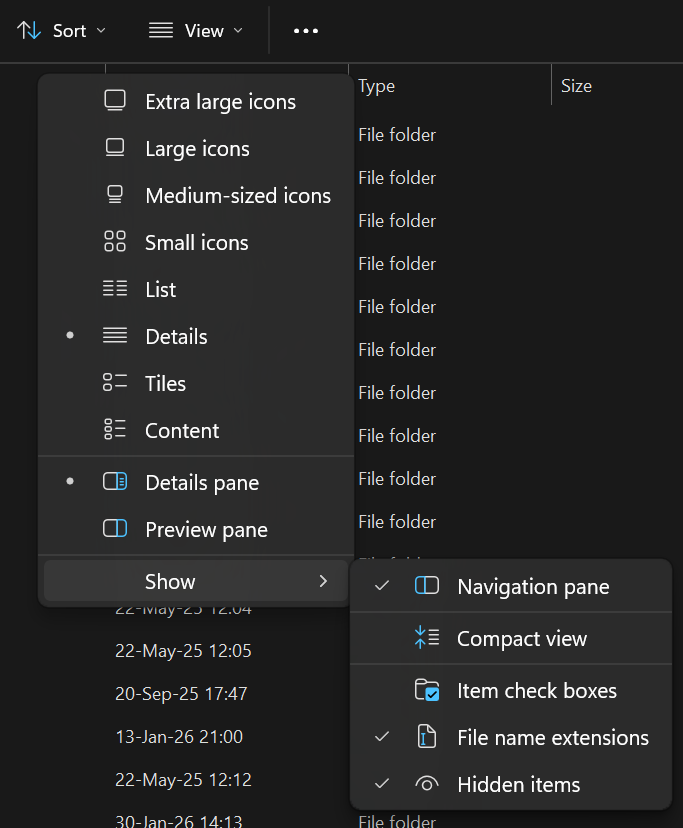
Alternatively, you can type %appdata% in your Windows command bar:
Kind Regards,
Bartosz
Keen Software House
Hello Ron Whitehead,
This means that your AppData folder is hidden, make sure that you have selected "Show Hidden Items" in View option:
Alternatively, you can type %appdata% in your Windows command bar:
Kind Regards,
Bartosz
Keen Software House
I believe this save file contains two separate grids, one working and one that does not. Hopefully, this will give you adequate data to work with.
I believe this save file contains two separate grids, one working and one that does not. Hopefully, this will give you adequate data to work with.
Replies have been locked on this page!