


Toggle for buildable holographic blocks in Survival
After designing a ship in creative and attempting to build it in survival, I ran into the issue of being unable to build blocks that were sandwiched by other blocks inside the ship because the holograms got in the way, blocks that would give you the "Unauthorized Action - No connection points detected" anyway if you tried to build them because they weren't attached to the first block you built.
To me this is a simple solution, give us a way to toggle between viewing "buildable connected holographic" blocks and hiding the unbuildable ones, since it's keeping track of that anyway it seems. This can either completely disappear all the unbuildable blocks in the hologram for the duration of the toggle, or make the unbuildable holograms appear at 5-10% opacity instead, effectively disappearing them while still being able to vaguely see the outline of the general thing.
I think a good idea would be to also make it so that it only shows buildable holograms when the attached blocks are at 100% integrity, too, since it would be frustrating to finish a block at 75% and then suddenly be building a block in front of it.
An adjacent suggestion would be for a right click option with the welder held that will highlight blocks nearby that have compromised integrity, making building and repairing less of a pain.
Thank you for what you've done! I look forward to sinking many more hours into SE2!
 I like this feedback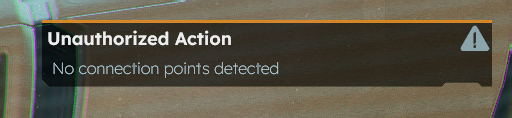
This is a very necessary addition!
This is a very necessary addition!
Uhm... there's an easier way, and it's already in the game: To weld blocks hidden behind a block in a projection, use right-click to remove the block that is hiding the others. Weld the now uncovered blocks. Hit CTRL+Z to undo the block deletion to get the original removed block back. Weld that as well.
It works really well, and you can remove a bunch of blocks and restore them with multiple undo's. No need to remember which particular weird armor block shape the removed block was, and in which orientation it was placed. Let the game remember it and just use the delete+undo method to weld everything you need.
Uhm... there's an easier way, and it's already in the game: To weld blocks hidden behind a block in a projection, use right-click to remove the block that is hiding the others. Weld the now uncovered blocks. Hit CTRL+Z to undo the block deletion to get the original removed block back. Weld that as well.
It works really well, and you can remove a bunch of blocks and restore them with multiple undo's. No need to remember which particular weird armor block shape the removed block was, and in which orientation it was placed. Let the game remember it and just use the delete+undo method to weld everything you need.
Replies have been locked on this page!