


Pistons detach from their grid after building a multi-subgrid crane
Need More Information
Hello Keen Software House,
I encountered a bug in Space Engineers 2 where pistons detach from their parent grid.
My crane setup is:
Main grid → Rotor → Hinge → Piston → Rotor → Hinge → 2 Pistons → Drills
The crane initially worked correctly, but after operating the mechanical blocks, the piston/drill assembly detached and started floating nearby. The piston bases still appear in the terminal.
Expected: all piston heads and subgrids remain attached.
Actual: part of the crane detaches without any block being removed.
The issue occurred under 1 g gravity, with the pistons extended. Screenshot attached.
Files:
bugcrane.jpg
 I have the same bug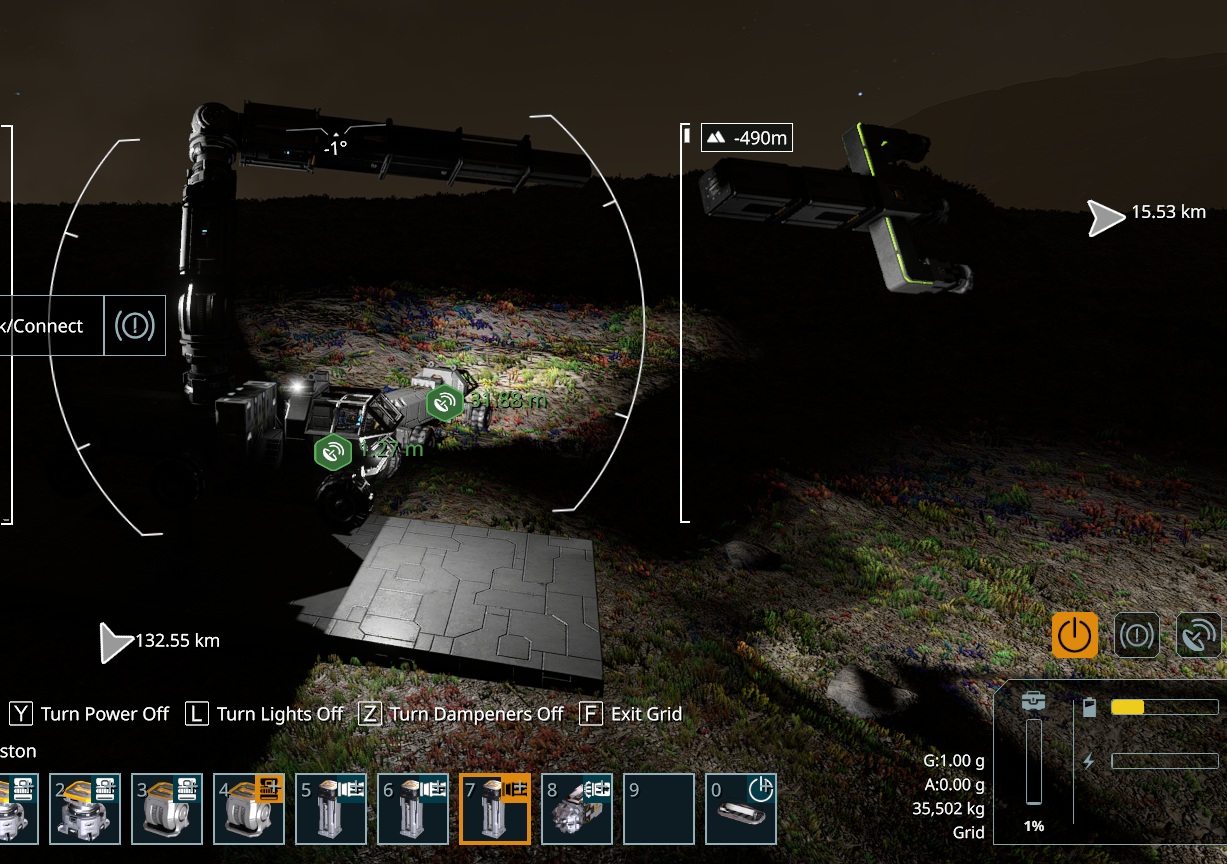
Hello Pierre Mouton,
Is your crane placed on a static Grid or on a dynamic Grid, like a rover? We are aware of an issue where such elaborate constructions (made of Mechanical Blocks) can become disconnected / clang. Could you please confirm whether or not this describes your issue?
Kind Regards,
Bartosz
Keen Software House
Hello Pierre Mouton,
Is your crane placed on a static Grid or on a dynamic Grid, like a rover? We are aware of an issue where such elaborate constructions (made of Mechanical Blocks) can become disconnected / clang. Could you please confirm whether or not this describes your issue?
Kind Regards,
Bartosz
Keen Software House
I've had this happen a few times, where the piston body will disappear, but the piston head will still be attached to the "Drill" grill and still operating like the piston is there.
I've had this happen a few times, where the piston body will disappear, but the piston head will still be attached to the "Drill" grill and still operating like the piston is there.
Similar thing I had pistons going beyond the limit and tested a little bit.
Kisai is correct in saying that the pistons need opposing velocity. In the attached image, the red piston has negative and the blue are positive. The 2 blue pistons will push the red piston past the maximum of 4 extensions. If the red is set to 0 and pushed on by blue pistons it will remain locked.
My observation would be that it does then seem to hit a hard limit and cannot be pushed further at what would appear to me to be where a 5th segment in the piston would be (I did try to add extra blocks and push it further to no avail). Something off by one maybe as it seems to extend to 5th segment.
Similar thing I had pistons going beyond the limit and tested a little bit.
Kisai is correct in saying that the pistons need opposing velocity. In the attached image, the red piston has negative and the blue are positive. The 2 blue pistons will push the red piston past the maximum of 4 extensions. If the red is set to 0 and pushed on by blue pistons it will remain locked.
My observation would be that it does then seem to hit a hard limit and cannot be pushed further at what would appear to me to be where a 5th segment in the piston would be (I did try to add extra blocks and push it further to no avail). Something off by one maybe as it seems to extend to 5th segment.
Replies have been locked on this page!