


Hello,
I am experiencing a bug in the campaign mission "Objective 2: Destroy the Renegade Base".
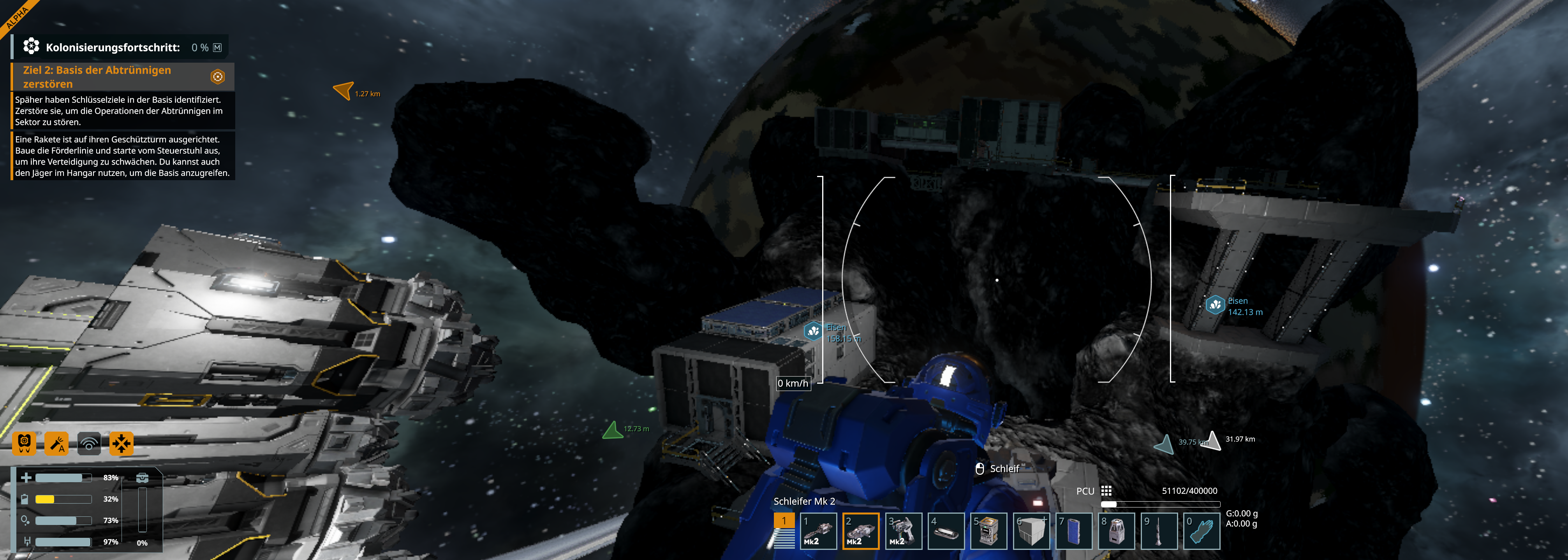
I destroyed the mission targets, including the turret and the key objectives inside the base, but the mission does not complete. The objective remains active and I cannot progress further in the campaign.
Game version:
(Please insert your game version here.)
Steps to reproduce:
- Start the mission "Objective 2: Destroy the Renegade Base".
- Destroy the turret and all identified key objectives.
- The mission does not complete.
Expected behavior:
The mission should complete after all required objectives have been destroyed.
Actual behavior:
The objective remains active and campaign progression is blocked.
I have attached a screenshot showing the mission objective.
Thank you for your support.
 I have the same bug
Hello XD_JGAMER_XD,
Did the thruster on the missile produced any exhaust flames? Have you put any ice in to the Grid's Oxygen Generator?
Kind Regards,
Bartosz
Keen Software House
Hello XD_JGAMER_XD,
Did the thruster on the missile produced any exhaust flames? Have you put any ice in to the Grid's Oxygen Generator?
Kind Regards,
Bartosz
Keen Software House
Same issue here. The missile either stays exactly where it is, or launches violently backwards. Its hydrogen tank is at 100%, the 2m thruster is at full override.
Things I've tried: restarting the game. Grinding the thruster part way and repairing it. Grinding either or both of the connectors on the base and the missile. Toggling the thruster both before and after disconnecting from the base. Toggling the override before turning the thruster on. Gently bumping the missile forwards with my avatar. Toggling the other 4, small thrusters. Switching to Creative Mode so I could grind down the thruster and paste in a copy of it.
No matter what I do, the missile either sits there or crashes into the wall behind it. It's as if there's a massive damping force in the forward direction, despite there not being any thrusters facing that way.
Attached is a screenshot of the missile sitting still while the back thruster blasts away at full override. Can't get a shot of it ramming backwards because it happens too fast.
Same issue here. The missile either stays exactly where it is, or launches violently backwards. Its hydrogen tank is at 100%, the 2m thruster is at full override.
Things I've tried: restarting the game. Grinding the thruster part way and repairing it. Grinding either or both of the connectors on the base and the missile. Toggling the thruster both before and after disconnecting from the base. Toggling the override before turning the thruster on. Gently bumping the missile forwards with my avatar. Toggling the other 4, small thrusters. Switching to Creative Mode so I could grind down the thruster and paste in a copy of it.
No matter what I do, the missile either sits there or crashes into the wall behind it. It's as if there's a massive damping force in the forward direction, despite there not being any thrusters facing that way.
Attached is a screenshot of the missile sitting still while the back thruster blasts away at full override. Can't get a shot of it ramming backwards because it happens too fast.
Hi Keen Team!
That Bug did not happened to me but I saw 2 Participant not able to make the missille work, they shared their saves on the Workshop, I loaded both saves and noticed the missile not working and all contract have to be reactivated.
So I went to Trade station to activate the contract #10, it added a brand new asteroid at another loacation and the missile worked very well over there.
Hi Keen Team!
That Bug did not happened to me but I saw 2 Participant not able to make the missille work, they shared their saves on the Workshop, I loaded both saves and noticed the missile not working and all contract have to be reactivated.
So I went to Trade station to activate the contract #10, it added a brand new asteroid at another loacation and the missile worked very well over there.
I will add :
Looks like the completed contracts are not saved when we load a save shared by another player, because I loaded Alison's save from the above comment and I had to reactivate the contract #10 that fixed the problem.
I will add :
Looks like the completed contracts are not saved when we load a save shared by another player, because I loaded Alison's save from the above comment and I had to reactivate the contract #10 that fixed the problem.
I got to this mission,
I'm not sure how to solve it.
If I sit in the seat, there is no button to press. If I press "P" (which is what unparks it and the ship), the missile leaves the base and seems to blow up the thing at the base, but the quest does not progress. So it seems that "unparking" the missile is not what the game expects you to do.
I got to this mission,
I'm not sure how to solve it.
If I sit in the seat, there is no button to press. If I press "P" (which is what unparks it and the ship), the missile leaves the base and seems to blow up the thing at the base, but the quest does not progress. So it seems that "unparking" the missile is not what the game expects you to do.
Have the same issue as Kisai, launched the missile then went and remove remain portions of base that were marked for removal. Only remaining marker is for the seat to launch the missile and the mission does not progress
I am on V2.3.0.2783
Have the same issue as Kisai, launched the missile then went and remove remain portions of base that were marked for removal. Only remaining marker is for the seat to launch the missile and the mission does not progress
I am on V2.3.0.2783
In the latest update (2.3), I've destroyed everything about the enemy base a couple of times and never had it go past the explanation about releasing the missile and using the ship to destroy other components.
I did successfully complete this mission in 2.2 and have abandoned/accepted the contract multiple times in 2.3.
In the latest update (2.3), I've destroyed everything about the enemy base a couple of times and never had it go past the explanation about releasing the missile and using the ship to destroy other components.
I did successfully complete this mission in 2.2 and have abandoned/accepted the contract multiple times in 2.3.
This quest is bugged in 2.3. Completed it fine in 2.2, but cannot complete in 2.3 as the quest objectives never update regardless of whether I complete them.
This quest is bugged in 2.3. Completed it fine in 2.2, but cannot complete in 2.3 as the quest objectives never update regardless of whether I complete them.
Same Destroy the Renegade Base issue as the multiple users above. I arrived at base I chose to launch missile. seemed pretty straight forward load the base with Ice, repair the 3 conveyor parts and, while I did not hit P to release, I did go into control panel and disconnect the connector that way. Missile launched then blew up. I went to location and grinned down the 2 gear forges and the reactor as the mission indicators suggested then mission indicator appeared at control seat back at missile site and did nothing. Nothing I could do would allow contract to complete.
Same Destroy the Renegade Base issue as the multiple users above. I arrived at base I chose to launch missile. seemed pretty straight forward load the base with Ice, repair the 3 conveyor parts and, while I did not hit P to release, I did go into control panel and disconnect the connector that way. Missile launched then blew up. I went to location and grinned down the 2 gear forges and the reactor as the mission indicators suggested then mission indicator appeared at control seat back at missile site and did nothing. Nothing I could do would allow contract to complete.
So today after the hotfix note, I went and retried this mission again. Still no cue as to how to launch the missile, but pressing P to unpark it still let it go and it did smash into the thing it was pointed at. didn't see any explosion though.
So I took the regular cutter and went over and destroyed the targeted items, and the quest cleared this time after the reactor was destroyed.
(the other two renegade quests I basically flew around the asteroid and entered the renegade's ships and went straight to their reactor and those also cleared immediately after the reactor was deconstructed.)
So I was finally able to make progress.
So today after the hotfix note, I went and retried this mission again. Still no cue as to how to launch the missile, but pressing P to unpark it still let it go and it did smash into the thing it was pointed at. didn't see any explosion though.
So I took the regular cutter and went over and destroyed the targeted items, and the quest cleared this time after the reactor was destroyed.
(the other two renegade quests I basically flew around the asteroid and entered the renegade's ships and went straight to their reactor and those also cleared immediately after the reactor was deconstructed.)
So I was finally able to make progress.
The missile launching worked just fine as did destroying the marked targets but doing so still didn't complete the mission.
I even extra destroyed it with the gatling cannon ship just to be sure I was doing it right ;)
also unsure if working as intended the ship guns never actually consumed the ammo, they just reloaded to 1200 (300 x4) every time but didn't actually consume any of the bullet items in the inventory, which super nice if intended but not worth the mission not completing if part of the bug (or another bug)
images attach showing the completely destroyed base but lack of mission completion in the upper left
also destroying everything with bullets is quite enjoyable!
The missile launching worked just fine as did destroying the marked targets but doing so still didn't complete the mission.
I even extra destroyed it with the gatling cannon ship just to be sure I was doing it right ;)
also unsure if working as intended the ship guns never actually consumed the ammo, they just reloaded to 1200 (300 x4) every time but didn't actually consume any of the bullet items in the inventory, which super nice if intended but not worth the mission not completing if part of the bug (or another bug)
images attach showing the completely destroyed base but lack of mission completion in the upper left
also destroying everything with bullets is quite enjoyable!
I have tried multiple times to destroy the place using different methods. Tried grinding it all down, tried using both rocket and Gunship combo, tried to do rocket and grinding rest, and gunship and grinding rest and still will not complete. Sabotage - Renegade base is bugged. Can not think of any other way to destroy the place other than warhead which we cannot make yet in progression.
I have tried multiple times to destroy the place using different methods. Tried grinding it all down, tried using both rocket and Gunship combo, tried to do rocket and grinding rest, and gunship and grinding rest and still will not complete. Sabotage - Renegade base is bugged. Can not think of any other way to destroy the place other than warhead which we cannot make yet in progression.
It's the 6th topic on the same subject.... maybe they will do something?
It's the 6th topic on the same subject.... maybe they will do something?
Maybe the clearing conditions are different from what I expect. This sometimes happens particularly when language translation occurs. For instance in my several attempts I figured out how to launch the missile by setting up some toolbar buttons and pressing them in a specific sequence, someone else suggested the <P> button. In my case the missile did not hit the turret and there is no way to fly the thing once it is launched. Maybe the way I'm launching causes the miss and destroying the turret with the missile as opposed to grinding it is required. Unfortunately there is no message popping up saying a requirement can no longer be met.
The logic that clears all the target markers seems to be independent of the "Quest Clear" determination logic.
Fortunately I just found out that if you abandon a quest you can retake it later. My previous save file isn't quite as up to date as it should be. I'm hoping they go back to their previous save progress mechanic where you automatically had several backups for the same play through. Using "Save As" and changing the name is usable but not as convenient.
Maybe the clearing conditions are different from what I expect. This sometimes happens particularly when language translation occurs. For instance in my several attempts I figured out how to launch the missile by setting up some toolbar buttons and pressing them in a specific sequence, someone else suggested the <P> button. In my case the missile did not hit the turret and there is no way to fly the thing once it is launched. Maybe the way I'm launching causes the miss and destroying the turret with the missile as opposed to grinding it is required. Unfortunately there is no message popping up saying a requirement can no longer be met.
The logic that clears all the target markers seems to be independent of the "Quest Clear" determination logic.
Fortunately I just found out that if you abandon a quest you can retake it later. My previous save file isn't quite as up to date as it should be. I'm hoping they go back to their previous save progress mechanic where you automatically had several backups for the same play through. Using "Save As" and changing the name is usable but not as convenient.
Hello Jochen Frahm,
Have you repaired / welded up the Control Seat and launched the Missile from it in the Objective 1 of that Contract?
Kind Regards,
Bartosz
Keen Software House
Hello Jochen Frahm,
Have you repaired / welded up the Control Seat and launched the Missile from it in the Objective 1 of that Contract?
Kind Regards,
Bartosz
Keen Software House
Keen, instead of asking for more information, please just have a random person try the mission while you watch. It seems like this happens for the majority of people. It seems hard to believe you can't reproduce the issue on a playthrough.
Keen, instead of asking for more information, please just have a random person try the mission while you watch. It seems like this happens for the majority of people. It seems hard to believe you can't reproduce the issue on a playthrough.
Hola, tengo el mismo problema. por favor arreglen la misión esto arruina totalmente la experiencia. Gracias.
Hola, tengo el mismo problema. por favor arreglen la misión esto arruina totalmente la experiencia. Gracias.
You have to repair the control seat and the broken conveyor line. Then add ice to the system, any tiny bit will work. You will then see the missile's hydrogen engine turn on This is when you sit in the control seat, access the control panel, and disconnect the connector or tell it to stop aligning. The missile goes straight outward to hit the enemy base. If you stay at the enemy base too long grinding it then the contract will glitch so that when you return back to the missile platform to grind that up the contract may glitch and tell you to repeat the objective of destroying the enemy base...
You have to repair the control seat and the broken conveyor line. Then add ice to the system, any tiny bit will work. You will then see the missile's hydrogen engine turn on This is when you sit in the control seat, access the control panel, and disconnect the connector or tell it to stop aligning. The missile goes straight outward to hit the enemy base. If you stay at the enemy base too long grinding it then the contract will glitch so that when you return back to the missile platform to grind that up the contract may glitch and tell you to repeat the objective of destroying the enemy base...
I had to give some ice to the O2/H2 generator or cargo container, and it will take a tiny amount and fill the H2 tank on the missile. Than all you have to do is press "P" on the chair to unlock the connector and the missile will go and blow up the turret.
I had to give some ice to the O2/H2 generator or cargo container, and it will take a tiny amount and fill the H2 tank on the missile. Than all you have to do is press "P" on the chair to unlock the connector and the missile will go and blow up the turret.
same issue, welded the control seat first then the coveyor parts to the misile, then entered the seat to and launched the misile
same issue, welded the control seat first then the coveyor parts to the misile, then entered the seat to and launched the misile
well i have not lauchet it i fly over and have grinded the turend and reaktors oe waht ever and the mision was compleete
well i have not lauchet it i fly over and have grinded the turend and reaktors oe waht ever and the mision was compleete
I have tried to finish this mission 5 times. Fired the missile on 3/5 attempts, tried to shoot everything with gatling guns, tried to disable everything with my grinder, tried a combination of both shooting and grinding, tried not firing the missile.
I have tried to finish this mission 5 times. Fired the missile on 3/5 attempts, tried to shoot everything with gatling guns, tried to disable everything with my grinder, tried a combination of both shooting and grinding, tried not firing the missile.
Duplicate report
Duplicate report
not only disable grind it komplet down so its not exist the gatling and reaktors well so was by me
not only disable grind it komplet down so its not exist the gatling and reaktors well so was by me
I think the "gets stuck" happens if you save the game while the mission is still active. At least, that was my experience. Did multiple runs, and every time I had to take a break in the middle of the mission, it ended up in the "stuck" condition. When I did the mission all in one go in the same session without exiting/reloading, it completed ok.
To me that kind of behavior points to a bug where some part of the mission state info does not get saved and stored into the save game. When you load the save, the mission state info no longer matches with the actual situation, and it's stuck.
Workaround: If you are stuck, abandon and restart the mission, and then do it in one, single session.
I think the "gets stuck" happens if you save the game while the mission is still active. At least, that was my experience. Did multiple runs, and every time I had to take a break in the middle of the mission, it ended up in the "stuck" condition. When I did the mission all in one go in the same session without exiting/reloading, it completed ok.
To me that kind of behavior points to a bug where some part of the mission state info does not get saved and stored into the save game. When you load the save, the mission state info no longer matches with the actual situation, and it's stuck.
Workaround: If you are stuck, abandon and restart the mission, and then do it in one, single session.
I think the "gets stuck" happens if you save the game while the mission is still active. At least, that was my experience. Did multiple runs, and every time I had to take a break in the middle of the mission, it ended up in the "stuck" condition. When I did the mission all in one go in the same session without exiting/reloading, it completed ok.
To me that kind of behavior points to a bug where some part of the mission state info does not get saved and stored into the save game. When you load the save, the mission state info no longer matches with the actual situation, and it's stuck.
Workaround: If you are stuck, abandon and restart the mission, and then do it in one, single session.
I think the "gets stuck" happens if you save the game while the mission is still active. At least, that was my experience. Did multiple runs, and every time I had to take a break in the middle of the mission, it ended up in the "stuck" condition. When I did the mission all in one go in the same session without exiting/reloading, it completed ok.
To me that kind of behavior points to a bug where some part of the mission state info does not get saved and stored into the save game. When you load the save, the mission state info no longer matches with the actual situation, and it's stuck.
Workaround: If you are stuck, abandon and restart the mission, and then do it in one, single session.
That makes sense, the first time I spent a very long time grinding down everything I could at the enemy base. I probably took a break during that time. There used to be a bug that if you left the game while in a completed contract then it would lose your contract status. I bet you figured this out.
That makes sense, the first time I spent a very long time grinding down everything I could at the enemy base. I probably took a break during that time. There used to be a bug that if you left the game while in a completed contract then it would lose your contract status. I bet you figured this out.
Same issue. Did all the preparations a couple days ago, welding up the control seat & all conveyors. Loaded up today, shoved ice into the missile and from the control seat i pressed P. Missile flew off, exploded. Objective for fixing the conveyors and launching the missile remained.
That led to the "seeing sparks from very far away" bug so I guess the missile blew up something that went flying off never to be seen again.
Welded up the gatling cannons, went over there and shot the 2 leftover targets, whatever they were. Targets disappeared, objective remained. I flew back to the control seat which still was the only thing left with a target marker on it.
Tried to force finish the objectives with the debug menu but that did nothing either, it didn't tell me to go back to the contract place to hand in the completed quest, and I still had the target marker sitting on that control seat so I ground that thing down for good measure too.
Same issue. Did all the preparations a couple days ago, welding up the control seat & all conveyors. Loaded up today, shoved ice into the missile and from the control seat i pressed P. Missile flew off, exploded. Objective for fixing the conveyors and launching the missile remained.
That led to the "seeing sparks from very far away" bug so I guess the missile blew up something that went flying off never to be seen again.
Welded up the gatling cannons, went over there and shot the 2 leftover targets, whatever they were. Targets disappeared, objective remained. I flew back to the control seat which still was the only thing left with a target marker on it.
Tried to force finish the objectives with the debug menu but that did nothing either, it didn't tell me to go back to the contract place to hand in the completed quest, and I still had the target marker sitting on that control seat so I ground that thing down for good measure too.
It would be good if there were a way round this as I cannot continue. Same issue, the seat still has a objective marker and the base is gone. If this has to be done in one session do you have to turn off autosave?
It would be good if there were a way round this as I cannot continue. Same issue, the seat still has a objective marker and the base is gone. If this has to be done in one session do you have to turn off autosave?
This mission still has the same bugs in the current Aug 17 2026 version, I started the game entirely over to see if anything changed
- There was an addition to the Barn that wasn't there the last time, but aside from that, it seems several locations/ships just have working lights now.
However when I got to this base, I experienced the same problem the first time around, but this time I made some notes:
- If you go directly from the station to the asteroid with the missile, you will see "Hostile Turret" on the way
- If you load the game after the mission has been accepted, the mission will NEVER complete.
- There is no silicon nearby to finish building the control seat. You can however go to another control panel (Eg on the smelter) and disconnect the missile's connector, and it will release the missile.
- If you abort and re-accept the mission. The hostile turret is not respawned. The hydrogen tank next to it is however.
- If you abort and re-accept the, gunship is despawned and respawned, I feel this is correct behavior, however it's entirely possible to drive this ship back to the starbase, which means a player could be left stranded if it despawns on them. Likewise whatever they flew out there might be left on the respawned base. Perhaps at the minimum always leave the player's last owned ship they flew as a marker.
Destroying the two gearforges and the reactor will complete the mission if you do not reload the game at any point after accepting it. If you reload the game, you have to abort the mission. However if you already launched the missile, the hostile turret will not be respawned.
This mission still has the same bugs in the current Aug 17 2026 version, I started the game entirely over to see if anything changed
- There was an addition to the Barn that wasn't there the last time, but aside from that, it seems several locations/ships just have working lights now.
However when I got to this base, I experienced the same problem the first time around, but this time I made some notes:
- If you go directly from the station to the asteroid with the missile, you will see "Hostile Turret" on the way
- If you load the game after the mission has been accepted, the mission will NEVER complete.
- There is no silicon nearby to finish building the control seat. You can however go to another control panel (Eg on the smelter) and disconnect the missile's connector, and it will release the missile.
- If you abort and re-accept the mission. The hostile turret is not respawned. The hydrogen tank next to it is however.
- If you abort and re-accept the, gunship is despawned and respawned, I feel this is correct behavior, however it's entirely possible to drive this ship back to the starbase, which means a player could be left stranded if it despawns on them. Likewise whatever they flew out there might be left on the respawned base. Perhaps at the minimum always leave the player's last owned ship they flew as a marker.
Destroying the two gearforges and the reactor will complete the mission if you do not reload the game at any point after accepting it. If you reload the game, you have to abort the mission. However if you already launched the missile, the hostile turret will not be respawned.
I also had issues with this but after repairing the conveyors & chair, filling up ice, launcing the missile using [P] ,then flying over and grinding the other items i got it to complete. I believe you need to use [P] to launch the missile, not the grid controls.
I also had issues with this but after repairing the conveyors & chair, filling up ice, launcing the missile using [P] ,then flying over and grinding the other items i got it to complete. I believe you need to use [P] to launch the missile, not the grid controls.
Bug still not solved. Non-playable Alfa.
Bug still not solved. Non-playable Alfa.
I have the same problem. After doing all the required action, the final task is to destroy the console, which i did. However, there is still an icon indicator at the console position. this indicates it has not been destroyed. So, cannot complete mission. Gotta use the Debug (CTRL-F12) to complete. Asinine! So many broken missions since the update.
I have the same problem. After doing all the required action, the final task is to destroy the console, which i did. However, there is still an icon indicator at the console position. this indicates it has not been destroyed. So, cannot complete mission. Gotta use the Debug (CTRL-F12) to complete. Asinine! So many broken missions since the update.
Same issue - except I do cannot see where in the Debug Menu to mark mission complete mission. Destroying the console does not work for me. This has become a great way to waste my time. Furthermore, abandoning the mission in the Contract's terminal prevents moving to the next system. Come on, blokes - fix these missions. Ok, so I found how to set the mission to completed. How many more will need this hack?
Same issue - except I do cannot see where in the Debug Menu to mark mission complete mission. Destroying the console does not work for me. This has become a great way to waste my time. Furthermore, abandoning the mission in the Contract's terminal prevents moving to the next system. Come on, blokes - fix these missions. Ok, so I found how to set the mission to completed. How many more will need this hack?
Bonjour
j'ai exactement le même problème avec une mission identique sur Kemik mission donnée a dusispire junction la destruction d'une base renégat qui n'aboutie pas même si la base est complètement détruite. J'ais abandonné la mission 6 fois relancer le jeux 6 fois annuler les sauvegardes automatiques mais rien n'y fait la mission n'est jamais validée
Bonjour
j'ai exactement le même problème avec une mission identique sur Kemik mission donnée a dusispire junction la destruction d'une base renégat qui n'aboutie pas même si la base est complètement détruite. J'ais abandonné la mission 6 fois relancer le jeux 6 fois annuler les sauvegardes automatiques mais rien n'y fait la mission n'est jamais validée
I shot 40 rockets, emptied 30 clips, the entire base pretty much levelled to the ground. Didn't complete.
The GPS was off by 80 meters, and also, it says hydrogen tanks (but there was only 1 tank), not multiple.
I shot 40 rockets, emptied 30 clips, the entire base pretty much levelled to the ground. Didn't complete.
The GPS was off by 80 meters, and also, it says hydrogen tanks (but there was only 1 tank), not multiple.
As I understood, you can NOT use "Load game" during entire missions with objectives of destroying ships or base. Just save tha game Before accepting a contract, then accept it and do it in one game session. In this case all objectives works fine, even if it says for example all engines OR reactor, it will really complete on destroying of any listed items, does not even metter Grinding or Destroying by autocannon. I passed same mission one time with loading a game in the midle - not possible to complete, and same mission without loading game - easily complited. Then I passed around 10 missions like that, with grinding, shooting ... all complete without loading the game in progress of mission.
As I understood, you can NOT use "Load game" during entire missions with objectives of destroying ships or base. Just save tha game Before accepting a contract, then accept it and do it in one game session. In this case all objectives works fine, even if it says for example all engines OR reactor, it will really complete on destroying of any listed items, does not even metter Grinding or Destroying by autocannon. I passed same mission one time with loading a game in the midle - not possible to complete, and same mission without loading game - easily complited. Then I passed around 10 missions like that, with grinding, shooting ... all complete without loading the game in progress of mission.
I am having this issue with the mission: Sabotage - Renegade Suppression, a couple of issues in fact, the missile will lose physics if it is attempted to launch without fueling which is not mentioned in the log, if it is fueled and you never touch park before that it will launch, all mission parameters show up but the mission text never updates, once all items are destroyed the marker for the control seat remains. After destroying every functional block in both asteroids, the mission remains incomplete.
I have not tried turning off auto save and seeing if it can be done as a single session if it makes a difference as noted above.
I am having this issue with the mission: Sabotage - Renegade Suppression, a couple of issues in fact, the missile will lose physics if it is attempted to launch without fueling which is not mentioned in the log, if it is fueled and you never touch park before that it will launch, all mission parameters show up but the mission text never updates, once all items are destroyed the marker for the control seat remains. After destroying every functional block in both asteroids, the mission remains incomplete.
I have not tried turning off auto save and seeing if it can be done as a single session if it makes a difference as noted above.
Is there any way to skip this mission? I can't progress any further because the mission won't register as completed. I've already tried every possible solution, but nothing works.
Is there any way to skip this mission? I can't progress any further because the mission won't register as completed. I've already tried every possible solution, but nothing works.
I found a solution, as someone already mentioned here. You must not exit the game while the mission is in progress.
Here's what you need to do:
This worked for me!
I found a solution, as someone already mentioned here. You must not exit the game while the mission is in progress.
Here's what you need to do:
This worked for me!
Hello Engineers,
We have reproduced the issue and reported it internally (SPE2-4139).
Thank you for your patience.
Kind regards,
Petra
Keen Software House
Hello Engineers,
We have reproduced the issue and reported it internally (SPE2-4139).
Thank you for your patience.
Kind regards,
Petra
Keen Software House
Replies have been locked on this page!