


This bug is kinda serious.
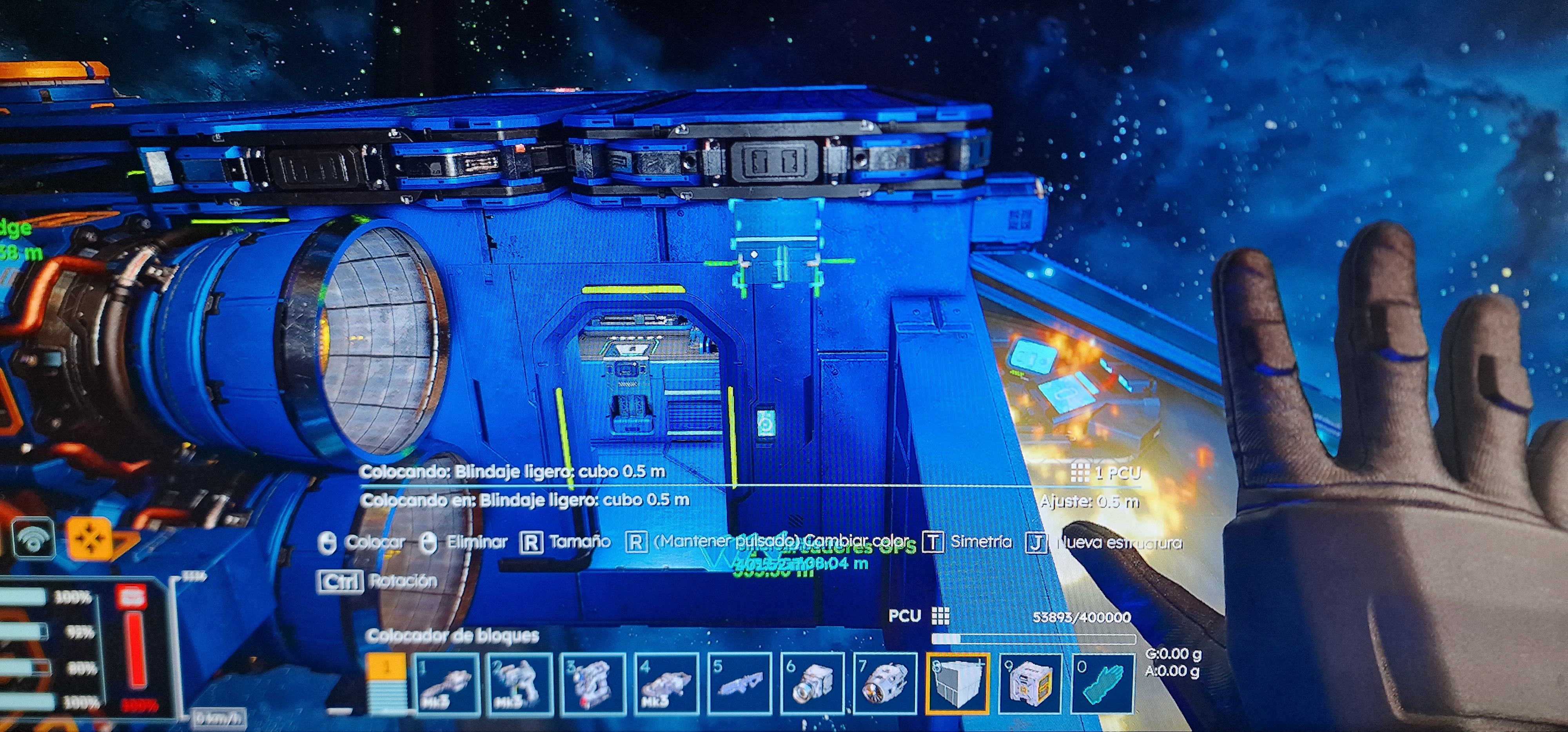
I try to put a hologram of a tube to build it in a specific place to fix the ship, however, the holo doesnt set there, but the PCU increase for each click

I've been playing survivol for last couple of weeks and build pretty large ship. But today I noticed, that I'm not able to place any new block(projection) on any of my grids. Sometimes I get message that says something like: "Make sure that space for placing the block is free", but mostly it's just that denial sound.
I made a video.
UPDATE.
I have an update on this one. So previously I've been connecting this ship to Vallation Station with connectors. I did weld some blocks on my ship, while it was connected to the station. Now I came back there and found all those projections there where my ship was connected to the station. See the screenshot
Game version is: v2.2.0.2002
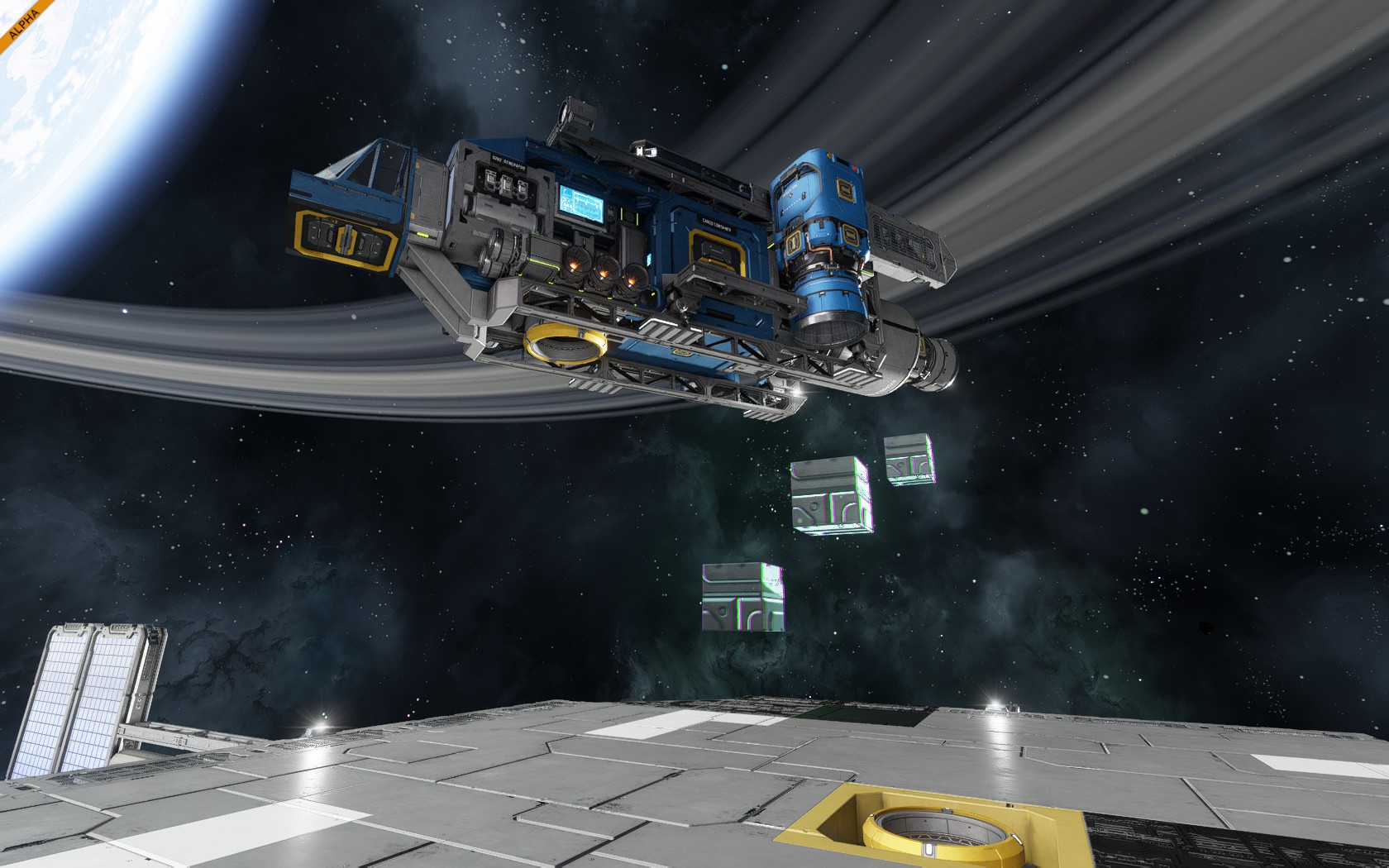
 I have the same bug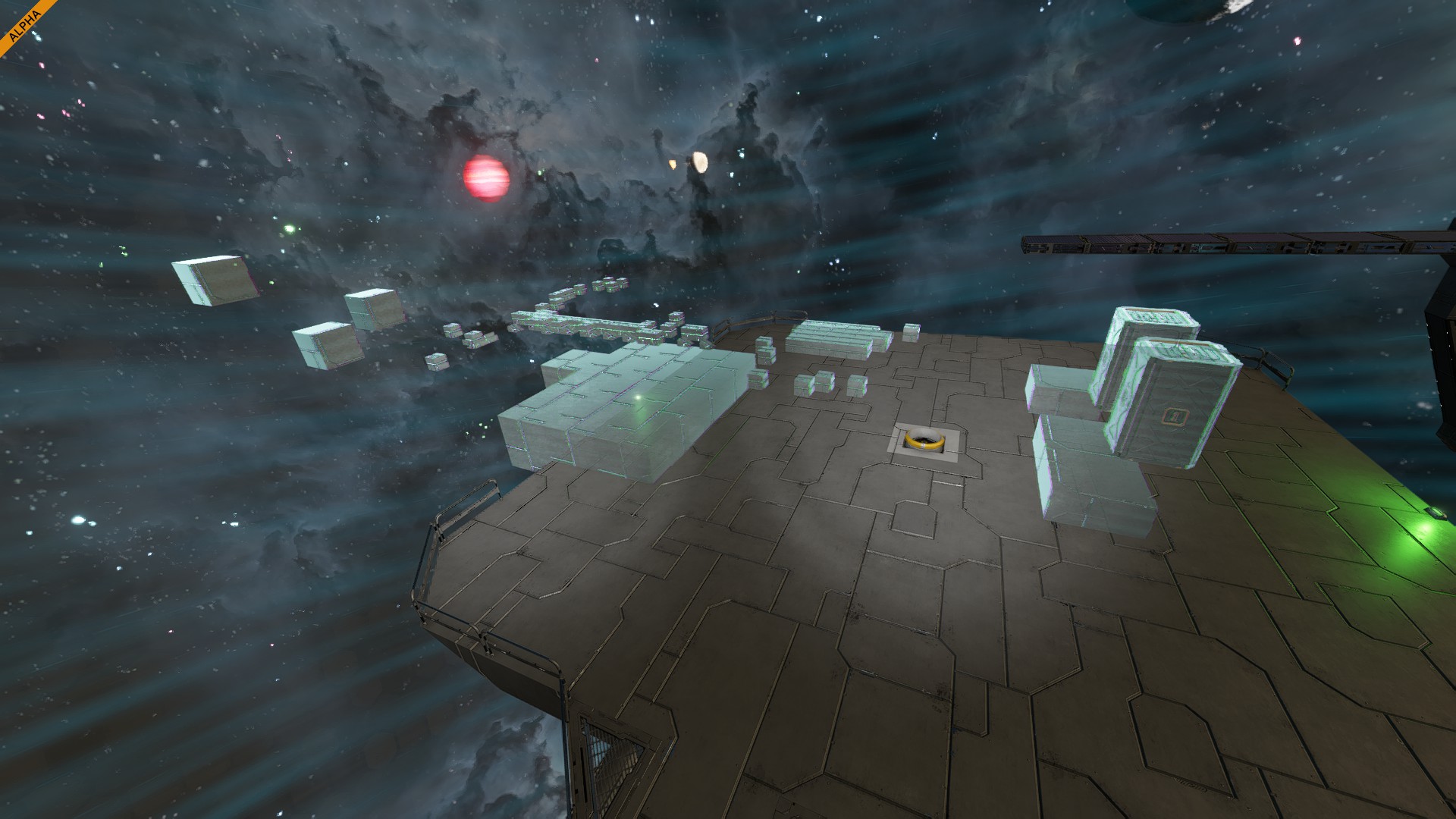
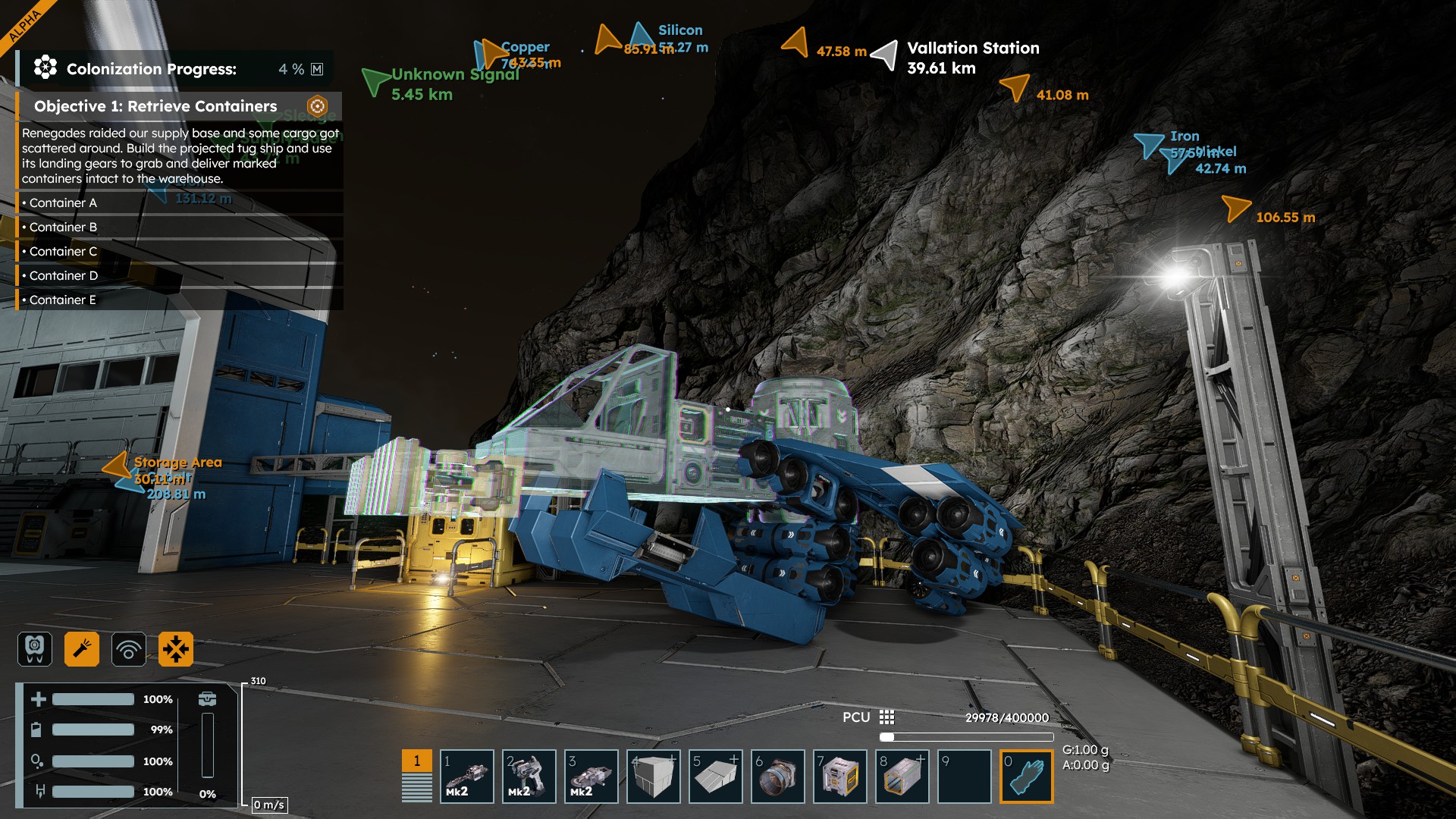
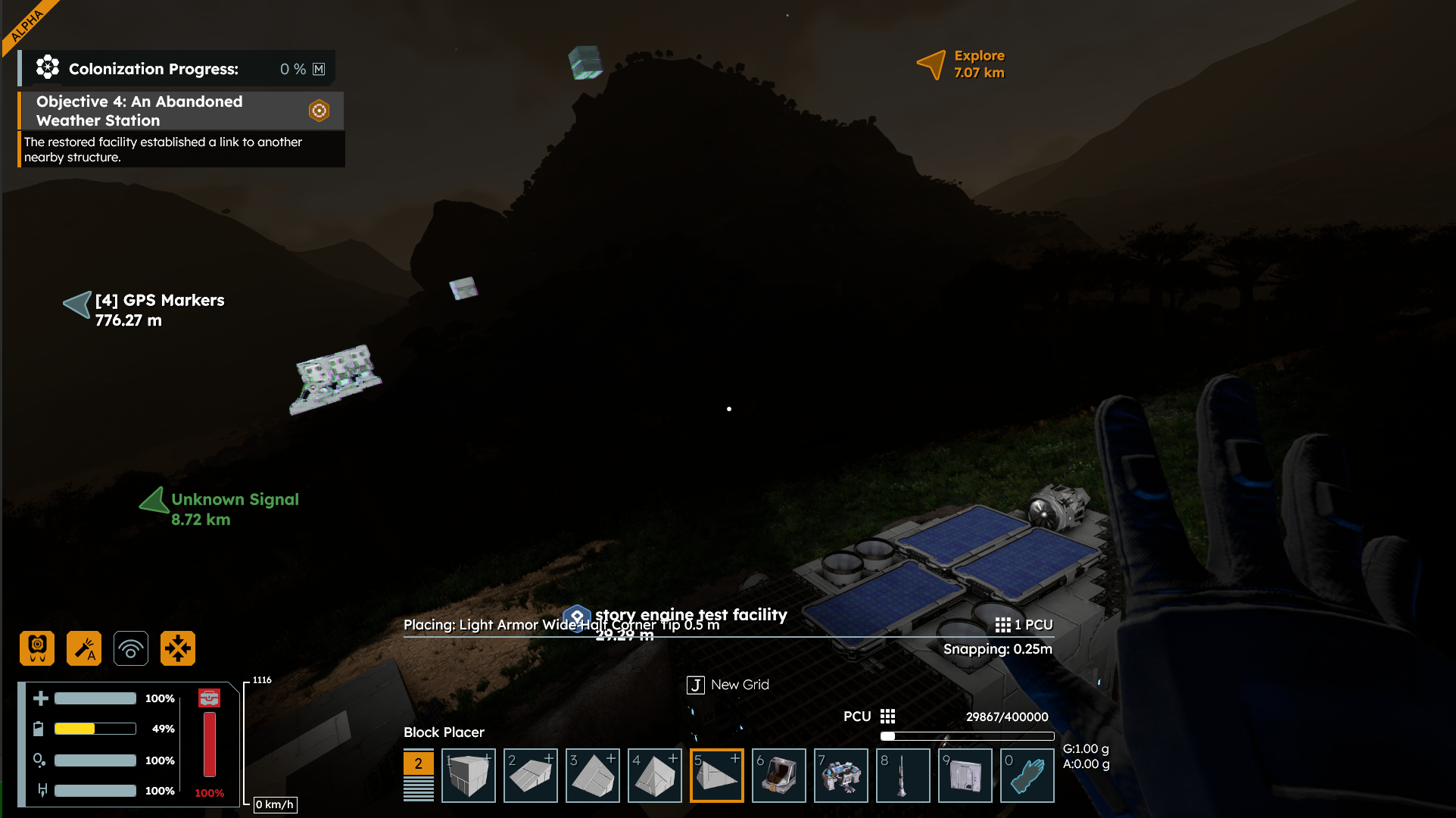
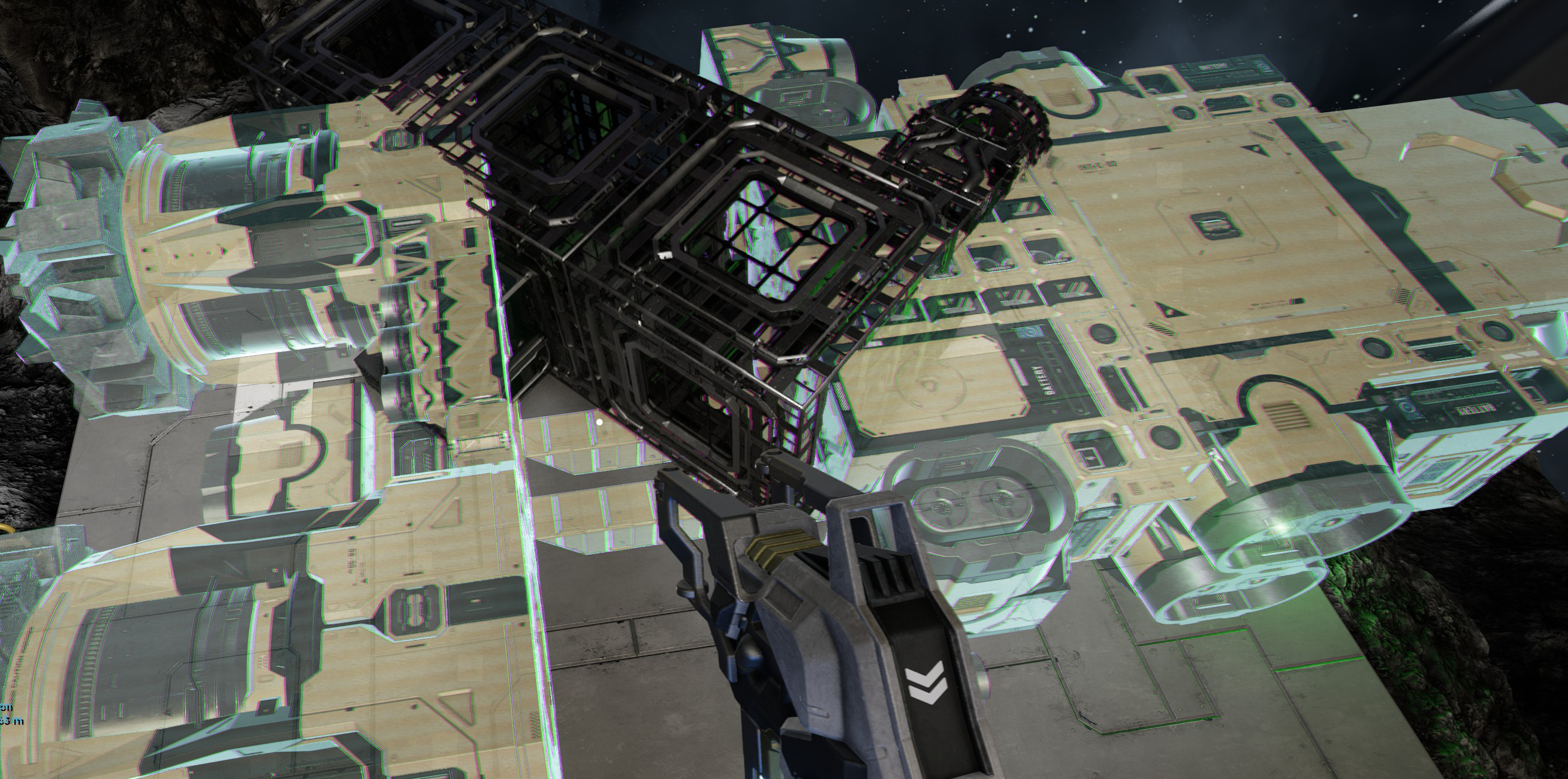
I managed to fix this by switching to creative mode, cutting and pasting my grids and then switching back to survivol.
I managed to fix this by switching to creative mode, cutting and pasting my grids and then switching back to survivol.
I experienced a version of this today after the .2002 patch.
Small station with ship grid attached. Move into NPC bubble prior to shutdown for the night.
Patch .2002
Load in, move station/ship out of bubble. Cannot place blocks on either grid. No error message.
Look around and see a dozen full armor blocks sitting back inside the bubble. Obviously I couldn't place them there originally, there are no holes in the existing grids so they weren't just lost...The blocks did not move back and forth as I moved the grids around either. So they were attached....but not really?
Workaround: debug menu, safe zones, set ignore safe zone to on, go into the bubble and remove the blocks. Turn safe zone back on. Placing blocks onto grid that is clearly outside bubble now works again.
I experienced a version of this today after the .2002 patch.
Small station with ship grid attached. Move into NPC bubble prior to shutdown for the night.
Patch .2002
Load in, move station/ship out of bubble. Cannot place blocks on either grid. No error message.
Look around and see a dozen full armor blocks sitting back inside the bubble. Obviously I couldn't place them there originally, there are no holes in the existing grids so they weren't just lost...The blocks did not move back and forth as I moved the grids around either. So they were attached....but not really?
Workaround: debug menu, safe zones, set ignore safe zone to on, go into the bubble and remove the blocks. Turn safe zone back on. Placing blocks onto grid that is clearly outside bubble now works again.
Exact same bug! I built a ship and then flew 40km from base. Wanted to do some modifications in space but it wouldn't let me place anything. When I came back to base, all the blocks I wanted to place were placed where I originally built the ship in the first place.
Exact same bug! I built a ship and then flew 40km from base. Wanted to do some modifications in space but it wouldn't let me place anything. When I came back to base, all the blocks I wanted to place were placed where I originally built the ship in the first place.
Got the exact same bug. I noticed I went to put new thrusters on my ship they wouldnt attach. I turned around and saw a bunch of blue glowies (projection) in an area that the ship was located in not less than 5-10mins earlier. Went over and deleted these projections, came back to the ship and was able to place new blocks on my ship. I decided to do another test, moved the ship to a new location and tried to put a new block on my ship and same thing, the projects appear in the last position my ship was. So again I had to go to where the projects spawned, delete them, go back to the ship and I was able to add my blocks again to the ship. This is all in my survival mode, I have not attempted any of the debug suggestions here yet.
Got the exact same bug. I noticed I went to put new thrusters on my ship they wouldnt attach. I turned around and saw a bunch of blue glowies (projection) in an area that the ship was located in not less than 5-10mins earlier. Went over and deleted these projections, came back to the ship and was able to place new blocks on my ship. I decided to do another test, moved the ship to a new location and tried to put a new block on my ship and same thing, the projects appear in the last position my ship was. So again I had to go to where the projects spawned, delete them, go back to the ship and I was able to add my blocks again to the ship. This is all in my survival mode, I have not attempted any of the debug suggestions here yet.
It sounds like there's two separate bugs here?
Bug#1 - The game allowed you to place new blocks and weld inside of the safe zone at Valation station.
Bug#2 - When you enter the game, you can place new blocks if you have not moved your ship. Once you move your ship, the game's building system thinks your ship is at the original location, no matter how far you've flown the ship since the world had loaded. When you place new blocks they are placed at the original grid location, not at the current grid location.
It sounds like there's two separate bugs here?
Bug#1 - The game allowed you to place new blocks and weld inside of the safe zone at Valation station.
Bug#2 - When you enter the game, you can place new blocks if you have not moved your ship. Once you move your ship, the game's building system thinks your ship is at the original location, no matter how far you've flown the ship since the world had loaded. When you place new blocks they are placed at the original grid location, not at the current grid location.
After the recent bug-fix patch of the last 24hrs I also began noticing this bug. Its not that the blocks aren't placing, its that they're being placed in unusual spots buried inside the geometry of the ship I was working on. I noticed this because larger pieces were sticking out. They are also hard to clear because they can be placed multiple times in the exact same spot requiring multiple instances of requests to clear the spot.
This doesn't happen always, I can sometimes place a block where I want it, but its happening with a high frequency making building an exercise in frustration. Hope this helps the devs crush it.
After the recent bug-fix patch of the last 24hrs I also began noticing this bug. Its not that the blocks aren't placing, its that they're being placed in unusual spots buried inside the geometry of the ship I was working on. I noticed this because larger pieces were sticking out. They are also hard to clear because they can be placed multiple times in the exact same spot requiring multiple instances of requests to clear the spot.
This doesn't happen always, I can sometimes place a block where I want it, but its happening with a high frequency making building an exercise in frustration. Hope this helps the devs crush it.
It's odd that Keen doesn't have people testing the releases. "Use Admin mode to start where you left off, so you don't have to start from the beginning again for this vertical slice release"
I've been through the complete walkthrough dozens of times. In my opinion, this vertical slice release shows the lack of quality control with so many bugs in the walk-through starting scenario. Bugs like this "can't build" bug should have been caught in testing before it was released due to the severity.
It's odd that Keen doesn't have people testing the releases. "Use Admin mode to start where you left off, so you don't have to start from the beginning again for this vertical slice release"
I've been through the complete walkthrough dozens of times. In my opinion, this vertical slice release shows the lack of quality control with so many bugs in the walk-through starting scenario. Bugs like this "can't build" bug should have been caught in testing before it was released due to the severity.
It won't allow me place any modification on orbital ship. Before last patch I were able to modify Hopper. But I can't put anything on Sledge now.
It won't allow me place any modification on orbital ship. Before last patch I were able to modify Hopper. But I can't put anything on Sledge now.
I'm having the same issue. I can build a new grid, but cannot place blocks or build on grids I've previously built on. The block placement is green, but nothing will actually place. The issue began for me on build 2.2.0.2002 that came out yesterday. I was very briefly able to get an error to pop up twice while trying to get the debug menu to open, and it said make sure there was enough clear space for me to build on, but there's nothing blocking the block placement, and I couldn't get the error to pop up again. I tried placing it everywhere on multiple grids I owned, and nothing worked.
I'm having the same issue. I can build a new grid, but cannot place blocks or build on grids I've previously built on. The block placement is green, but nothing will actually place. The issue began for me on build 2.2.0.2002 that came out yesterday. I was very briefly able to get an error to pop up twice while trying to get the debug menu to open, and it said make sure there was enough clear space for me to build on, but there's nothing blocking the block placement, and I couldn't get the error to pop up again. I tried placing it everywhere on multiple grids I owned, and nothing worked.
I also am having this issue on 2.2.0.2002. I built a new grid, and then went to add something to it a few minutes after welding it all up, and it created a new grid blueprint consisting of a line of blocks of the type I tried to place several meters away from the grid I was trying to build it on. When I tried building the blocks in a different spot, it kept creating a new grid blueprint about the same distance away from the previously erroneously created grid blueprint.
I also am having this issue on 2.2.0.2002. I built a new grid, and then went to add something to it a few minutes after welding it all up, and it created a new grid blueprint consisting of a line of blocks of the type I tried to place several meters away from the grid I was trying to build it on. When I tried building the blocks in a different spot, it kept creating a new grid blueprint about the same distance away from the previously erroneously created grid blueprint.
Guys try to search for similar topics before creating new ones.
https://support.keenswh.com/spaceengineers2/pc/topic/53251-cant-place-any-new-block-on-my-ships-in-survivol
Guys try to search for similar topics before creating new ones.
https://support.keenswh.com/spaceengineers2/pc/topic/53251-cant-place-any-new-block-on-my-ships-in-survivol
Today I got this bug again. Keen, please fix this!
Today I got this bug again. Keen, please fix this!
Moved my build ship and unable to place new blocks onto it.
Have read here, that others have reported that blocks are placed at first build spot, but that spot is now 100 of km/miles from my new location, so I can't verify this in my current survival game.
Also at random the game crashes to desktop claimig, that a bug report has been created and can be read from a log file, but no such a file is created.
Would be a lot esaier to attach such a log file here, if it existed.
Moved my build ship and unable to place new blocks onto it.
Have read here, that others have reported that blocks are placed at first build spot, but that spot is now 100 of km/miles from my new location, so I can't verify this in my current survival game.
Also at random the game crashes to desktop claimig, that a bug report has been created and can be read from a log file, but no such a file is created.
Would be a lot esaier to attach such a log file here, if it existed.
Videos attached showing the issue. We need more people to vote this up.
Videos attached showing the issue. We need more people to vote this up.
Can't add any block to my ship. when I try, cpu is consumed, but block schema don't appear.
video and save game attached.
Link of video: https://youtu.be/BaMhUWnlIEw
Can't add any block to my ship. when I try, cpu is consumed, but block schema don't appear.
video and save game attached.
Link of video: https://youtu.be/BaMhUWnlIEw
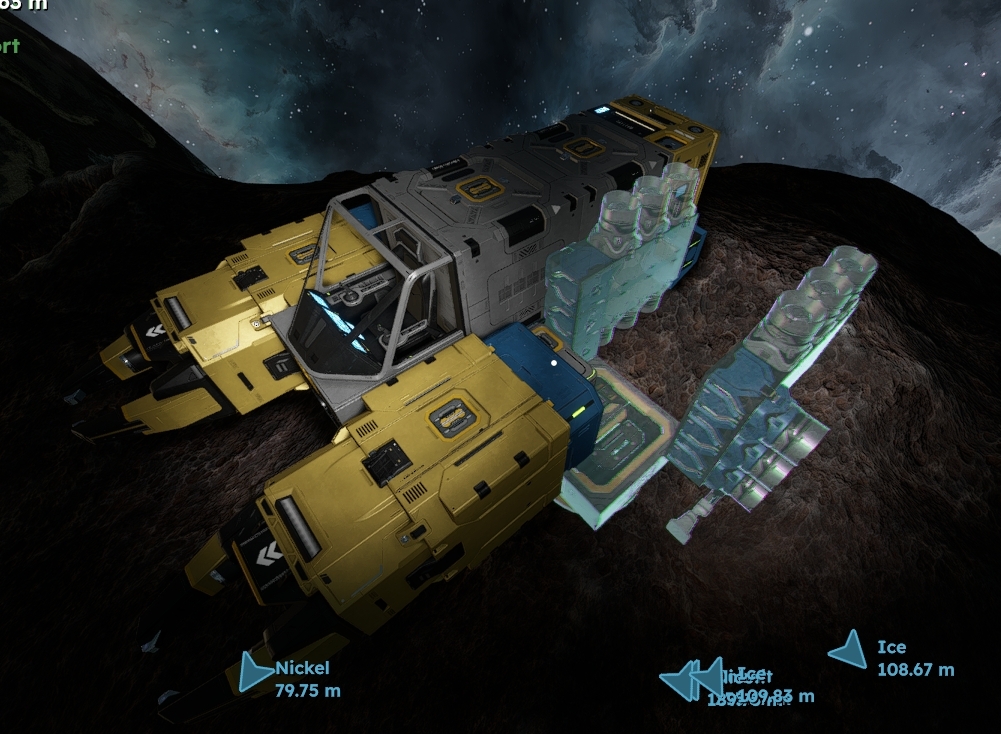
Logged in today, could in fact still place blocks ok, but definitely has some positioning errors. Screenshot shows a stack of hydro engines that were all placed at the same time; and prior to shutdown was all in the same stage of welding. Now ~some~ are no longer attached correctly or half welded.
The inability to place blocks has got to be a symptom of this misalignment with NPC bubble being a contributing factor.
Logged in today, could in fact still place blocks ok, but definitely has some positioning errors. Screenshot shows a stack of hydro engines that were all placed at the same time; and prior to shutdown was all in the same stage of welding. Now ~some~ are no longer attached correctly or half welded.
The inability to place blocks has got to be a symptom of this misalignment with NPC bubble being a contributing factor.
I've been fighting the same issue. I think it has to do with velocity when you get out of the cockpit/control. If I wait until it fully stops then it sometimes aligns projections correctly. Moreover the projections are no longer tied to the structure they are placed with so using pistons to print broke as well.
I've been fighting the same issue. I think it has to do with velocity when you get out of the cockpit/control. If I wait until it fully stops then it sometimes aligns projections correctly. Moreover the projections are no longer tied to the structure they are placed with so using pistons to print broke as well.
I have also the same bug i could not add blocks to my starter ship and didnt recogize the block are position elsewhere. But i could build a blueprint ship from an earlier stage of the game.
I have also the same bug i could not add blocks to my starter ship and didnt recogize the block are position elsewhere. But i could build a blueprint ship from an earlier stage of the game.
Hello Engineers,
The issue here is that the projections seem not to be attached properly to the Grid and as such, once the Grid is moved, the projections stay in the location they were placed.
I have reported this issue and attached this thread in our internal ticket (SE2-31940). We will address this issue in a next week's Hotfix.
Kind Regards,
Bartosz
Keen Software House
Hello Engineers,
The issue here is that the projections seem not to be attached properly to the Grid and as such, once the Grid is moved, the projections stay in the location they were placed.
I have reported this issue and attached this thread in our internal ticket (SE2-31940). We will address this issue in a next week's Hotfix.
Kind Regards,
Bartosz
Keen Software House
Wtf is wrong with this building system?...I've just wasted 2 hours of my spare time trying to build a simple miner, landing gear wouldn't go down on my station platform so built a connecting block then detached when the ship was ready to support itself..fail...cannot continue building the ship, cannot attach any new blocks as it's just an empty Grid..tried pasting the blueprint...can't paste it due to the supporting blocks not being created anywhere.
Grind the whole thing down and try again this time with landing gear attached to the dirt...removed gear and support, flies ship briefly, park up to continue construction...guess what..no more blocks can be added..if I try to add them the blocks somehow go and place themselves where the original landing gear was in the dirt...wth is happening.
Wtf is wrong with this building system?...I've just wasted 2 hours of my spare time trying to build a simple miner, landing gear wouldn't go down on my station platform so built a connecting block then detached when the ship was ready to support itself..fail...cannot continue building the ship, cannot attach any new blocks as it's just an empty Grid..tried pasting the blueprint...can't paste it due to the supporting blocks not being created anywhere.
Grind the whole thing down and try again this time with landing gear attached to the dirt...removed gear and support, flies ship briefly, park up to continue construction...guess what..no more blocks can be added..if I try to add them the blocks somehow go and place themselves where the original landing gear was in the dirt...wth is happening.
Looked to me like it isn't necessarily the 'home' connector, but the last one you were docked to.. I've added a bunch more underneath the pad and keep the sledge docked there, and that's where the projections showed up. Kind of funny, I was around 30km away from base trying to temporarily slap a drill on the nose of it, nothing happening, no errors, or anything of the kind, kept clicking for a bit.. After I finished up and got back i had like ten drill projections stacked in the same location.
Looked to me like it isn't necessarily the 'home' connector, but the last one you were docked to.. I've added a bunch more underneath the pad and keep the sledge docked there, and that's where the projections showed up. Kind of funny, I was around 30km away from base trying to temporarily slap a drill on the nose of it, nothing happening, no errors, or anything of the kind, kept clicking for a bit.. After I finished up and got back i had like ten drill projections stacked in the same location.
same problem but the projections were projected about 50M away from where i've tried to add the parts.
i've tried taking the ship away from the starter base - there trying to place parts - i can only hear a beep noise and that's it.
same problem but the projections were projected about 50M away from where i've tried to add the parts.
i've tried taking the ship away from the starter base - there trying to place parts - i can only hear a beep noise and that's it.
HA, this explains the random smelter i seen floating in space above valation station the other day.... wasnt until i found ground down a vital link between my cockpit and survival kit in my sledge that i realized i couldnt re-attatch the thing that the two issues are linked.
HA, this explains the random smelter i seen floating in space above valation station the other day.... wasnt until i found ground down a vital link between my cockpit and survival kit in my sledge that i realized i couldnt re-attatch the thing that the two issues are linked.
Same here.
The way I see it, holograms have trouble attaching to grids. That seems to be the core of the problem here.
My hammer got damaged, but I can't really fix it as it would require attaching new thrusters to it. Can't really fly it in this state either, so this is a game breaking bug.
Loaded an earlier save... BTW remember to save every 2 minutes to a new file. You'll thank me sooner rather than later. Anyway, after loading, I started working on a blueprint I made in creative. If I can't fix the Hammer, I'll build a new one, right? Wrong!
After welding a few blocks, I accidentally bumped into the unfinished ship, and it started drifting. Turns out, the holograms aren't attached to the unfinished ship as they used to be. Yeah, so can't really repair or build anything until this bug gets fixed.
Same here.
The way I see it, holograms have trouble attaching to grids. That seems to be the core of the problem here.
My hammer got damaged, but I can't really fix it as it would require attaching new thrusters to it. Can't really fly it in this state either, so this is a game breaking bug.
Loaded an earlier save... BTW remember to save every 2 minutes to a new file. You'll thank me sooner rather than later. Anyway, after loading, I started working on a blueprint I made in creative. If I can't fix the Hammer, I'll build a new one, right? Wrong!
After welding a few blocks, I accidentally bumped into the unfinished ship, and it started drifting. Turns out, the holograms aren't attached to the unfinished ship as they used to be. Yeah, so can't really repair or build anything until this bug gets fixed.
I experienced the same bug. I have attached an image.
By moving the ship back near the projection I could weld the ship welders, and they are attached correctly to the ship. The projections seem to still be logically connected to the ship. Just their projection did not move along with the ship.
I experienced the same bug. I have attached an image.
By moving the ship back near the projection I could weld the ship welders, and they are attached correctly to the ship. The projections seem to still be logically connected to the ship. Just their projection did not move along with the ship.
Same here. on H2 Starter ship in survival. no mod.
https://streamable.com/e/lt877p
Same here. on H2 Starter ship in survival. no mod.
https://streamable.com/e/lt877p
Sam issue here, when I want to place blocks on a ship as soon as I place them, they jump to a place away from the ship into the air. When I start welding them they are back on the place I initially placed them.
Sam issue here, when I want to place blocks on a ship as soon as I place them, they jump to a place away from the ship into the air. When I start welding them they are back on the place I initially placed them.
I'm facing the same issue constantly.
My case: place few blocks on a new grid, build some of the blocks, then give a little push to the grid. As a result, built part is floating, but projection stays at the same place. All blocks placed afterwards are built on the same coordinates even if you fly pretty far away. Anyway, it is still possible to weld projected parts, because they are created in the target grid (attached).
I'm facing the same issue constantly.
My case: place few blocks on a new grid, build some of the blocks, then give a little push to the grid. As a result, built part is floating, but projection stays at the same place. All blocks placed afterwards are built on the same coordinates even if you fly pretty far away. Anyway, it is still possible to weld projected parts, because they are created in the target grid (attached).
Btw.: There should be a connector connected to the cargo containers, where the welder ship could dock, so that it wouldn't float away. This would also help loading or unloading other ships. E.g. I have filled my Sledge with loot and have to transfer it with my character and do several voyages now.
Btw.: There should be a connector connected to the cargo containers, where the welder ship could dock, so that it wouldn't float away. This would also help loading or unloading other ships. E.g. I have filled my Sledge with loot and have to transfer it with my character and do several voyages now.
in my case those projected blocks end up at the last location the ship was docked, by landing gear or connector or crash site. you would have to go back to the last docked location and clear those projections before attempting to place another projected block
in my case those projected blocks end up at the last location the ship was docked, by landing gear or connector or crash site. you would have to go back to the last docked location and clear those projections before attempting to place another projected block
The projections appear where ship is originally built/connected to station. cut and paste in creative and then going to survival does not fix the issue just resets the "original" connection point for the projections to appear.
The projections appear where ship is originally built/connected to station. cut and paste in creative and then going to survival does not fix the issue just resets the "original" connection point for the projections to appear.
i noticed that this occurred after completing the first sector, when I built a mobile base out of the starter platform before moving to sector 2.
I'm able to start a new grid, and attach things to that, but I'm also getting the same issue as described above... stuff wont attach to the existing grids, and I also got the visual of build holograms being misaligned with the existing grid.
UPDATE: After constructing a new grid from projections, I am then unable to add further parts to already welded components
i noticed that this occurred after completing the first sector, when I built a mobile base out of the starter platform before moving to sector 2.
I'm able to start a new grid, and attach things to that, but I'm also getting the same issue as described above... stuff wont attach to the existing grids, and I also got the visual of build holograms being misaligned with the existing grid.
UPDATE: After constructing a new grid from projections, I am then unable to add further parts to already welded components
I have this issue, however the ship has NOT been welded while connected to Vallation Station, only modified while at the Starter Base.
I WAS able to modify the ship as of last Sunday (March 30th) so something happened between then and now. I have it all on Twitch atm.
I have this issue, however the ship has NOT been welded while connected to Vallation Station, only modified while at the Starter Base.
I WAS able to modify the ship as of last Sunday (March 30th) so something happened between then and now. I have it all on Twitch atm.
Hi Keen Team!
That Bug also affect Verdure Hauling contract where we have to bring all cargo containers inside the hangar, the incomplete Tug ship fell down by the Planet Gravity and detached from its projected blocks.
The workaround is to use the Sledge ship to complete the contract or paste the Tug ship if you have the Blueprint, that is what I did :
Hi Keen Team!
That Bug also affect Verdure Hauling contract where we have to bring all cargo containers inside the hangar, the incomplete Tug ship fell down by the Planet Gravity and detached from its projected blocks.
The workaround is to use the Sledge ship to complete the contract or paste the Tug ship if you have the Blueprint, that is what I did :
I've found a workaround, all my girds were just labelled Grid, and I didn't realise you could double click where it says Grid to rename it, as soon as I renamed my station from grid, and started building a ship, renamed that away from grid... deleting the foundation block is now treating the ship as its own entity and I can build again...phew..hope this helps...edit...it worked once...I can add blocks on the second attempt but like everyone else the blueprint for the blocks are back where I first started building the ship..fuck me this is exhausting...oh wait...after deleting every single foundation block instead of just the one that was attaching the ship to the rest of the support blocks it works...blocks are going onto the ship!!!!
I've found a workaround, all my girds were just labelled Grid, and I didn't realise you could double click where it says Grid to rename it, as soon as I renamed my station from grid, and started building a ship, renamed that away from grid... deleting the foundation block is now treating the ship as its own entity and I can build again...phew..hope this helps...edit...it worked once...I can add blocks on the second attempt but like everyone else the blueprint for the blocks are back where I first started building the ship..fuck me this is exhausting...oh wait...after deleting every single foundation block instead of just the one that was attaching the ship to the rest of the support blocks it works...blocks are going onto the ship!!!!
This was resolved by deleting incomplete Ghost Grids, which I presume exceeded the overall incomplete Ghost Grid count.
By the way, please correct my terminology :)
This was resolved by deleting incomplete Ghost Grids, which I presume exceeded the overall incomplete Ghost Grid count.
By the way, please correct my terminology :)
Yes, the ghost blocks will be fixed in next week's patch we've been told. However, anytime you receive a "free" ship it may have become your own ship using your own personal PCU. In SE2 projected blocks are real blocks that you own and that consume PCU, even when they have not been welded yet.
Yes, the ghost blocks will be fixed in next week's patch we've been told. However, anytime you receive a "free" ship it may have become your own ship using your own personal PCU. In SE2 projected blocks are real blocks that you own and that consume PCU, even when they have not been welded yet.
Have the bug as well. Built a ship from blueprint. Was attached to station. removed station blocks near ship so it could float. Ship wont act as a ship. Get in it and nothing. Cant convert to ship (no info tab anymore like in SE1??). Cant add any blocks to the ship, doesn't give any error. The blocks show up near station where it was originally built.
Very frustating, it took me a long time to build that blueprint ship.
Have the bug as well. Built a ship from blueprint. Was attached to station. removed station blocks near ship so it could float. Ship wont act as a ship. Get in it and nothing. Cant convert to ship (no info tab anymore like in SE1??). Cant add any blocks to the ship, doesn't give any error. The blocks show up near station where it was originally built.
Very frustating, it took me a long time to build that blueprint ship.
I have also submitted a bug report for the same issue: https://support.keenswh.com/spaceengineers2/pc/topic/53391-vs2-2-build-holograms-are-placed-at-original-construction-location
Makes ship upgrades impossible away from initial build location.
I have also submitted a bug report for the same issue: https://support.keenswh.com/spaceengineers2/pc/topic/53391-vs2-2-build-holograms-are-placed-at-original-construction-location
Makes ship upgrades impossible away from initial build location.
Have the same problem: Trying to add components to ship, got green marks but warning buzz. What i noticed, that the PCU count increses, as if the placement were successful...
Have the same problem: Trying to add components to ship, got green marks but warning buzz. What i noticed, that the PCU count increses, as if the placement were successful...
Guys... I tested something...
What happen if you try to weld distant blocks?
Answer : they teleport themselves :
https://streamable.com/0yuvzh
Guys... I tested something...
What happen if you try to weld distant blocks?
Answer : they teleport themselves :
https://streamable.com/0yuvzh
This will all be fixed in 2 days when the next patch comes out. 2.2.0.2002 is broken - doesn't allow building. There's no telling what will happen with any workaround builds when the patch comes out. For example, if you can find the blocks that are placed (most players cannot because they spawn at the grid's creation point usually), then you can weld them and they appear on your ship. However, we do not know what is going on with the code behind the scenes. We do not know if the blocks will still be attached to your grid or if your grid will explode after the next patch is applied. Someone reported they did the trick of welding the blocks to make them appear on their ship, but that the blocks were not really part of their ships grid.
It's amazing how long this past week has lasted, seems like a year already waiting for the next patch to come out.
This will all be fixed in 2 days when the next patch comes out. 2.2.0.2002 is broken - doesn't allow building. There's no telling what will happen with any workaround builds when the patch comes out. For example, if you can find the blocks that are placed (most players cannot because they spawn at the grid's creation point usually), then you can weld them and they appear on your ship. However, we do not know what is going on with the code behind the scenes. We do not know if the blocks will still be attached to your grid or if your grid will explode after the next patch is applied. Someone reported they did the trick of welding the blocks to make them appear on their ship, but that the blocks were not really part of their ships grid.
It's amazing how long this past week has lasted, seems like a year already waiting for the next patch to come out.
if you place blocks down it will show block placement at the location where you got the ship at for some reason
if you place blocks down it will show block placement at the location where you got the ship at for some reason
I don't plan to play till the patch is out. Then i plan to place a piston down to use as a leverage point in space to place a ship blueprint on with a landing gear attached to the blueprint and the piston as a point where the landing gear can connect to. I always use a landing gear to attach it to the stations that way it does no become part of the station. Hell I might do this before the patch just to test things.
I don't plan to play till the patch is out. Then i plan to place a piston down to use as a leverage point in space to place a ship blueprint on with a landing gear attached to the blueprint and the piston as a point where the landing gear can connect to. I always use a landing gear to attach it to the stations that way it does no become part of the station. Hell I might do this before the patch just to test things.
Hi team, this is being addressed in this week's patch release:
Can't place any new block on my ships in survivol | Space Engineers 2 Support
Hi team, this is being addressed in this week's patch release:
Can't place any new block on my ships in survivol | Space Engineers 2 Support
I have this bug also. I found I could "reset" the coordinates by deleting a blueprint block before even welding it and any new blocks can then be placed on the ship.
Unfortunately I'm still using the free ship (Sledge) so I can't go back to fix that one.
I have this bug also. I found I could "reset" the coordinates by deleting a blueprint block before even welding it and any new blocks can then be placed on the ship.
Unfortunately I'm still using the free ship (Sledge) so I can't go back to fix that one.
I found that if i did changes before the ice packing mission before the crashed spaceship, it let me. When i finished the ice mission, it didn't. I didn't make it off planet on that game. forgot the side thrusters after removing small thrusters and increasing cargo capacity.
I found that if i did changes before the ice packing mission before the crashed spaceship, it let me. When i finished the ice mission, it didn't. I didn't make it off planet on that game. forgot the side thrusters after removing small thrusters and increasing cargo capacity.
Hello Engineers,
This issue has been fixed internally and the fix will be shipped in next Hotfix.
As such, I will close this thread.
Kind Regards,
Bartosz
Keen Software House
Hello Engineers,
This issue has been fixed internally and the fix will be shipped in next Hotfix.
As such, I will close this thread.
Kind Regards,
Bartosz
Keen Software House
Replies have been locked on this page!