


Space Engineers 2 Alpha: VS 2 - Planets & Survival Foundations
Hello, Engineers!
You’ve left the training grounds of Concordia Research Facility behind you - now it’s time to take your first real steps into the Almagest system. A new frontier stretches before you, vast and unexplored, waiting for the first Engineers to shape it.
You are the pioneers of this era, carrying the spark of humanity to untouched worlds. Your mission is simple, yet monumental: to build, expand, and bring life to the silent worlds of Almagest. Every structure you place, every sector you claim, will shape the foundation of humanity’s future among the stars. The age of exploration begins again - and it begins with you!
- Full Blog Post: https://2.spaceengineersgame.com/space-engineers-2-vs2-planets-survival-foundations-live-now/
- Roadmap: https://2.spaceengineersgame.com/roadmap-2/
- Connect: https://www.keenswh.com/connect/

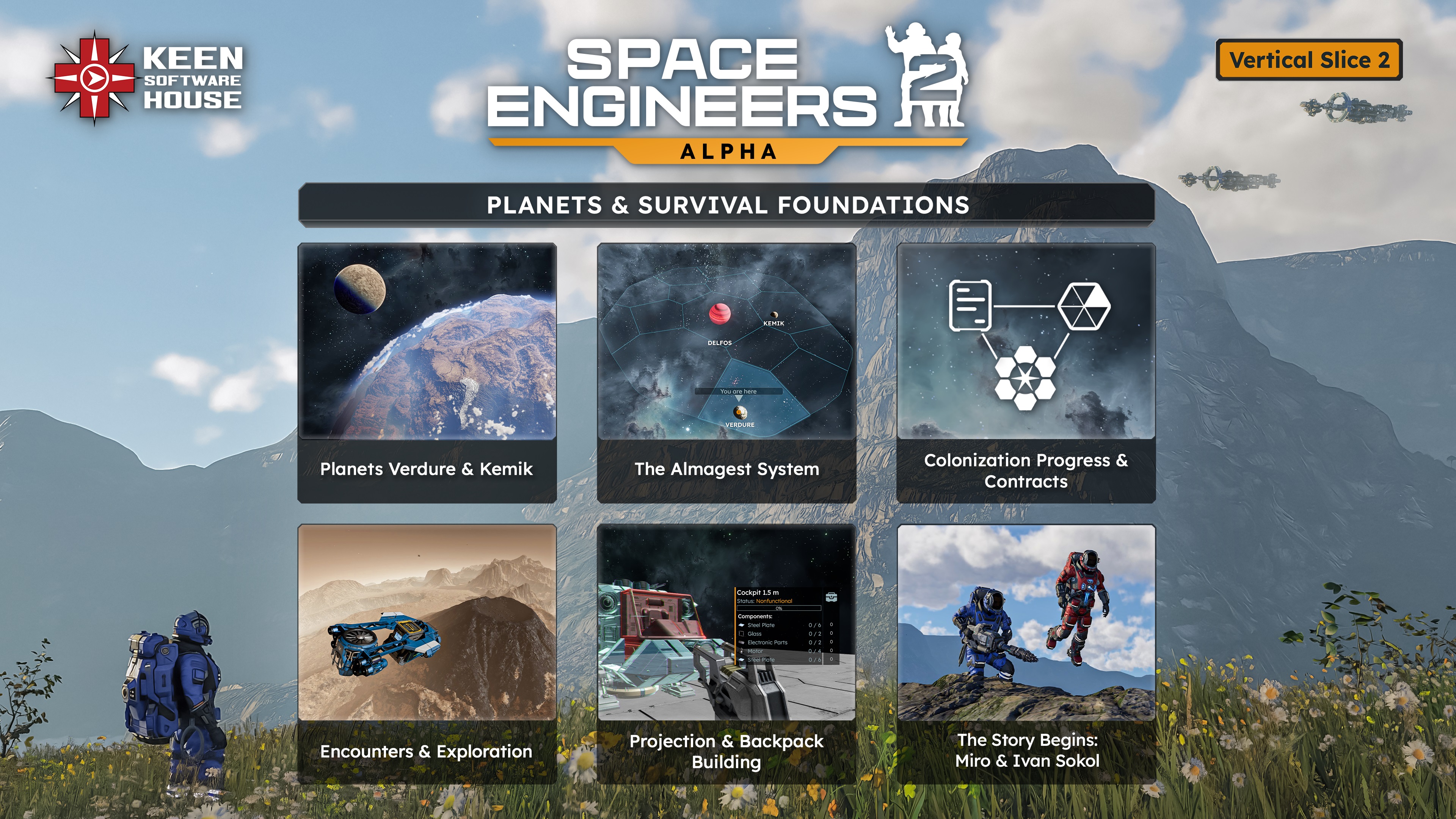
- Almagest Star System
- Brown Dwarf Delfos
- Planet Verdure
- Planet Kemik
- Planetary Features
- Flora, overhangs, caves
- Destructible trees and rocks
- Volumetric Clouds
- Multiple different biomes
- Voxel Decals
- Natural Wonders
- Dynamic Voxel Hardness (snow/sand vs rock)
- Colonization
- Star System & First 2 Sectors
- Colonization Progression
- Storyline Introduction & Base Contract Systems
- Interactive Star System Map
- Fast Travel (Station Points)
- Basis for GPS system (without custom GPS)
- Basis for Safe Zone System (non-placable for now)
- Survival Mode
- Backpack Building (Smelter Components)
- Projection Building
- Modular Blueprint Building
- Mirroring
- Copy/Paste
- Undo/Redo
- Basic Production Systems, Manufacture
- Grid Power System & Swappable Batteries
- Block Construction Stages
- Consumables (Hydrogen, Energy, Health)
- Jetpack H2 usage for Boost, Energy for non-boost movement
- HUD Additions & Changes
- New UI Screens (initial implementation of Production Screen, Grid & Player Inventory Screen, Respawn Screen
- G-screen Improvements
- Ore Detection (Drill + Ore Detector blocks)
- Random Encounters (non-dynamic, non-AI, non-NPC for now)
- Optimizations
- Rendering Improvements
- Destruction LODs & Performance Improvements
- Tons of new Animations added (welding, grinding, drilling, character movement, and more!)
- Inverse Kinematics
- Added New Particle Effects
- Added New In-game and UI sounds
- ModSDK Tools Updated
- Press "U" to hide the UI (TAB - now opens the Inventory)
Hand Tools
- Welders
- Grinders
- Drills
New Blocks
- Survival Kit (respawn, healing, recharge)
- Fabricator
- Gearforge
- Smelter
- Batteries
- Contract Block
- Atmospheric Thrusters
- Hydrogen Tanks
- Largest Hydrogen Thruster
- Large Drill
- Barrel (non-connected cargo container)
Blocks with added functionality
- Added Inventories to all blocks (Crates, Lockers, Cargo Containers)
- Reactor
- Medical Bay
- Ore Detector
- Solar Panels
- Connector - limited functionality, ejector/connector functionality planned
- Conveyor System
- Large O2/H2 Generator (Just H2)
- Small O2/H2 Generator (Just H2)
- Antenna
- Animation added to existing blocks (Assembler, Refinery)
Natural Resources
- Iron
- Silicon
- Nickel
- Copper
- Cobalt
- Lead
- Magnesium
- Gold
- Chromium
- Silver
- Titanium
- Uranium
- Platinum
- Ice
Components
- Steel Plate
- Steel Tube
- Glass
- Electronic Parts
- Motor
- Construction Component
- Wire
- Turbine Blades
- Metal Grid
- Power Cell Parts
- Power Module Parts
- Magnesium Powder
- Lead Bar
- Gold Thread
- Chrome Coating
- Enriched Uranium
- Platinum Electrode
- Silver Rod
- Titanium Sheet
- Permanent Magnet
- Superconductor
- Radiation Shielding
- Stainless Steel
- Magnesium Bar
- Compressor
- Motherboard
- Combustion Chamber
- Pressure Pipe
- Ion Chamber
- Chemical Synthesizer
- Heavy-duty Plate
- Radio-comm Module
- Reactor Core
- Hard Drive
- Mainframe
- Ion Accelerator
- Ultra-resistant Plate
- Advanced Compressor
- Gravity Core
- Titanium Blades
- Laser

- Expanded Official Soundtrack
- Refreshed digital art book filled with new concept art, design sketches, and updated behind-the-scenes materials
- https://store.steampowered.com/app/3365540/Space_Engineers_2_Pioneer_Edition/

Please keep in mind that VS2 is still an Early Access and Alpha version of Space Engineers 2. We are planning daily hotfixes after the initial release.
- Starting with this release, we will always keep previous versions of the game available after major updates. This means you can return to an earlier version at any time and, for example, save your blueprints or creations. You will find these builds in the Steam Beta tab.
- We also want to be upfront about one important thing. We already know that water will be such a monumental change for the game that you will need to start a new save when VS3 arrives. We try to minimize situations like this, but during the alpha stage of development they are sometimes unavoidable.
- Planet modding is not fully supported at this stage of development - we will bring you modding support for planets at later stages!
- Customizable Controls are coming in VS2.2!
- In rare cases, Procedural Voxel Generation may cause a Contract grid to spawn inside a voxel area. If this happens, you will need to start a new map. This is a top priority issue for our next hotfix.
- Attempting to fast travel with a large ship may cause the game to freeze. A fix is already in progress.
- Several edge-case crashes are known and will be addressed in the first hotfix.
- Tutorial Contracts can be broken by not following the task sequence; this will be reworked and mitigated in the future updates.
- Contract-related containers and few unfinished grids may not be affected by planetary gravity in the “Supply Base” Contract.

Stability
 Fixed a crash when trying to set relative dampening to a fracture
- Fixed a crash in memory
Performance
- Fixed an issue where the game froze while loading a more complex world
- Fixed an issue where the blueprint screen refreshed very slowly
- Fixed an issue where the game froze when modifying a blueprint upon publishing
Functional
- Fixed an issue where the character got stuck and clipped into blocks when crouching in low tunnels
- Fixed an issue where switching to static spectator camera from free spectator resulted in an uncontrollable character
- Fixed an issue where the character could move grids weighing over 50 tons
- Fixed an issue where the camera was jittering during character movement
- Fixed an issue where blocks snapped too deep into the voxel
- Fixed an issue where a block preview was not visible when placement was not possible
- Fixed an issue where it was not possible to cycle back to the previous block using Shift + R
- Fixed an issue where the block placer stopped detecting moving ships
- Fixed an issue where changing blueprint visibility in the web browser was not reflected in-game
- Fixed an issue where editing a published mod in Steam did not take effect in-game
- Fixed an issue where no warning message appeared after removing mods from a saved game
- Fixed an issue where a published mod was not listed as an available mod in the Manage Mods screen
- Fixed an issue where publishing a blueprint while Steam was offline triggered a nonspecific error
- Fixed an issue where it was not possible to drag a block by its tile edge in the G-screen
- Fixed an issue where blocks and blueprints could not be dragged off of a toolbar
- Fixed an issue where symmetry was deactivated when no block was selected
- Fixed an issue where Structural Support Wide was incorrectly mirrored on green symmetry planes
- Fixed an issue where the sides of the Hydrogen Thruster 2.5 m snapped incorrectly to 2.5 m blocks
- Fixed an issue where it was possible to see inside a voxel
- Fixed an issue where opening mod details added the mod to the available mods list
- Fixed an issue where Alt + Enter did not toggle full screen mode
- Fixed an issue where the Paint Tool single-size decal stayed on the grid when aiming off the grid
- Fixed an issue where the Paint Tool ignored certain blocks when using a larger brush
- Fixed an issue where colors in the palette were duplicated
- Fixed an issue where fractured Landing Gear without a bottom part stayed connected
- Fixed an issue where Landing Gear did not lock to a voxel when positioned too close
- Fixed an issue where a grid continued rotating even when all gyroscopes were disabled
- Fixed an issue where Cockpit LCDs did not turn off when the block’s power was off
- Fixed an issue where a burning, ruined Cockpit remained functional
- Fixed an issue where the splash screen appeared on the monitor with the cursor instead of the main monitor
- Fixed an issue where disconnecting a ship from voxel did not make it dynamic
- Fixed an issue where it was not possible to slide a ship on flat surfaces
- Fixed an issue where searching numbers switched toolbar tiles
- Fixed an issue where block placement and removal particles were not scaled with block size
- Fixed an issue where the Medical Room had a redundant highlight part
- Fixed an issue where renaming a save folder created a corrupted copy of the save
Render
- Fixed an issue where the radius of projected light was much smaller than the block’s actual light sphere
- Fixed an issue where the game became blurry when deselected
- Fixed an issue where an armor block occluded too early when entering the Red Ship
- Fixed an issue where block previews cast shadows when the block model included a grating
- Fixed an issue where light leaked through blocks
- Fixed an issue where changing the graphic preset made toolbar icons blurry
- Fixed an issue where armor textures were blurry on the high graphic preset
UI
- Fixed an issue where the disabled button did not appear disabled
- Fixed an issue where a control hint was displayed as plain text instead of keybinding style
- Fixed an issue where blocks in the control panel could not be sorted by name
- Fixed an issue where the block group icon in the terminal had a low resolution
- Fixed an issue where graphic settings were scrolled down when opening the menu
- Fixed an issue where an incorrect message was displayed when enabling fullscreen mode
- Fixed an issue where cycling a grid’s power off and on disabled the grid’s angular gyro controls UI
- Fixed an issue where voxel hand operator hints did not start with capital letters
- Fixed an issue with inconsistent capitalization in the Help screen
- Fixed an issue where discarding pending changes returned the user to the wrong tab
- Fixed an issue where the pending changes dialog was redundant
- Fixed an issue where windowed mode resolutions were missing
Animation
- Fixed a delay before the floating animation when exiting the cockpit
- Fixed an issue where mirrored blocks did not have the correct rotation animation
- Fixed an issue where the character’s legs were twisted when sprinting and toggling the jetpack
- Fixed an issue where headbob was missing in first-person camera while sprinting
- Fixed an issue where the character had deformed animations after colliding with fractures
- Fixed an issue where it was possible to look through the character's head when standing or crouching
Particles
- Fixed an issue where the Debug Gun and Paint Tool did not shake after falling
- Fixed an issue where particles appeared when the character collided with a spinning drill
- Fixed an issue where destruction particles were missing for the final destruction stage of single blocks
- Fixed an issue where stepping down from a 25 cm height caused falling dust particles to spawn
Art
- Fixed various art-related issues on fractured block models: Wall Pillar Slope 2.5 m, Gyroscope 2.5 m, Gyroscope 7.5 m, Cargo Container 2.5 m, Cargo Container 7.5 m, and Refinery 7.5 m
- Fixed an issue where it was possible to see inside the Reactor 7.5 m model
- Fixed an issue where texts changed across LODs for the Gravity Generator and Cargo Container 7.5 m
- Fixed an issue where an extra mesh part was present on one of the 7.5 m Ion Thruster exhausts
- Fixed an issue where the back side of the Control Seat was slightly offset
- Fixed an issue with Z-fighting on the Reactor’s button
- Fixed an issue with glitchy conveyor port handles on Cargo Container 1.5 m
- Fixed an issue where the Cockpit used an incorrect texture at LOD3 and higher
- Fixed an issue where the warning decal on the O2/H2 Generator was mirrored
- Fixed an issue where the Crate’s UVs were stretched
- Fixed an issue where the Interior Light flare was offset
- Fixed an issue where fractures of the O2/H2 Generator were missing textures
Audio
- Fixed an issue where the sounds of the flying Blue Ship were not balanced
- Fixed an issue where selecting a tile in the G-screen by its edge did not play a sound
- Fixed an issue where thrusters were missing SFX after the grid was disconnected from a static grid
- Fixed an issue where some thruster startup SFX were cut off when accelerating
- Fixed an issue where in-game music did not loop
VRAGE3 Mod Editor - Stability
- Fixed a crash when naming two assets the same and choosing “Abort” in the pop-up message
- Fixed a crash when renaming a folder
- Fixed a crash when swapping Entry Node state between two Single Clip States twice and deleting the Animation Controller
- Fixed a crash when adding a NamedDefinitionSetLoaderComponent to an empty prefab
- Fixed a crash when deleting a HierarchyComponent in a prefab
- Fixed a crash when editing animation files
- Fixed a crash when modifying the Duration field in Mixer1D in the animation controller
- Fixed a crash when opening Controller.def
- Fixed a crash when importing definitions into the editor
- Fixed a crash when resizing the editor window while a particle effect was playing
- Fixed a crash when deleting any <assetname>_Collision.hkt file
- Fixed a crash when playing a particle effect while another asset was displayed in the Render View window
- Fixed a crash when deleting a read-only asset
- Fixed a crash when interacting with the Particle Effects editor
- Fixed a crash when selecting particle emitters in ParticleEffect.def files
- Fixed a crash when removing the Planet Atmosphere RenderComponent from EarthLike.partialdef
- Fixed a crash when opening a prefab of Hydrogen Thruster 2 m
- Fixed a crash when trying to create a prefab of Landing Gear
- Fixed a crash when deleting a newly created configuration override
- Fixed a crash when trying to dock a window
- Fixed a crash when selecting DrillsShakeDefinition.def
VRAGE3 Mod Editor - Performance
- Fixed an issue where the editor consumed a large amount of memory at rest
- Fixed a performance issue when renaming an asset
VRAGE3 Mod Editor - Functional
- Fixed an issue where the editor did not display block preview after adding or removing components
- Fixed an issue where the build progress slider displayed jittery movement
- Fixed inconsistent behavior of the import dialog
- Fixed an issue where Ctrl + Z did not work when Render View was focused
- Fixed an issue where Ctrl + Z did not update values when the Inspector was focused
- Fixed an issue where it was not possible to spawn a prefab and a particle effect at the same time
- Fixed an issue where navigation to an asset was not possible through a readonly reference property in the Inspector
- Fixed an issue where adding an element to VerdureEnvironmentServer.def produced a validation error
- Fixed an issue where no validation errors were displayed for an invalid asset
- Fixed an issue where the preview of Verdure.partialdef disappeared after removing a texture under Terrain Texture Variation in GrassBrush.def
- Fixed an issue where suggestions for BreakableBlock Definition were duplicated
- Fixed an issue where suggestions were missing in AnimationController Definition
- Fixed an issue where it was not possible to copy asset names
VRAGE3 Mod Editor - UI
- Fixed an issue where tooltips in the animation controller were not shown
- Fixed an issue where tooltips were not displayed correctly
- Fixed an issue with VRAGE capitalization in the splash screen
- Fixed an issue where blue template icons did not have priority over green partial copy icons
- Fixed an issue where large numbers were not displayed in the Inspector

02/12/2025
We have disabled the Survival Intro video for some hardware setups; this should remedy multiple issues when starting a Survival play for now. We are working on a permanent fix for the intro video.
Stability
- Fixed a crash when welding block projections
- Fixed a crash when filtering ores in an ore detector
- Fixed a crash when opening the map after fast travelling
- Fixed a crash when fast travelling to Kemik
- Fixed a crash when clicking on items in the character inventory
- Fixed crashes when transferring and dropping items in or from the inventory
 Fixed a crash when the same encounter was generated twice
- Fixed a crash when trying to interact with a Cockpit that was being destroyed
- Fixed various crashes related to particles
- Fixed a crash when clicking the "Continue" button in the Main Menu
- Fixed a crash when forcing asteroids to spawn while in spectator
- Fixed a crash when forcing flora to spawn while in spectator
- Fixed a crash in planet bitmaps
- Fixed a crash by increasing the required DXR tier for raytracing to prevent unsupported systems from using DXR 1.0
- Fixed various GPU crashes
- Fixed a crash in the flora raytracing shader
- Fixed a crash in autosave
Performance
- Fixed a freeze when fast travelling with a large ship
Functional
- Fixed an issue where the Debug Gun appeared as a locked item in the G-screen in survival
- Fixed an issue where containers were not affected by planet's gravity in the Supply Base contract
UI
- Fixed an issue where icons of a selected block in the G-screen did not update correctly
Art
- Fixed an issue where a damaged Cargo Container in a survival objective displayed a purple texture
Render
- Fixed an issue where the Main Menu banner and Workshop tiles appeared blurry after launch

03/12/2025
Stability
- Fixed a crash when trying to use hand tools in safe zones while notifications were disabled
- Fixed a crash when dropping items from the character inventory
- Fixed a crash when closing the game with the Contracts screen open
- Fixed a crash when switching quickly between tabs in the Workshop and then clicking on an item
- Fixed a crash when attempting to load a different saved world while already in the game
- Fixed various crashes related to particles
- Fixed a crash when flying far away from an encounter with the connected Bullfrog ship
- Fixed a crash in the cutscene
- Fixed a crash related to using Nvidia GTX 10*0 GPUs with the High graphics preset
- Fixed a crash in planet bitmaps
- Fixed a crash in task cancellation handling
Functional
- Fixed an issue where the "Inventory Full" notification appeared for every action performed
VRAGE3 Mod Editor - Stability
- Fixed a crash when trying to change a layout in the editor
- Fixed a crash in the context menu

04/12/2025
Stability
- Fixed an issue that caused the game to freeze indefinitely during loading.
- Fixed an issue where the game could crash during physics world migration, causing unexpected crashes while playing.
- Fixed an issue with a startup check that should detect PCs below minimum requirements or using unsupported drives and show a clear error instead of crashing when loading Game Audio.
Audio
- Fixed an issue with Intro Cutscene Audio playing at a wrong speed.
UI
- Fixed an issue where VS2 would include non-English localizations that were not intended for this version.

05/12/2025
Stability
- Fixed an issue that could cause the game to crash while saving the world due to a file system error.
- Fixed an issue that could cause the game to crash when playing an in‑game video/cutscene due to a video player component error.
- Fixed an issue that could cause the game to crash during autosave due to an error while checking voxel entities in the world.
- Fixed an issue that could cause the game to crash while updating entity detection, improving overall game stability.
- Fixed an issue where the game could crash with an “out of memory” error when handling audio/music.
- Fixed an issue that could cause the game to crash while generating planetary flora in the environment.
- Fixed an issue that could cause the game to crash due to an audio system error when stopping a sound.
- Fixed an issue where the game could suddenly close during early loading on Windows 8 machines, and added a proper shutdown with a message instead.
- Fixed an issue where the game could crash when returning to the main menu from a modded world due to missing audio files from unloaded mods.
- Fixed an issue that could cause the game to crash with an error when returning to the main menu.
- Fixed an issue where corrupted planet data files could cause a crash, and improved error reporting so the game clearly warns players about corrupted or modified content and suggests validating game files.
- Fixed an issue that could cause the game to crash during screen-space ambient occlusion (HBAO) rendering due to an invalid render target resize operation.
- Fixed an issue where the game could crash when loading textures via DirectStorage on non‑standard Steam install locations.
- Fixed an issue where the game could crash when unloading the world and returning to the main menu, due to some corrupted entities.
- Fixed a crash that could occur when repairing fractured conveyor blocks (e.g. welding a connector and then grinding a nearby cargo container) which caused the conveyor system to get into an invalid state.
- Fixed an issue where opening the Control Panel near a station safe zone could cause the game to crash.
- Fixed an issue where the game could freeze or terminate unexpectedly when returning to the main menu.
- Fixed an issue where using the ore detector could cause the game to crash during ore detection in voxels.
- Fixed an issue where spawning encounters could sometimes cause the game to freeze and stop responding.
- Fixed an issue where the game could freeze or terminate unexpectedly while loading, because of shaders.
- Fixed an issue where loading a session with planets could trigger an internal error while generating the planet sky, which could lead to a crash
- Fixed an issue where the game could crash if you opened the medical room suit color selector while controlling the spectator camera.
- Fixed an issue where the game could crash while loading back to the main menu if a client-side system failed to initialize correctly.
- Fixed a crash that could happen right after the character died and the game tried to switch camera control during respawn.
- Fixed an issue where the game could crash when trying to download preview images for Steam Workshop items.
- Fixed a physics issue that could cause the game to crash.
Functional
- Fixed an issue where stealing a ship from a contract encounter could cause the entire encounter to despawn and the stolen ship to disappear.
Performance
- Fixed an issue where the ore detector HUD could cause excessive background activity that might impact game performance.
08/12/2025
Features
- Added Debug Menu - Warning: the game can become unstable; use at your own risk
- To activate the Debug Menu for the first time, press Ctrl+F12
- After the first activation, the Debug Menu opens with just F12 (Ctrl is no longer needed)
- Updated the Creative Scenario to include the full Almagest System
- Added new scenario: Vallation Station Start - a sandbox scenario without tutorial or story
- Added a switch between Creative and Survival modes in World Settings
Stability
- Fixed a crash that could occur when the game tried to sync work between the CPU and GPU, causing the game to close unexpectedly.
- Fixed an issue where the game could crash when moving on a planet surface.
- Fixed an issue where the game could crash when playing longer music or sound effects.
- Fixed a crash that could occur when the game was closed while it was switching to the main menu.
- Fixed a crash that could occur when starting a new Survival game on some AMD RX 5700 XT graphics cards.
- Fixed an issue where the game could crash during the intro cutscene in Survival scenario on AMD graphics cards.
- Fixed a crash that could occur when connectors were trying to connect to each other and one of them was removed or destroyed.
- Fixed a crash that could occur during autosave when the game was checking which entities should be saved in the world session.
UI
- Fixed spelling mistakes in the “Engineering – Asteroid Expedition” contract text.
- Fixed an issue where the tutorial tooltips could appear blurry for a moment when they first pops up.

12/12/2025
Features
- Opening the Debug Menu now shows a warning and marks your save as modified, with tagged saves showing a warning before loading.
Stability
- Fixed a crash that could happen when flying close to the ground in the Survival scenario on AMD graphics cards.
- Fixed an issue with GPU crashes caused by the SLUG shader by updating it to the latest version.
- Fixed a memory issue related to voxels to improve game stability and prevent crashes.
- Fixed an issue where the game would crash when Connector blocks tried to align or connect, especially after destruction or removal of grids.
Functional
- Fixed an issue where AMD graphics drivers were not detected correctly, improving compatibility for players using AMD GPUs.
Render
- Fixed an issue where in-game menus could become slow to open after playing for a long time.
I love the update and the planets look amazing. Can you add a creative mode for the planets please?
I love the update and the planets look amazing. Can you add a creative mode for the planets please?
game is stil unplayable with amd gear it keeps crashing
6800xt
5800x
64gig ram
game is stil unplayable with amd gear it keeps crashing
6800xt
5800x
64gig ram
Thanks for the fix, the infinite hang issue seems to have been resolved. I had a save that could only load ~5-10 seconds and freeze afterwards - it is now working normally.
Thanks for the fix, the infinite hang issue seems to have been resolved. I had a save that could only load ~5-10 seconds and freeze afterwards - it is now working normally.
When you move things into inventory using the "ctrl+alt" key combination, an "Inventory Full" notification appears every time, even though the inventory is not even half full.
When you move things into inventory using the "ctrl+alt" key combination, an "Inventory Full" notification appears every time, even though the inventory is not even half full.
Replies have been locked on this page!