


New AI block: The AI Advance (Task)
AI Advance (Task)
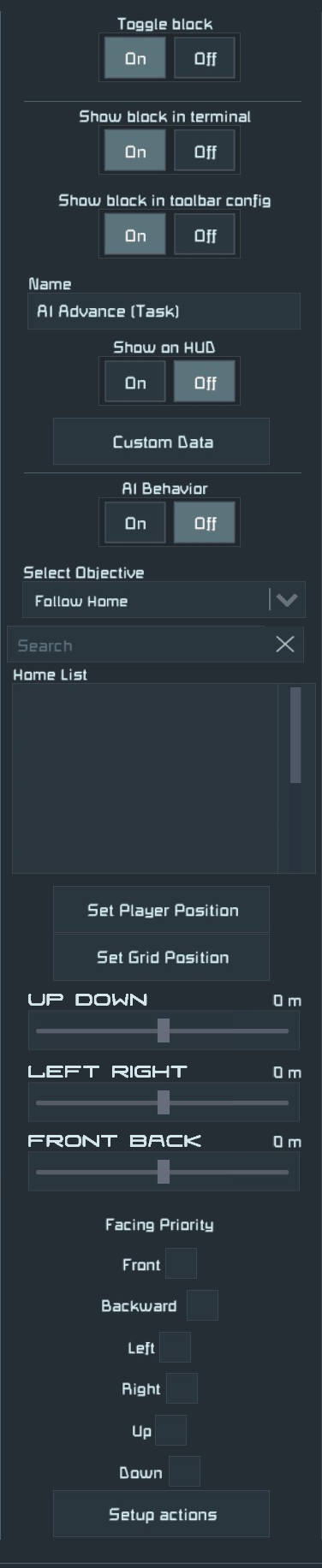
The block operates much like the AI Basic (Task) an objective. Follow Home. It will fly to a point in reference to its home point, such as a GPS point or a beacon block but instead of a random point between 0m and 2000m, or whatever minimum and maximum you have set, It would have sliders for positioning on the X, Y, and Z axis or Forward Back, Left Right, Up Down.
Set X, Y, Z axis
The idea here is simple. The beacon or GPS would be considered 0,0,0 for the the grid with the AI Flight (Move) block. From there you will have sliders between -2000m & 2000m for each axis, such as 2000m up, -2000m down.
If preset, this would be usable for formation flying. Instead of having to pre-set an AI recorder, a AI Advance (Task) block is used instead. This won't take over for the AI recorder as the grid would be flying to a specific point near the grid. Not following a path.
Face direction
It would also have the option for facing priority you can keep the grid facing forward in reference to the beacon. Say you have AI drones, they all face forward in reference to the lead drone. This would mean the beacon block should have directional indicator markers for easier visuals.
Setup action At point / Not at point
The AI Advance (Task) would also have a "Setup actions" button as well. If the grid is in position and if is not in position. Depending on your AI Flight (Move) block settings, if Precision Mode is on or off, this will trigger when the grid is either at the point exact or near the point.
Toolbar options
And for setting up toolbar actions for timers, sensors, setup actions, etc. Engineers should have the option for Increasing and Decreasing each Axis along with an option to Set axis directly such as Set X Axis to: then type in -300. And the option to Set Grid Position.
 I like this feedback
Replies have been locked on this page!