


Update removed access to 2.5m cargo containers in SE2
Reported
as per title. progress blocked due to needing to build those in my current missions
 I have the same bug
 Access denied
Access denied
Access denied
appears the missing items are the following
1) cargo container 2.5
2) Hydrogen tank 2.5
3) oxygen tank 2.5+??
4) No hinges (unsure as the current quest that is unable to complete due to missing the 2.5 items deals with unlocking that)
5) No explosives (same issue as above)
6) Control panel above .25??
7) Missing other automation blocks
Forum is not allowing me to attach the savegame.vrb file
appears the missing items are the following
1) cargo container 2.5
2) Hydrogen tank 2.5
3) oxygen tank 2.5+??
4) No hinges (unsure as the current quest that is unable to complete due to missing the 2.5 items deals with unlocking that)
5) No explosives (same issue as above)
6) Control panel above .25??
7) Missing other automation blocks
Forum is not allowing me to attach the savegame.vrb file
There is a specific contracg which unlocks the 2.5m cargo container
There is a specific contracg which unlocks the 2.5m cargo container
If I recall it is one of the Vallation Station Contracts.
If I recall it is one of the Vallation Station Contracts.
If you guys are stuck you can try debug menu (CTRL-F12)->Progression, select MaterialStorageT2 and click unlock selected reward group and see if that helps you along.
If you guys are stuck you can try debug menu (CTRL-F12)->Progression, select MaterialStorageT2 and click unlock selected reward group and see if that helps you along.
I have the same Bug for the H2 tank and container. (still don't know for the other one.)
I bypass the issue with a plan of each made in creative mode and imported in campain mode.
Hope it help until the fix...
I have the same Bug for the H2 tank and container. (still don't know for the other one.)
I bypass the issue with a plan of each made in creative mode and imported in campain mode.
Hope it help until the fix...
Hello Engineers,
I have reproduced this issue with provided save file and have reported this issue internally. Additionally I have added this thread to our internal ticket (SE2-34400).
Please note that for the save file to work, the whole folder must be compressed as either .zip or .rar file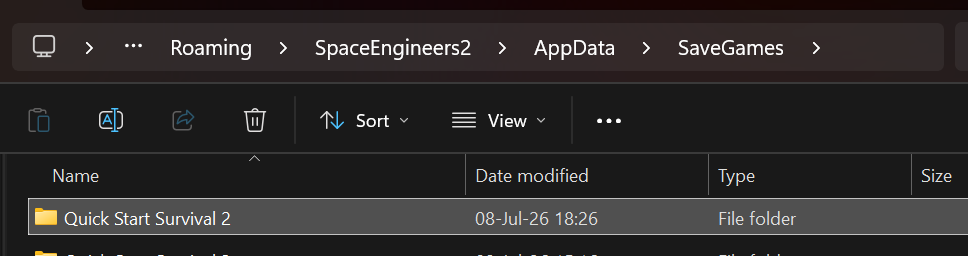
Kind Regards,
Bartosz
Keen Software House
Hello Engineers,
I have reproduced this issue with provided save file and have reported this issue internally. Additionally I have added this thread to our internal ticket (SE2-34400).
Please note that for the save file to work, the whole folder must be compressed as either .zip or .rar file
Kind Regards,
Bartosz
Keen Software House
Same here, have you found a solution? If I use the debug menu, will I compromise my save file?
Same here, have you found a solution? If I use the debug menu, will I compromise my save file?
Replies have been locked on this page!