


Engineering - Lost Asteroid Base - Is bounding box correct?
Not a Bug
Build v2.3.0.2783
I am just starting the new Engineering - Lost Asteroid Base contract, where you need to build certain equipment on the base. The game shows a bounding box, where I am assuming new building is supposed to count. However, the box appears to be away from the incomplete base.
I have tried adding blocks to the base, but I don't have permission to change it.
Screenshots attached.
 I have the same bug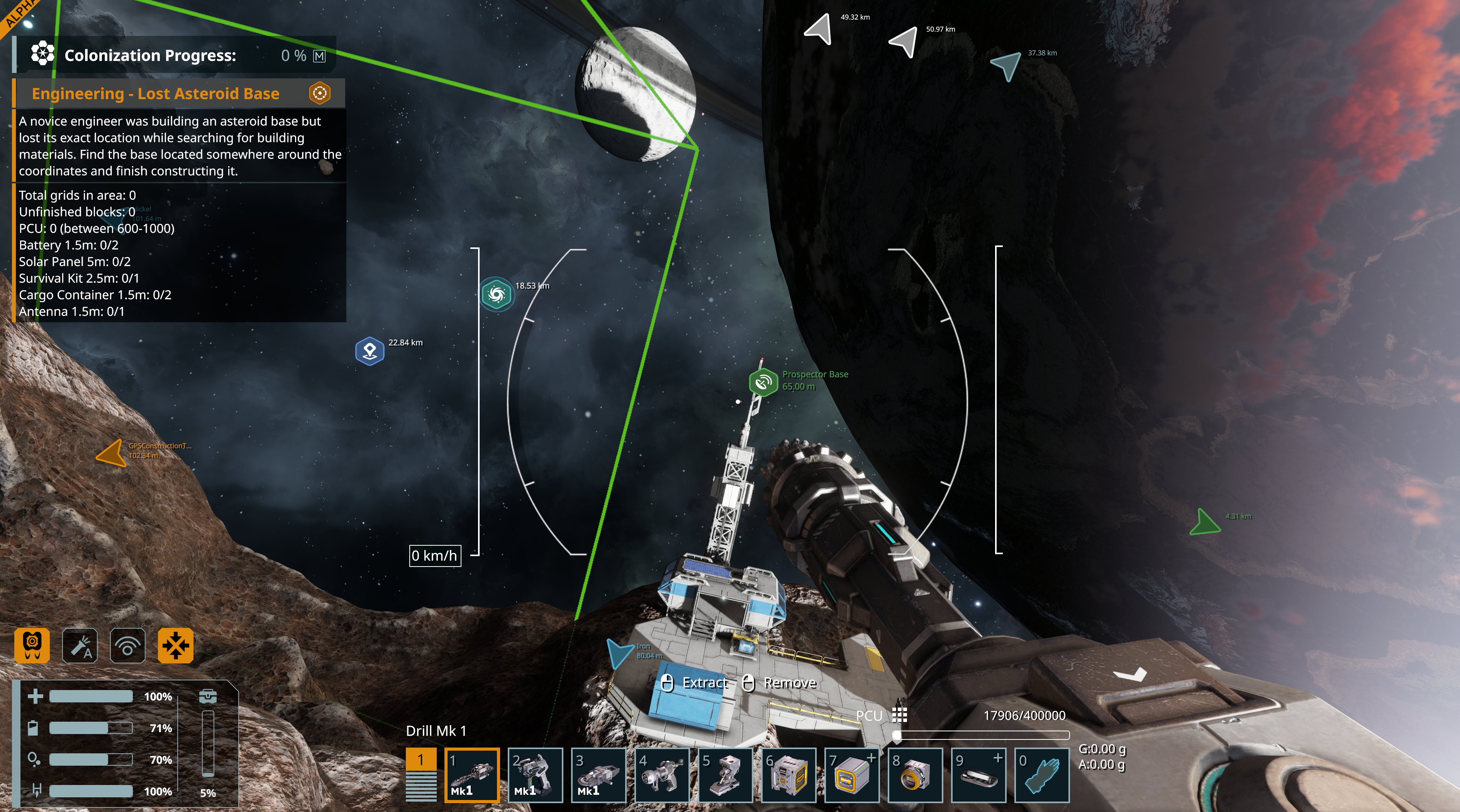
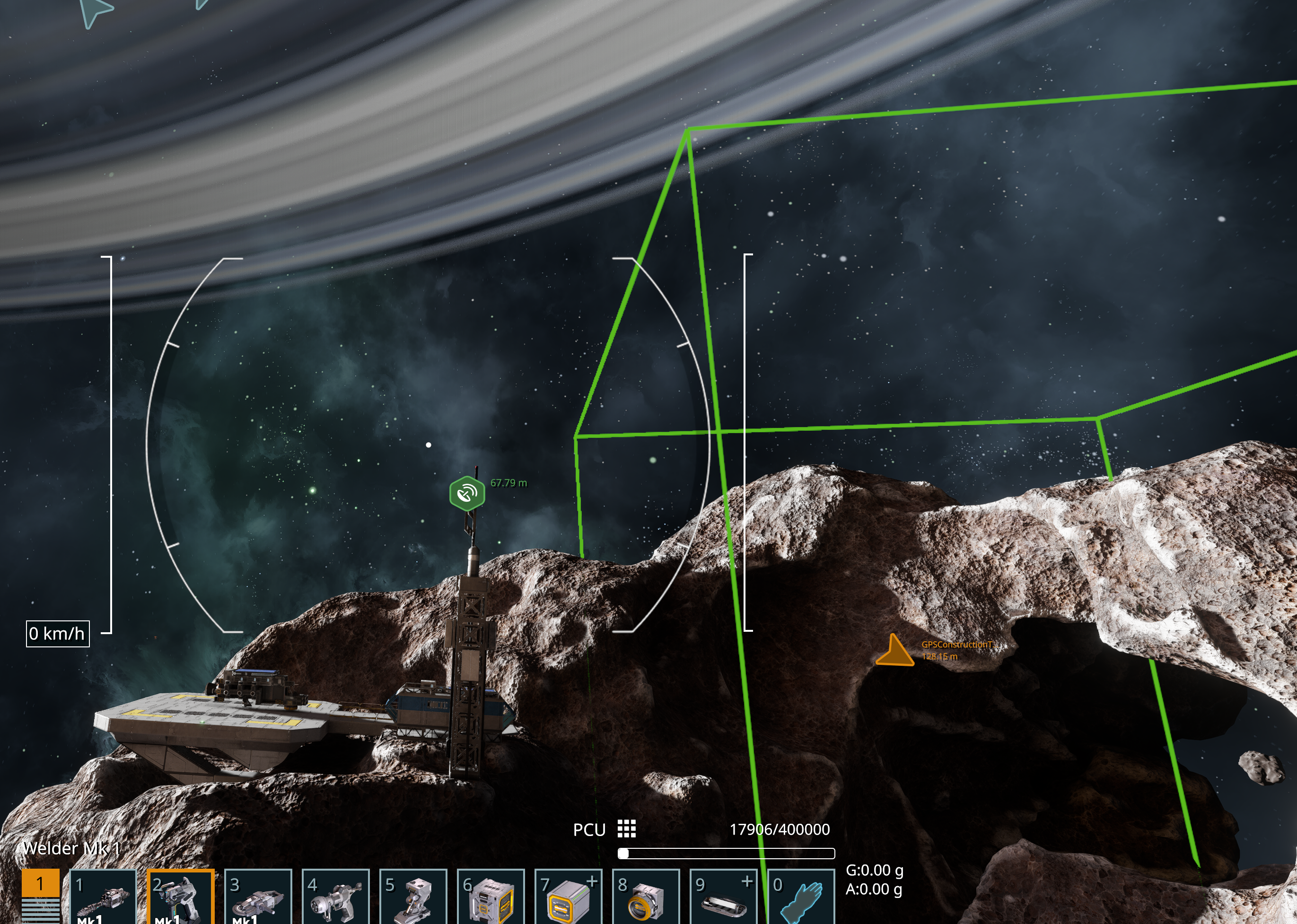
This is a follow-up comment after completing the mission. I could see the bounding box either way for this scenario - including or excluding the pre-existing construction. As it is, space engineers have to build away from the landing pad and existing incomplete structure.
This could also be a variant of the mission itself, where sometimes engineers have to expand on an existing base, and at other times the engineers have to build from scratch at a different location.
This is a follow-up comment after completing the mission. I could see the bounding box either way for this scenario - including or excluding the pre-existing construction. As it is, space engineers have to build away from the landing pad and existing incomplete structure.
This could also be a variant of the mission itself, where sometimes engineers have to expand on an existing base, and at other times the engineers have to build from scratch at a different location.
I have tried to do this mission. In the preview pic of the mission, it shows the mission where you clear the floating boxes away from the base, I remember doing that one in VS2.0, However the base is not the same in the VS2.3 mission, the bounding box has no base inside it (just one next to it that looks entirely different). I built a base there in the bounding box and fulfilled the task's requirements, but then nothing happened. I ended up abandoning the mission. When I came to accept it again, the base I built was refunded to me and the entire asteroid respawned a little way away from where it was in the first place and presented me with the same conundrum. I didn't feel incentivised to build it again, because I felt like the mission is broken. Shame since I think I need to complete it to progress in the campaign.
I hope this is fixed soon and I really want the area welder :)
I have tried to do this mission. In the preview pic of the mission, it shows the mission where you clear the floating boxes away from the base, I remember doing that one in VS2.0, However the base is not the same in the VS2.3 mission, the bounding box has no base inside it (just one next to it that looks entirely different). I built a base there in the bounding box and fulfilled the task's requirements, but then nothing happened. I ended up abandoning the mission. When I came to accept it again, the base I built was refunded to me and the entire asteroid respawned a little way away from where it was in the first place and presented me with the same conundrum. I didn't feel incentivised to build it again, because I felt like the mission is broken. Shame since I think I need to complete it to progress in the campaign.
I hope this is fixed soon and I really want the area welder :)
yeah this one got me too. either the very obvious unfinished base is supposed to be within the bounding box, or we are ment to make a second base? which doesnt make sense.
i think there is probably just an issue with the contract potentially using the same placement mechanic as unknown signals and it being placed before the contract is accepted. so then you get the contract starting, adjacent where it was SUPPOSED to start, but it couldnt because a grid was already there, when starting the contract was supposed to place it there, maybe...?
yeah this one got me too. either the very obvious unfinished base is supposed to be within the bounding box, or we are ment to make a second base? which doesnt make sense.
i think there is probably just an issue with the contract potentially using the same placement mechanic as unknown signals and it being placed before the contract is accepted. so then you get the contract starting, adjacent where it was SUPPOSED to start, but it couldnt because a grid was already there, when starting the contract was supposed to place it there, maybe...?
Hello Engineers,
This is intended behavior. All Contracts have been reworked in the Vertical Slice 2.3. Engineering Contracts in particular are now requiring you to design and build the Grid based on given parameters. You are given the place to build it (the green bounding box) and after fulfilling these parameters you are instructed to transfer the ownership of the Grid you just built in another location which then completes the Contract.
As this is intended behavior, I will close this thread as Not a Bug.
Kind Regards,
Bartosz
Keen Software House
Hello Engineers,
This is intended behavior. All Contracts have been reworked in the Vertical Slice 2.3. Engineering Contracts in particular are now requiring you to design and build the Grid based on given parameters. You are given the place to build it (the green bounding box) and after fulfilling these parameters you are instructed to transfer the ownership of the Grid you just built in another location which then completes the Contract.
As this is intended behavior, I will close this thread as Not a Bug.
Kind Regards,
Bartosz
Keen Software House
Replies have been locked on this page!