


Stacked Pistons are in different groups
Not a Bug
I put 4 pistons on top of each other to create an elevator, but they appear in different grid groups in the control panel (see attached image). How I am going to put them into a single group to assign them to one button (when this feature will be available)?
It makes it also difficult to find in the control panel.
Files:
StackedPistons.png
 I have the same bug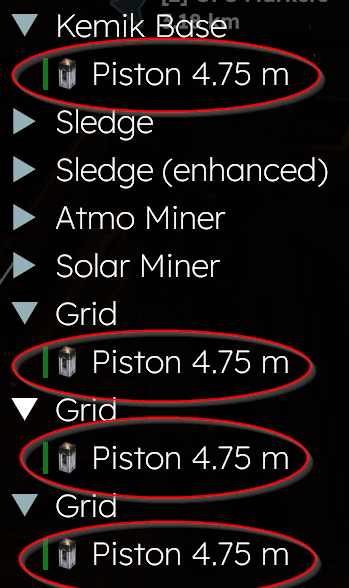
This may be due to the piston creating a sub-grid. There might not be the ability to group sub-grids and make them in the same group as the main grid yet. Hopefully they make it so sub-grids are synonymous with main-grids so grouping will act more like SE1.
This may be due to the piston creating a sub-grid. There might not be the ability to group sub-grids and make them in the same group as the main grid yet. Hopefully they make it so sub-grids are synonymous with main-grids so grouping will act more like SE1.
Hello,
I think for now this is as intended, and pretty sure it's the same for rotors. I put a rotor after a piston on a ship and got 3 grids... when docked in a station with other ships, that's a lot of grids when looking at the control panel or inventories LOL.
I don't think for a second the sub-grids are on their final forms.
Hello,
I think for now this is as intended, and pretty sure it's the same for rotors. I put a rotor after a piston on a ship and got 3 grids... when docked in a station with other ships, that's a lot of grids when looking at the control panel or inventories LOL.
I don't think for a second the sub-grids are on their final forms.
Hello Olivier Jacot-Descombes,
This is currently intended behavior. The Pistons are not in a different block group but rather are their own separate sub-grids (This applies to Rotors as well). There are currently no plans of changing this as far as I am aware of.
As such, I will close this thread as Not a Bug.
Kind Regards,
Bartosz
Keen Software House
Hello Olivier Jacot-Descombes,
This is currently intended behavior. The Pistons are not in a different block group but rather are their own separate sub-grids (This applies to Rotors as well). There are currently no plans of changing this as far as I am aware of.
As such, I will close this thread as Not a Bug.
Kind Regards,
Bartosz
Keen Software House
Replies have been locked on this page!