


Continue thumbnail not updating
The image next to the Continue button does not get refreshed as often as it should. I had many saves and crashed/died in the game. I exited without saving. The Continue button showed the same screen capture image of when I first started playing the world. I checked and the auto-saved had current thumbnails. It appears that the Continue thumbnail image reverts back to the original of when the world was last continued instead of the current screenshot or the last known save screenshot.
This can be misleading, especially for new players who may think their last 2 hours of playing that day were lost.
How to reproduce:
Dock your ship at Valation Station, save and exit the world. The screenshot for the Continue button will now be of your ship at Valation Station.
Play the game for 10+ minutes so that you get one or two saves. This will show you that each save has the correct screen capture on the Load menu.
Crash your ship to kill the player. You will respawn. Exit the game without saving.
The Continue screenshot will now be the same exact screenshot of when you first started playing about 10 minutes ago.
 I have the same bug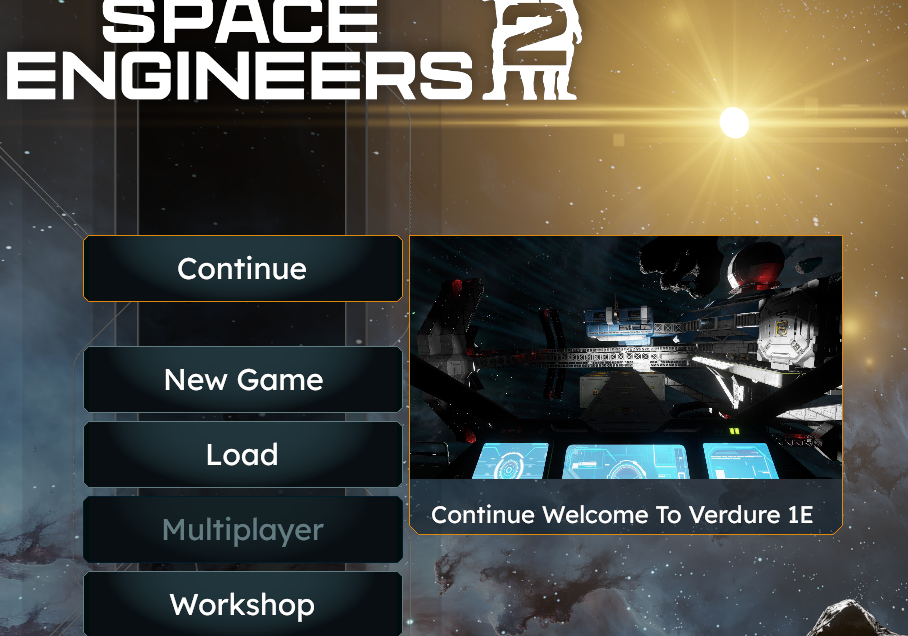
Hello SuperDK7,
I could not reproduce this issue following your steps. Upon exiting to Main Menu without saving, the thumbnail in the Continue button matched the last autosave made.
Could you please provide a video recording of this issue if possible?
Kind Regards,
Bartosz
Keen Software House
Hello SuperDK7,
I could not reproduce this issue following your steps. Upon exiting to Main Menu without saving, the thumbnail in the Continue button matched the last autosave made.
Could you please provide a video recording of this issue if possible?
Kind Regards,
Bartosz
Keen Software House
Hello SuperDK7,
As there has been no activity to this thread in some time, I will close it. If you're still experiencing this issue, please create a new thread.
Kind Regards,
Bartosz
Keen Software House
Hello SuperDK7,
As there has been no activity to this thread in some time, I will close it. If you're still experiencing this issue, please create a new thread.
Kind Regards,
Bartosz
Keen Software House
Replies have been locked on this page!