


Game keeps crashing 10-15min within entering save
Need More Information
Location: Moon (Palatine)
Title pretty much says it all, ever since I landed on the moon my game won't stop crashing every 10-15min and a cmd box will pop up saying it's creating a dump file. I would upload the .dmp file from the cmd box but last time I tried this forum doesn't accept .dmp uploads. Here's logs. Please look into it because it's frustrating having my 50% of my playtime wiped in vain (If it crashed under 10min without autosaving...).
 I have the same bug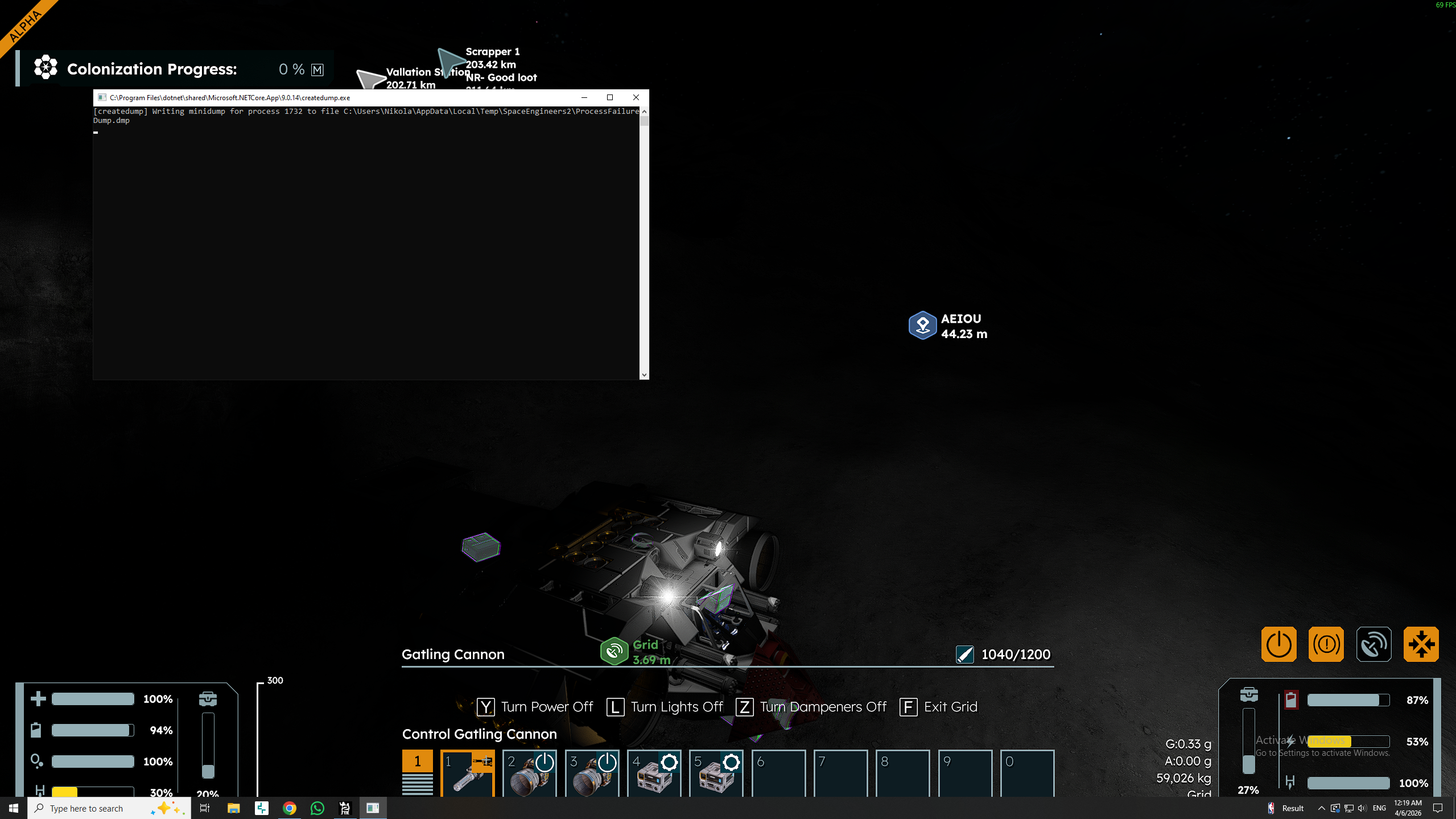
Hello Nick S.,
This crash seems to occur most likely due to problems between the Game and the AMD drivers, however since the logs do not contain any exceptions, I cannot be certain. Please note that we are currently investigating AMD driver issues.
Could you please provide your affected Save file? You can compress it as a ZIP file and attach here on the Site.
Kind Regards,
Bartosz
Keen Software House
Hello Nick S.,
This crash seems to occur most likely due to problems between the Game and the AMD drivers, however since the logs do not contain any exceptions, I cannot be certain. Please note that we are currently investigating AMD driver issues.
Could you please provide your affected Save file? You can compress it as a ZIP file and attach here on the Site.
Kind Regards,
Bartosz
Keen Software House
I think I have the same issue. Have built multiple bases and ships in other parts of the system without issues but then decided to land and build one on Palatine and have been having regular .net crashes ever since. Attached most recent .net dump file and logs. Have a few other dumps that all happened in the same area if required.
Event log shows
Log Name: Application
Source: .NET Runtime
Date: 19/04/2026 7:28:30 am
Event ID: 1026
Task Category: None
Level: Error
Keywords: Classic
User: N/A
Computer:
Description:
Application: SpaceEngineers2.exe
CoreCLR Version: 9.0.1526.17522
.NET Version: 9.0.15
Description: The process was terminated due to an unhandled exception.
Stack:
at Keen.VRage.Physics.Havok.Core.HknpWorld.destroyConstraints(Keen.VRage.Physics.Havok.Core.HknpConstraintId*, Int32, ActivationMode)
at Keen.VRage.Physics.Havok.Constraints.HavokConstraintManager.DestroyBodyVirtualConstraints(Keen.VRage.Physics.Havok.Core.HknpBodyId)
at Keen.VRage.Physics.Havok.Constraints.HavokConstraintManager.DestroyBodyConstraints(Keen.VRage.DCS.Accessors.DEntity, Keen.VRage.Physics.Havok.Core.HknpWorld*)
at Keen.VRage.Physics.Havok.WorldManager.HavokWorldHelper.DestroyBody(Keen.VRage.Physics.Havok.HavokSessionComponent, Keen.VRage.DCS.Accessors.DEntityContext ByRef)
at Keen.VRage.Physics.Havok.WorldManager.HavokLargeWorldManager.DestroyBody(Keen.VRage.DCS.Accessors.DEntity, Boolean)
at Keen.VRage.Physics.Havok.WorldManager.HavokLargeWorldManager.ReorderClusters(Keen.VRage.Library.Mathematics.BoundingBoxD, Keen.VRage.DCS.Accessors.DEntity, Keen.VRage.Physics.Data.BodyArgs ByRef)
at Keen.VRage.Physics.Havok.WorldManager.HavokLargeWorldManager.AllocateBody(Keen.VRage.DCS.Accessors.DEntity, Keen.VRage.Physics.Data.BodyArgs ByRef)
at Keen.VRage.Physics.Havok.HavokSessionComponent.AllocateBody(Keen.VRage.DCS.Accessors.DEntity, Keen.VRage.Physics.Data.BodyArgs ByRef)
at Keen.VRage.Physics.Components.RigidBodyComponent.OnAddedToScene()
at Keen.VRage.Core.Game.Systems.SessionEntityLifetimeHandler.AddToSimulation(Keen.VRage.DCS.Components.Entity)
at Keen.VRage.Core.Game.Systems.Session.AddEntityToSceneCore(Keen.VRage.DCS.Components.Entity)
at Keen.VRage.Core.Game.Systems.Session.AddEntityBundleToScene(System.ReadOnlySpan`1<Keen.VRage.DCS.Components.Entity>)
at Keen.Game2.Simulation.GameSystems.ProjectileSystems.ProjectileSystemSessionComponent.SpawnSimulatedProjectile(ProjectileSpawnInfo)
at Keen.Game2.Simulation.GameSystems.ProjectileSystems.ProjectileSystemSessionComponent.ProcessProjectileSpawnRequests()
at Keen.Game2.Simulation.GameSystems.ProjectileSystems.ProjectileSystemSessionComponent.ProcessProjectileSpawnRequests_InvocationStub(Byte**, Int32, Keen.VRage.DCS.Scenes.Scene, System.Object)
at Keen.VRage.DCS.Scenes.Scene.RunJob(Int32)
at Keen.VRage.DCS.Scenes.Scene.Tick(Boolean)
at Keen.VRage.Core.Game.Systems.Session.Update(Boolean)
at Keen.Game2.WorldTickComponent.Tick()
at Keen.Game2.InProcessServerWorldTickComponent.TickServerInternal()
at Keen.Game2.InProcessServerWorldTickComponent.Tick()
at Keen.Game2.GameAppComponent.GameUpdate()
at Keen.Game2.GameAppComponent.GameUpdate_InvocationStub(Byte**, Int32, Keen.VRage.DCS.Scenes.Scene, System.Object)
at Keen.VRage.DCS.Scenes.Scene.RunJob(Int32)
at Keen.VRage.DCS.Scenes.Scene.Tick(Boolean)
at Keen.VRage.Core.VRageCore.Update(System.TimeSpan)
at Keen.VRage.Library.Utils.AppLoop.Run(System.Action`1<System.TimeSpan>)
at Keen.Game2.Program.Main(System.String[])
Log Name: Application
Source: Application Error
Date: 19/04/2026 7:28:36 am
Event ID: 1000
Task Category: Application Crashing Events
Level: Error
Keywords:
User:
Computer:
Description:
Faulting application name: SpaceEngineers2.exe, version: 2.2.0.2113, time stamp: 0x68d50000
Faulting module name: coreclr.dll, version: 9.0.1526.17522, time stamp: 0x69c4809f
Exception code: 0xc0000005
Fault offset: 0x00000000002e5102
Faulting process id: 0x8BEC
Faulting application start time: 0x1DCCF690313E6C7
Faulting application path: C:\Program Files (x86)\Steam\steamapps\common\SpaceEngineers2\Game2\SpaceEngineers2.exe
Faulting module path: C:\Program Files\dotnet\shared\Microsoft.NETCore.App\9.0.15\coreclr.dll
Report Id: 8c7d4a8f-4fde-42a7-84f2-b1611b48b835
Faulting package full name:
Faulting package-relative application ID:
I think I have the same issue. Have built multiple bases and ships in other parts of the system without issues but then decided to land and build one on Palatine and have been having regular .net crashes ever since. Attached most recent .net dump file and logs. Have a few other dumps that all happened in the same area if required.
Event log shows
Log Name: Application
Source: .NET Runtime
Date: 19/04/2026 7:28:30 am
Event ID: 1026
Task Category: None
Level: Error
Keywords: Classic
User: N/A
Computer:
Description:
Application: SpaceEngineers2.exe
CoreCLR Version: 9.0.1526.17522
.NET Version: 9.0.15
Description: The process was terminated due to an unhandled exception.
Stack:
at Keen.VRage.Physics.Havok.Core.HknpWorld.destroyConstraints(Keen.VRage.Physics.Havok.Core.HknpConstraintId*, Int32, ActivationMode)
at Keen.VRage.Physics.Havok.Constraints.HavokConstraintManager.DestroyBodyVirtualConstraints(Keen.VRage.Physics.Havok.Core.HknpBodyId)
at Keen.VRage.Physics.Havok.Constraints.HavokConstraintManager.DestroyBodyConstraints(Keen.VRage.DCS.Accessors.DEntity, Keen.VRage.Physics.Havok.Core.HknpWorld*)
at Keen.VRage.Physics.Havok.WorldManager.HavokWorldHelper.DestroyBody(Keen.VRage.Physics.Havok.HavokSessionComponent, Keen.VRage.DCS.Accessors.DEntityContext ByRef)
at Keen.VRage.Physics.Havok.WorldManager.HavokLargeWorldManager.DestroyBody(Keen.VRage.DCS.Accessors.DEntity, Boolean)
at Keen.VRage.Physics.Havok.WorldManager.HavokLargeWorldManager.ReorderClusters(Keen.VRage.Library.Mathematics.BoundingBoxD, Keen.VRage.DCS.Accessors.DEntity, Keen.VRage.Physics.Data.BodyArgs ByRef)
at Keen.VRage.Physics.Havok.WorldManager.HavokLargeWorldManager.AllocateBody(Keen.VRage.DCS.Accessors.DEntity, Keen.VRage.Physics.Data.BodyArgs ByRef)
at Keen.VRage.Physics.Havok.HavokSessionComponent.AllocateBody(Keen.VRage.DCS.Accessors.DEntity, Keen.VRage.Physics.Data.BodyArgs ByRef)
at Keen.VRage.Physics.Components.RigidBodyComponent.OnAddedToScene()
at Keen.VRage.Core.Game.Systems.SessionEntityLifetimeHandler.AddToSimulation(Keen.VRage.DCS.Components.Entity)
at Keen.VRage.Core.Game.Systems.Session.AddEntityToSceneCore(Keen.VRage.DCS.Components.Entity)
at Keen.VRage.Core.Game.Systems.Session.AddEntityBundleToScene(System.ReadOnlySpan`1<Keen.VRage.DCS.Components.Entity>)
at Keen.Game2.Simulation.GameSystems.ProjectileSystems.ProjectileSystemSessionComponent.SpawnSimulatedProjectile(ProjectileSpawnInfo)
at Keen.Game2.Simulation.GameSystems.ProjectileSystems.ProjectileSystemSessionComponent.ProcessProjectileSpawnRequests()
at Keen.Game2.Simulation.GameSystems.ProjectileSystems.ProjectileSystemSessionComponent.ProcessProjectileSpawnRequests_InvocationStub(Byte**, Int32, Keen.VRage.DCS.Scenes.Scene, System.Object)
at Keen.VRage.DCS.Scenes.Scene.RunJob(Int32)
at Keen.VRage.DCS.Scenes.Scene.Tick(Boolean)
at Keen.VRage.Core.Game.Systems.Session.Update(Boolean)
at Keen.Game2.WorldTickComponent.Tick()
at Keen.Game2.InProcessServerWorldTickComponent.TickServerInternal()
at Keen.Game2.InProcessServerWorldTickComponent.Tick()
at Keen.Game2.GameAppComponent.GameUpdate()
at Keen.Game2.GameAppComponent.GameUpdate_InvocationStub(Byte**, Int32, Keen.VRage.DCS.Scenes.Scene, System.Object)
at Keen.VRage.DCS.Scenes.Scene.RunJob(Int32)
at Keen.VRage.DCS.Scenes.Scene.Tick(Boolean)
at Keen.VRage.Core.VRageCore.Update(System.TimeSpan)
at Keen.VRage.Library.Utils.AppLoop.Run(System.Action`1<System.TimeSpan>)
at Keen.Game2.Program.Main(System.String[])
Log Name: Application
Source: Application Error
Date: 19/04/2026 7:28:36 am
Event ID: 1000
Task Category: Application Crashing Events
Level: Error
Keywords:
User:
Computer:
Description:
Faulting application name: SpaceEngineers2.exe, version: 2.2.0.2113, time stamp: 0x68d50000
Faulting module name: coreclr.dll, version: 9.0.1526.17522, time stamp: 0x69c4809f
Exception code: 0xc0000005
Fault offset: 0x00000000002e5102
Faulting process id: 0x8BEC
Faulting application start time: 0x1DCCF690313E6C7
Faulting application path: C:\Program Files (x86)\Steam\steamapps\common\SpaceEngineers2\Game2\SpaceEngineers2.exe
Faulting module path: C:\Program Files\dotnet\shared\Microsoft.NETCore.App\9.0.15\coreclr.dll
Report Id: 8c7d4a8f-4fde-42a7-84f2-b1611b48b835
Faulting package full name:
Faulting package-relative application ID:
Replies have been locked on this page!