World won't load and can't add block to my grid

Guillaume Couture shared this bug 21 days ago
Need More Information

I have encountered two bugs that I would like to report:

1. World Loading Failure (v2.2): The world I started after the 2.2 update has suddenly stopped loading. Additionally, the backup save I created for this world is also failing to load. You can find the save file here: https://steamcommunity.com/sharedfiles/filedetails/?id=3697473250

2. Block Placement Restriction: After encountering the first bug, I started a new world. Everything was functioning correctly until I found that I could no longer place blocks on a ship I had built. While I am able to start a new grid, I cannot add blocks to the existing grid in this save. Here is the link to the file: https://steamcommunity.com/sharedfiles/filedetails/?id=3697474590

Thanks for the help, and keep up the good work!

Replies (4)

photo
2

Hello Guillaume Couture,


1 - Every save should have backups available through Advanced Settings button in Load menu: 00eadc2d71ce1d8945ecbfa0a0154598
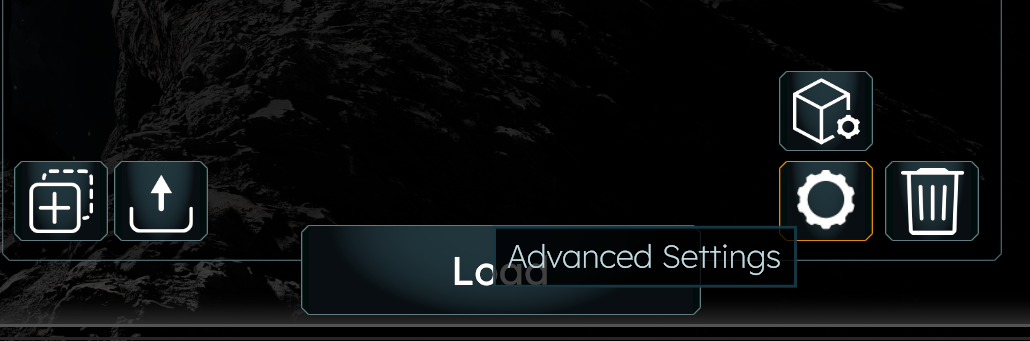
Have you tried loading any backups there?

2 - This issue is tracked in this thread: https://support.keenswh.com/spaceengineers2/pc/topic/53251-cant-place-any-new-block-on-my-ships-in-survivol


Kind Regards,

Bartosz

Keen Software House

photo
2

The backups also crash.

photo
1

I have that bug too. My world doesn't load. Are you using a converted grid from Space Engineers 1 in your save? I found out that only some grids in the savegame are leading to a minidump log file and the closing of the game.

photo
1

No, but it was after i've built a ship blueprint. It started when after a save and exit. I've never been able to load that world again. The weird part is that it bugged the back-up save too. I don't really care to get that save back. I just want them to know it happen so they can find a fix for the future.

photo
2

I had a similar issue, then found off to the side of my Starter Base, a bunch of ghost blocks from a prior build that I'd never completed.

I presume the Ghost Blocks were each identified as new (but incomplete) Grids and that I had exceeded the games limit of independent and incomplete Grids.

Once I deleted these Ghost / Incomplete Grids, I was able to again modify, and add new blocks to my existing ships

However and maybe THIS is a bug, when the game was in the "too many incomplete Ghost Grids" state, trying to add Blocks to my Ship (which didn't work), still increased the PCU count.

Literally, I could spam the placement enough times to exceed the overall PCU count limit even though no new Blocks (or Ghost Blocks) were added to the ship.

photo
2

Sometimes the world becomes corrupted and crashes. Sometimes the corruption gets saved as backup files. This means that even though there are 5 backups of your current world they could all be corrupted. It is best to click SAVE AS to create a new save for your current world. For example, whenever I make a large achievement, like adding to my mother ship, mining a large number of ore, or after every few contracts, I SAVE AS. I rename the save-as by removing the "copy of" at the end of the name and adding a letter a, b, c, etc. This way I can go back to previous saves, each with 5 backups. I learned this lesson the hard way when the first version was released and 4 of the 5 backups had the same corruption/crash issue. Luckily the 5th save worked. I also sometimes make a copy of the complete backup folder.

photo
1

That sounds exactly like my problem.

If your PC-RAM is full and you save, its possible that the save gets corrupted. After 2 hours my 32gb Ram is full, The game manages ram badly at the moment. It grows and grows. I have the taskmanager open all the time to watch ram. If its full i kill a few tasks like firefox or mediaplayer and so on to free Ram too save the game.

Additional info : I had a perfectly working world till i imported a specific grid. As i found out later the problem was that 16 Blocks of the grid were damaged. (I think this is a missing or corrupted material/texture problem) The grid even made the blueprint gallery slow. Everytime i deleted the grid the gallery was fast loading again. I loaded the corrupted import grid into a empty world and i removed the damaged blocks and the areas around them and then i saved it into the blueprints. The second thing that helped was to split the grid into mulitple parts and then i tested which part of the grid corrupted the save. When i loaded this new blueprint into my old world it worked and the save works fine.

photo
2

Yeah, hopefully the memory leaks get fixed in the next release, but they said the fixes will be ongoing. They did fix some of the inventory memory leaks, but others still exist. For example, every time you go into a new cargo container you lose approximately 100mb of memory. Now it happens when you go into a new cargo container. It used to be that every time you were in a cockpit and pressed tab to go into your inventory you would lose 100mb, not it only happens sometimes. There's also a memory leak that happens when flying through space, but I have not figured it out yet because it doesn't always happen.


All sorts of bugs/issue happen when the computer memory is used up. It seems to be around 12GB where things start breaking in the game. SE2 must be completely closed and re-opened to free the memory, closing the world does not fix it.


That's great that you figured out the blueprint from SE1 to SE2 issue, many people have reported SE1 imports crash SE2, but did not know why.

photo
2

every time i try to continue a party i get this and the game crash , it does not happen when i start a game but if i try to relaunch it it crash , it seems to only happen with empty world , i created a empty file name Dump.dmp at the place that it was tryng to create it but it did not fix it

photo
1

Good news, since yesterdays (07.04.2026) fixing-update all my saves are loading again, even the oldest and also those which were corrupted.


I also installed the game on Win11 (before win10), but i think its the update which solved the problem for me.

I hope its fixed for you guys and the original poster here too. :)

photo
1

I'm glad to hear it. My save isn't working, but it's no big deal.

photo
photo
1

Hello Guillaume Couture,


It seems that your Saved File got corrupted due to some data mismatch after the Game split a Grid. Do you happen to have that Ship's blueprint that you could attach here?


Have you been able to build that specific ship in other saves?


Kind Regards,

Bartosz

Keen Software House

Leave a Comment
 
Attach a file
Access denied
Access denied
Access denied
