


Linux - Missing dependencies VS2
Not a Bug
When loading the new VS2 release on Linux CachyOS and others advising missing dependencies.
Comment your Distro and vote up so Keen get on this
Files:
Screenshot_2025...
 I have the same bug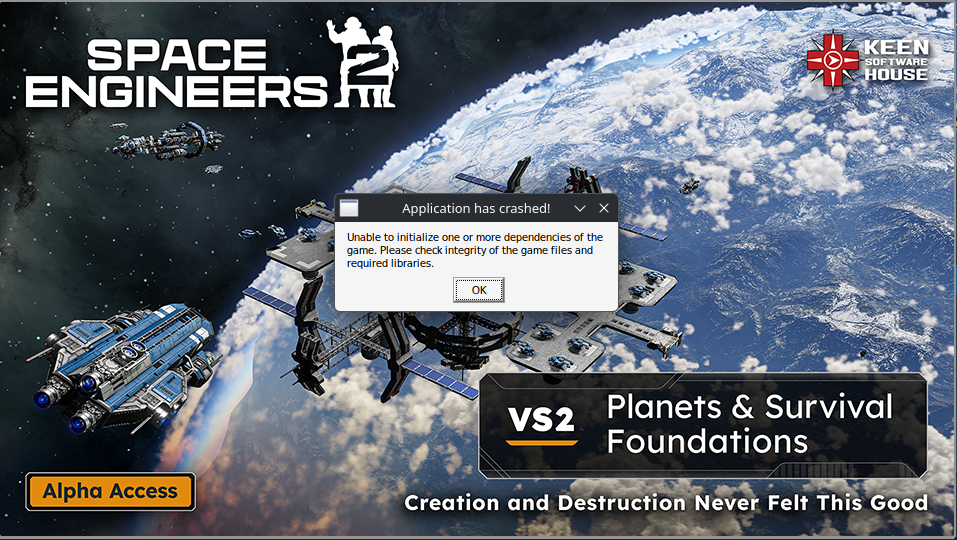
On Mint and have the same error.
On Mint and have the same error.
Mint and Ubuntu are also effected, more details are listed in this steam diskussion: https://steamcommunity.com/app/1133870/discussions/0/686365108484469179/
(worked before just fine)
Mint and Ubuntu are also effected, more details are listed in this steam diskussion: https://steamcommunity.com/app/1133870/discussions/0/686365108484469179/
(worked before just fine)
On some Proton Versions I just get this message shown in the screenshot not sure if same root problem or not
On some Proton Versions I just get this message shown in the screenshot not sure if same root problem or not
CachyOS - Could play before the update without a problem
CachyOS - Could play before the update without a problem
Same here with Ubuntu Pop OS
Same here with Ubuntu Pop OS
zorin 18, same here. flawless before VS2, refuses to boot after.
zorin 18, same here. flawless before VS2, refuses to boot after.
Hello Engineers,
Linux based systems are currently not officially supported for Space Engineers 2. As such, we cannot guarantee a smooth experience.
As such I will close this thread.
Kind Regards,
Bartosz
Keen Software House
Hello Engineers,
Linux based systems are currently not officially supported for Space Engineers 2. As such, we cannot guarantee a smooth experience.
As such I will close this thread.
Kind Regards,
Bartosz
Keen Software House
I am aware that Linux is not supported yet, but it does not make sense to close this thread as you need Linux gamers as well if you want the game to be more successful than ever.
I have the same issue on Linux Mint with the Unable to initialize one or more dependencies of the game error.
The previous version worked flawlessly without any crashes or noticable bugs. It was also running extremely smooth, better than on Windows 11.
I tried using different versions of Proton but it still gives the same errors.
EDIT: Using the Proton HotFix and @Max Neumann suggested parameter launched the game successfully but it is lagging, inventory not showing, and then it froze. I guess I will have to wait for the next update...
I am aware that Linux is not supported yet, but it does not make sense to close this thread as you need Linux gamers as well if you want the game to be more successful than ever.
I have the same issue on Linux Mint with the Unable to initialize one or more dependencies of the game error.
The previous version worked flawlessly without any crashes or noticable bugs. It was also running extremely smooth, better than on Windows 11.
I tried using different versions of Proton but it still gives the same errors.
EDIT: Using the Proton HotFix and @Max Neumann suggested parameter launched the game successfully but it is lagging, inventory not showing, and then it froze. I guess I will have to wait for the next update...
Parrot os this is what i get
Parrot os this is what i get
So a bit of an update after I came here complaining they were just brushing off Linux users: I was able to get mine running with the command "PROTON_HIDE_NVIDIA_GPU=1 %command%"
I also noticed that before, with VS1, I got the error on launch about my system not meeting the minimum requirements. I also could not enable RT with VS1.
Now, with the command above, it does launch VS2 without error; even the one about minimum requirements is not appearing. I believe it's either something with how the engine is looking for a video card, or with the Linux Nvidia drivers (known issue with poor Linux support, poo on Nvidia!).
My guess is that it's a combination of both. Something has changed on the game side because it did work before and this is the first time I've come across a game that wouldn't launch with Proton on Linux (only been on Linux for a few months, but I've tried lots of my games, both new and ancient).
For reference, I'm on a 3080 Ti on CachyOS with the currently updated Nvidia Open driver from Cachy's own repo, version 580.108.08. The launch command above does work for me.
So a bit of an update after I came here complaining they were just brushing off Linux users: I was able to get mine running with the command "PROTON_HIDE_NVIDIA_GPU=1 %command%"
I also noticed that before, with VS1, I got the error on launch about my system not meeting the minimum requirements. I also could not enable RT with VS1.
Now, with the command above, it does launch VS2 without error; even the one about minimum requirements is not appearing. I believe it's either something with how the engine is looking for a video card, or with the Linux Nvidia drivers (known issue with poor Linux support, poo on Nvidia!).
My guess is that it's a combination of both. Something has changed on the game side because it did work before and this is the first time I've come across a game that wouldn't launch with Proton on Linux (only been on Linux for a few months, but I've tried lots of my games, both new and ancient).
For reference, I'm on a 3080 Ti on CachyOS with the currently updated Nvidia Open driver from Cachy's own repo, version 580.108.08. The launch command above does work for me.
Before the latest patch update (4th December) I was able to play SE2 on Linux. Now I get application crashed.
I also find it funny how the game is built for Windows and yet within the game files there are some dependancies/runtime files for Linux too.
Since Keen are using UE5 as the base game engine you would think they would port to Linux as it's built into the engine to port to Linux.
Before the latest patch update (4th December) I was able to play SE2 on Linux. Now I get application crashed.
I also find it funny how the game is built for Windows and yet within the game files there are some dependancies/runtime files for Linux too.
Since Keen are using UE5 as the base game engine you would think they would port to Linux as it's built into the engine to port to Linux.
On CachyOS got it working using Proton-9.0-4, but i had to install a lot of stuff via protontricks...
After that, running the game without launch options it told me I dont have the capable hardware, but setting `PROTON_HIDE_NVIDIA_GPU=1 %command%` to launch options bypassed the check.
On Pop!OS prior to switching to CachyOS, I only had to install dotnet472 and got the game working with ProtonGE-10-25.
Specs:
OS: CachyOS x86_64
Kernel: Linux 6.12.63-2-cachyos-lts
CPU: 12th Gen Intel(R) Core(TM) i5-12400F (12) @ 4.40 GHz
GPU: NVIDIA GeForce RTX 2080 SUPER [Discrete]
On CachyOS got it working using Proton-9.0-4, but i had to install a lot of stuff via protontricks...
After that, running the game without launch options it told me I dont have the capable hardware, but setting `PROTON_HIDE_NVIDIA_GPU=1 %command%` to launch options bypassed the check.
On Pop!OS prior to switching to CachyOS, I only had to install dotnet472 and got the game working with ProtonGE-10-25.
Specs:
OS: CachyOS x86_64
Kernel: Linux 6.12.63-2-cachyos-lts
CPU: 12th Gen Intel(R) Core(TM) i5-12400F (12) @ 4.40 GHz
GPU: NVIDIA GeForce RTX 2080 SUPER [Discrete]
On EndeavourOS, I got the game working with ProtonGE-10-25. I needed to let ProtonGE install a C# runtime environment from Microsoft and restart Steam once afterward. After that, SE2 is running fine.
What has stopped working is the SE2 mod kit. I bought the game a few days before the release of VS2.0, got it running as described above and the mod kit also "worked sufficiently" that I could start it up and play around a bit. When I tried again several days later, it crashed right away and has since kept doing so.
On EndeavourOS, I got the game working with ProtonGE-10-25. I needed to let ProtonGE install a C# runtime environment from Microsoft and restart Steam once afterward. After that, SE2 is running fine.
What has stopped working is the SE2 mod kit. I bought the game a few days before the release of VS2.0, got it running as described above and the mod kit also "worked sufficiently" that I could start it up and play around a bit. When I tried again several days later, it crashed right away and has since kept doing so.
Replies have been locked on this page!