


Suspected AMD Driver? - Crashes now unfortunately unplayable.
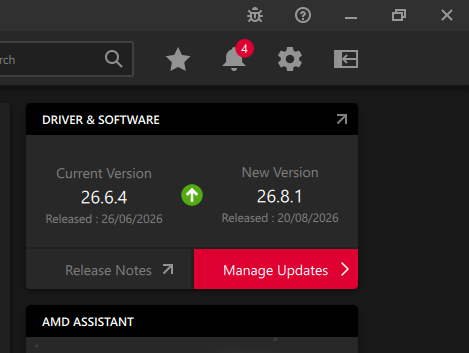
I thought I had narrowed down a persistent crash I've been experiencing and am stuck as to how to fix it. If there's any advice would be great otherwise consider this a bug report. When i used the alt freelook - and move the mouse, specifically I think it has a preference for when i move it to the right (to look right in game), it crashes. But also left. This was what i thought was the case - however after rolling back AMD driver from 26.8.1 to 26.6.4
It was survival, everything unlocked, save. I have accessed debug a few times, exclusively in order to put down blueprints by enabling creative mode (I think i also spawned some mk4 tools at the beginning of the save as well)
I have tried:
- updating GPU drivers
- Installing AMD adrenaline to manage drivers
- Verifying game files
- Turned discord, microsoft and steam overlays off
- I run 3 screens on my system - however disconnected these, set my system up - as one screen and replicated it many times in the same manner.
- Restarted
- Unsubscribed from all my workshop blueprints (and mods which i hadn't used)
- Changing resolution - see below
- i don't use any software for my mouse so havent tried reducing DPI but i took off the windows setting which allows smoother transitions between screens, but crash still presented.
- uninstalled and resintalled the game from a fresh download, loaded into the save first time, didn't crash. was spinning mouse around yaw axis as fast as i could. No crash. Second time i loaded it up later. the crash happened again.
- fair few other things
- Rolled back AMD drivers as above
- reinstalled game from fresh downloaded install files
I am running game in 4k on 4k monitor. When i change to HD it appears to happen less frequently or I have to move it faster to trigger the crash.
It was happening for the last month seldom, now its every time I play after about 5 minutes it'll happen. In new game's i start as well. I'm not going to be able to play until I get a workaround or fix for this. Great game, Please help!
Cheers
System Specifications
OS: Microsoft Windows 11 Pro (64-bit, Build 26200)
CPU: AMD Ryzen 7 5800X (8 Cores, 16 Threads)
GPU: AMD Radeon RX 6700 XT
RAM: 48.0 GB Installed Physical Memory
Motherboard: Gigabyte Technology B450 AORUS PRO
BIOS Version: F63d (07/20/2022)
Can provide more info if required
 I have the same bug
Turned off steam's automatic screen recording. I thought I'd turned it off by disabling overlay. But not same thing. So far so good... Will update if i can't replicate it over the next few days
Turned off steam's automatic screen recording. I thought I'd turned it off by disabling overlay. But not same thing. So far so good... Will update if i can't replicate it over the next few days
https://steamcommunity.com/sharedfiles/filedetails/?id=3805909998 crashes every time I load if I V in and out of 3rd person while pooting the viewpoint around, usually within a minute and quicker if I have HDR turned on in display properties or start noodging the game's graphics options. See the comments in the published world that I'll leave untouched, verified steam files, did safe-mode ddu clean installs and verified that the chipset driver versions matched for the june, august and latest optional september drivers so it's been consistent once it starts happening, I got this far (almost all palatine station contracts complete, going back to vallation for the gatlings) without it crashing but it just started failing endessly yesterday.
https://steamcommunity.com/sharedfiles/filedetails/?id=3805909998 crashes every time I load if I V in and out of 3rd person while pooting the viewpoint around, usually within a minute and quicker if I have HDR turned on in display properties or start noodging the game's graphics options. See the comments in the published world that I'll leave untouched, verified steam files, did safe-mode ddu clean installs and verified that the chipset driver versions matched for the june, august and latest optional september drivers so it's been consistent once it starts happening, I got this far (almost all palatine station contracts complete, going back to vallation for the gatlings) without it crashing but it just started failing endessly yesterday.
Replies have been locked on this page!