


[Bug / Issue] Mission "Bounty - Raider Base" cannot be triggered or completed (GPS inside mountain)
Need More Information
Hi everyone,
I encountered an issue with the mission "Bounty - Raider Base" in Survival mode and I am unsure if this is a bug or if I'm missing something.
- Issue: The mission marker GPSActiveContract spawned deep inside a mountain.
- Steps taken:Accepted the "Bounty - Raider Base" contract and flew to the target location.Upon arrival, I noticed the GPS marker was embedded inside the mountain terrain.I landed, dug my way into the mountain to reach the marker, but the mission did not trigger/activate.I then went around the mountain to the actual enemy base and destroyed everything as instructed in the description, but the mission remains incomplete/unfulfilled.
Troubleshooting already done:
- Started a completely fresh save game after Update 2.3.
- Verified integrity of game files via Steam.
If this is indeed a bug, I wanted to report it here. If this is intended or if there is a specific trick to triggering this mission properly, I'd appreciate any guidance!
Thanks in advance!
 I have the same bug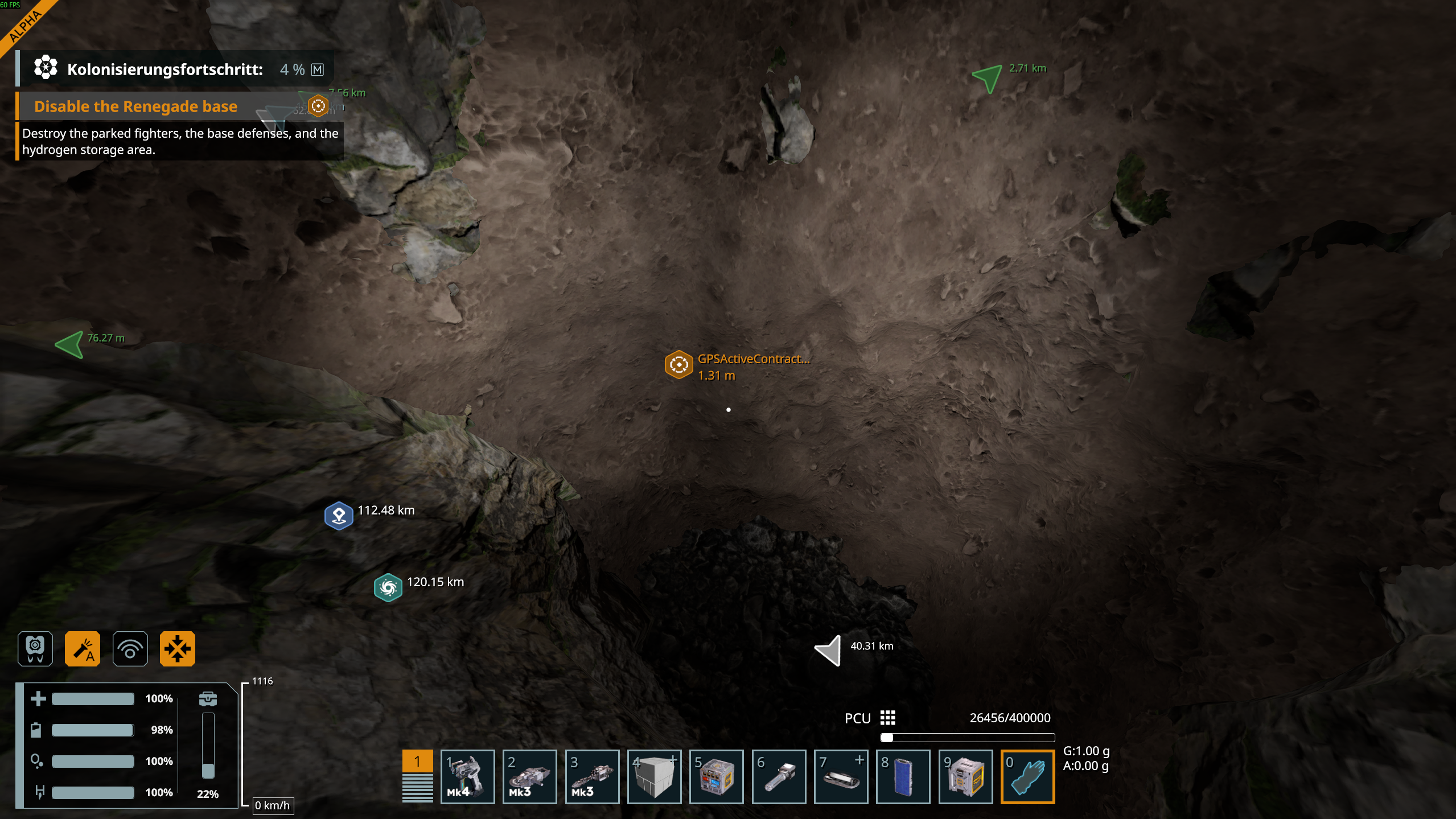
You can't vote. Please authorize!
You can't vote. Please authorize!
You can't vote. Please authorize!
You can't vote. Please authorize!
Hello Heiko Hartmann (TutMeistensNix),
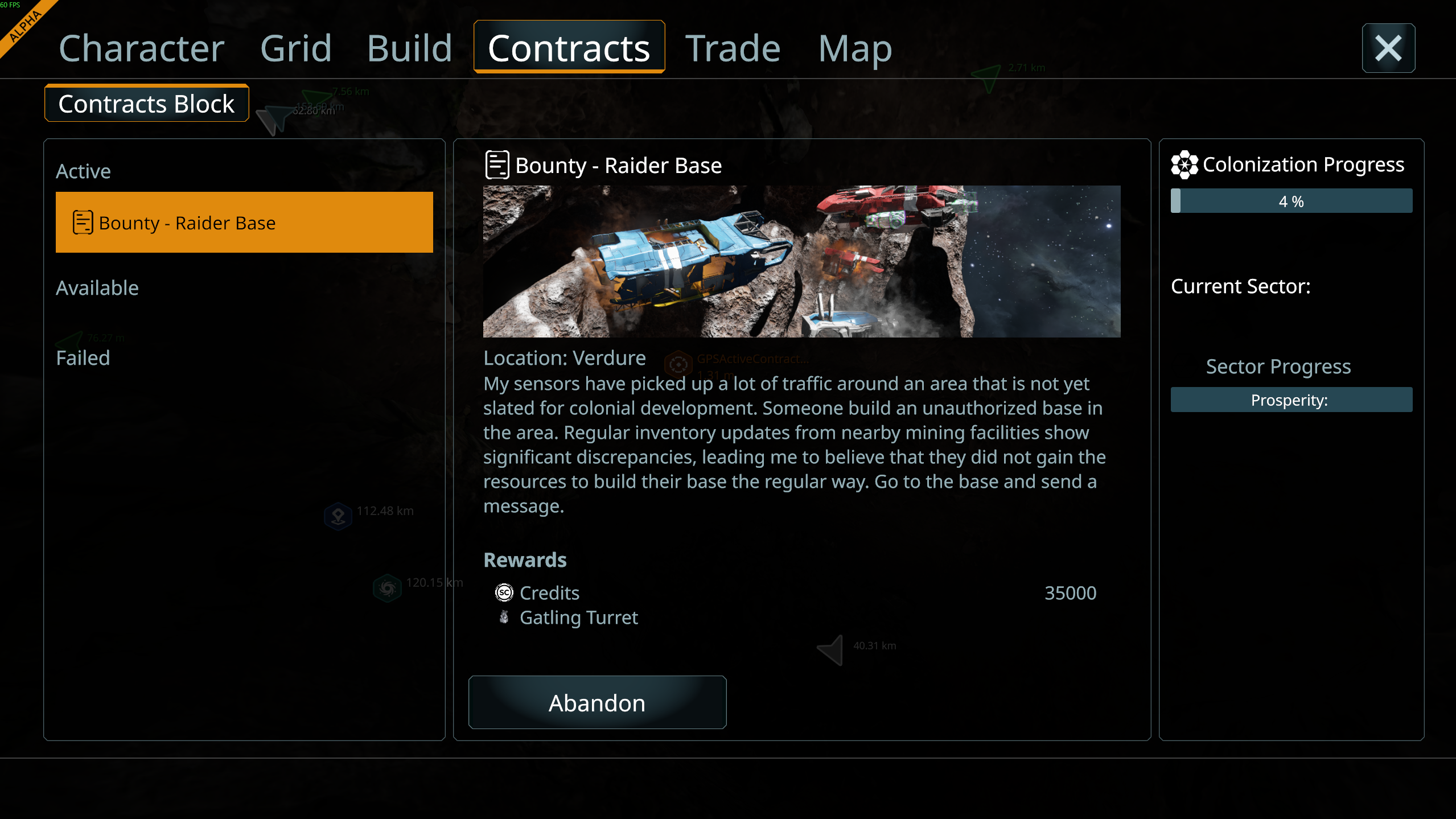
I can complete the Bounty - Raider Base Contract without an issue by destroying the Gatling Turret, 3 parked ships and the Hydrogen Tanks located inside the base. Could you please provide a video of your issue?
Please note that the Contract in question does not have another stage after reaching the GPS Marker - it is active immediately after accepting it from the Contract Terminal.
Kind Regards,
Bartosz
Keen Software House
Hello Heiko Hartmann (TutMeistensNix),
I can complete the Bounty - Raider Base Contract without an issue by destroying the Gatling Turret, 3 parked ships and the Hydrogen Tanks located inside the base. Could you please provide a video of your issue?
Please note that the Contract in question does not have another stage after reaching the GPS Marker - it is active immediately after accepting it from the Contract Terminal.
Kind Regards,
Bartosz
Keen Software House
Hi Bartosz,
Thank you for the quick reply!
That is very interesting. I just launched the game again to record a video for you. To make the video easier to follow, I switched the game language from German to English.
Surprisingly, as soon as I played in English, the mission completed immediately without any issues when destroying the base!
Before this, while playing in German, I tried the mission 4 times:
It seems this issue might be tied to the language/localization settings (German language causing a trigger/objective detection failure).
Since it worked right away in English, I unfortunately couldn't capture the bug on video, but I hope this detail helps tracking down the issue if it is indeed language-related!
Kind regards,
Heiko (TutMeistensNix)
Hi Bartosz,
Thank you for the quick reply!
That is very interesting. I just launched the game again to record a video for you. To make the video easier to follow, I switched the game language from German to English.
Surprisingly, as soon as I played in English, the mission completed immediately without any issues when destroying the base!
Before this, while playing in German, I tried the mission 4 times:
It seems this issue might be tied to the language/localization settings (German language causing a trigger/objective detection failure).
Since it worked right away in English, I unfortunately couldn't capture the bug on video, but I hope this detail helps tracking down the issue if it is indeed language-related!
Kind regards,
Heiko (TutMeistensNix)
Hi This Bug/issue may need further investigation as I'm playing in English and have come across exactly the same issue as described above. I Arrived to find the Contract marker under the hill, found the base ground down the turret, hydrogen tanks and all 3 fighters but the contract isn't completing/ updating.
Regards
Paul Floyd
Hi This Bug/issue may need further investigation as I'm playing in English and have come across exactly the same issue as described above. I Arrived to find the Contract marker under the hill, found the base ground down the turret, hydrogen tanks and all 3 fighters but the contract isn't completing/ updating.
Regards
Paul Floyd
Hello Heiko Hartmann (TutMeistensNix),
I have tried to reproduce this issue on today's Hotfix - 2.3.0.2788. The Contract can be completed correctly in German.
Could you please try to reproduce this issue again on the 2.3.0.2788 version? Additionally, please try to record the attempt and attach it here.
Let me know if you can complete the Contract.
Kind Regards,
Bartosz
Keen Software House
Hello Heiko Hartmann (TutMeistensNix),
I have tried to reproduce this issue on today's Hotfix - 2.3.0.2788. The Contract can be completed correctly in German.
Could you please try to reproduce this issue again on the 2.3.0.2788 version? Additionally, please try to record the attempt and attach it here.
Let me know if you can complete the Contract.
Kind Regards,
Bartosz
Keen Software House
Hi Bartosz
I Have managed to complete the contract on my second attempt. This time I ground down the turret, but instead of grinding down hydrogen tanks and fighters I used the gatling guns on my ship to blow them up and this worked fine so may be related to grinding the items to destroy them.
Regards
Paul Floyd
Hi Bartosz
I Have managed to complete the contract on my second attempt. This time I ground down the turret, but instead of grinding down hydrogen tanks and fighters I used the gatling guns on my ship to blow them up and this worked fine so may be related to grinding the items to destroy them.
Regards
Paul Floyd
Hi Bartosz,
Thank you for the update.
I tested this again on the new Hotfix version (2.3.0.2788) and recorded the entire attempt. The video is almost 20 minutes long and completely uncut, so you can see every step without any reloads or edits in between. (Feel free to fast-forward through the long flight times!)
Here is what I did during the video test:
Since another player (Paul Floyd) reported the same bug while playing in English, it might not be a pure localization text issue, but perhaps resetting the language/contract context forces a trigger fix.
I have attached/linked the video here for you to review:
https://youtu.be/deym__F-KgQ
Hope this helps you track down the underlying cause!
Kind regards,
Heiko (TutMeistensNix)
Hi Bartosz,
Thank you for the update.
I tested this again on the new Hotfix version (2.3.0.2788) and recorded the entire attempt. The video is almost 20 minutes long and completely uncut, so you can see every step without any reloads or edits in between. (Feel free to fast-forward through the long flight times!)
Here is what I did during the video test:
Since another player (Paul Floyd) reported the same bug while playing in English, it might not be a pure localization text issue, but perhaps resetting the language/contract context forces a trigger fix.
I have attached/linked the video here for you to review:
https://youtu.be/deym__F-KgQ
Hope this helps you track down the underlying cause!
Kind regards,
Heiko (TutMeistensNix)
Hello Heiko Hartmann (TutMeistensNix),
Thank you for the video. I see other problem in there and I think I know what might be case. Have tried verifying Game files on Steam?
If not, please verify the Game files on Steam and try to complete the Contract again in German. I believe there might be some files either missing or corrupted in your installation (especially since there are no particle effects of the explosions in your video)
Let me know if this helps.
Kind Regards,
Bartosz
Keen Software House
Hello Heiko Hartmann (TutMeistensNix),
Thank you for the video. I see other problem in there and I think I know what might be case. Have tried verifying Game files on Steam?
If not, please verify the Game files on Steam and try to complete the Contract again in German. I believe there might be some files either missing or corrupted in your installation (especially since there are no particle effects of the explosions in your video)
Let me know if this helps.
Kind Regards,
Bartosz
Keen Software House
Hi Bartosz,
Thank you for analyzing the video so closely!
Regarding your question: I actually did verify the game files via Steam right when I first encountered the issue, and again yesterday after the hotfix update (because my world wouldn't load at all, which the verification fixed). Interestingly, I did have explosion particle effects before yesterday's hotfix.
To follow your advice, I just verified the game files once again and tested the contract in German.
Your theory about corrupted files makes sense for the missing effects, but logically, if a broken file were preventing the mission trigger from working, it shouldn't magically fix itself the exact moment I switch the language to English within the same installation.
Fortunately, since the language-switch workaround worked for me during the test, I was able to progress much further in the story now! ;)
I hope the team can still figure out why the language toggle seems to bypass this trigger blockage, especially since Paul experienced something similar in English.
Kind regards,
Heiko (TutMeistensNix)
Hi Bartosz,
Thank you for analyzing the video so closely!
Regarding your question: I actually did verify the game files via Steam right when I first encountered the issue, and again yesterday after the hotfix update (because my world wouldn't load at all, which the verification fixed). Interestingly, I did have explosion particle effects before yesterday's hotfix.
To follow your advice, I just verified the game files once again and tested the contract in German.
Your theory about corrupted files makes sense for the missing effects, but logically, if a broken file were preventing the mission trigger from working, it shouldn't magically fix itself the exact moment I switch the language to English within the same installation.
Fortunately, since the language-switch workaround worked for me during the test, I was able to progress much further in the story now! ;)
I hope the team can still figure out why the language toggle seems to bypass this trigger blockage, especially since Paul experienced something similar in English.
Kind regards,
Heiko (TutMeistensNix)
Hi Bartosz
Not sure if you fixed this Issue yet or not but it seems to me there may be some bigger issue with this mission type as I've now progressed through my game to Dustspire Flats (Kemik). The first contract I accepted there was the bounty to destroy a renegade base (Bounty - Power Plant). The contract objective is to destroy the turrets of which there are 3 and destroy the base reactor. I have tried grinding down, using rocket launcher (player), rifle and the gatling guns on my ship to destroy the objectives but it will not complete.
Not sure if this a related bug or a separate issue.
Hi Bartosz
Not sure if you fixed this Issue yet or not but it seems to me there may be some bigger issue with this mission type as I've now progressed through my game to Dustspire Flats (Kemik). The first contract I accepted there was the bounty to destroy a renegade base (Bounty - Power Plant). The contract objective is to destroy the turrets of which there are 3 and destroy the base reactor. I have tried grinding down, using rocket launcher (player), rifle and the gatling guns on my ship to destroy the objectives but it will not complete.
Not sure if this a related bug or a separate issue.
Hello Engineers,
Bounty Contracts should allow completion with either destroying or grinding down marked blocks / grids.
There is another thing we can try, but since this will require Debug Menu, please conduct this test on a copy of your save:
Once the Warheads detonate, observe if the whole Grids are destroyed and if the Contract is completed.
Let me know the results.
Kind Regards,
Bartosz
Keen Software House
Hello Engineers,
Bounty Contracts should allow completion with either destroying or grinding down marked blocks / grids.
There is another thing we can try, but since this will require Debug Menu, please conduct this test on a copy of your save:
Once the Warheads detonate, observe if the whole Grids are destroyed and if the Contract is completed.
Let me know the results.
Kind Regards,
Bartosz
Keen Software House
i just did the above. the contract was only complete when every block was destroyed.
i just did the above. the contract was only complete when every block was destroyed.
I have the same problem.
I have the same problem.
same issue i even completely desroyed base with warheads and the mission didnt update for me so i loaded an earlier save
same issue i even completely desroyed base with warheads and the mission didnt update for me so i loaded an earlier save
ok the workaround for me involved exiting game, verify files in steam, launch game, reload save, abandon quest, re-accept quest, went back to mission site used my gatling guns to blow the shit out of the turret making it inoperable then I shot hydrogen tanks they exploded (boom) then shot the shit out of the ships making sure the cockpit and batteries were destroyed. mission wasn't complete at this point, so I exited and ground down the turret remains to 0 and it finally worked. no idea what step worked exactly but I'm thinking it was the abandoning and re-accepting the quest. hopfully this helps the devs find the bug but if not hopfully it helps you guys complete the quest.
ok the workaround for me involved exiting game, verify files in steam, launch game, reload save, abandon quest, re-accept quest, went back to mission site used my gatling guns to blow the shit out of the turret making it inoperable then I shot hydrogen tanks they exploded (boom) then shot the shit out of the ships making sure the cockpit and batteries were destroyed. mission wasn't complete at this point, so I exited and ground down the turret remains to 0 and it finally worked. no idea what step worked exactly but I'm thinking it was the abandoning and re-accepting the quest. hopfully this helps the devs find the bug but if not hopfully it helps you guys complete the quest.
I'm having this issue as well. I've attempted it at lease 6 times now using various methods. I've abandoned and retook it. I've loaded up saved games just prior to accepting the contract. I've destroyed the 3 ships, hydrogen tanks and turret using multiple methods to no avail. I've drilled down into the mountain/meteorite to the gold contract location marker multiple times, there's nothing there but a marker and planet. Is the marker SUPPOSED to be there??? I went into Steam and verified the game files twice. This is very frustrating.
I'm having this issue as well. I've attempted it at lease 6 times now using various methods. I've abandoned and retook it. I've loaded up saved games just prior to accepting the contract. I've destroyed the 3 ships, hydrogen tanks and turret using multiple methods to no avail. I've drilled down into the mountain/meteorite to the gold contract location marker multiple times, there's nothing there but a marker and planet. Is the marker SUPPOSED to be there??? I went into Steam and verified the game files twice. This is very frustrating.
I have this issue as well. I have destroyed all the blocks of the three fighters, turret and hydrogen tanks and the mission does not complete.
I have this issue as well. I have destroyed all the blocks of the three fighters, turret and hydrogen tanks and the mission does not complete.
have the same issue. destroy everything twice and didnt work.
have the same issue. destroy everything twice and didnt work.
Same issue as all above comments. Started fresh vs2.3 a few days ago. Tried to complete this Mission 4 times. Restarted game, verified steam files integrity, abandoned quest, tried again and again. Attacked targets with rocket launcher, gatling guns, grinder. Dismantled/grinded down the whole base completely, every single element including platforms etc. Nothing works. I tried Bartosz's solution with nukes but I cannot place any warhead or other items within the base, says the area is protected/don't have permission, something along these lines. There is something off with this mission registering progress. Please fix as I cannot progress further with the next region, as the Blueprint it unlocks is needed in the next sector for a few missions.
Same issue as all above comments. Started fresh vs2.3 a few days ago. Tried to complete this Mission 4 times. Restarted game, verified steam files integrity, abandoned quest, tried again and again. Attacked targets with rocket launcher, gatling guns, grinder. Dismantled/grinded down the whole base completely, every single element including platforms etc. Nothing works. I tried Bartosz's solution with nukes but I cannot place any warhead or other items within the base, says the area is protected/don't have permission, something along these lines. There is something off with this mission registering progress. Please fix as I cannot progress further with the next region, as the Blueprint it unlocks is needed in the next sector for a few missions.
Ok, on about the 15th attempt.... *SIGH* it FINALLY completed. I did a run through trying another method someone had suggested without success. Abandoned contract (AGAIN) then returned. Got on site and realized I had absolutely 0 ammo/rockets so I started grinding. Snuck up on turret and grinded it down. Took out the Fighter cockpits and batteries. Grinded down the 4 hydrogen tanks. No success. Was just heading back to my ship and saw those huge thrusters on the rear of the fighters and just for kicks, took out he rear and the lift thrusters of each ship. *COMPLETE* No rhyme. No reason....
Ok, on about the 15th attempt.... *SIGH* it FINALLY completed. I did a run through trying another method someone had suggested without success. Abandoned contract (AGAIN) then returned. Got on site and realized I had absolutely 0 ammo/rockets so I started grinding. Snuck up on turret and grinded it down. Took out the Fighter cockpits and batteries. Grinded down the 4 hydrogen tanks. No success. Was just heading back to my ship and saw those huge thrusters on the rear of the fighters and just for kicks, took out he rear and the lift thrusters of each ship. *COMPLETE* No rhyme. No reason....
Ok, so i was having the same issue and i fixed this way. 1st i must say that i left the mission undone and qhen i came back to do it it work at first try, BUT, for some bugs my ship crash and i didnt save it. SO, I went to do another mission instead and then i came back and it work right again. MAYBE it just need to be refreshed by completing other missions
Ok, so i was having the same issue and i fixed this way. 1st i must say that i left the mission undone and qhen i came back to do it it work at first try, BUT, for some bugs my ship crash and i didnt save it. SO, I went to do another mission instead and then i came back and it work right again. MAYBE it just need to be refreshed by completing other missions
The GPS is in the rock indeed, but the base is on the other side, attached to the side of it. Th GPS point is just misplaced.
The GPS is in the rock indeed, but the base is on the other side, attached to the side of it. Th GPS point is just misplaced.
hm. I ground down the turret, all blocks of the 3 bullfrog fighters, the four hydrogen tanks AND the two 2m Atmospheric thrusters inside the container on the far left (when facing the fighters head-on. After that, I ground down the control center chair and lcd/button panel, the big battery and the storage container of the base.
It didn't want to finish, my ship is full to the brim (I fetched it and parked it on the landing area). My last hope is that by taking off, the # of landing pad "interactions" will be zero, finishing the mission. But that might be just me hoping for the best.
The GPS marker is indeed inside the mountain. Digging there didn't trigger the mission (as stated before).
Game version 2.3.0.2798
Kind regards,
Dick
hm. I ground down the turret, all blocks of the 3 bullfrog fighters, the four hydrogen tanks AND the two 2m Atmospheric thrusters inside the container on the far left (when facing the fighters head-on. After that, I ground down the control center chair and lcd/button panel, the big battery and the storage container of the base.
It didn't want to finish, my ship is full to the brim (I fetched it and parked it on the landing area). My last hope is that by taking off, the # of landing pad "interactions" will be zero, finishing the mission. But that might be just me hoping for the best.
The GPS marker is indeed inside the mountain. Digging there didn't trigger the mission (as stated before).
Game version 2.3.0.2798
Kind regards,
Dick
i had/have the same issue as Starman, tried redoing the mission multiple times and still notta. destroyed with guns, ground down with grinder. no completion
i had/have the same issue as Starman, tried redoing the mission multiple times and still notta. destroyed with guns, ground down with grinder. no completion
Check the other threads for this mission.
My theory is that the game doesn't track cumulative damage to the fighters. That is you need to destroy a fighter completely before you start on the next one. Completely may not be necessary. I was successful grinding from the front, taking out the cockpit and the cargo container but overkill may be better.
Check the other threads for this mission.
My theory is that the game doesn't track cumulative damage to the fighters. That is you need to destroy a fighter completely before you start on the next one. Completely may not be necessary. I was successful grinding from the front, taking out the cockpit and the cargo container but overkill may be better.
Replies have been locked on this page!