


SE2 Crash - grouping bug - cockpit toolbar bug
Version .1991
I was in the cockpit attempting to learn how the gatling gun options worked and adding actions for them onto the toolbar.
I noticed there's many missing tooltips and a major lack of instructions on what the options are for.
I tried grouping the gatling guns, but nothing happened. I tried a few times, nothing happened. I noticed that if I left the menu and went back in the groupings showed. However, the toolbar disappeared if I clicked any gatling gun or if I searched for them.
Group Bug: When grouping and ungrouping there is no visual change. The item list does not refresh. The user must exit the menu and then go back into the menu to see the changes of what is grouped or not.
Toolbar Bug: The toolbar worked correctly the first 2 or 3 times that I dragged gatling guns to it but then any attempt to add another item to the toolbar would cause the toolbar to disappear, no matter if the gatling gun item was single, multiple-selected, or grouped.
The log files are attached. It should be noted that the video I recorded this morning has messed up sound which would indicate an issue with my computer. It probably needs to be rebooted or perhaps a Windows Update was installed this morning. I will reboot and re-test.
 I have the same bug
Hello SuperDK7,
I could not reproduce this issue, I can group the blocks without any problems and it is immediately visible in the Terminal. Please note that currently, Cockpit Toolbar actions do not support groups. Could you please provide a video recording?
Kind Regards,
Bartosz
Keen Software House
Hello SuperDK7,
I could not reproduce this issue, I can group the blocks without any problems and it is immediately visible in the Terminal. Please note that currently, Cockpit Toolbar actions do not support groups. Could you please provide a video recording?
Kind Regards,
Bartosz
Keen Software House
Hi, it turns out that the instructions are wrong.
1) We cannot drag-n-drop anything from the terminal list to the toolbar unless we are in Edit mode. This is why the toolbar was disappearing when I selected an item from the terminal list.
2) When we click the action button, the first line states we can drag-n-drop to the toolbar.
We must click the Edit Action button to perform any toolbar function, including drag-n-drop from the terminal list.
Hi, it turns out that the instructions are wrong.
1) We cannot drag-n-drop anything from the terminal list to the toolbar unless we are in Edit mode. This is why the toolbar was disappearing when I selected an item from the terminal list.
2) When we click the action button, the first line states we can drag-n-drop to the toolbar.
We must click the Edit Action button to perform any toolbar function, including drag-n-drop from the terminal list.
Hello SuperDK7,
Could you please elaborate on which instructions were wrong?
Kind Regards,
Bartosz
Keen Software House
Hello SuperDK7,
Could you please elaborate on which instructions were wrong?
Kind Regards,
Bartosz
Keen Software House
The very first line should tell that the Edit Action button must be toggled to on before anything can be done with the toolbar. It currently reads that we can drag-n-drop items from the terminal list to the toolbar and then we can use the Edit-Actions button to modify the actions. However, the Edit-Actions button must be clicked before performing ANY toolbar task, including drag-n-dropping items from the terminal list. The "Edit-Action" works as the "Edit Toolbar" because it must be used for any changes made to the toolbar, not just to the toolbar actions.
Perhaps the instructions are correct and there's a bug that does not allow the items to be drag-n-dropped to the toolbar???
The very first line should tell that the Edit Action button must be toggled to on before anything can be done with the toolbar. It currently reads that we can drag-n-drop items from the terminal list to the toolbar and then we can use the Edit-Actions button to modify the actions. However, the Edit-Actions button must be clicked before performing ANY toolbar task, including drag-n-dropping items from the terminal list. The "Edit-Action" works as the "Edit Toolbar" because it must be used for any changes made to the toolbar, not just to the toolbar actions.
Perhaps the instructions are correct and there's a bug that does not allow the items to be drag-n-dropped to the toolbar???
I've even seen famous SE2 Youtubers say they spent way too long trying to figure out how to drag items to the toolbar before they figured out that they first had to click the Edit-Action button to enable it.
I've even seen famous SE2 Youtubers say they spent way too long trying to figure out how to drag items to the toolbar before they figured out that they first had to click the Edit-Action button to enable it.
LOL, Keen just replied that the button should be called "Toolbar Edit Mode", so both the button needs to be renamed and the instructions updated. Also, it would be helpful if the instructions were shown on the screen prior to the user having to figure out where the edit button is located, clicking it and then finding some instructions.
Keen explains: Ship toolbar | Space Engineers 2 Support
LOL, Keen just replied that the button should be called "Toolbar Edit Mode", so both the button needs to be renamed and the instructions updated. Also, it would be helpful if the instructions were shown on the screen prior to the user having to figure out where the edit button is located, clicking it and then finding some instructions.
Keen explains: Ship toolbar | Space Engineers 2 Support
Hello SuperDK7,
By instructions are you referring to the ones shown after pressing the "Edit toolbar actions" button?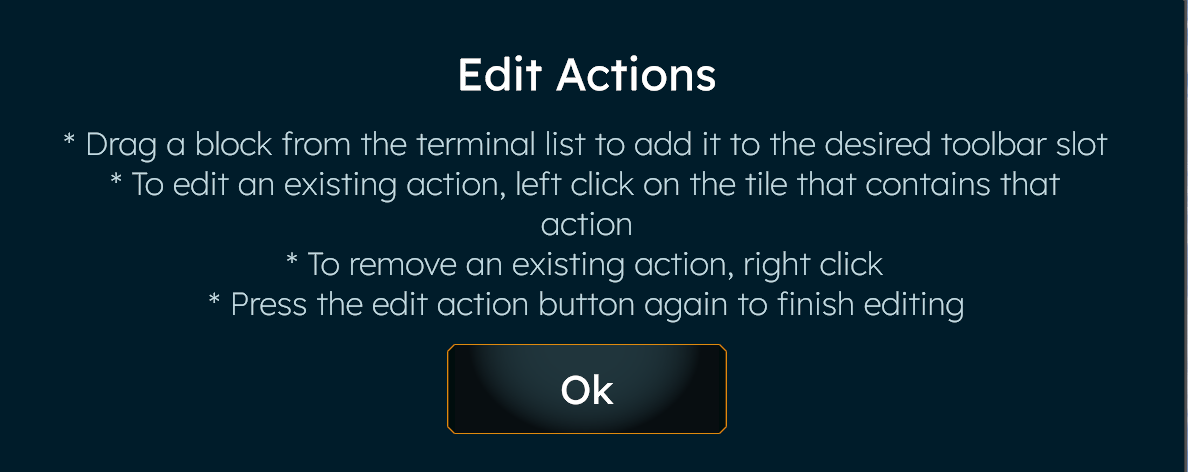
Please note that it is shown in this video that in order to enter Toolbar Edit Mode, you have to first press "Edit toolbar actions" button: https://www.youtube.com/watch?v=X9mTp_Palio
For clarification, it was not stated in reply to linked thread that the name of the button is incorrect and as such there is no need to change it.
As for the instructions being present before pressing the button, please create a feature request in our Feedback section.
Kind Regards,
Bartosz
Keen Software House
Hello SuperDK7,
By instructions are you referring to the ones shown after pressing the "Edit toolbar actions" button?
Please note that it is shown in this video that in order to enter Toolbar Edit Mode, you have to first press "Edit toolbar actions" button: https://www.youtube.com/watch?v=X9mTp_Palio
For clarification, it was not stated in reply to linked thread that the name of the button is incorrect and as such there is no need to change it.
As for the instructions being present before pressing the button, please create a feature request in our Feedback section.
Kind Regards,
Bartosz
Keen Software House
Hello SuperDK7,
As there has been no activity to this thread in some time, I will close it. If you're still experiencing this issue, please create a new thread.
Kind Regards,
Bartosz
Keen Software House
Hello SuperDK7,
As there has been no activity to this thread in some time, I will close it. If you're still experiencing this issue, please create a new thread.
Kind Regards,
Bartosz
Keen Software House
51 days is not a long time. This is still an issue. I cannot drag a group to the ship's toolbar, which for Me is a major function that is not working.
51 days is not a long time. This is still an issue. I cannot drag a group to the ship's toolbar, which for Me is a major function that is not working.
Replies have been locked on this page!