


Started game on steam, says running but nothing happens. Couple of seconds pass then status is back to nothing as if nothing happened. Tried Validating file integrity from steam, complete reinstall. Still will not start, it was working normally before VS2.

Game fails to launch
Reported
When I click "Play" in steam, the button changes to "Cancel", then "Stop" then 2 seconds later back to "Play". There is no indication on screen from the game at all and no audible indication of it running. I have not launched SE2 before.
The steam log folder is not present so no logs are created.
In Windows Event Viewer I see the following relating to the game...
Faulting application name: SpaceEngineers2.exe, version: 2.0.2.29, time stamp: 0x68d50000
Faulting module name: KERNELBASE.dll, version: 10.0.19041.804, time stamp: 0x0e9c5eae
Exception code: 0xc0000602
Fault offset: 0x000000000010bd5c
Faulting process ID: 0x46b0
Faulting application start time: 0x01dc65c8bf21fd77
Faulting application path: F:\Games\SteamLibrary\steamapps\common\SpaceEngineers2\Game2\SpaceEngineers2.exe
Faulting module path: C:\Windows\System32\KERNELBASE.dll
Report ID: 9aa2af9b-7eb8-407f-a95f-868da8c2b6c5
Faulting package full name:
Faulting package-relative application ID:
Attempting to launch the game directly from the exe gives the same result, nothing happens.
My System:
- Windows 10 Enterprise 20H2 build 19042.867
- AMD Ryzen 9 5950X - standard clock speed
- 32 Gb DDR4 3600
- AMD Radeon RX 7900 XT - Drivers updated last night, standard clock speed
- Motherboard Chipset X570
- 2 Displays, both 1920x1080 with 100% scaling.
 I have the same bug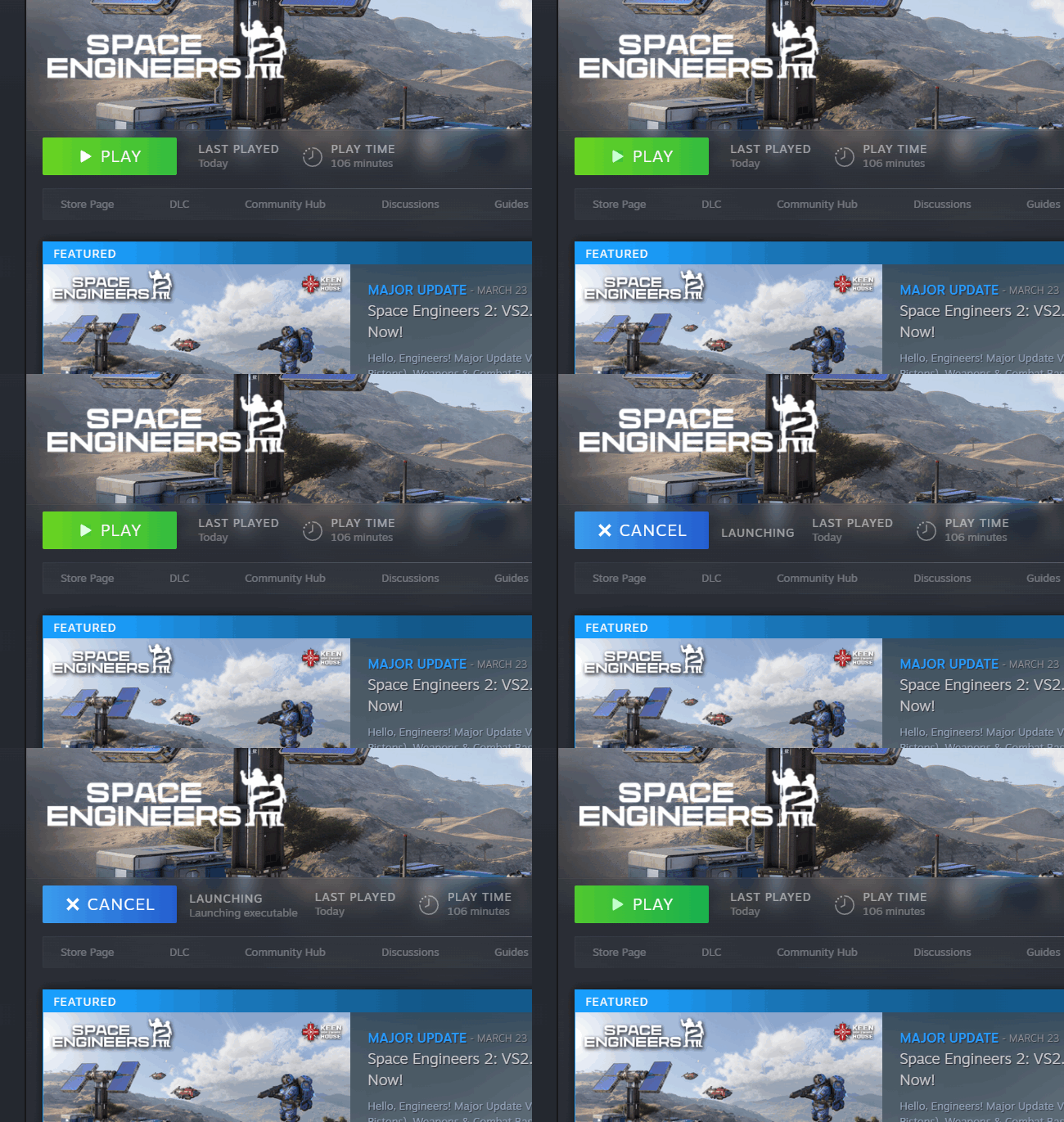
Hello Данила Гребенец,
From the logs you have provided I can see that your GPU drivers are outdated with version being 56094 (r560_88) while the latest available drivers for you GPU are version 58180 (r581_66). Have your tried launching the Game with the latest drivers?
You can download the latest drivers from here: Download The Official NVIDIA Drivers | NVIDIA
Let me know if this helps.
Kind Regards,
Bartosz
Keen Software House
Hello Данила Гребенец,
From the logs you have provided I can see that your GPU drivers are outdated with version being 56094 (r560_88) while the latest available drivers for you GPU are version 58180 (r581_66). Have your tried launching the Game with the latest drivers?
You can download the latest drivers from here: Download The Official NVIDIA Drivers | NVIDIA
Let me know if this helps.
Kind Regards,
Bartosz
Keen Software House
Hello Mohamed Farouk El-Borollosy,
Could you please provide us your logs? You can find them here:
C:\Users(your_username)\AppData\Roaming\SpaceEngineers2\Temp\Logs
Kind Regards,
Katerina
Keen Software House
Hello Mohamed Farouk El-Borollosy,
Could you please provide us your logs? You can find them here:
C:\Users(your_username)\AppData\Roaming\SpaceEngineers2\Temp\Logs
Kind Regards,
Katerina
Keen Software House
Hello shinotenshi,
Sometimes after update, old setting files cause issues with the Game launch. The usual solution for this is to delete the contents of this folder (Please note that this will delete all of your saves and blueprints, as such I recommend making a backup of Blueprints and SaveGames folders):
C:\Users\(your_username)\AppData\Roaming\SpaceEngineers2\AppData
After the AppData folder is empty, try to launch the Game again.
Let me know if this helps.
Kind Regards,
Bartosz
Keen Software House
Hello shinotenshi,
Sometimes after update, old setting files cause issues with the Game launch. The usual solution for this is to delete the contents of this folder (Please note that this will delete all of your saves and blueprints, as such I recommend making a backup of Blueprints and SaveGames folders):
C:\Users\(your_username)\AppData\Roaming\SpaceEngineers2\AppData
After the AppData folder is empty, try to launch the Game again.
Let me know if this helps.
Kind Regards,
Bartosz
Keen Software House
I have the same problem. click play in steam, after a few seconds button changes back to play and nothing from the game appears on screen.
In event log I get the following...
The space engineers 2 log file is not created.
My system:
Windows 10
AMD Ryzen 9 5950X
32 Gb DDR4 3600
RX 7900 XT
I have the same problem. click play in steam, after a few seconds button changes back to play and nothing from the game appears on screen.
In event log I get the following...
The space engineers 2 log file is not created.
My system:
Windows 10
AMD Ryzen 9 5950X
32 Gb DDR4 3600
RX 7900 XT
Same library error here
Same library error here
Experiencing same behavior as OP with similar event viewer log:
System:
W10 Pro 20H2
AMD 5800X3D
RTX 3090
48gb RAM
single 4k display
Experiencing same behavior as OP with similar event viewer log:
System:
W10 Pro 20H2
AMD 5800X3D
RTX 3090
48gb RAM
single 4k display
Second this but I just bought the game
First time the game ran without any trouble, i've been able to start a new game but my PC entirely crash in the middle of the introduction video
After restarting the PC, the game won't start, green button turns blue on steam then goes back to green without displaying anything
Tried similare things as OP but nothing changed
Second this but I just bought the game
First time the game ran without any trouble, i've been able to start a new game but my PC entirely crash in the middle of the introduction video
After restarting the PC, the game won't start, green button turns blue on steam then goes back to green without displaying anything
Tried similare things as OP but nothing changed
i would recommend you both try turning off in game overlays through steam i had this same problem and this seemed to fix the problem for me. you can do this by right clicking on the game, going to the properties, the General Tab and turning off enable the steam overlay while in games. hope this helps.
i would recommend you both try turning off in game overlays through steam i had this same problem and this seemed to fix the problem for me. you can do this by right clicking on the game, going to the properties, the General Tab and turning off enable the steam overlay while in games. hope this helps.
Hello Engineers,
The lack of Game logs is quite problematic, however, it may seem that some dependencies may be corrupted / missing.
Please try to reinstall .NET Framework from here: Download .NET 9.0 Desktop Runtime (v9.0.11) - Windows x64 Installer.
You can also try to install this older version: Download .NET Framework 4.8.1 | .NET
Let me know if this helps.
Kind Regards,
Bartosz
Keen Software House
Hello Engineers,
The lack of Game logs is quite problematic, however, it may seem that some dependencies may be corrupted / missing.
Please try to reinstall .NET Framework from here: Download .NET 9.0 Desktop Runtime (v9.0.11) - Windows x64 Installer.
You can also try to install this older version: Download .NET Framework 4.8.1 | .NET
Let me know if this helps.
Kind Regards,
Bartosz
Keen Software House
I had already tried, and I tried again now with that one, but it doesn't change, it tries to start but closes without giving any messages.
I had already tried, and I tried again now with that one, but it doesn't change, it tries to start but closes without giving any messages.
No change (game still fails to launch) after the today's hotfix. Only if this info is relevant for problem tracking.
No change (game still fails to launch) after the today's hotfix. Only if this info is relevant for problem tracking.
Same here. I been trying to resolve this since the planets update with 0 luck.
Same here. I been trying to resolve this since the planets update with 0 luck.
I have the exact same issue and additional information.
VS1 worked fine back when it released for me with the exact same setup. The machine is the same, its the same windows config that has been running. VS2 is having this silent instant crash issue with no logs being produced.
Attempting the usual fixes of validating files, clearing the appdata SE2 folder, disabling steam overlay, running as administrator etc. did not change the behavior.
Event Viewer logs:
I have the exact same issue and additional information.
VS1 worked fine back when it released for me with the exact same setup. The machine is the same, its the same windows config that has been running. VS2 is having this silent instant crash issue with no logs being produced.
Attempting the usual fixes of validating files, clearing the appdata SE2 folder, disabling steam overlay, running as administrator etc. did not change the behavior.
Event Viewer logs:
when can we expect a fix ?
when can we expect a fix ?
have a similar issue. However, I have never successfully launched the game as I just recently purchased it. There are no logs to post. However, I was able to launch the opt in steam Beta version 1.5 and play it with no issues. The live version will not launch.
This is event viewer information; I have the latest .net software installed
Description: A .NET application failed.
Application: SpaceEngineers2.exe
Path: C:\games\steam\steamapps\common\SpaceEngineers2\Game2\SpaceEngineers2.exe
Message: Failed to parse file [C:\Program Files\dotnet\shared\Microsoft.NETCore.App\9.0.11\Microsoft.NETCore.App.runtimeconfig.json]. JSON parsing exception: The document is empty. [offset 0: line 1, column 1]
Invalid framework config.json [C:\Program Files\dotnet\shared\Microsoft.NETCore.App\9.0.11\Microsoft.NETCore.App.runtimeconfig.json]
have a similar issue. However, I have never successfully launched the game as I just recently purchased it. There are no logs to post. However, I was able to launch the opt in steam Beta version 1.5 and play it with no issues. The live version will not launch.
This is event viewer information; I have the latest .net software installed
Description: A .NET application failed.
Application: SpaceEngineers2.exe
Path: C:\games\steam\steamapps\common\SpaceEngineers2\Game2\SpaceEngineers2.exe
Message: Failed to parse file [C:\Program Files\dotnet\shared\Microsoft.NETCore.App\9.0.11\Microsoft.NETCore.App.runtimeconfig.json]. JSON parsing exception: The document is empty. [offset 0: line 1, column 1]
Invalid framework config.json [C:\Program Files\dotnet\shared\Microsoft.NETCore.App\9.0.11\Microsoft.NETCore.App.runtimeconfig.json]
No change (game still fails to launch) after the today's Obliviara patch.
Only if this info may help for problem tracking.
It's slowly turns annoying to suddenly not be able to play a game paid for......the steam refund conditions are longest passed.....
No change (game still fails to launch) after the today's Obliviara patch.
Only if this info may help for problem tracking.
It's slowly turns annoying to suddenly not be able to play a game paid for......the steam refund conditions are longest passed.....
Recently I played Derail Valley, Light up the town, Tainted Grail, Deadzone Rogue, Varthos, The last caretaker, Raodcraft, Monsters are coming, Mine Mogul. Everything I try is running except SE2.
FIX THIS CRAP ALREADY.
Recently I played Derail Valley, Light up the town, Tainted Grail, Deadzone Rogue, Varthos, The last caretaker, Raodcraft, Monsters are coming, Mine Mogul. Everything I try is running except SE2.
FIX THIS CRAP ALREADY.
It would be nice to have some feedback or attention about this issue, if its being looked into.
It would be nice to have some feedback or attention about this issue, if its being looked into.
I feel that the team may be looking into the issues that the active players have but I was only able to play the new update once on release and ever since I have not got past the launcher and many people are suffering the same issues. I feel keen would get a lot more done if EVERY player was giving them feedback on the game. And it obviously has to do with the update. please Fix I've had this problem for a while. and nothing has worked. Please at least acknowledge that there are some steps being made. and if anyone has had success fixing this please let everyone else know. logs below because i haven't submitted them yet.
I feel that the team may be looking into the issues that the active players have but I was only able to play the new update once on release and ever since I have not got past the launcher and many people are suffering the same issues. I feel keen would get a lot more done if EVERY player was giving them feedback on the game. And it obviously has to do with the update. please Fix I've had this problem for a while. and nothing has worked. Please at least acknowledge that there are some steps being made. and if anyone has had success fixing this please let everyone else know. logs below because i haven't submitted them yet.
Apdate beta version se2version1_5 launch
Apdate beta version se2version1_5 launch
I'm having the same issue, the mentioned se2version1_5 runs fine the current version however does not.
There are no logs created but looking in the event view shows an application crash
Hopefully this isnt a "you need to upgrade your pc" deal
I'm having the same issue, the mentioned se2version1_5 runs fine the current version however does not.
There are no logs created but looking in the event view shows an application crash
Hopefully this isnt a "you need to upgrade your pc" deal
I too have the same issue - note issue also mentioned https://support.keenswh.com/spaceengineers2/pc/topic/52009-i-cant-launch-game-steam-version -
I have tried all the mentioned steps with no resolve nor change in behavior
I do have the related appcrash files if it helps the devs get to the bottom of this
I too have the same issue - note issue also mentioned https://support.keenswh.com/spaceengineers2/pc/topic/52009-i-cant-launch-game-steam-version -
I have tried all the mentioned steps with no resolve nor change in behavior
I do have the related appcrash files if it helps the devs get to the bottom of this
Those who still have this issue should add logs. Keen can't do much without them. They are found here:
C:\Users\**USERNAME**\AppData\Roaming\SpaceEngineers2\Temp\Logs\
Those who still have this issue should add logs. Keen can't do much without them. They are found here:
C:\Users\**USERNAME**\AppData\Roaming\SpaceEngineers2\Temp\Logs\
Add logs so Keen have a chance to figure out the issue.
They are found here:
C:\Users\**USERNAME**\AppData\Roaming\SpaceEngineers2\Temp\Logs\
Add logs so Keen have a chance to figure out the issue.
They are found here:
C:\Users\**USERNAME**\AppData\Roaming\SpaceEngineers2\Temp\Logs\
My logs
My logs
To those expressing anger and frustration at this issue, please understand this is an incredibly difficult issue to deal with, and this is very early access. Please be patient and understanding with the developers who have a lot of work to do and have to prioritise where they focus. This issue, while game breaking for us, seems to affect only a minority of users.
As far as I can tell this is a dependency issue, either direct dependency of the game or an indirect dependency through something else the game depends on. There's no stack trace or dependency heirachy shown so figuring this out will be very time consuming and difficult.
I am running quite an old release of Windows 10 for compatibility reasons with other things, maybe SE2 just isn't compatible with this old release of Windows, I don't know, it'll take a lot of testing and experimentation to figure it out. What we do know from other users is that SE2 worked before the last big update, and doesn't now, so one clue is what changed in the code and dependencies between versions, only Keen can know that, but again will take a lot of investigation, experimentation and time to figure it out. Also this is a crash in a core windows component further implying it could be an incompatibility with older Windows 10.
What we can do in the meantime is update our own systems if we can and report back what works and what doesn't. Does updating Windows 10 work? Does updating to Windows 11 work? Which versions of KernalBase.dll work and which don't. This will help zero in on the issue and expedite a fix.
To those expressing anger and frustration at this issue, please understand this is an incredibly difficult issue to deal with, and this is very early access. Please be patient and understanding with the developers who have a lot of work to do and have to prioritise where they focus. This issue, while game breaking for us, seems to affect only a minority of users.
As far as I can tell this is a dependency issue, either direct dependency of the game or an indirect dependency through something else the game depends on. There's no stack trace or dependency heirachy shown so figuring this out will be very time consuming and difficult.
I am running quite an old release of Windows 10 for compatibility reasons with other things, maybe SE2 just isn't compatible with this old release of Windows, I don't know, it'll take a lot of testing and experimentation to figure it out. What we do know from other users is that SE2 worked before the last big update, and doesn't now, so one clue is what changed in the code and dependencies between versions, only Keen can know that, but again will take a lot of investigation, experimentation and time to figure it out. Also this is a crash in a core windows component further implying it could be an incompatibility with older Windows 10.
What we can do in the meantime is update our own systems if we can and report back what works and what doesn't. Does updating Windows 10 work? Does updating to Windows 11 work? Which versions of KernalBase.dll work and which don't. This will help zero in on the issue and expedite a fix.
Following up to this i have examined a crash dump from the application and gleaned this info from it hopefully something strikes a cause. If the devs wish to get the .dmp file i can send that to them.
KEY_VALUES_STRING: 1

    Key  : Analysis.CPU.mSec
    Value: 1702

    Key  : Analysis.Elapsed.mSec
    Value: 1798

    Key  : Analysis.IO.Other.Mb
    Value: 35

    Key  : Analysis.IO.Read.Mb
    Value: 1

    Key  : Analysis.IO.Write.Mb
    Value: 92

    Key  : Analysis.Init.CPU.mSec
    Value: 22827

    Key  : Analysis.Init.Elapsed.mSec
    Value: 287579

    Key  : Analysis.Memory.CommitPeak.Mb
    Value: 129

    Key  : CLR.Engine
    Value: CORECLR

    Key  : CLR.Version
    Value: 9.0.1125.51716

    Key  : Failure.Bucket
    Value: BITNESS_MISMATCH_X64_FAIL_FAST_EXCEPTION_c0000602_coreclr.dll!__FreeBuildAssertFail

    Key  : Failure.Hash
    Value: {5088324a-c9dd-4394-7869-41d8d7373c74}

    Key  : Timeline.OS.Boot.DeltaSec
    Value: 24675830

    Key  : Timeline.Process.Start.DeltaSec
    Value: 1

    Key  : WER.OS.Branch
    Value: vb_release

    Key  : WER.OS.Version
    Value: 10.0.19041.1

    Key  : WER.Process.Version
    Value: 2.0.2.51


FILE_IN_CAB:  SpaceEngineers2.exe.187076.dmp

NTGLOBALFLAG:  0

APPLICATION_VERIFIER_FLAGS:  0

CONTEXT:  (.ecxr)
rax=000000804d37e9c0 rbx=000000804d37e920 rcx=000000804d37e9c0
rdx=0000000000000000 rsi=00000000000279c0 rdi=000000804d37e9c0
rip=00007ff88fdeb362 rsp=000000804d37e8e0 rbp=0000000000000001
 r8=0000000000000000  r9=0000000000000000 r10=0000000000000012
r11=2000000000200880 r12=00007ffffe0af3c8 r13=0000000000000002
r14=0000000000000000 r15=0000000000001f12
iopl=0         nv up ei pl nz na po nc
cs=0033  ss=002b  ds=002b  es=002b  fs=0053  gs=002b             efl=00000204
KERNELBASE!RaiseFailFastException+0x152:
00007ff8`8fdeb362 0f1f440000      nop     dword ptr [rax+rax]
Resetting default scope

EXCEPTION_RECORD:  (.exr -1)
ExceptionAddress: 00007ff88fdeb362 (KERNELBASE!RaiseFailFastException+0x0000000000000152)
   ExceptionCode: c0000602
  ExceptionFlags: 00000001
NumberParameters: 0

PROCESS_NAME:  SpaceEngineers2.dll
ERROR_CODE: (NTSTATUS) 0xc0000602 - {Fail Fast Exception}  A fail fast exception occurred. Exception handlers will not be invoked and the process will be terminated immediately.
EXCEPTION_CODE_STR:  c0000602

STACK_TEXT:
00000080`4d37e8e0 00007fff`fdff14a1     : 00000000`0002dac4 000001c1`ffffffff 00000000`0002dac4 00000000`00000008 : KERNELBASE!RaiseFailFastException+0x152
00000080`4d37eec0 00007fff`fdcf156c     : 00000000`00000000 00000000`00000001 00000000`00000000 00000000`00000001 : coreclr!__FreeBuildAssertFail+0x12d
00000080`4d37ef70 00007fff`fddec649     : 00000000`00000001 000001c1`94a23020 00000000`0000000d 00000080`4d37efe0 : coreclr!EEStartupHelper+0xa44
00000080`4d37f050 00007fff`fddec5e5     : 00000080`4d370064 000001c1`96500063 00007fff`fe068c58 00007fff`fdcf0a96 : coreclr!EEStartup+0x2d
00000080`4d37f090 00007fff`fddec51b     : 000001c1`964ff240 00007fff`fdcf02c3 00000000`00800003 00000000`0000000d : coreclr!EnsureEEStarted+0x95
00000080`4d37f0d0 00007fff`fde03323     : 00000000`00000000 000001c1`94a28410 00000000`00000000 00000080`4d37f198 : coreclr!CorHost2::Start+0x5b
00000080`4d37f110 00007ff8`000b3931     : 000001c1`94a2eeb0 00000000`00000000 000001c1`94a2eeb0 00000000`00000000 : coreclr!coreclr_initialize+0x163
00000080`4d37f1e0 00007ff8`000cc9a5     : 00007ff8`000fa720 000001c1`94af7280 000001c1`9650cfd0 000001c1`94af8880 : hostpolicy!coreclr_t::create+0x2e1
00000080`4d37f360 00007ff8`000cec9f     : 00007ff8`001091e0 00000000`00000000 000001c1`94a09720 000001c1`94a09720 : hostpolicy!`anonymous namespace'::create_coreclr+0x165
00000080`4d37f3c0 00007ff8`3348dffb     : 00000000`00000000 00000000`00000001 00000000`00000000 00000080`4d37f870 : hostpolicy!corehost_main+0x15f
00000080`4d37f4c0 00007ff8`334908bc     : 000001c1`94a23de0 00000080`4d37f601 00000000`00000000 00000000`00000000 : hostfxr!execute_app+0x2bb
00000080`4d37f550 00007ff8`33492c96     : 00007ff8`334c6e48 000001c1`94af5350 00000080`4d37f7b8 00000080`4d37f770 : hostfxr!`anonymous namespace'::read_config_and_execute+0xac
00000080`4d37f650 00007ff8`33490dbd     : 00000080`4d37f870 00000000`00000000 00000080`4d37f7e1 00000000`00000002 : hostfxr!fx_muxer_t::handle_exec_host_command+0x1d6
00000080`4d37f700 00007ff8`33488628     : 00000080`4d37f890 000001c1`94af5510 00000000`00000001 00007ff7`0b9b17dd : hostfxr!fx_muxer_t::execute+0x2ad
00000080`4d37f830 00007ff7`0b9b2dec     : 00007ff8`901af4e8 00007ff8`33489e90 00000080`4d37fa30 000001c1`94a21be0 : hostfxr!hostfxr_main_startupinfo+0xa8
00000080`4d37f930 00007ff7`0b9b3256     : 00007ff7`0b9ce840 00000000`00000007 000001c1`94a09720 00000000`0000005e : SpaceEngineers2!exe_start+0x7fc
00000080`4d37fae0 00007ff7`0b9c2518     : 00000000`00000000 00000000`00000000 000001c1`94a09720 00000000`00000000 : SpaceEngineers2!wmain+0x156
00000080`4d37fb60 00007ff8`91de7034     : 00000000`00000000 00000000`00000000 00000000`00000000 00007ff8`296b0000 : SpaceEngineers2!__scrt_common_main_seh+0x10c
00000080`4d37fba0 00007ff8`924a2651     : 00000000`00000000 00000000`00000000 00000000`00000000 00000000`00000000 : kernel32!BaseThreadInitThunk+0x14
00000080`4d37fbd0 00000000`00000000     : 00000000`00000000 00000000`00000000 00000000`00000000 00000000`00000000 : ntdll!RtlUserThreadStart+0x21

STACK_COMMAND:  ~0s; .ecxr ; kb
FAULTING_SOURCE_LINE:  D:\a\_work\1\s\src\coreclr\utilcode\debug.cpp
FAULTING_SOURCE_FILE:  D:\a\_work\1\s\src\coreclr\utilcode\debug.cpp
FAULTING_SOURCE_LINE_NUMBER:  503
SYMBOL_NAME:  coreclr!__FreeBuildAssertFail+12d
MODULE_NAME: coreclr
IMAGE_NAME:  coreclr.dll
FAILURE_BUCKET_ID:  BITNESS_MISMATCH_X64_FAIL_FAST_EXCEPTION_c0000602_coreclr.dll!__FreeBuildAssertFail
OS_VERSION:  10.0.19041.1
BUILDLAB_STR:  vb_release
OSPLATFORM_TYPE:  x64
OSNAME:  Windows 10
IMAGE_VERSION:  9.0.1125.51716
FAILURE_ID_HASH:  {5088324a-c9dd-4394-7869-41d8d7373c74}
Following up to this i have examined a crash dump from the application and gleaned this info from it hopefully something strikes a cause. If the devs wish to get the .dmp file i can send that to them.
KEY_VALUES_STRING: 1 Key : Analysis.CPU.mSec Value: 1702 Key : Analysis.Elapsed.mSec Value: 1798 Key : Analysis.IO.Other.Mb Value: 35 Key : Analysis.IO.Read.Mb Value: 1 Key : Analysis.IO.Write.Mb Value: 92 Key : Analysis.Init.CPU.mSec Value: 22827 Key : Analysis.Init.Elapsed.mSec Value: 287579 Key : Analysis.Memory.CommitPeak.Mb Value: 129 Key : CLR.Engine Value: CORECLR Key : CLR.Version Value: 9.0.1125.51716 Key : Failure.Bucket Value: BITNESS_MISMATCH_X64_FAIL_FAST_EXCEPTION_c0000602_coreclr.dll!__FreeBuildAssertFail Key : Failure.Hash Value: {5088324a-c9dd-4394-7869-41d8d7373c74} Key : Timeline.OS.Boot.DeltaSec Value: 24675830 Key : Timeline.Process.Start.DeltaSec Value: 1 Key : WER.OS.Branch Value: vb_release Key : WER.OS.Version Value: 10.0.19041.1 Key : WER.Process.Version Value: 2.0.2.51 FILE_IN_CAB: SpaceEngineers2.exe.187076.dmp NTGLOBALFLAG: 0 APPLICATION_VERIFIER_FLAGS: 0 CONTEXT: (.ecxr) rax=000000804d37e9c0 rbx=000000804d37e920 rcx=000000804d37e9c0 rdx=0000000000000000 rsi=00000000000279c0 rdi=000000804d37e9c0 rip=00007ff88fdeb362 rsp=000000804d37e8e0 rbp=0000000000000001 r8=0000000000000000 r9=0000000000000000 r10=0000000000000012 r11=2000000000200880 r12=00007ffffe0af3c8 r13=0000000000000002 r14=0000000000000000 r15=0000000000001f12 iopl=0 nv up ei pl nz na po nc cs=0033 ss=002b ds=002b es=002b fs=0053 gs=002b efl=00000204 KERNELBASE!RaiseFailFastException+0x152: 00007ff8`8fdeb362 0f1f440000 nop dword ptr [rax+rax] Resetting default scope EXCEPTION_RECORD: (.exr -1) ExceptionAddress: 00007ff88fdeb362 (KERNELBASE!RaiseFailFastException+0x0000000000000152) ExceptionCode: c0000602 ExceptionFlags: 00000001 NumberParameters: 0 PROCESS_NAME: SpaceEngineers2.dll ERROR_CODE: (NTSTATUS) 0xc0000602 - {Fail Fast Exception} A fail fast exception occurred. Exception handlers will not be invoked and the process will be terminated immediately. EXCEPTION_CODE_STR: c0000602 STACK_TEXT: 00000080`4d37e8e0 00007fff`fdff14a1 : 00000000`0002dac4 000001c1`ffffffff 00000000`0002dac4 00000000`00000008 : KERNELBASE!RaiseFailFastException+0x152 00000080`4d37eec0 00007fff`fdcf156c : 00000000`00000000 00000000`00000001 00000000`00000000 00000000`00000001 : coreclr!__FreeBuildAssertFail+0x12d 00000080`4d37ef70 00007fff`fddec649 : 00000000`00000001 000001c1`94a23020 00000000`0000000d 00000080`4d37efe0 : coreclr!EEStartupHelper+0xa44 00000080`4d37f050 00007fff`fddec5e5 : 00000080`4d370064 000001c1`96500063 00007fff`fe068c58 00007fff`fdcf0a96 : coreclr!EEStartup+0x2d 00000080`4d37f090 00007fff`fddec51b : 000001c1`964ff240 00007fff`fdcf02c3 00000000`00800003 00000000`0000000d : coreclr!EnsureEEStarted+0x95 00000080`4d37f0d0 00007fff`fde03323 : 00000000`00000000 000001c1`94a28410 00000000`00000000 00000080`4d37f198 : coreclr!CorHost2::Start+0x5b 00000080`4d37f110 00007ff8`000b3931 : 000001c1`94a2eeb0 00000000`00000000 000001c1`94a2eeb0 00000000`00000000 : coreclr!coreclr_initialize+0x163 00000080`4d37f1e0 00007ff8`000cc9a5 : 00007ff8`000fa720 000001c1`94af7280 000001c1`9650cfd0 000001c1`94af8880 : hostpolicy!coreclr_t::create+0x2e1 00000080`4d37f360 00007ff8`000cec9f : 00007ff8`001091e0 00000000`00000000 000001c1`94a09720 000001c1`94a09720 : hostpolicy!`anonymous namespace'::create_coreclr+0x165 00000080`4d37f3c0 00007ff8`3348dffb : 00000000`00000000 00000000`00000001 00000000`00000000 00000080`4d37f870 : hostpolicy!corehost_main+0x15f 00000080`4d37f4c0 00007ff8`334908bc : 000001c1`94a23de0 00000080`4d37f601 00000000`00000000 00000000`00000000 : hostfxr!execute_app+0x2bb 00000080`4d37f550 00007ff8`33492c96 : 00007ff8`334c6e48 000001c1`94af5350 00000080`4d37f7b8 00000080`4d37f770 : hostfxr!`anonymous namespace'::read_config_and_execute+0xac 00000080`4d37f650 00007ff8`33490dbd : 00000080`4d37f870 00000000`00000000 00000080`4d37f7e1 00000000`00000002 : hostfxr!fx_muxer_t::handle_exec_host_command+0x1d6 00000080`4d37f700 00007ff8`33488628 : 00000080`4d37f890 000001c1`94af5510 00000000`00000001 00007ff7`0b9b17dd : hostfxr!fx_muxer_t::execute+0x2ad 00000080`4d37f830 00007ff7`0b9b2dec : 00007ff8`901af4e8 00007ff8`33489e90 00000080`4d37fa30 000001c1`94a21be0 : hostfxr!hostfxr_main_startupinfo+0xa8 00000080`4d37f930 00007ff7`0b9b3256 : 00007ff7`0b9ce840 00000000`00000007 000001c1`94a09720 00000000`0000005e : SpaceEngineers2!exe_start+0x7fc 00000080`4d37fae0 00007ff7`0b9c2518 : 00000000`00000000 00000000`00000000 000001c1`94a09720 00000000`00000000 : SpaceEngineers2!wmain+0x156 00000080`4d37fb60 00007ff8`91de7034 : 00000000`00000000 00000000`00000000 00000000`00000000 00007ff8`296b0000 : SpaceEngineers2!__scrt_common_main_seh+0x10c 00000080`4d37fba0 00007ff8`924a2651 : 00000000`00000000 00000000`00000000 00000000`00000000 00000000`00000000 : kernel32!BaseThreadInitThunk+0x14 00000080`4d37fbd0 00000000`00000000 : 00000000`00000000 00000000`00000000 00000000`00000000 00000000`00000000 : ntdll!RtlUserThreadStart+0x21 STACK_COMMAND: ~0s; .ecxr ; kb FAULTING_SOURCE_LINE: D:\a\_work\1\s\src\coreclr\utilcode\debug.cpp FAULTING_SOURCE_FILE: D:\a\_work\1\s\src\coreclr\utilcode\debug.cpp FAULTING_SOURCE_LINE_NUMBER: 503 SYMBOL_NAME: coreclr!__FreeBuildAssertFail+12d MODULE_NAME: coreclr IMAGE_NAME: coreclr.dll FAILURE_BUCKET_ID: BITNESS_MISMATCH_X64_FAIL_FAST_EXCEPTION_c0000602_coreclr.dll!__FreeBuildAssertFail OS_VERSION: 10.0.19041.1 BUILDLAB_STR: vb_release OSPLATFORM_TYPE: x64 OSNAME: Windows 10 IMAGE_VERSION: 9.0.1125.51716 FAILURE_ID_HASH: {5088324a-c9dd-4394-7869-41d8d7373c74}I can say that with windows 10 22H2 it worked before VS2 and now after VS2 it doens't work any more.
The system was the same, no core component changed and match the minimal system requirements on steam.
So if this is really a windows issue due to the usage of newer OS functions after VS2, the minimal system requirements on steam have to be updated. Since steam refunds have a time limit and as mentioned it needs additional time to investigate without logs, too, I think the investigation of this issue needs a much higher priority.
I can say that with windows 10 22H2 it worked before VS2 and now after VS2 it doens't work any more.
The system was the same, no core component changed and match the minimal system requirements on steam.
So if this is really a windows issue due to the usage of newer OS functions after VS2, the minimal system requirements on steam have to be updated. Since steam refunds have a time limit and as mentioned it needs additional time to investigate without logs, too, I think the investigation of this issue needs a much higher priority.
Same problem here:
https://support.keenswh.com/spaceengineers2/pc/topic/52009-i-cant-launch-game-steam-version
Same problem here:
https://support.keenswh.com/spaceengineers2/pc/topic/52009-i-cant-launch-game-steam-version
This is still an issue
This is still an issue
The issue persists after today's update
The issue persists after today's update
This issue is still there in Update VS 2.2 as of today.
This issue is still there in Update VS 2.2 as of today.
Hello Engineers,
This issue is extremely hard to investigate and we are unable to reproduce it on our side. I may have however a potential solution:
Please make sure that both Steam and Space Engineers 2 are not running in Compatibility mode: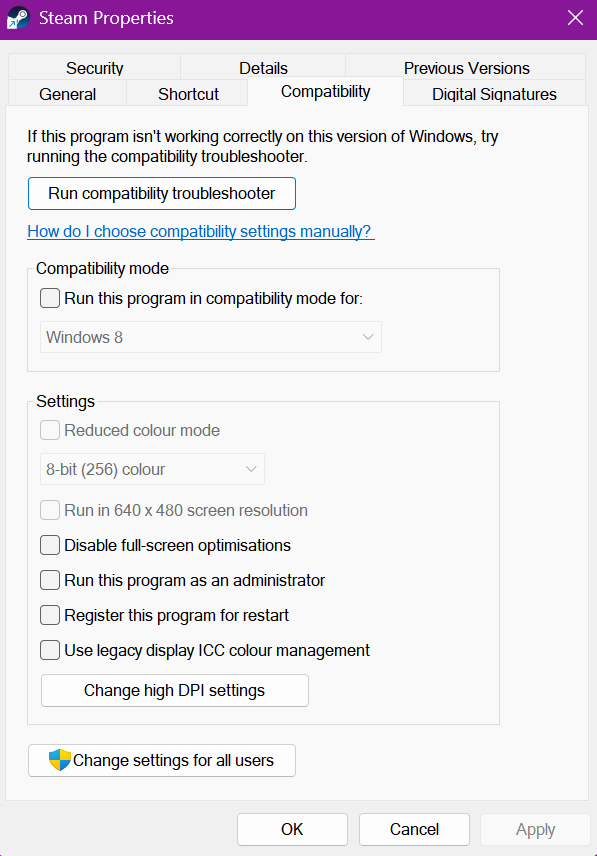
Let me know if this helps.
Kind Regards,
Bartosz
Keen Software House
Hello Engineers,
This issue is extremely hard to investigate and we are unable to reproduce it on our side. I may have however a potential solution:
Please make sure that both Steam and Space Engineers 2 are not running in Compatibility mode:
Let me know if this helps.
Kind Regards,
Bartosz
Keen Software House
Hello private username,
What is the OS you are using? Are you running Steam and / or Space Engineers 2 in Compatibility mode? If so, please try to disable it and then launch the Game again.
Additionally, are you able to launch the Space Engineers 2 ModSDK? It should be present in your Steam library under Tools.
Kind Regards,
Bartosz
Keen Software House
Hello private username,
What is the OS you are using? Are you running Steam and / or Space Engineers 2 in Compatibility mode? If so, please try to disable it and then launch the Game again.
Additionally, are you able to launch the Space Engineers 2 ModSDK? It should be present in your Steam library under Tools.
Kind Regards,
Bartosz
Keen Software House
This problem has been preventing many players (including myself) from playing or even launching the game for months now. I've tried everything from the release of 2.0 to now: clean uninstalls that also deleted saves and config files, .net updates, and other necessary runtimes. In the meantime, for my own needs, I've also formatted the system, and done other things I found recommended on the forums, but the problem persists. The only thing I'm sure of is that the problem started with the first hotfix for 2.0. Before that, I was able to play it for 5 hours (I can't say if it was there or not before 2.0, as I bought it specifically when that patch came out). I have to admit that after months of waiting, I'm disappointed to have paid for a product but not seeing support for a problem that affects many gamers, especially those with AMD components.
My setup:
This problem has been preventing many players (including myself) from playing or even launching the game for months now. I've tried everything from the release of 2.0 to now: clean uninstalls that also deleted saves and config files, .net updates, and other necessary runtimes. In the meantime, for my own needs, I've also formatted the system, and done other things I found recommended on the forums, but the problem persists. The only thing I'm sure of is that the problem started with the first hotfix for 2.0. Before that, I was able to play it for 5 hours (I can't say if it was there or not before 2.0, as I bought it specifically when that patch came out). I have to admit that after months of waiting, I'm disappointed to have paid for a product but not seeing support for a problem that affects many gamers, especially those with AMD components.
My setup:
* Windows 10
* I am not using compatibility mode of any kind on either program
* I do not have the ModSDK installed to test with
* Windows 10
* I am not using compatibility mode of any kind on either program
* I do not have the ModSDK installed to test with
This appears to be the same issue as https://support.keenswh.com/spaceengineers2/pc/topic/51041-game-fails-to-launch
This appears to be the same issue as https://support.keenswh.com/spaceengineers2/pc/topic/51041-game-fails-to-launch
Hello Engineers,
Please try the following steps and let me know if any of these changes anything on your end:
Kind Regards,
Bartosz
Keen Software House
Hello Engineers,
Please try the following steps and let me know if any of these changes anything on your end:
Kind Regards,
Bartosz
Keen Software House
Issue persists after today's update.
Issue persists after today's update.
In Steam, when going to "version", the original release (oldest) works. Neither 1.5 nor 2.2 run. Seems as though the problem originates from SE2, not from anyone else's system based on that.
For what it's worth, I did purchase the Pioneer Edition DLC.
Very disappointing to see little communication from the team, as I have every DLC from SE1 as well, and over 5200 hours.
In Steam, when going to "version", the original release (oldest) works. Neither 1.5 nor 2.2 run. Seems as though the problem originates from SE2, not from anyone else's system based on that.
For what it's worth, I did purchase the Pioneer Edition DLC.
Very disappointing to see little communication from the team, as I have every DLC from SE1 as well, and over 5200 hours.
Issue still persists after recent updates.
Issue still persists after recent updates.
Went to check if anything is fixed, Steam ran an install script, issue still persists.
Will be looking to refund the game by end of next week.
Went to check if anything is fixed, Steam ran an install script, issue still persists.
Will be looking to refund the game by end of next week.
Any update on this, anything we can do to help resolve this issue?
Any update on this, anything we can do to help resolve this issue?
Файл: C:\Users\admin\AppData\Local\CrashDumps
game won't start (game won't start | Space Engineers 2 Support)
Файл: C:\Users\admin\AppData\Local\CrashDumps
game won't start (game won't start | Space Engineers 2 Support)
I have the same problem. (Игра заканчивается через 2-3 секунды. | Поддержка Space Engineers 2)
I have the same problem. (Игра заканчивается через 2-3 секунды. | Поддержка Space Engineers 2)
Hello Engineers,
Are you using either Windows 10 or Windows 11? Please make sure that both the Game or Steam do not run in Compatibility mode and try to launch the Game again.
Let me know if this helps.
Kind Regards,
Bartosz
Keen Software House
Hello Engineers,
Are you using either Windows 10 or Windows 11? Please make sure that both the Game or Steam do not run in Compatibility mode and try to launch the Game again.
Let me know if this helps.
Kind Regards,
Bartosz
Keen Software House
Hello smuggles,
Please make sure that both Steam and the Game is not running in compatibility mode:
Let me know if this helps.
Kind Regards,
Bartosz
Keen Software House
Hello smuggles,
Please make sure that both Steam and the Game is not running in compatibility mode:
Let me know if this helps.
Kind Regards,
Bartosz
Keen Software House
Hello Engineers,
We are working on resolving this issue however since we are unable to reproduce this on our side, it is difficult to find the source for this.
However, the issue is reported internally with this thread attached to our internal ticket (SE2-32935).
Thank you for your patience.
Kind Regards,
Bartosz
Keen Software House
Hello Engineers,
We are working on resolving this issue however since we are unable to reproduce this on our side, it is difficult to find the source for this.
However, the issue is reported internally with this thread attached to our internal ticket (SE2-32935).
Thank you for your patience.
Kind Regards,
Bartosz
Keen Software House
Is it possible that VS2 introduced changes or requirements relating to Winget / Windows AppX Deployment Service ?
I have reasons to believe these things might be related.
Is it possible that VS2 introduced changes or requirements relating to Winget / Windows AppX Deployment Service ?
I have reasons to believe these things might be related.
Just bought the game, downloaded and it won't launch, installed the .net, cleared everything, ran the verify and still nothing.
Just bought the game, downloaded and it won't launch, installed the .net, cleared everything, ran the verify and still nothing.
Issue persists with VS3.
Issue persists with VS3.
A windows dump for this error may help (
ax=000000c67417e7c0 rbx=000000c67417e720 rcx=000000c67417e7c0
rdx=0000000000000000 rsi=0000000000001920 rdi=000000c67417e7c0
rip=00007ff8985db302 rsp=000000c67417e6e0 rbp=0000000000000001
r8=0000000000000000 r9=0000000000000000 r10=0000000000000012
r11=2000000000200880 r12=00007ff815ebf448 r13=0000000000000002
r14=0000000000000000 r15=0000000000001f12
iopl=0 nv up ei pl nz na po nc
cs=0033 ss=002b ds=002b es=002b fs=0053 gs=002b efl=00000204
KERNELBASE!RaiseFailFastException+0x152:
00007ff8`985db302 0f1f440000 nop dword ptr [rax+rax]
Resetting default scope
EXCEPTION_RECORD: (.exr -1)
ExceptionAddress: 00007ff8985db302 (KERNELBASE!RaiseFailFastException+0x0000000000000152)
ExceptionCode: c0000602
ExceptionFlags: 00000001
NumberParameters: 0
PROCESS_NAME: SpaceEngineers2.exe
ERROR_CODE: (NTSTATUS) 0xc0000602 - { Fail Fast} Fail Fast. , .
EXCEPTION_CODE_STR: c0000602
ADDITIONAL_DEBUG_TEXT: SOS.DLL is not loaded for managed code. Analysis might be incomplete
STACK_TEXT:
000000c6`7417e6e0 00007ff8`15e01641 : 00000000`0000197c 000001e0`ffffffff 00000000`0000197c 00000000`00000008 : KERNELBASE!RaiseFailFastException+0x152
000000c6`7417ecc0 00007ff8`15b0157c : 00000000`00000000 00000000`00000001 00000000`00000000 00000000`00000001 : coreclr!__FreeBuildAssertFail+0x12d
000000c6`7417ed70 00007ff8`15bfc6d9 : 00000000`00000001 000001e0`8262a6b0 00000000`00000011 000000c6`7417ede0 : coreclr!EEStartupHelper+0xa44
000000c6`7417ee50 00007ff8`15bfc675 : 000000c6`74170064 000001e0`84300063 00007ff8`15e78c58 00007ff8`15b00aca : coreclr!EEStartup+0x2d
000000c6`7417ee90 00007ff8`15bfc5ab : 000001e0`826f0780 00007ff8`15b002d3 00000000`00800003 00000000`00000011 : coreclr!EnsureEEStarted+0x95
000000c6`7417eed0 00007ff8`15c13413 : 00000000`00000000 000001e0`82616420 00000000`00000000 000000c6`7417ef98 : coreclr!CorHost2::Start+0x5b
000000c6`7417ef10 00007ff8`6efa3931 : 000001e0`8266f910 00000000`00000000 000001e0`8266f910 00000000`00000000 : coreclr!coreclr_initialize+0x163
000000c6`7417efe0 00007ff8`6efbc9a5 : 00007ff8`6efea720 000001e0`826f7700 000001e0`842f42d0 000001e0`8262a690 : hostpolicy!coreclr_t::create+0x2e1
000000c6`7417f160 00007ff8`6efbec9f : 00007ff8`6eff91e0 00000000`00000000 000001e0`82609280 000001e0`82609280 : hostpolicy!`anonymous namespace'::create_coreclr+0x165
000000c6`7417f1c0 00007ff8`78ded56b : 00000000`00000000 00000000`00000001 00000000`00000000 000000c6`7417f670 : hostpolicy!corehost_main+0x15f
000000c6`7417f2c0 00007ff8`78df029c : 000001e0`826295f0 000000c6`7417f401 00000000`00000000 00000000`00000000 : hostfxr!execute_app+0x2bb
000000c6`7417f350 00007ff8`78df2676 : 00007ff8`78e28ba8 000001e0`82618a10 000000c6`7417f5b8 000000c6`7417f570 : hostfxr!`anonymous namespace'::read_config_and_execute+0xac
000000c6`7417f450 00007ff8`78df079d : 000000c6`7417f670 00000000`00000000 000000c6`7417f5e1 00000000`00000002 : hostfxr!fx_muxer_t::handle_exec_host_command+0x1d6
000000c6`7417f500 00007ff8`78de8998 : 000000c6`7417f690 000001e0`82618910 00000000`00000002 00007ff6`59d917dd : hostfxr!fx_muxer_t::execute+0x2ad
000000c6`7417f630 00007ff6`59d92dec : 00007ff8`983df4e8 00007ff8`78dea2d0 000000c6`7417f830 000001e0`82628ad0 : hostfxr!hostfxr_main_startupinfo+0xa8
000000c6`7417f730 00007ff6`59d93256 : 00007ff6`59dae840 00000000`00000007 000001e0`82609280 00000000`0000005e : SpaceEngineers2!exe_start+0x7fc
000000c6`7417f8e0 00007ff6`59da2568 : 00000000`00000000 00000000`00000000 000001e0`82609280 00000000`00000000 : SpaceEngineers2!wmain+0x156
000000c6`7417f960 00007ff8`99527034 : 00000000`00000000 00000000`00000000 00000000`00000000 00007ff8`15f90000 : SpaceEngineers2!__scrt_common_main_seh+0x10c
000000c6`7417f9a0 00007ff8`9aaa2651 : 00000000`00000000 00000000`00000000 00000000`00000000 00000000`00000000 : kernel32!BaseThreadInitThunk+0x14
000000c6`7417f9d0 00000000`00000000 : 00000000`00000000 00000000`00000000 00000000`00000000 00000000`00000000 : ntdll!RtlUserThreadStart+0x21
FAULTING_SOURCE_LINE: D:\a\_work\1\s\src\coreclr\utilcode\debug.cpp
FAULTING_SOURCE_FILE: D:\a\_work\1\s\src\coreclr\utilcode\debug.cpp
FAULTING_SOURCE_LINE_NUMBER: 503
SYMBOL_NAME: coreclr!__FreeBuildAssertFail+12d
MODULE_NAME: coreclr
IMAGE_NAME: coreclr.dll
STACK_COMMAND: ~0s ; .ecxr ; kb
FAILURE_BUCKET_ID: BITNESS_MISMATCH_X64_FAIL_FAST_EXCEPTION_NOSOS_c0000602_coreclr.dll!__FreeBuildAssertFail
OS_VERSION: 10.0.19041.1
BUILDLAB_STR: vb_release
OSPLATFORM_TYPE: x64
OSNAME: Windows 10
FAILURE_ID_HASH: {d17a0f46-d45e-178d-d4b4-f5022e9d8243}
Followup: MachineOwner
A windows dump for this error may help (
ax=000000c67417e7c0 rbx=000000c67417e720 rcx=000000c67417e7c0
rdx=0000000000000000 rsi=0000000000001920 rdi=000000c67417e7c0
rip=00007ff8985db302 rsp=000000c67417e6e0 rbp=0000000000000001
r8=0000000000000000 r9=0000000000000000 r10=0000000000000012
r11=2000000000200880 r12=00007ff815ebf448 r13=0000000000000002
r14=0000000000000000 r15=0000000000001f12
iopl=0 nv up ei pl nz na po nc
cs=0033 ss=002b ds=002b es=002b fs=0053 gs=002b efl=00000204
KERNELBASE!RaiseFailFastException+0x152:
00007ff8`985db302 0f1f440000 nop dword ptr [rax+rax]
Resetting default scope
EXCEPTION_RECORD: (.exr -1)
ExceptionAddress: 00007ff8985db302 (KERNELBASE!RaiseFailFastException+0x0000000000000152)
ExceptionCode: c0000602
ExceptionFlags: 00000001
NumberParameters: 0
PROCESS_NAME: SpaceEngineers2.exe
ERROR_CODE: (NTSTATUS) 0xc0000602 - { Fail Fast} Fail Fast. , .
EXCEPTION_CODE_STR: c0000602
ADDITIONAL_DEBUG_TEXT: SOS.DLL is not loaded for managed code. Analysis might be incomplete
STACK_TEXT:
000000c6`7417e6e0 00007ff8`15e01641 : 00000000`0000197c 000001e0`ffffffff 00000000`0000197c 00000000`00000008 : KERNELBASE!RaiseFailFastException+0x152
000000c6`7417ecc0 00007ff8`15b0157c : 00000000`00000000 00000000`00000001 00000000`00000000 00000000`00000001 : coreclr!__FreeBuildAssertFail+0x12d
000000c6`7417ed70 00007ff8`15bfc6d9 : 00000000`00000001 000001e0`8262a6b0 00000000`00000011 000000c6`7417ede0 : coreclr!EEStartupHelper+0xa44
000000c6`7417ee50 00007ff8`15bfc675 : 000000c6`74170064 000001e0`84300063 00007ff8`15e78c58 00007ff8`15b00aca : coreclr!EEStartup+0x2d
000000c6`7417ee90 00007ff8`15bfc5ab : 000001e0`826f0780 00007ff8`15b002d3 00000000`00800003 00000000`00000011 : coreclr!EnsureEEStarted+0x95
000000c6`7417eed0 00007ff8`15c13413 : 00000000`00000000 000001e0`82616420 00000000`00000000 000000c6`7417ef98 : coreclr!CorHost2::Start+0x5b
000000c6`7417ef10 00007ff8`6efa3931 : 000001e0`8266f910 00000000`00000000 000001e0`8266f910 00000000`00000000 : coreclr!coreclr_initialize+0x163
000000c6`7417efe0 00007ff8`6efbc9a5 : 00007ff8`6efea720 000001e0`826f7700 000001e0`842f42d0 000001e0`8262a690 : hostpolicy!coreclr_t::create+0x2e1
000000c6`7417f160 00007ff8`6efbec9f : 00007ff8`6eff91e0 00000000`00000000 000001e0`82609280 000001e0`82609280 : hostpolicy!`anonymous namespace'::create_coreclr+0x165
000000c6`7417f1c0 00007ff8`78ded56b : 00000000`00000000 00000000`00000001 00000000`00000000 000000c6`7417f670 : hostpolicy!corehost_main+0x15f
000000c6`7417f2c0 00007ff8`78df029c : 000001e0`826295f0 000000c6`7417f401 00000000`00000000 00000000`00000000 : hostfxr!execute_app+0x2bb
000000c6`7417f350 00007ff8`78df2676 : 00007ff8`78e28ba8 000001e0`82618a10 000000c6`7417f5b8 000000c6`7417f570 : hostfxr!`anonymous namespace'::read_config_and_execute+0xac
000000c6`7417f450 00007ff8`78df079d : 000000c6`7417f670 00000000`00000000 000000c6`7417f5e1 00000000`00000002 : hostfxr!fx_muxer_t::handle_exec_host_command+0x1d6
000000c6`7417f500 00007ff8`78de8998 : 000000c6`7417f690 000001e0`82618910 00000000`00000002 00007ff6`59d917dd : hostfxr!fx_muxer_t::execute+0x2ad
000000c6`7417f630 00007ff6`59d92dec : 00007ff8`983df4e8 00007ff8`78dea2d0 000000c6`7417f830 000001e0`82628ad0 : hostfxr!hostfxr_main_startupinfo+0xa8
000000c6`7417f730 00007ff6`59d93256 : 00007ff6`59dae840 00000000`00000007 000001e0`82609280 00000000`0000005e : SpaceEngineers2!exe_start+0x7fc
000000c6`7417f8e0 00007ff6`59da2568 : 00000000`00000000 00000000`00000000 000001e0`82609280 00000000`00000000 : SpaceEngineers2!wmain+0x156
000000c6`7417f960 00007ff8`99527034 : 00000000`00000000 00000000`00000000 00000000`00000000 00007ff8`15f90000 : SpaceEngineers2!__scrt_common_main_seh+0x10c
000000c6`7417f9a0 00007ff8`9aaa2651 : 00000000`00000000 00000000`00000000 00000000`00000000 00000000`00000000 : kernel32!BaseThreadInitThunk+0x14
000000c6`7417f9d0 00000000`00000000 : 00000000`00000000 00000000`00000000 00000000`00000000 00000000`00000000 : ntdll!RtlUserThreadStart+0x21
FAULTING_SOURCE_LINE: D:\a\_work\1\s\src\coreclr\utilcode\debug.cpp
FAULTING_SOURCE_FILE: D:\a\_work\1\s\src\coreclr\utilcode\debug.cpp
FAULTING_SOURCE_LINE_NUMBER: 503
SYMBOL_NAME: coreclr!__FreeBuildAssertFail+12d
MODULE_NAME: coreclr
IMAGE_NAME: coreclr.dll
STACK_COMMAND: ~0s ; .ecxr ; kb
FAILURE_BUCKET_ID: BITNESS_MISMATCH_X64_FAIL_FAST_EXCEPTION_NOSOS_c0000602_coreclr.dll!__FreeBuildAssertFail
OS_VERSION: 10.0.19041.1
BUILDLAB_STR: vb_release
OSPLATFORM_TYPE: x64
OSNAME: Windows 10
FAILURE_ID_HASH: {d17a0f46-d45e-178d-d4b4-f5022e9d8243}
Followup: MachineOwner
I updated windows from "Windows 10 Enterprise 20H2 build 19042.867" to "Windows 10 Enterprise 22H2 build 19045.6456" and am now able to launch and play SE2
I updated windows from "Windows 10 Enterprise 20H2 build 19042.867" to "Windows 10 Enterprise 22H2 build 19045.6456" and am now able to launch and play SE2
Evidently there is an issue in the bootstrap code that requires a non-existent method in the 20H2 windows that it requires.
With the current dev push happening I'll be surprised if this ever gets fixed.
Further, I will not be upgrading to a terrible version of windows to play this single game from my library, I will however dig into what method it is looking for and create a patch to bypass this bug.
The difference being in kernelbase.dll between versions so it wont be terribly difficult to find the missing methods its requiring.
Evidently there is an issue in the bootstrap code that requires a non-existent method in the 20H2 windows that it requires.
With the current dev push happening I'll be surprised if this ever gets fixed.
Further, I will not be upgrading to a terrible version of windows to play this single game from my library, I will however dig into what method it is looking for and create a patch to bypass this bug.
The difference being in kernelbase.dll between versions so it wont be terribly difficult to find the missing methods its requiring.
Come on guys, we wanna play that game, there is a lot of people that cannot launch SE2.
Come on guys, we wanna play that game, there is a lot of people that cannot launch SE2.
Issue remains as of today's update
Issue remains as of today's update
As a data point, this stopped happening for me when I reinstalled windows for other reasons. Went from 20h2 to 22h2. It doesn't sound like this is a global fix but, data!
As a data point, this stopped happening for me when I reinstalled windows for other reasons. Went from 20h2 to 22h2. It doesn't sound like this is a global fix but, data!
Replies have been locked on this page!