Hi, I've noticed since the release of survival that SE2 seems to eat more and more memory until eventually, I run out of ram.
I've heard several reports of this happening to different people, most of which use AMD processors, where the game starts off using a somewhat reasonable amount of ram, but gradually sips on more and more until it balloons out of control.
My case is rather tame in comparison to others I've seen, but I did take a handful of screenshots.
Bear with me, as my specs are only on the lower threshold of requirements.
I did not think to screenshot my system's ram usage before game start, but it is typically between 9.5-10.5GB utilization.
Vram utilization is not exactly included in screenshots but, upon opening a pre-existing world, utilization caps out around 5GB.
The Screenshots attached were taken from a dual-monitor 1920x1080 60fps setup with in-game
graphics set to Medium preset.
The first screenshot is only 5min into the game, with utilization between 7-8GB.
By around 3 hours and 10 minutes into a non-stop single world run, Space Engineers 2 was taking
up around 19GB of available memory.
The game crashed within 10 minutes of that screenshot, likely due to running out of available memory.
This is honestly not the worst case I have heard of, but it's what I was able to replicate within a few hours time.
System Specs
Motherboard: MSI B450 Gaming Plus MS-7B86
Cpu: AMD Ryzen 7 2700X @4150Mhz 8cores, 16 threads, AM4
Ram: Corsair Vengeance LPX 16GB x2 Sticks, DDR4 @ 2933Mhz dual-channel
Gpu: Gigabyte GTX 1660 6GB GDDR5
Drive With Install: Samsung SSD 870 EVO 2TB


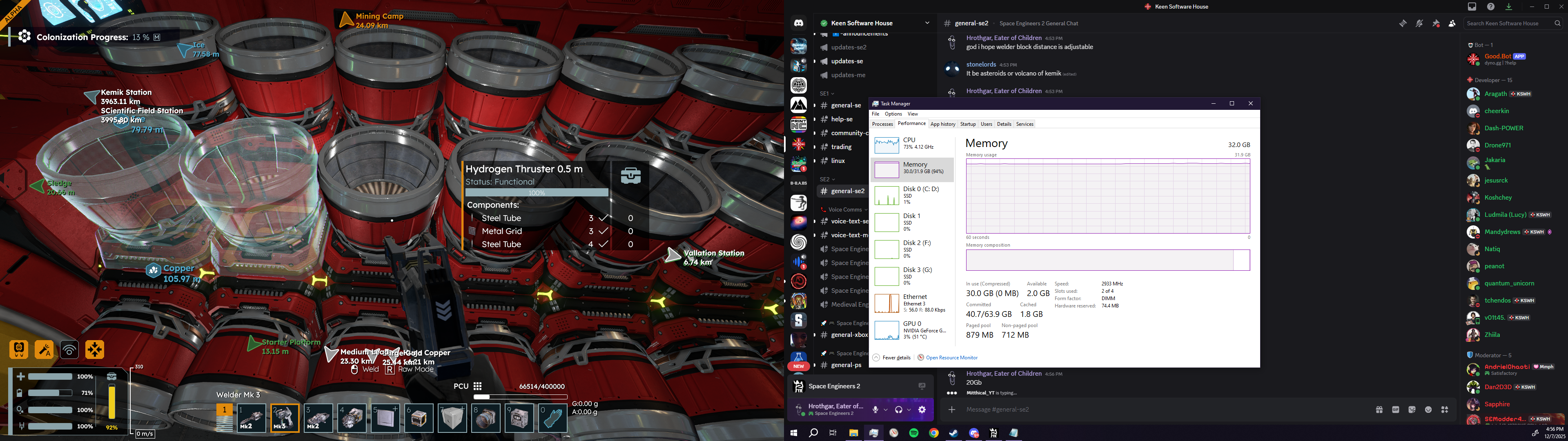
 I have the same bug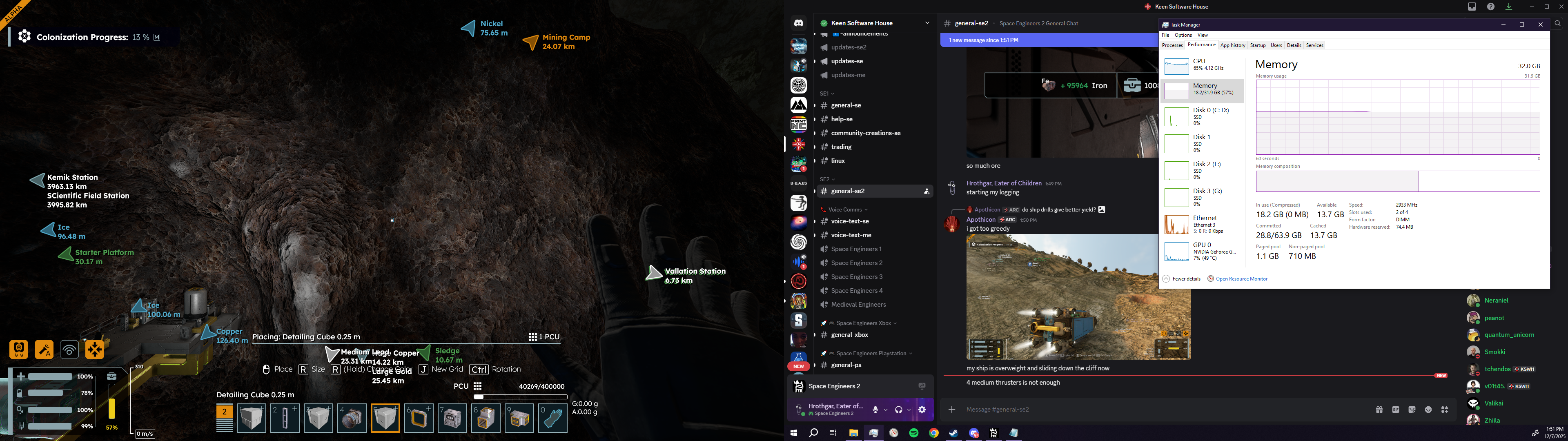
I have the same thing. On entering a ship, it takes about 8 seconds to load up the Grid Control Panel, then it's instant after that. Then leaving and entering the same ship, takes another 8 seconds on the initial load.
I have the same thing. On entering a ship, it takes about 8 seconds to load up the Grid Control Panel, then it's instant after that. Then leaving and entering the same ship, takes another 8 seconds on the initial load.
For me, things seem fine on first load-up. But the longer I play, the longer the menus start to take to load, including the images for items. They'll stay blurry for a while before sharpening up again to normal.
For me, things seem fine on first load-up. But the longer I play, the longer the menus start to take to load, including the images for items. They'll stay blurry for a while before sharpening up again to normal.
It eventually froze when I pressed "esc", and then never displayed the menu...
And yes, you're right! Restarting and loading my game does make it fast again.
It eventually froze when I pressed "esc", and then never displayed the menu...
And yes, you're right! Restarting and loading my game does make it fast again.
After several hours it turned into around a minute to open my menus. idk what is causing it exactly but for me it seemed to get worse the more items i had in an inventory, After getting to Kemik it was unbearable and i think lead to a crash after finishing the first mission there. Some serious optimization needs to happen with loading menus cause even the pause menu will lag after a while.
After several hours it turned into around a minute to open my menus. idk what is causing it exactly but for me it seemed to get worse the more items i had in an inventory, After getting to Kemik it was unbearable and i think lead to a crash after finishing the first mission there. Some serious optimization needs to happen with loading menus cause even the pause menu will lag after a while.
Mine isn't more than a few seconds, but it certainly is consistently delayed for both control panel and inventory menus.
Mine isn't more than a few seconds, but it certainly is consistently delayed for both control panel and inventory menus.
The more the game goes on, on a planet, the slower the game runs & stutters more. This applies to the menu opening as well.
After about 30min - 1h of play on a planet, opening a cargo takes several seconds to load, when it loads, the item icons are blurry and take a while to load in as well.
It's very frustrating.
The more the game goes on, on a planet, the slower the game runs & stutters more. This applies to the menu opening as well.
After about 30min - 1h of play on a planet, opening a cargo takes several seconds to load, when it loads, the item icons are blurry and take a while to load in as well.
It's very frustrating.
I have this issue too, and it seems, that this is a rendering problem, ui is there almost instantly, if I move my mouse there is a "hovering over elements" sound, but rendering takes a few seconds(up to 10).
I have this issue too, and it seems, that this is a rendering problem, ui is there almost instantly, if I move my mouse there is a "hovering over elements" sound, but rendering takes a few seconds(up to 10).
Same issue, but it presents somewhat differently that described above. I'll walk up to my ship, press to open the inventory while looking at the cargo box, and the menu will apparently open, but it and the mouse cursor are totally invisible for about 7 seconds. during this time, moving the mouse around will cause the 'tooltips' to appear as if the menu was open normally; the only UI element that appears at all during this period. This is after playing for 2-3 hours. upon initially launching the game it was instant.
hope it helps!
Same issue, but it presents somewhat differently that described above. I'll walk up to my ship, press to open the inventory while looking at the cargo box, and the menu will apparently open, but it and the mouse cursor are totally invisible for about 7 seconds. during this time, moving the mouse around will cause the 'tooltips' to appear as if the menu was open normally; the only UI element that appears at all during this period. This is after playing for 2-3 hours. upon initially launching the game it was instant.
hope it helps!
Similar issue here, after playing for 2-3 hours everything gets slow with some freezes. Checked Taks Manager, SE2 was eating all of my leftover RAM (About 24 GB :D )
Similar issue here, after playing for 2-3 hours everything gets slow with some freezes. Checked Taks Manager, SE2 was eating all of my leftover RAM (About 24 GB :D )
I'll note at the same time, having more than one drill can often cause crashes. I see the ores cycling in and out of the drills on an endless loop and never actually going into the cargo containers. One drill is enough to cause a significant amount of "lag."
Seems the whole inventory system is bug-infested.
I'll note at the same time, having more than one drill can often cause crashes. I see the ores cycling in and out of the drills on an endless loop and never actually going into the cargo containers. One drill is enough to cause a significant amount of "lag."
Seems the whole inventory system is bug-infested.
I can play for about 40 minutes before it becomes noticeable. And after about an hour I have to quit out of the game.
I have 24 GB of RAM, and I can see the SE2 proc uses about ~10 GB of memory when I have to leave the game.
I can play for about 40 minutes before it becomes noticeable. And after about an hour I have to quit out of the game.
I have 24 GB of RAM, and I can see the SE2 proc uses about ~10 GB of memory when I have to leave the game.
It looks like a memory leak. More you play, more you wait. Restarting the game fix the issues.
It looks like a memory leak. More you play, more you wait. Restarting the game fix the issues.
I see there was an update just now. Patched. I'll see if this fixes the memory leak. It chewed up 37gig over 6 hours. Starts with 16gig. Menus take 6+ seconds to open.
i9 Intel 14900k @6.0ghz
64gig ram
Game on M.2 SSD
I'll update here it is continues to happen. Just writing this post and it's already up to 22gig ram.
UPDATE:
After 30 minutes, game consumes 26.5 of 64gig and climbing. Big time memory leak.
I see there was an update just now. Patched. I'll see if this fixes the memory leak. It chewed up 37gig over 6 hours. Starts with 16gig. Menus take 6+ seconds to open.
i9 Intel 14900k @6.0ghz
64gig ram
Game on M.2 SSD
I'll update here it is continues to happen. Just writing this post and it's already up to 22gig ram.
UPDATE:
After 30 minutes, game consumes 26.5 of 64gig and climbing. Big time memory leak.
I found the same issue but seem to have found a way around it when knocking back my graphics detail. I haven't taken a close look at it, yet, but I am suspicious that it may be the ray tracing on my graphics card causing the issue.
I'm also using an NVIDIA 3060 Ti
I found the same issue but seem to have found a way around it when knocking back my graphics detail. I haven't taken a close look at it, yet, but I am suspicious that it may be the ray tracing on my graphics card causing the issue.
I'm also using an NVIDIA 3060 Ti
oops, I think this is a dupe of https://support.keenswh.com/spaceengineers2/pc/topic/50373-it-takes-several-seconds-to-open-any-menu-everytime
oops, I think this is a dupe of https://support.keenswh.com/spaceengineers2/pc/topic/50373-it-takes-several-seconds-to-open-any-menu-everytime
had this too until I reduced from "high" to "medium" preset in settings
I have no idea which option does the slowdown but now the delay is gone...
had this too until I reduced from "high" to "medium" preset in settings
I have no idea which option does the slowdown but now the delay is gone...
Hello Engineers,
I have reported this issue and attached this thread to our internal ticket (SE2-29318). I will post an update here when the issue is fixed.
Kind Regards,
Bartosz
Keen Software House
Hello Engineers,
I have reported this issue and attached this thread to our internal ticket (SE2-29318). I will post an update here when the issue is fixed.
Kind Regards,
Bartosz
Keen Software House
I suspect it's a memory leak; it get's really bad round the 8 hour mark and starts using approx 32GB RAM.
I suspect it's a memory leak; it get's really bad round the 8 hour mark and starts using approx 32GB RAM.
I'm experiencing the same behaviour. When pressing G or accessing any inventory, the game loads for 2-3 seconds before the UI is shown, and then it takes 1-2 more seconds for everything to become unblurred.
Specs:
Windows 11
Intel i9-9900K
RTX 5070 TI
64 GB DDR4 RAM
2560x1440p @ 144Hz
I'm experiencing the same behaviour. When pressing G or accessing any inventory, the game loads for 2-3 seconds before the UI is shown, and then it takes 1-2 more seconds for everything to become unblurred.
Specs:
Windows 11
Intel i9-9900K
RTX 5070 TI
64 GB DDR4 RAM
2560x1440p @ 144Hz
Also suffering the lag with accessing UI elements and noticeable delay on inventory icons showing full resolution. Issue gets worse the longer I play. Starts at 1-2 seconds and eventually gets as bad as 5-10 seconds. It seems that larger, fuller storage systems take longer than simple/empty ones.
Windows 11 (latest update)
AMD 5800 X3D
Radeon 9070 XT
64 Gigs System memory
Game and OS installed on Samsung Evo M.2 drive
Additionally I was inflicted with the memory leak style bug that prevented me from playing until the hot fix. Still see ramping sys mem usage as I play. Usually need to close the game and restart my PC every 3 to 4 hours of play to keep consistent performance.
Also suffering the lag with accessing UI elements and noticeable delay on inventory icons showing full resolution. Issue gets worse the longer I play. Starts at 1-2 seconds and eventually gets as bad as 5-10 seconds. It seems that larger, fuller storage systems take longer than simple/empty ones.
Windows 11 (latest update)
AMD 5800 X3D
Radeon 9070 XT
64 Gigs System memory
Game and OS installed on Samsung Evo M.2 drive
Additionally I was inflicted with the memory leak style bug that prevented me from playing until the hot fix. Still see ramping sys mem usage as I play. Usually need to close the game and restart my PC every 3 to 4 hours of play to keep consistent performance.
V.39 : inventory access is sluggish : 2 to 3 seconds to access
V.39 : inventory access is sluggish : 2 to 3 seconds to access
Same here. When you start the game it opens up all screens immediatly. The longer you play, the sluggier it gets.
Same here. When you start the game it opens up all screens immediatly. The longer you play, the sluggier it gets.
I'm having this issue too. The more I build/mine/put in containers the more it seems to have to inventory everything I have in my container each time I open it. That doesn't seem right in some cases because in some cases I'll it "F" on the inventory and it'll have no overlay that comes up, but my character is immobilized. If I move my cursor around I get the "Alt-text" (what they called it in HTML, not sure what it is in game code) pop up showing me what I'm hovering over in my inventory. I just can't see or click on it. Feels like a UI thing where the menu just isn't loading properly for me. Not that things aren't there or even that the game is freezing. It'll struggle to pull up the "Esc" menu sometimes too. It'll pause the game, but the menu doesn't come up. I can unpause and even hit tab to open my inventory... It just lags. I found that if I jump out of the game (game still fully running, just Alt+tab) to another window that's open, it'll take less time to populate the menu/inventory/else. No idea why but it's something I noticed. After I jump out and back in, it doesn't give me grief about it for another 10-15 mins...
I'm having this issue too. The more I build/mine/put in containers the more it seems to have to inventory everything I have in my container each time I open it. That doesn't seem right in some cases because in some cases I'll it "F" on the inventory and it'll have no overlay that comes up, but my character is immobilized. If I move my cursor around I get the "Alt-text" (what they called it in HTML, not sure what it is in game code) pop up showing me what I'm hovering over in my inventory. I just can't see or click on it. Feels like a UI thing where the menu just isn't loading properly for me. Not that things aren't there or even that the game is freezing. It'll struggle to pull up the "Esc" menu sometimes too. It'll pause the game, but the menu doesn't come up. I can unpause and even hit tab to open my inventory... It just lags. I found that if I jump out of the game (game still fully running, just Alt+tab) to another window that's open, it'll take less time to populate the menu/inventory/else. No idea why but it's something I noticed. After I jump out and back in, it doesn't give me grief about it for another 10-15 mins...
turning textures down in the settings may help
textures are taking up too much vram which slows down the game
turning textures down in the settings may help
textures are taking up too much vram which slows down the game
turning textures down in settings helped me
turning textures down in settings helped me
Hello Engineers,
This issue has been fixed in an upcoming patch. In-game menus should no longer take ridiculous amount of time to open after longer sessions.
As such I will close this thread. If you still encounter issues with in-game menus, please create a new thread.
Happy Engineering!
Kind Regards,
Bartosz
Keen Software House
Hello Engineers,
This issue has been fixed in an upcoming patch. In-game menus should no longer take ridiculous amount of time to open after longer sessions.
As such I will close this thread. If you still encounter issues with in-game menus, please create a new thread.
Happy Engineering!
Kind Regards,
Bartosz
Keen Software House
Hello Engineers,
Hotfix 2.0.2.47 is out. Please check it out and let us know. :)
Hello Engineers,
Hotfix 2.0.2.47 is out. Please check it out and let us know. :)
Inventory now works as intended at all graphics settings and across the full span of long play sessions. Good Work!
Inventory now works as intended at all graphics settings and across the full span of long play sessions. Good Work!
Replies have been locked on this page!