


Control Panel Groups - Expanded by Default & Resets Scroll to Top on Interaction
The Issue:
When navigating to the Control Panel, all groups are expanded by default instead of collapsed, meaning you have to collapse them all every time (or scroll with everything expanded). Related to this and aggravating the issue, if you create a new group or ungroup an existing one, it re-expands everything and scrolls you back to the top of the list, which confirms in my mind that this is a bug instead of intended behavior.
Steps to Reproduce Bug:
Requires: Any vehicle with grouped objects in the control panel, I used a ship I built, accessing the control panel from the cockpit to view groups of thrusters, landing gear, gyroscopes, etc.
Step 1: Enter the cockpit of your vehicle.
Step 2: Press TAB to open the menu.
Step 3: Click on 'Control Panel'.
You will see all groups are expanded by default, as per my attached screenshot.
To continue with the related aggravating issue:
Step 4: Close some of the groups.
Step 5: Find a couple of items that aren't in a group, select them both by holding CTRL and clicking on them individually (or shift-clicking) to highlight them.
Step 5: Click on the 'Create Group' icon at the top right of the panel.
You will see all of the groups have been expanded again, and you are scrolled back to the top.
Notes:
Game Version Info: "VRAGE3 v2.4.0.95 Release Alpha"
If you don't have a vehicle, go to any of the stations and access the control panel there (you can access it via any battery if there isn't a dedicated point). The results are the same there too.
Try adding 100 items (thrusters, gyros, landing gear, etc) to a dummy / test grid, and then create groups of 5 to get an idea of how the issue scales, where groups are most needed.
 I have the same bug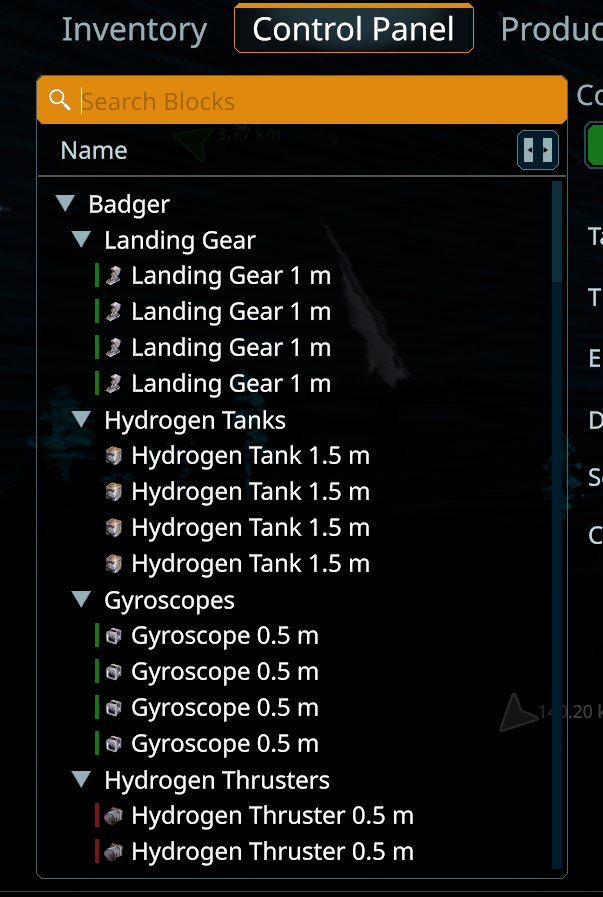
Replies have been locked on this page!