


Gyro pogo issue with ungainly ship - unexpected behavior when exiting
I'm not sure if this a bug or not, but I'm reporting it. My current mining ship is extremely ungainly, especially under load. See screenshot for a view of the ship.
I have uploaded the blueprints for the ship under two blueprints:
- Boring Driller Mk 1
- Boring Driller Mk 1 Drills
The first blueprint is the ship with a piston for extending the drill head. The second is the drills attachment which is hooked to a rotor. The rotor has to be added to the piston before adding the drills.
Since I started using the ship again, I added 6 more small rotors to help with the ship's ungainliness, but it is still ungainly under load.
When driving it around, if you rotate the ship, the ship will pogo back and forth through the new direction before eventually settling down. This can take several minutes before eventually nulling out. And the pogo effect is most extreme when the ship is under load (i.e. full of ore). Even the 6 additional small rotors hasn't counteracted the effect under load.
What's interesting is what happens when you exit the cockpit. The ship immediately slows and stops the pogo effect. See the attached video. I would have expected the pogo effect to continue for a while, since my weight should be minimal compared to the ship. In the video, it is currently carrying almost 400K in lead ore.
Anyway, just thought I should report the behavior. I probably need to add more/larger gyros to the ship. I'll probably work some more on this once I get medium gyros unlocked.
I also think I need to replace some of the small ion thrusters with mediums to help with ship movement.
Sidebar
For those who are curious how I have the controls for the ship set up.
Groups
- Batteries - collection of 5
- Ion Thrusters - grouped together
- Drills (under separate Drill Grid) - collection of 9
Controls - Group 1
- 7 - Ion Thrusters - Set Enabled to True
- 8 - Ion Thrusters - Set Enabled to False
- 9 - Batteries - Set Mode to Auto
- 10 - Batteries - Set Mode to Fill
For some reason, toggling enable on groups of thrusters gets confused and can cause different ones to toggle on and off opposite of each other. This usually happens when I modify the thrusters, and somehow the states get out of sync with each other. I found it was simpler to just set Enabled directly rather than use the toggles.
This control configuration lets me shut down the engines and fill the batteries while docked at a station.
Beware of Hydrogen Engines at a station. The station will draw ice from your cargo hold to fill itself.
Controls - Group 2
- 1 - Drills - Set Tool Mode to Drill
- 2 - Drills - Set Tool Mode to Dig
- 3 - Drills - Set Tool Mode to None
- 5 - Rotor 2.5m - Set Angular Velocity to 1 RPM
- 6 - Rotor 2.5m - Set Angular Velocify to 0 RPM
- 8 - Piston 4.75m - Set Piston Velocity to 0.01 m/s
- 9 - Piston 4.75m - Set Piston Velocity to 0.5 m/s
Setting the piston velocities in the cockpit controls was very tricky and required patiently small adjusting the mouse until the right value appeared in the control after clicking. I had to spend several minutes micro-adjusting the mouse and clicking until I hit just the right numbers.
I did not use the arrows because they incremented the controls in increment of 1. Ctrl+Click does nothing, and Alt and Shift don't adjust the increment amount.
I'm hoping in the future that Keen adds a text input box for the value to the page, or pops up a second dialog or displays a text input box when Ctrl-clicking on the bar to open an input dialog for a specific amount. It would make these adjustments much easier.
Overall Effect
With these controls set up this way, I can park the ship over an ore location and let it slowly grind out a bore hole to reach the ore or slowly mine the ore deposit and collect a lot of ore.
I usually have a stack of books to read or watch a video while mining and keep an eye out for the dreaded "Full Inventory" red alert.
The nice round hole also prevents the ship and drill head from jamming during the extraction step.
 I have the same bug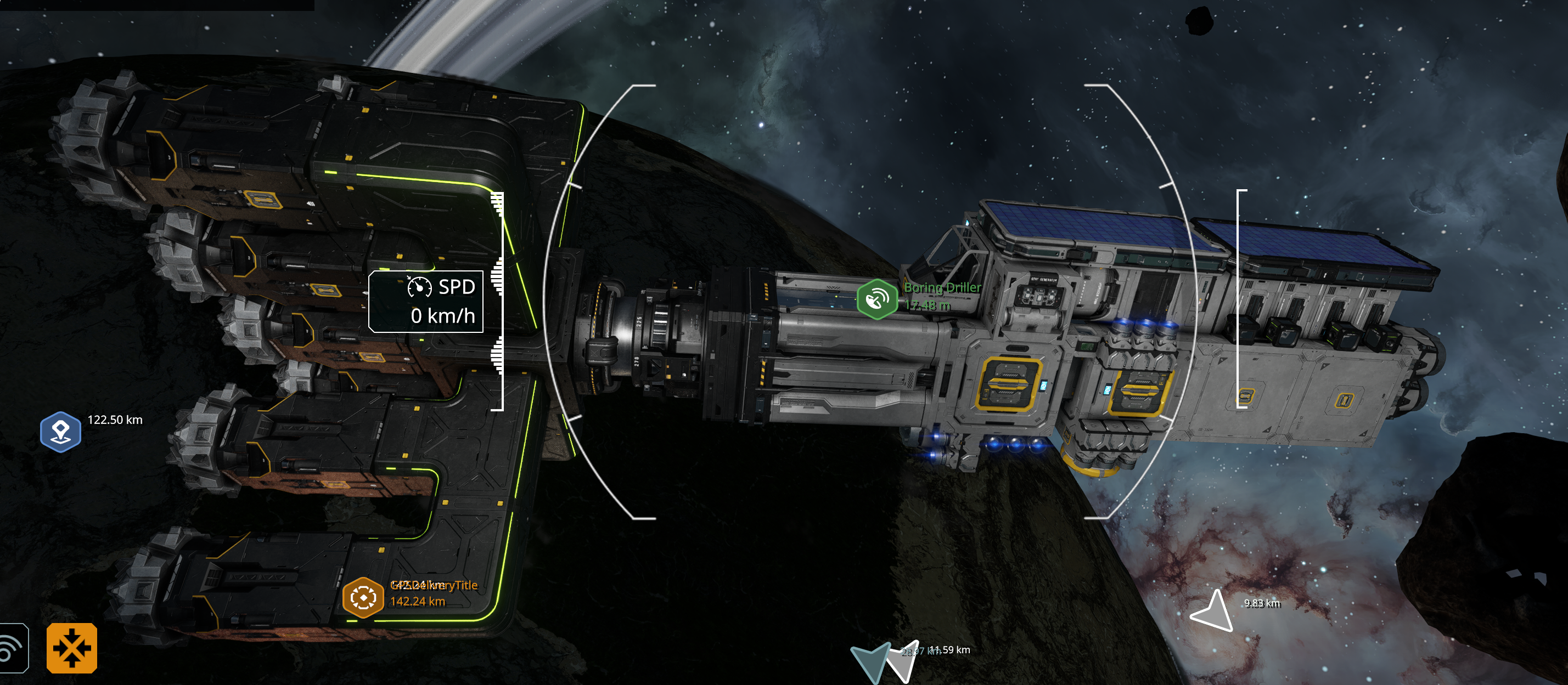
Replies have been locked on this page!